
A WhatsApp chat widget matters for one reason that most agency offers miss. The channel is already where the audience lives. By early 2026, WhatsApp had about 3.3 billion monthly active users, was used in more than 180 countries, supported 60+ languages, and had around 87 million users in the United States alone, according to Infobip's WhatsApp statistics roundup. That changes the pitch from “add another chat bubble” to “turn site traffic into conversations inside an app your client's customers already use.”
For agencies, that's not a widget sale. It's a recurring service line.
A plain install is easy to commoditize. A managed WhatsApp acquisition and follow-up system is not. When you package setup, routing, CRM sync, response workflows, reporting, and compliance controls, the widget becomes the front door to a broader client retainer. That's where the margin is.
Table of Contents
- What Is a WhatsApp Chat Widget and Why It Matters in 2026
- Core Benefits for Lead Generation and Client Services
- Choosing Your Integration Method QR Connect vs Cloud API
- Deploying Your WhatsApp Widget Step by Step
- Customization and UX Best Practices for Conversion
- Advanced Agency Strategies Reselling and Automation
- Frequently Asked Questions
What Is a WhatsApp Chat Widget and Why It Matters in 2026
With messaging now baked into how buyers ask questions, compare options, and follow up, agencies have a clear opening. A WhatsApp chat widget turns website traffic into direct conversations in a channel prospects already use.
For an agency, that matters because the widget is not just another site feature. It is the front end of a service you can package, white-label, and resell across multiple clients. Value is speed to contact, cleaner attribution, and a lower-friction path from visit to qualified conversation.
A WhatsApp chat widget usually appears as a floating button, sticky contact prompt, or compact chat panel on a website. When a visitor clicks it, they move from browsing into a WhatsApp conversation with the business.
The business case is stronger than the definition.
On a typical client site, the drop-off point is not traffic. It is hesitation. Forms create delay, inboxes create uncertainty, and callbacks depend on someone noticing the lead in time. A WhatsApp widget shortens that gap. The visitor asks the question while intent is still high.
That makes the widget especially useful for agencies selling lead generation as a managed service. You are not delivering a button. You are delivering a repeatable conversation entry point that can be deployed across home service brands, clinics, local retailers, coaches, SaaS companies, and B2B firms with only minor changes to copy, routing, and reporting.
More than a design element
What clients buy is the handoff.
A good widget takes a visitor from anonymous session to named conversation with far less friction than a form. In practice, that means faster first responses, better context from the lead, and more chances to recover high-intent visitors before they leave the site.
That is why agencies that price the widget as a one-time install usually leave money on the table.
The stronger model is monthly recurring revenue. Set up the widget, connect it to the client's workflow, define who gets the message, add pre-filled prompts, and track which pages start conversations. Then roll the same process out account by account. If your team is already selling CRM setup, funnel optimization, or how founders use AI for workflows, the widget fits naturally into that offer.
Why agencies should care now
Buyer behavior has shifted toward direct, mobile-first communication, and clients are feeling it. They still want leads, but they also want shorter response times, clearer attribution, and fewer missed opportunities caused by slow follow-up.
A WhatsApp widget helps agencies solve all three if they package it correctly.
The use cases are straightforward:
- Lead capture: turn service-page and pricing-page traffic into direct inquiries
- Pre-sales qualification: let prospects ask buying questions before they bounce
- Support routing: move repetitive questions into a channel clients can manage faster
- Post-visit follow-up: keep the conversation alive after the session ends
For a single business, that is useful. For an agency, it is scalable. You can standardize setup, brand the experience for each client, and sell the widget as part of a broader conversion system instead of a standalone add-on.
Core Benefits for Lead Generation and Client Services
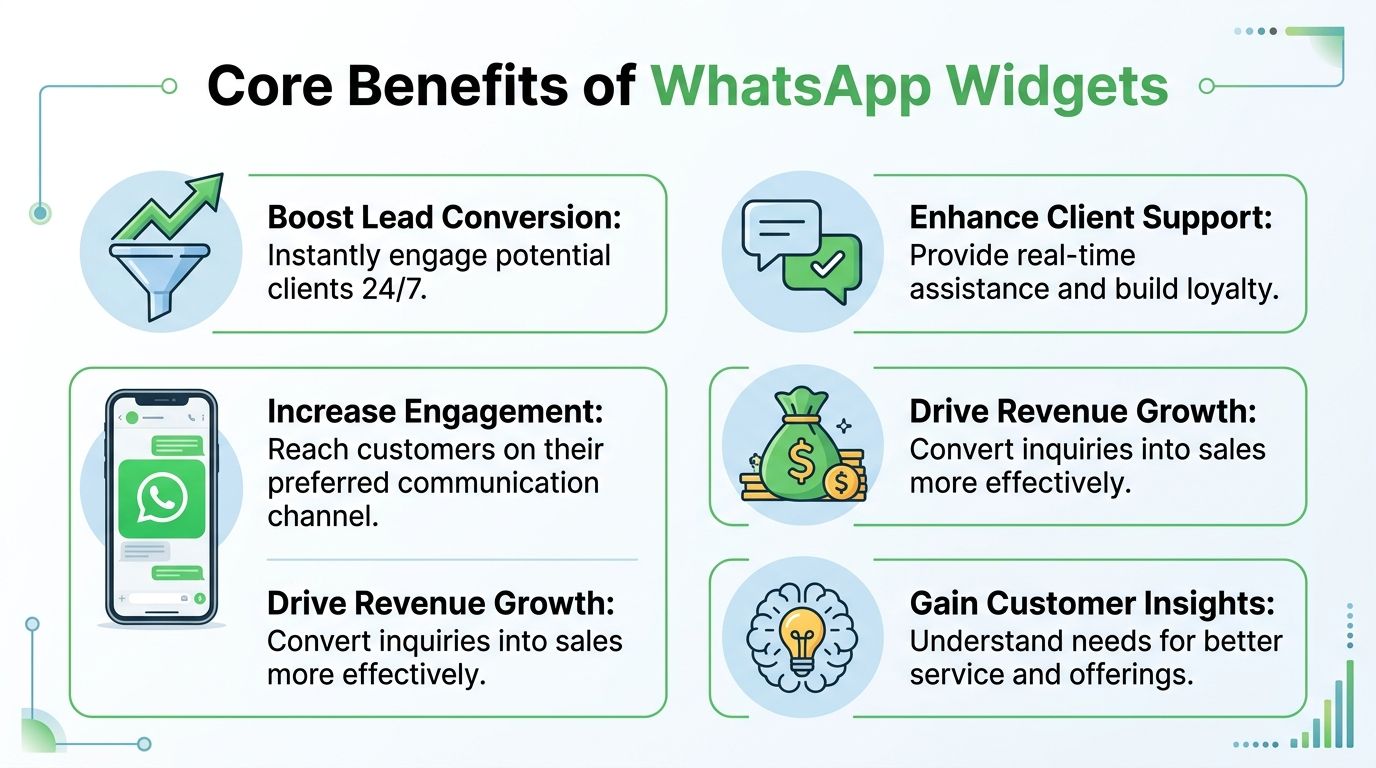
The biggest reason agencies should offer a WhatsApp chat widget is simple. It creates conversations where forms usually create silence.
WhatsApp outperforms older channels on attention. Independent industry sources in 2026 report WhatsApp Business message open rates of 95–98%, while email open rates are typically around 20–25%. The same sources report promotional click-through rates in the 45–60% range. Those figures come from Wizmessage's WhatsApp Business statistics roundup. If you're responsible for lead gen, that difference changes the math of follow-up.
Better lead quality, not just more chats
A visitor who opens WhatsApp and starts typing is usually showing stronger intent than someone who half-completes a form. They're choosing immediate contact.
That matters for agencies because clients don't buy “more messages.” They buy leads their team can close.
Three business outcomes usually improve first:
- Speed to conversation: The prospect doesn't wait in an inbox queue.
- Context quality: The first message often includes the actual question or buying concern.
- Lower follow-up friction: The business can continue the conversation in the same thread.
Stronger client service economics
Now, the agency offer gets interesting. A WhatsApp widget supports both acquisition and retention work.
For paid traffic clients, it can sit on landing pages and service pages as a second conversion path. For SEO clients, it gives high-intent visitors an easier action than hunting for the contact page. For lifecycle clients, it becomes the start of a support and reactivation system.
Practical rule: If a client has traffic but weak form completion, a WhatsApp entry point is often the fastest way to test whether the problem is intent or friction.
There's also a backend upside. Messaging conversations create cleaner handoff opportunities between media buying, sales, and support. That makes agency reporting easier because you can tie campaigns to conversations instead of guessing from pageviews alone.
Teams that are already operationalizing chat and support alongside automation should also study how founders use AI for workflows. Not because AI replaces the widget, but because the primary margin comes from what happens after the first message: tagging, routing, summaries, follow-up tasks, and re-engagement sequences.
What works and what doesn't
What works:
- High-intent placements: Pricing, service, product, and contact pages.
- Specific prompts: “Ask about availability” beats “Chat now.”
- Fast human response: Especially for local services and sales-led offers.
What doesn't:
- Generic installs: A floating icon with no routing, no ownership, and no follow-up.
- Treating WhatsApp like email: Slow responses kill the point of the channel.
- Selling it as a one-time setup: That's low-margin work and easy to replace.
Choosing Your Integration Method QR Connect vs Cloud API
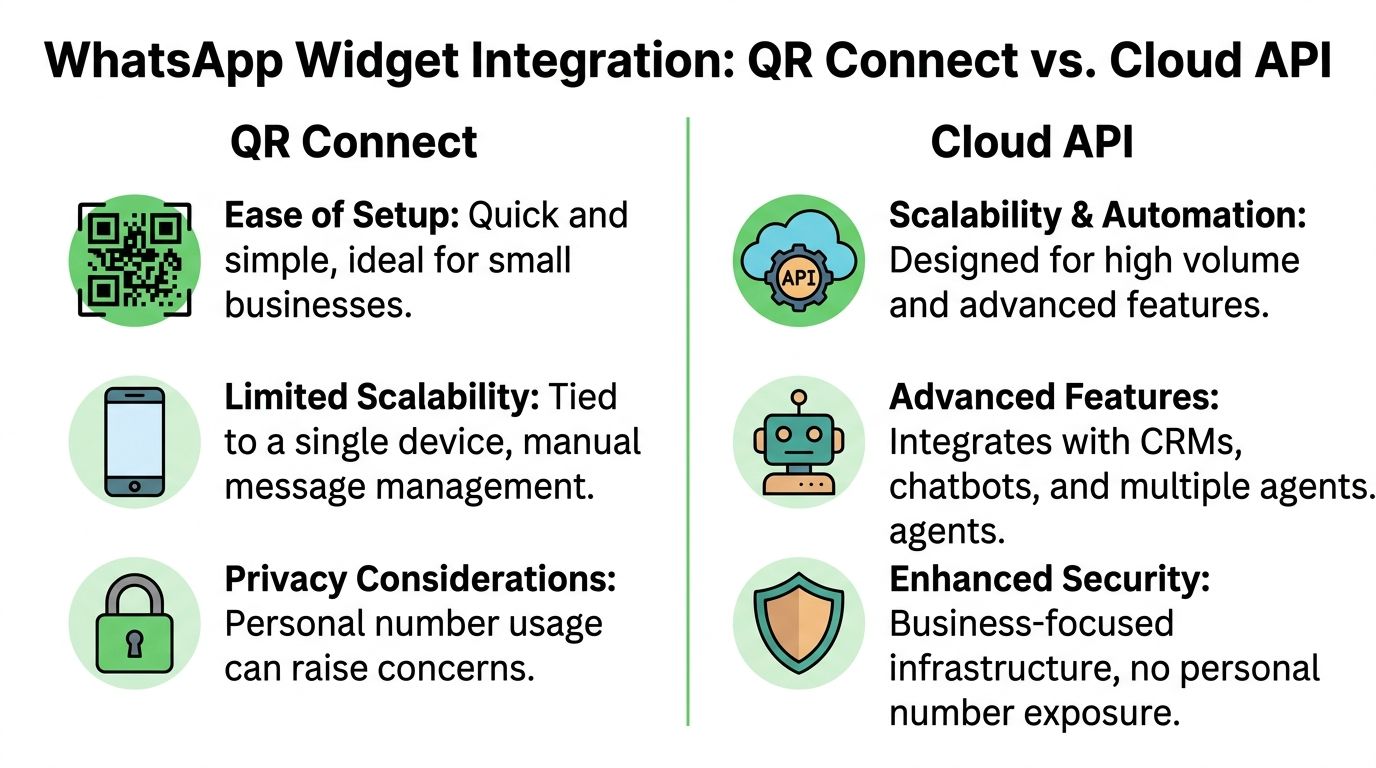
Agencies usually face two practical options. Use a simpler linked-device setup, often called QR Connect, or use the WhatsApp Cloud API.
The easiest way to explain the trade-off is this. QR Connect is like giving the client a dedicated business phone that starts ringing right away. Cloud API is like building a proper contact center around the same channel. Both can work. They solve different problems.
The simple model
QR Connect or linked-device setups are attractive because they're fast to launch and easy for clients to understand. Scan, connect, and start receiving messages.
That makes them useful when the client wants speed, the team still replies manually, and the agency is validating demand before introducing heavier automation.
The downsides show up later. Manual handling gets messy. Team access can become awkward. Data is thinner. Attribution often breaks once you try to connect ad traffic, lead routing, and CRM workflows across multiple accounts.
The scalable model
The Cloud API takes more planning, but it gives agencies a stronger operating foundation.
One key advantage is deterministic lead capture. According to Authkey's explanation of WhatsApp Business API widgets, widgets running through the WhatsApp Business API can automatically extract and store the verified mobile number of the person who starts the conversation on first click, which enables 100% attribution accuracy for CRM sync. Their explanation is that the API handshake validates identity before the session opens, while basic click-to-chat links start a text stream without the same metadata capture.
That one distinction matters more than most design decisions. If the agency can reliably identify the lead and sync the contact into the CRM, it can build automations that are worth billing for.
Which one agencies should sell
The decision should match the client's delivery model, not your favorite tech stack.
| Feature | QR Connect (Linked Device) | WhatsApp Cloud API |
|---|---|---|
| Setup speed | Faster to launch | More setup work |
| Team workflows | Better for simpler manual handling | Better for multi-user operations |
| CRM sync | More limited and less deterministic | Stronger structured data workflows |
| Attribution | Harder to make reliable | Better fit for source-aware pipelines |
| Automation | Basic to moderate | Better for advanced automation |
| Best fit | Smaller clients, fast validation, lower complexity | Agencies building repeatable, scalable services |
A good rule is to sell QR Connect when the client needs a fast win and the conversation volume is still manageable. Sell Cloud API when the client wants repeatable routing, structured lead capture, CRM sync, and workflow automation.
Teams evaluating service operations at scale may also find Sift AI for customer operations useful reading, especially if they're mapping WhatsApp into broader support and ops processes instead of treating it as a standalone inbox.
If you can't tell the client where the lead came from, who owns the reply, and what happens after first contact, you don't have a WhatsApp system. You have a button.
Deploying Your WhatsApp Widget Step by Step
Most agency deployments fall into three lanes. A plugin install, a managed platform snippet, or a custom build.
The right choice depends on how many client sites you manage, how much control you need, and who on your team owns implementation.
Deployment path one
Use a WordPress plugin when the client has a simple site, limited technical requirements, and a narrow use case. This path works when speed matters more than extensibility.
It's usually enough for brochure sites, local businesses, and basic support flows. The trade-off is standardization. Once you manage many clients, plugin-by-plugin configuration creates operational drag.
Deployment path two
Use a managed snippet when you want one repeatable deployment pattern across many websites.
On high-traffic sites, implementation best practice is to embed a single-line JavaScript snippet before the </body> tag so the widget loads without blocking rendering. According to Common Ninja's WhatsApp button guidance, that placement helps preserve performance, and they note a benchmark of page load times under 2 seconds, alongside the claim that delays of over 100ms reduce engagement by 7%. The same source also highlights the value of a single floating interface that lets users choose among channels like WhatsApp, Messenger, and Telegram to reduce friction.
For agencies, the appeal is operational. One deployment pattern means cleaner handoff between strategy, dev, and account management.
A related implementation pattern shows up in embedded AI tools too. If your team is layering AI assistance into client experiences, AgentStack's guide on how to embed AgentStack is worth reviewing because the same principles apply: lightweight embed, clean placement, and predictable behavior across sites.
Deployment path three
Use a custom build when the widget has to reflect bespoke UX, custom routing logic, or a tightly controlled front-end.
This is usually the right choice when the client's site has strict design rules, advanced analytics requirements, or a nonstandard conversion flow. It's also the most expensive path to maintain.
Custom builds make sense when the client's business model is custom. They don't make sense when the agency just hasn't standardized delivery yet.
A clean rollout process usually looks like this:
- Define the entry points: Pick pages where conversation intent is highest.
- Set the first-message logic: Pre-fill the prompt or route based on page context.
- Install the script or plugin: Keep the implementation lightweight.
- Test desktop and mobile behavior: Most friction appears on mobile transitions.
- Confirm ownership: Decide who replies, when, and under what SLA.
After setup, train the client team on response handling. The widget is only as good as the first ten minutes after someone clicks it.
Here's a short visual walkthrough of the embedded approach in practice.
Customization and UX Best Practices for Conversion
A working widget isn't automatically a converting widget.
Most underperforming installs fail for ordinary reasons. The prompt is vague, the placement is lazy, the styling clashes with the site, or the message goes to a team that replies too slowly.
What to customize first
Start with the things that affect intent.
- CTA copy: “Ask about pricing” is stronger than “Message us.”
- Pre-filled message: Give the visitor a useful starting point that reflects the page they're on.
- Business identity: Show a real brand name and recognizable visual cues.
- Availability cues: Set expectations if the team replies only during business hours.
These details shape who clicks. A broad CTA can increase noise. A specific CTA tends to attract visitors with a clearer question or buying need.
Where agencies usually get it wrong
The biggest mistake is putting the same widget, same copy, and same behavior on every client site.
A legal-services site, a med spa, a B2B software company, and a course creator don't need the same opening message. They don't even need the same conversion trigger. One may want consultation requests. Another may want support triage. Another may want qualification before sales touches the lead.
Use these practical rules:
- Match the page intent: On pricing pages, invite questions about plans or fit. On service pages, invite booking or qualification.
- Keep the widget visible but not loud: It should be easy to find without covering important mobile UI.
- Write for the first response: The best prompt makes it easier for the human or automation on the other side to reply well.
- Limit unnecessary options: Too many choices can slow the click.
A WhatsApp chat widget should feel native to the buying journey, not pasted onto the corner of the site.
Placement also matters. Sitewide installs can work, but agencies often get better results by tuning behavior around high-intent pages first, then widening deployment after the team sees how conversations develop.
One more rule is worth keeping. If a client can't maintain fast replies, don't promise “instant support.” Set honest expectations in the widget text and use a fallback welcome message that acknowledges receipt and explains when someone will answer.
Advanced Agency Strategies Reselling and Automation
The agency opportunity isn't the widget itself. It's the system around it.
When you resell WhatsApp well, you're not billing for a floating button. You're billing for conversation capture, routing, attribution, follow-up, and compliance management under your own process.
Package the outcome, not the widget
Clients don't want “WhatsApp installed.” They want faster lead response, cleaner handoff, fewer missed inquiries, and a channel they can use.
That's why the best agency offers are packaged as managed services:
- Launch package: Setup, branding, CTA writing, routing, testing.
- Operations package: Inbox management, assignments, templates, reporting.
- Growth package: CRM sync, automation, re-engagement, campaign support.
This framing protects margin. It also makes the offer stickier because replacing you means replacing the operating system, not just the front-end element.
Build automation around intent
Automation works best when it starts from a clear signal.
A visitor who clicks from a pricing page should trigger a different workflow than someone asking for support from an account page. Route based on page, campaign source, first message, or business hours. Then push the contact into the client's CRM with tags the sales or support team can use immediately.
That's where agencies amplify their efforts. One system can feed media reporting, lead qualification, and client follow-up without manual copying.
Treat compliance as a product feature
Most agencies underinvest here, and that becomes dangerous once they move from direct chat into outbound messaging.
There's a real guidance gap around compliant widget use for broadcast campaigns. aThemes' documentation on WhatsApp chat notes that most tutorials explain embedding but don't explain how to avoid policy issues when a user starts a chat and later receives outbound broadcasts. The same source points to pain around Meta's 24-hour window rule, country-specific consent requirements for some non-Cloud API setups, and the need for controls such as terms checkboxes, business-hour auto-responses, and consent logging amid tighter 2024–2025 policy enforcement.
For agencies, that means compliance can't be an afterthought.
Build it into the service:
- Consent capture: Make sure the widget flow documents permission when needed.
- Message boundaries: Separate support replies from later promotional sends.
- Business-hour logic: Use auto-responses so the client doesn't accidentally create bad expectations.
- Audit trail: Keep records of how the lead entered and what they agreed to.
Compliance work is billable work when it prevents bans, protects list quality, and lets the client scale messaging with confidence.
Frequently Asked Questions
Can I use a personal WhatsApp number for a website widget
You can, but it's usually a bad agency standard. Personal-number setups create ownership problems, messy handoffs, and weak operational control. They may be acceptable for a very small client testing demand, but they aren't ideal for a service you plan to resell at scale.
Will a WhatsApp chat widget slow down the client's site
It can if it's implemented poorly. Lightweight snippets placed correctly are the safer path. As noted earlier, script placement matters, especially on traffic-heavy sites. Test mobile behavior and page rendering after deployment instead of assuming the vendor embed is harmless.
Should the widget appear on every page
Not always. Start with pages where buying intent is already high. Pricing, contact, product, and service pages usually deserve attention first. After that, expand based on actual conversation quality, not instinct.
Is QR Connect enough, or should agencies push Cloud API
QR Connect is often enough for a simple launch and manual handling. Cloud API is the better long-term fit when the client needs structured lead capture, CRM sync, and heavier automation. Sell based on the client's workflow maturity, not whichever option sounds more advanced.
What should agencies include in a WhatsApp service offer
Include setup, copy, routing, ownership rules, CRM integration where needed, response templates, and compliance controls. If you only sell installation, clients will compare you on price. If you sell a managed communication system, they'll compare you on outcomes.
If you want to turn WhatsApp into a repeatable agency revenue stream instead of a one-off setup task, Double My Leads is built for that model. It gives agencies a way to launch a white-labeled WhatsApp offering quickly, support both QR-based and Cloud API workflows, manage inboxes and broadcasts, and keep margins predictable while reselling under their own brand.


