
You've probably already built the easy version of this.
You paste a WhatsApp number into a free generator, add a short message like “Hi, I'm interested,” drop the link into Instagram, your site, or a flyer, and call it done. Messages start coming in. Then significant problems show up. You can't tell which campaign drove the conversation. Sales and support land in the same inbox. QR scans from print look identical to clicks from ads. A client asks what's working, and all you can really say is, “We got some chats.”
That's where most WhatsApp link guides stop too early.
A WhatsApp link generator isn't just about producing a chat URL. For serious marketing, it's the entry point to attribution, routing, and operational control. The basic link is simple. The hard part is building a system around it so every click tells you something useful and every conversation goes to the right place.
Table of Contents
- Why Every Business Needs a Direct Line to Customers
- How to Manually Create a WhatsApp Link for Free
- Using Basic Online WhatsApp Link Generators
- Supercharge Your Links with UTM Tracking
- Bridge the Physical and Digital Worlds with QR Codes
- The Agency Playbook Scale Campaigns with Smart Links
- Frequently Asked Questions
Why Every Business Needs a Direct Line to Customers
A customer sees your offer and wants to ask one question before buying. If you send them to a contact form, many won't bother. If you send them to WhatsApp, the conversation starts in the app they already use.
That's the appeal of a WhatsApp link. It removes the extra step of saving a number manually, searching for the chat, and figuring out what to say. A tap from an Instagram story, product page, email, or QR code can open a ready-to-send conversation while intent is still high.
For local businesses, that can mean menu questions, booking requests, and order follow-ups. For ecommerce teams, it often means product clarification, delivery questions, and abandoned-cart recovery. For agencies, it becomes a reporting issue fast. If the link works but the tracking doesn't, you're left with conversations you can't attribute.
A working chat link is useful. A tracked, routed, campaign-specific chat link is a channel.
The good news is that the foundation is straightforward. The official link format is easy to build by hand. The bigger opportunity comes after that, when you add analytics, cleaner distribution, and routing logic that free tools usually can't support.
How to Manually Create a WhatsApp Link for Free
Use the official format first
If you want the most reliable starting point for a WhatsApp link generator workflow, use WhatsApp's official click-to-chat structure. According to Green Bubble's breakdown of the official wa.me format, the standard uses the wa.me/ domain, requires the phone number in full international format, and removes plus signs, spaces, hyphens, and brackets. That same reference notes you can append a pre-filled message with the ?text= parameter using URL-encoded content.
That matters because most third-party generators are only wrapping this same structure in a friendlier interface. If you know the underlying format, you can build links on the fly and troubleshoot broken ones fast.
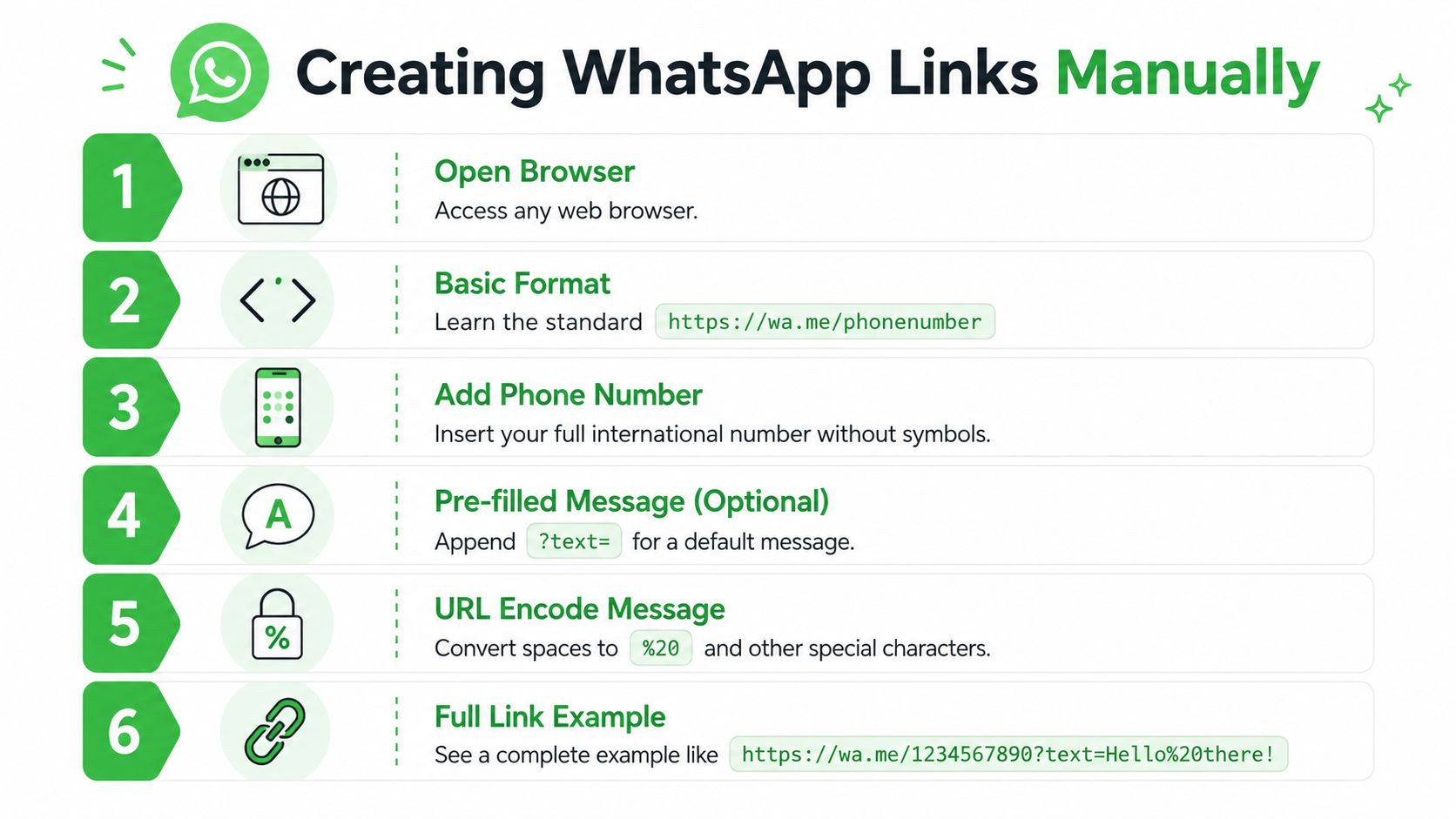
Build the link step by step
Start with the base URL and your number in international format.
https://wa.me/phonenumber
If your business number is written as +1 (555) 123-4567, the link format removes every symbol and becomes:
https://wa.me/15551234567
To add a default message, append ?text= followed by your encoded message.
https://wa.me/15551234567?text=Hello%20there!
Here's the practical part people often miss. URL encoding turns characters into web-safe versions. The most common example is a space, which becomes %20. Other special characters may also need encoding, especially if you use punctuation, line breaks, or non-standard symbols.
A simple workflow looks like this:
- Write the message in plain language. Keep it short and natural.
- Remove formatting from the phone number. Use country code plus number only.
- Encode the message. At minimum, convert spaces correctly.
- Assemble the full link. Number first, message after
?text=. - Test on desktop and mobile. You want WhatsApp Web on desktop and the app on mobile.
Practical rule: If a WhatsApp link fails, check the phone number format first, then check the message encoding.
Manual creation is still the best way to understand what a WhatsApp link generator is doing. It's quick, dependable, and good enough for one-off uses like a bio link, a PDF CTA, or a support button on a simple site.
Where it stops being enough is measurement. A raw wa.me link opens a conversation, but by itself it doesn't give marketing teams much operational context.
Using Basic Online WhatsApp Link Generators
Where free generators help
Basic generators are useful for speed. You paste in a number, type the message, and the tool gives you a ready-made link without making you think about formatting or encoding.
That convenience matters for non-technical teams, solo operators, and anyone producing simple assets quickly. If you've ever used a form helper like the Static Forms mailto generator, it's the same appeal. The tool saves you from syntax errors and gets you to a usable link faster.
For a one-number setup, that's fine. The link works, the message opens, and the barrier to entry stays low.
Where they fall apart
The problems start when the business needs more than a static link.
Most free WhatsApp link generator tools produce one destination, one message, and very little else. No attribution logic. No routing by campaign. No pre-chat qualification. No branded distribution layer. If you're running multiple offers, multiple traffic sources, or multiple departments, that's where the cracks show.
Here's the trade-off in plain terms:
| Option | Good for | Weak point |
|---|---|---|
| Manual wa.me link | Fast, reliable basics | No built-in attribution layer |
| Free generator | Convenience for simple use cases | Usually static and generic |
| Managed smart link setup | Campaign measurement and routing | Requires setup discipline |
Another issue is presentation. Generic links and generic shorteners can feel disposable. On channels where trust matters, that hurts. A link that looks branded usually earns more confidence than one that looks anonymous.
Supercharge Your Links with UTM Tracking
A WhatsApp link without attribution leaves marketing teams guessing. You may know that people clicked. You may even know that chats started. But you won't know whether the lead came from an ad, an email, a creator partnership, or a QR code in a retail location.
What UTM tags answer
Best practices for WhatsApp analytics recommend adding UTM parameters such as utm_source, utm_medium, and utm_campaign so you can distinguish traffic sources in dashboards, and they also identify high-performing placements like sticky widgets, inline product-page buttons, and post-purchase thank-you page CTAs. The same guidance notes that custom branded short domains preserve trust better than generic shorteners. You can review those recommendations in GetTrack's guide to tracking WhatsApp links.
UTM tags answer questions that matter in real campaigns:
Which source started the chat
Was it Instagram, email, paid social, or a partner placement?Which campaign produced the inquiry
Did the conversation come from your summer promo, product launch, or retargeting sequence?Which medium is producing intent
Are users engaging more from social posts, newsletters, or onsite buttons?
If you need a clean primer on how UTM tracking logic works around lead capture, Orbit AI on UTM forms is a useful reference point.
Build links for channel level attribution
A practical campaign setup usually means creating separate tracked links for each traffic source, even when they all end at the same WhatsApp number.
For example:
- Facebook ad link with campaign tags tied to paid social
- Email CTA link with newsletter-specific tags
- Influencer link with creator and campaign naming baked in
- Onsite button link with source and placement clearly labeled
Keep your naming disciplined. Lowercase, consistent separators, and campaign names your team will still understand later.
If you can't identify the source from the URL alone, your naming convention isn't finished.
Placement matters as much as tagging
Tracking doesn't help if the link placement is weak. A WhatsApp CTA buried in a footer might still serve as a fallback, but high-intent pages deserve more deliberate placement.
What tends to work best operationally:
- Sticky widgets for sitewide access
- Inline product-page buttons where pre-purchase questions happen
- Thank-you page prompts for post-purchase support or upsell conversations
- Footer links as a secondary access point
One more hard-earned lesson. Don't ignore the destination preview. WhatsApp can pull Open Graph metadata into the link preview, so titles, descriptions, and imagery influence how the link looks before someone taps. Messy previews lower confidence quickly.
Bridge the Physical and Digital Worlds with QR Codes
QR codes turn a WhatsApp link into an offline response channel. Put one on packaging, table tents, event signage, print inserts, or store displays, and you give people a direct path from physical attention to live conversation.
That only works well if the QR code is connected to a link strategy, not treated like a decorative extra.
Static versus dynamic QR codes
A static QR code points to one fixed destination. Once printed, it's locked. If the number changes, the campaign changes, or you need updated tracking, you usually have to replace the code everywhere it appears.
A dynamic QR code points to a managed destination you can edit later. That gives marketers room to update routing, tags, and destination logic without reprinting materials.
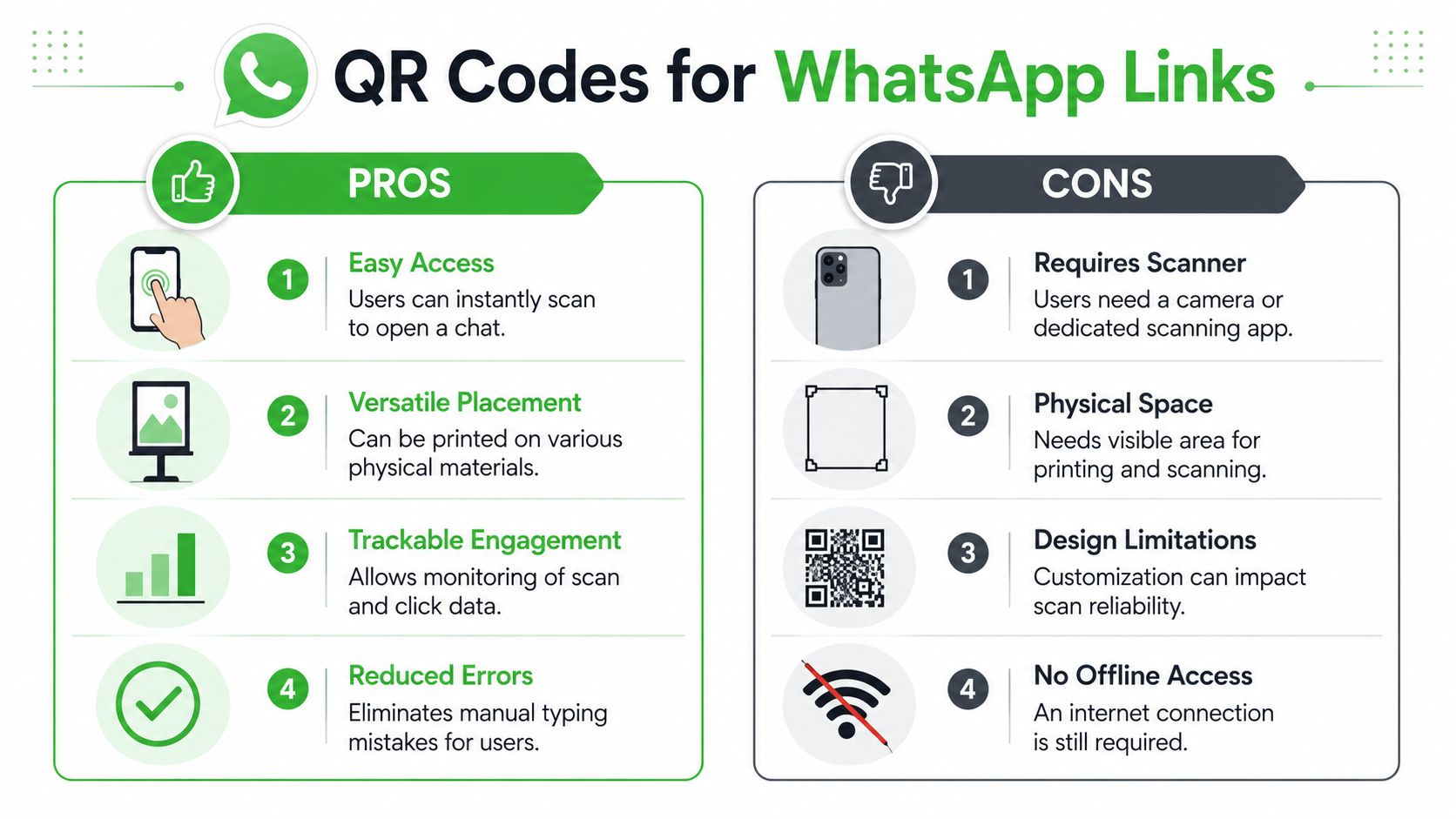
For business use, dynamic usually wins because it supports iteration. Campaigns change. Phone ownership changes. Departments change. Print stock doesn't.
A QR code on a poster is rarely the final version of the campaign. Build for edits from day one.
A practical workflow for campaigns
The workflow is simple when done properly:
- Create the tracked WhatsApp link first. Don't start with the QR code.
- Use that tracked link as the QR destination. That preserves your campaign context.
- Label the asset by placement. Storefront, flyer, menu, trade show booth, packaging insert.
- Test scan behavior on multiple devices. Fast scans don't matter if the link opens badly.
- Keep a fallback process. If a campaign changes, update the dynamic destination, not the printed asset.
The operational advantage is clarity. You can separate retail traffic from event traffic, or post-purchase packaging scans from in-store promotional scans, as long as the destination link was set up with that distinction in mind before the code was generated.
The Agency Playbook Scale Campaigns with Smart Links
Agencies hit the ceiling on basic WhatsApp links faster than most in-house teams do. A single static link might work for a local business with one number and one offer. It doesn't hold up when clients want attribution, inbox assignment, lead qualification, and reporting that goes deeper than “we got messages.”
Why static links break at scale
The biggest limitation is structural. Most generators create one static link and stop there. They don't handle dynamic parameter injection or redirect logic well enough for agencies that need to route leads by campaign or department. That gap is described clearly in Blabla.ai's discussion of WhatsApp link routing limits, which notes that free tools typically don't support the kind of programmatic routing and source attribution agencies need.
That creates familiar problems:
Mixed intent in one inbox
Sales questions, support requests, and partnership inquiries all arrive the same way.Weak client reporting
You know a lead came through WhatsApp, but not which ad, page, or offline asset initiated it.Manual triage
Staff have to read the first message and decide where it should go.Lost source data
By the time the conversation starts, the original acquisition context may already be gone.
What smart links fix
A smarter layer becomes necessary. Instead of dropping every click straight into the same chat flow, smart links can add control before the conversation begins.
In practice, that can mean:
Pre-chat lead capture
Collect contact details or qualifying information before opening WhatsApp.Department routing
Send product inquiries to sales, account issues to support, and local requests to the right regional team.Campaign attribution preservation
Keep source tags attached so the CRM or reporting stack can tie the conversation back to the campaign.White-label delivery for clients
Agencies can package WhatsApp as a managed service instead of a loose collection of links and inboxes.
The strategic difference is simple. A static WhatsApp link opens a chat. A smart link can act like a controlled handoff between traffic source, lead data, and the correct conversation path.
For agencies, that's the point where WhatsApp stops being a convenience feature and becomes a trackable service line.
Frequently Asked Questions
Do WhatsApp links expire
A standard WhatsApp link usually doesn't expire on its own if the destination number remains active and the link is formatted correctly. What changes over time is the campaign context around it, which is why managed links and editable QR destinations are easier to maintain.
Can I create a WhatsApp link without a business account
Yes. The basic click-to-chat format works without needing API keys or Meta verification when you use the standard wa.me method covered earlier. What you won't get from that alone is the business-grade reporting and routing layer.
How should I add a WhatsApp link to my Instagram bio
Use a clean, branded link if possible, and make the CTA specific. “Chat with sales,” “Ask about pricing,” or “Message us to book” performs better operationally than a vague “Contact us” because it sets intent before the chat opens.
Should I use one WhatsApp link everywhere
Usually not. One universal link makes reporting messy. Separate links by channel, campaign, or placement so you can identify what drove the conversation.
Are WhatsApp click-to-chat links free to use
The basic link format is free to create and use. The cost usually comes later, when teams need branded redirects, tracking, CRM sync, routing logic, or shared inbox workflows.
What's the most common mistake people make
They treat link creation as the finish line. It's only the first step. If there's no attribution plan, naming convention, or routing logic behind the link, the business ends up with chats but very little insight.
If you've outgrown one-size-fits-all links and need a system that captures leads before the chat starts, preserves source attribution, and gives agencies a white-labeled way to scale WhatsApp services, Double My Leads is the logical next step. It's built for teams that want more than a basic WhatsApp link generator and need smart links, tracked QR codes, shared inbox workflows, and client-ready infrastructure without a heavy setup.


