
You've got a new sending domain, a fresh SMTP setup, and pressure to launch. Maybe it's one brand. Maybe it's twenty client accounts inside a reseller stack. Either way, the same mistake keeps showing up: teams treat SMTP warm up like a switch instead of a reputation-building process.
That's why good campaigns fail before the copy ever gets tested. The infrastructure looks fine on paper, but mailbox providers haven't seen enough trustworthy behavior yet. So the first sends get throttled, filtered, or buried.
For agencies and SaaS teams, the risks are amplified. One sloppy rollout can contaminate a client relationship, delay launches, and create support tickets across multiple workspaces. A disciplined SMTP warm up prevents that. It gives each domain or sending stream a clean runway, builds positive engagement signals, and lets you scale without guessing.
Table of Contents
- Your Deliverability Pre-Flight Checklist
- Building a Data-Driven Warm Up Schedule
- Crafting High-Engagement Warm Up Content
- Key Metrics and Tools for Monitoring Success
- Troubleshooting Common SMTP Warm Up Issues
- SMTP Warm Up for Agencies and SaaS Resellers
Your Deliverability Pre-Flight Checklist
Most warm-up failures start before the first email goes out. Teams blame copy, volume, or the SMTP provider, but the actual problem is usually missing trust signals. If authentication is incomplete, list quality is weak, or bounce handling is sloppy, mailbox providers have no reason to give a new sender the benefit of the doubt.
That matters even more in a reseller environment. When an agency onboards a client fast and skips validation, the cleanup work lands later in support, campaign performance, and reputation recovery.
What breaks when you skip setup
If SPF and DKIM aren't aligned, providers can't confidently verify that your mail is authorized. If DMARC isn't in place, you lose an important policy and reporting layer. If your list includes stale or invalid contacts, your very first sends generate the wrong behavior.
Practical rule: Don't begin SMTP warm up until authentication, bounce handling, and audience selection are all confirmed. Warm-up volume won't compensate for broken setup.
A lot of teams also confuse email tool readiness with deliverability readiness. Your platform may be connected, templates may render correctly, and automations may fire on time. None of that proves inbox trust. If you need a broader operational view, this guide to understanding email warm up services is useful because it frames warm up as a managed reputation process rather than a one-click feature.
The non-negotiable setup list
Use this checklist before you send anything meaningful.
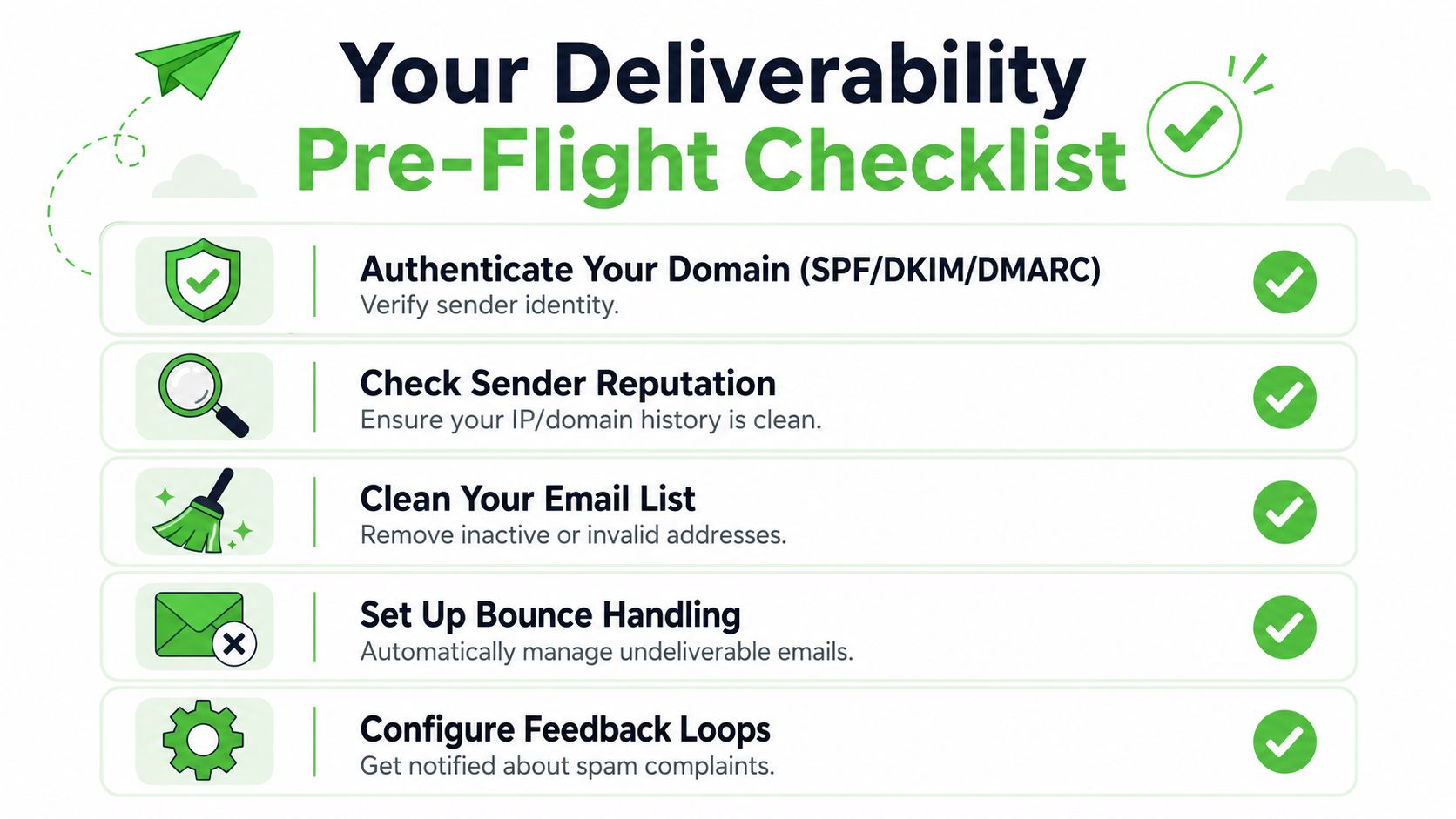
Authenticate the sending domain: Confirm SPF, DKIM, and DMARC are set up and aligned with the domain you'll use in production. This is the identity layer. Without it, your SMTP warm up starts from suspicion.
Review sender history: Check whether the domain or IP has been used before. A recycled asset can carry baggage. A clean new asset gives you more control, but only if you treat the first weeks carefully.
Clean the starting audience: Warm-up mail should go to people most likely to engage. Remove obviously invalid, risky, or long-unresponsive addresses from the starting segment.
Set up bounce handling: Hard bounces need to suppress future sends automatically. If your system keeps retrying bad recipients, providers see repeated signs of poor hygiene.
Enable complaint visibility: Feedback loops and mailbox provider dashboards help you catch issues before they spread across a client account.
Domain warm up or dedicated IP warm up
This is a strategic choice, not a technical footnote.
If you're a smaller sender, or you're onboarding many clients with modest volume, domain warm up usually matters more than chasing a dedicated IP too early. Mailbox providers pay close attention to domain reputation, and a dedicated IP doesn't fix weak engagement or bad audience targeting.
A dedicated IP makes more sense when volume is consistently high enough to support its own reputation pattern and when the team can maintain disciplined segmentation, complaint control, and monitoring. It gives you isolation and control, but it also removes the protection that can come from a well-managed shared environment.
For agencies, the practical split is simple:
- Use shared infrastructure carefully when client volume is lower and operational consistency matters more than isolation.
- Move strong senders to dedicated infrastructure when they have stable volume, good data hygiene, and a clear reason to separate reputation.
- Never warm multiple risky clients the same way just because the SMTP backend is shared. Each sender needs its own audience logic and pacing.
Building a Data-Driven Warm Up Schedule
The fastest way to ruin a new sender is to act like reputation will catch up later. It won't. Mailbox providers watch pattern changes closely, and abrupt jumps are one of the clearest signals that a sender hasn't earned trust yet.
Microsoft's guidance says domain warming is done over several days or weeks, and maximum deliverability typically takes 4 to 8 weeks depending on target volume and engagement. It also describes a widely used path that starts with 50 to 100 emails on day one, then roughly doubles every 3 to 4 days, reaching around 100 to 200 per day in week one, 500 to 1,000 per day by week two, and 2,000 to 5,000 per day by week four in a controlled progression in Microsoft Learn's warm-up guidance.
The ramp that mailbox providers expect
That ramp works because it looks normal. New senders that build volume gradually give providers time to observe authentication, delivery consistency, recipient interaction, and complaint behavior. New senders that go from near-zero to blast mode often get filtered before they can establish any positive history.
Another deliverability guide follows a similar shape, recommending roughly 50 to 100 emails per day in week 1, then 200 to 500 per day in week 2, then 1,000 to 2,000 per day in week 3, while continuing to scale only if bounce and engagement metrics stay healthy in MySMTP's warm-up guide.
Consistency beats ambition during SMTP warm up. Providers would rather see a sender grow predictably than appear overnight at full volume.
Sample SMTP warm up schedules by target daily volume
Use the table below as a planning model, not a license to force growth. If engagement weakens or technical issues appear, hold volume where it is.
| Day | Low Volume (Target 5k/day) | Medium Volume (Target 25k/day) | High Volume (Target 100k+/day) |
|---|---|---|---|
| 1 | 50 | 100 | 100 |
| 4 | 100 | 200 | 200 |
| 8 | 200 | 500 | 500 |
| 12 | 350 | 1,000 | 1,000 |
| 16 | 500 | 2,000 | 2,000 |
| 20 | 750 | 3,500 | 3,500 |
| 24 | 1,000 | 5,000 | 5,000 |
| 28 | 1,500 | continue scaling carefully | continue scaling carefully |
This table does two useful things for operators.
First, it forces patience. If your end goal is large daily volume, week one still looks small. That's normal.
Second, it separates capacity planning from reputation planning. Just because your infrastructure can send more doesn't mean your sender should.
How agencies should apply the schedule
Agencies usually get warm up wrong in one of three ways.
They copy the same volume plan to every client. They onboard several brands at once and increase them together. Or they let sales pressure override the schedule because a launch date was promised before the mailbox reputation existed.
A better operating model looks like this:
Create warm-up tiers: Group clients by expected steady-state volume and risk profile. A local service business with a clean opt-in list shouldn't follow the same rollout plan as a high-volume SaaS migration.
Stagger start dates: Don't start every client on the same day. Staggering makes monitoring easier and reduces the chance that one process mistake affects multiple accounts at once.
Tie increases to review gates: Before each step up, review placement, bounces, complaints, and engagement. Volume increases should be earned operationally, not triggered by a calendar alone.
Separate streams when possible: Transactional, lifecycle, and outbound prospecting traffic behave differently. Warming them as one blended stream muddies the signal and makes troubleshooting harder.
If you're managing multi-tenant infrastructure, your warm-up calendar is part deliverability system, part account management discipline. The schedule only works when your team enforces it.
Crafting High-Engagement Warm Up Content
A lot of teams focus on how many emails to send and almost ignore what those emails say. During SMTP warm up, that's backwards. Volume creates visibility. Engagement creates trust.

Why engagement beats volume
MailDeck reports that during warm up, reply rates below 20% correlate with 17% lower inbox placement in the first 30 days of cold sending, and rushing the process can cause 23% more spam-folder placements in the first month. The same guidance recommends a minimum warm-up period of 3 to 4 weeks, with 4 to 6 weeks preferred, and advises sending first to subscribers active in the past 30 days, then to those active in the past 60 days, while avoiding recipients inactive for 90 days during the first 6 weeks in MailDeck's warm-up analysis.
That's the operational takeaway: the best warm-up audience is not your full list. It's your most recently engaged segment.
What to send during warm up
Warm-up content should feel easy to receive and easy to interact with. It shouldn't look like a scaled sales push.
Good examples include:
- Productive check-ins: Short messages that ask a simple question and invite a real reply.
- Transactional-style updates: Account notices, useful reminders, or relevant status emails that match an existing relationship.
- Founder or account-manager notes: Plain-text messages to a warm segment often outperform designed campaigns early because they look and feel personal.
- Customer success nudges: Helpful prompts tied to known behavior, especially for SaaS accounts with active users.
Bad examples are usually obvious.
- Aggressive promotions: Heavy discount framing or urgent sales language can trigger negative reactions before your sender has earned trust.
- Large creative blasts: Big image-heavy templates may work later. Early on, they often add complexity without improving reputation.
- Cold list revivals: Sending to old, quiet contacts just because they're available is one of the quickest ways to poison a warm-up run.
Ask for small, natural interactions. A reply, a click to a known resource, or a simple acknowledgment matters more during warm up than broad campaign reach.
A useful training asset for junior team members is below. It's especially handy when agencies need to standardize how account managers think about sender reputation.
What not to send
If a message would make sense only at full campaign scale, it probably doesn't belong in week one.
Avoid mixed-intent sends. Don't combine newsletter content, promotional offers, and reactivation copy in the same early stream. Don't test six subject line styles at once. Don't rotate through disconnected audiences just to hit a volume target. Warm up works best when the provider sees a clear sender identity and a clear audience relationship.
For agencies, this means pushing back on clients who want to “use the warm-up phase to test everything.” That's not testing. That's noise.
Key Metrics and Tools for Monitoring Success
Warm up without monitoring is guesswork dressed up as process. You don't need dozens of dashboards, but you do need a small set of signals that tell you whether a sender is becoming trustworthy or drifting toward filtering.
What to watch every day
Start with the indicators that change operational decisions.
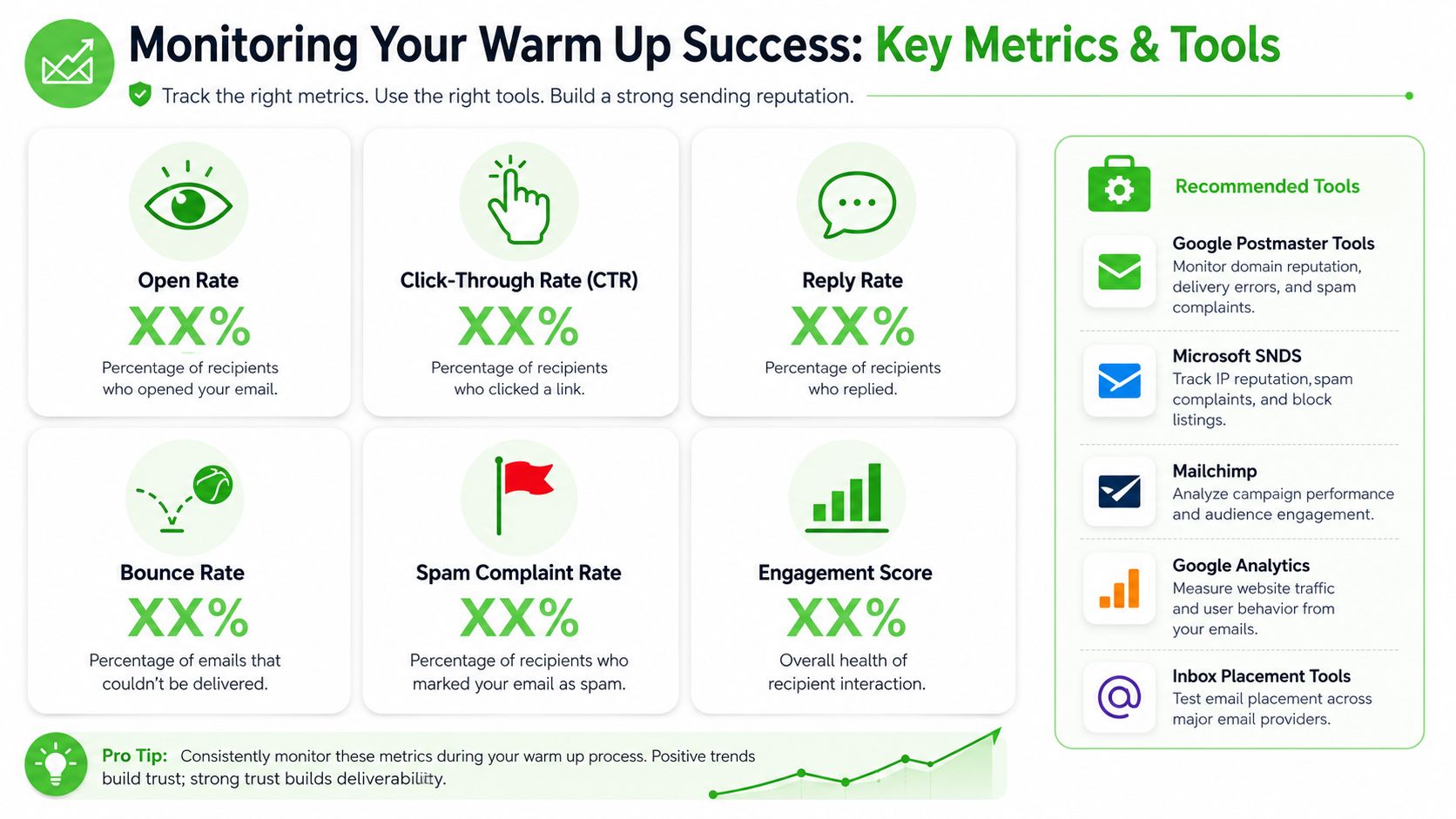
Inbox placement: This is the outcome that matters most. Delivered isn't enough if the message lands in spam or promotions where it gets ignored.
Bounce pattern: Separate hard bounces from soft bounces in your review. Hard bounces usually point to bad addresses or data problems. Soft bounces can indicate temporary mailbox or provider-side friction, but they can also be the first sign that your pace is too aggressive.
Spam complaints: Even a small spike is a warning. Complaints tell providers that recipients didn't want the message or didn't recognize the sender.
Reply and click behavior: During warm up, engagement is part of the reputation signal. A technically clean sender with weak interaction still struggles to build trust.
Reputation dashboards: Google Postmaster Tools and Microsoft SNDS belong in your standard setup. They won't answer every question, but they show whether large mailbox providers are comfortable with your traffic.
What the tools are telling you
Google Postmaster Tools is useful for domain-level visibility. It helps you spot whether your sending reputation is improving, flat, or deteriorating across Gmail traffic. Microsoft SNDS gives a view into how Microsoft properties interpret your activity and whether complaint or traffic patterns look unusual.
Use them to answer practical questions:
| Signal | What it usually means | What to do next |
|---|---|---|
| Inbox placement improving | The sender is gaining trust | Maintain pacing, don't jump volume too early |
| Soft bounces increasing | Throttling or temporary provider resistance may be developing | Hold volume and review recent audience or content changes |
| Hard bounces appearing early | The list or data source is weak | Stop adding volume and clean the source segment |
| Complaints rising | Recipient fit or message framing is off | Narrow the audience and simplify the message |
| Reputation flat despite clean sends | Providers still don't trust the pattern | Stay consistent longer instead of forcing scale |
A lot of teams misuse these tools by treating them as retrospective reports. They're decision tools. Review them before each increase, not after a bad launch.
The most expensive warm-up mistake isn't a slow start. It's scaling while the data is already telling you to stop.
How to make monitoring usable across client accounts
Agency teams need a layer above the raw dashboards. One client account is manageable by hand. Ten or fifty aren't.
Build a review process that standardizes what account managers check each day. Keep it simple:
- Use one scorecard per sender: Track placement trend, bounce trend, complaints, and engagement in a shared internal sheet or client dashboard.
- Flag exceptions, not everything: Teams burn time when they manually inspect healthy senders. Focus on accounts with deteriorating signals or stalled progress.
- Log changes: If volume increased, content changed, segmentation widened, or a new mailbox provider segment was introduced, note it. Warm-up analysis gets much easier when you can tie performance shifts to a specific change.
Mature agencies separate themselves from tool operators. The tool collects signals. The team turns those signals into restraint, action, or escalation.
Troubleshooting Common SMTP Warm Up Issues
Even clean warm-up plans hit friction. What matters is whether you diagnose the problem early and stop making it worse.

Low placement and weak engagement
Symptom: Delivery looks acceptable, but messages aren't surfacing where recipients notice them. Replies and clicks stay weak.
Probable causes: The starting audience is too broad, the content feels promotional too early, or technical trust signals still aren't aligned.
Solution: Narrow the audience to your best recent engagers, simplify the message, and review authentication alignment first. If your warm-up stalls and inbox placement fails to climb toward 80 to 90% by the end of the second week, pause volume increases and re-check your setup, especially SPF and DKIM alignment as Signado notes in its email warm-up guidance.
Bounce spikes and complaint signals
Symptom: Bounces begin to increase, or complaint notifications show up faster than expected.
Probable causes: Imported data quality is weaker than expected, suppression logic is incomplete, or a client added an older list segment to “help” warm up faster.
Solution: Freeze volume. Audit the exact segment that was mailed. Confirm that invalid recipients are being removed and that complaint feedback is reaching the sending team. In a reseller environment, also verify that one client's suppression rules didn't get applied inconsistently across workspaces.
Blocklist and reputation problems
Symptom: A sender hits a public blocklist, or a mailbox provider starts filtering a stream much more aggressively.
Probable causes: Sudden volume jumps, poor list hygiene, repeated retries to bad addresses, or a client mixing cold outreach with warm lifecycle traffic from the same sender identity.
Solution: Stop scaling. Isolate the affected stream. Remove risky audiences and separate traffic types if they were blended together. Then inspect the last operational changes, not just the template. Most blocklist events follow behavior changes, not random bad luck.
When troubleshooting SMTP warm up, don't ask only “What changed in the email?” Ask “What changed in the system, the audience, and the sending pattern?”
SMTP Warm Up for Agencies and SaaS Resellers
Running SMTP warm up for one brand is an execution task. Running it for many clients is an operating model.
The biggest shift is this: you're no longer protecting a single sender reputation. You're managing a portfolio of reputations, each with different list quality, campaign maturity, launch pressure, and technical discipline.
Build a repeatable client onboarding model
A workable agency process starts before the first campaign request.
Create a standard intake that captures sending domain status, expected volume tier, audience source, recent engagement quality, and traffic type. Then assign each client to a warm-up track. Some should stay on shared infrastructure longer. Others should earn dedicated separation only after they've shown stable behavior.
This also means setting expectations early. Clients often think the quiet start is wasted time. It isn't. It's the part that protects future revenue emails, product launches, and retention sequences from avoidable filtering.
Protect the portfolio, not just one sender
Shared environments can work well when the operator is strict. They fail when teams let weak senders hide beside strong ones.
For SaaS resellers and agencies, a few rules matter a lot:
- Segment client risk: Don't group clean opt-in lifecycle traffic with questionable outbound behavior.
- Document approval gates: Volume increases, audience expansion, and major template changes should require review.
- Train account managers: Warm up isn't a background technical task. Client-facing staff need to understand why launches sometimes need to slow down.
- Escalate sooner: In multi-tenant systems, early intervention protects everyone else using the platform.
Agencies that do this well turn deliverability discipline into a service advantage. They don't just send email for clients. They build sending infrastructure clients can trust.
If your agency or SaaS business also wants a white-labeled messaging channel beyond email, Double My Leads gives you a practical way to launch and resell WhatsApp workflows under your own brand, with shared team inboxes, broadcasts, automation, and predictable pricing. It fits especially well for teams that already manage client communications and want another owned channel without adding heavy setup overhead.


