
You've got the number, the app, and a webhook URL that works on your laptop. Then production rings, nobody hears anything useful, and the call lands somewhere you didn't intend. That gap between “it saves in the console” and “it answers calls correctly” is where most voice URL setups go wrong.
A voice URL is the instruction point for inbound calls. In Twilio's model, the number's incoming-call behavior lives in Voice & Fax, where A Call Comes In can point to a webhook or a Studio Flow, and saving that setting makes every inbound call to that number trigger the chosen workflow, while Twilio's url attribute defines the location that returns the TwiML instructions after answer and before connection (Twilio voice configuration overview). That's why configure your numbers voice url is really shorthand for wiring a phone number into a live decision engine, not just pasting text into a field.
The practical part starts before the first save. Your endpoint needs to be public, HTTPS, and fast enough to answer inside the provider's window. Localhost won't work without a tunnel, reverse proxies and CDNs can hide problems, and a browser check can still pass while the webhook fails under telephony traffic.
Practical rule: if a call can't reach the URL cleanly, the rest of the config doesn't matter.
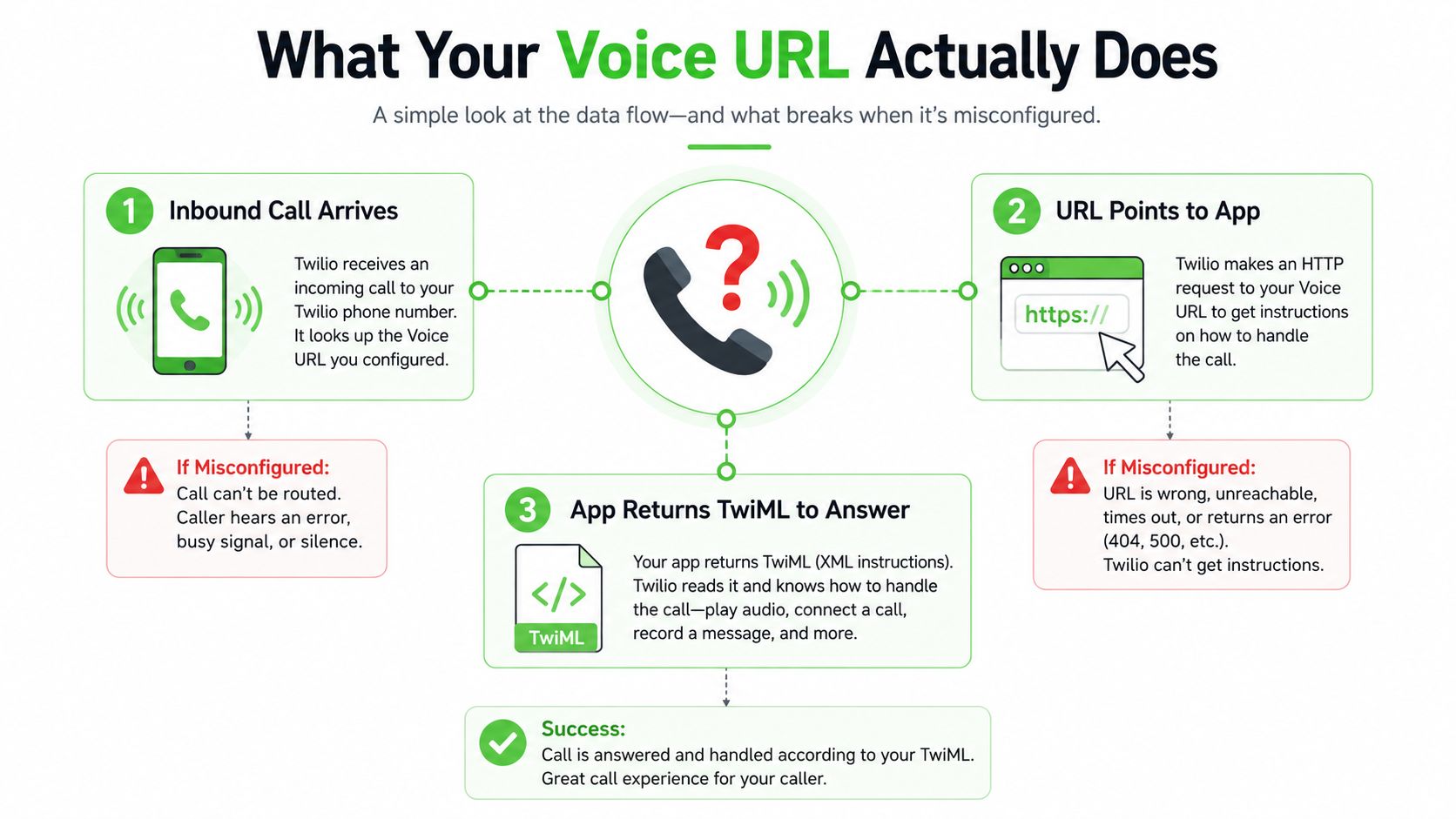
Table of Contents
- What Configuring Your Numbers Voice URL Actually Does
- Setting the Voice URL in Your Provider Console
- Configuring the Voice URL Through the API and CLI
- Request and Response Formats Your Endpoint Must Handle
- How Other Providers Handle the Same Configuration
- Testing, Security, and Production Hardening
- Why Your Voice URL Looks Correct but Calls Still Misroute
What Configuring Your Numbers Voice URL Actually Does
The first bad moment is usually quiet. An agency opens the number config screen, sees a webhook field, pastes in a URL that worked during a quick test, and assumes the number is now “wired up.” Then the phone rings, no useful response comes back, and everyone starts checking the app before they check the route that delivered the call in the first place.
The number becomes a routing decision
That's the change. A phone number stops being a passive endpoint and becomes a trigger for logic, which can mean a greeting, an IVR menu, call forwarding, voicemail, or a branch into another experience. In Twilio's setup, switching A Call Comes In from webhook to Studio Flow changes the number's behavior from a direct request handler to a workflow entry point, and after saving, every inbound call to that number follows that selected path (Twilio voice configuration model).
That mental model travels well across providers. Fone Dynamics exposes number routing through its REST endpoint for numbers in E.164 format without the plus sign, which shows the industry has moved toward machine-readable number configuration rather than one-off dashboard edits (Fone Dynamics number configuration API). The common pattern is simple, the number receives a call, the platform asks your app what to do, your app answers with instructions.
A browser can load your URL and still tell you nothing about whether a voice platform can use it.
The endpoint has to be reachable in the way telephony expects
A working voice URL needs more than a public page. It needs an HTTPS endpoint with a valid certificate, a public host, the right ports exposed, and a handler that responds quickly enough for call setup. A local server on localhost won't help unless you expose it through a tunnel, and a reverse proxy can break the request chain even when the upstream app looks healthy.
There's also a subtle failure mode that catches teams with polished web stacks. A CDN or WAF can cache, delay, or transform responses in ways that don't matter for ordinary traffic but do matter when a voice provider expects a prompt TwiML reply. If the handler stalls, returns the wrong content type, or takes a detour through a slow middleware chain, the number may appear configured yet still fail at call time.
The safest pre-flight check is boring. Confirm the URL is public, confirm TLS works, confirm the request handler returns voice instructions, and confirm the same endpoint works outside your workstation. If any one of those pieces is missing, the number can look configured while the call path stays broken.

Setting the Voice URL in Your Provider Console
Twilio's Voice & Fax panel is still the clearest reference point because it exposes the same fields most other providers hide behind different labels. Start by opening the number, then go to the place where inbound call handling is configured. The key decision is whether the number should hit a webhook directly or a workflow such as Studio Flow, because that choice changes where the call lands before your code ever runs.
The fields that matter
The A Call Comes In control decides what Twilio does on inbound traffic. If you're pointing at a custom webhook, paste the URL into the voice field, choose the HTTP method your app expects, and save the change explicitly. Twilio's own number setup flow is a reminder that configuration only becomes active after you save, which is why people often think they changed the number when they left the old routing in place (Twilio number setup workflow).
The fallback field deserves the same attention. Twilio's operational guidance separates the primary handler from the fallback URL, and the fallback must be handled in the portal rather than through the REST update path described later. That's useful when the main app is healthy but the deployment briefly blips, because a fallback can keep the number from going dead during a release.
For teams that want a docs-first reference while they work through a live setup, it helps to keep a secondary walkthrough open in another tab. A clean, vendor-neutral example can be useful when you're comparing how different voice stacks name the same controls, so you can explore the documentation without guessing which field maps to which behavior.
What to verify before saving
- Endpoint format: The URL should be HTTPS, publicly reachable, and designed to return telephony instructions, not a human-facing page.
- HTTP method: Match the method to your handler. If your app expects POST bodies, don't leave the console on GET just because it's the default.
- Fallback path: Decide where calls go if the primary handler fails, and make sure that destination is safe to answer production traffic.
- Save state: Confirm the configuration saved. Twilio won't apply the change until you click save, and that's where a lot of “it should work” debugging starts.
The safest habit is to test the number immediately after saving. If the call routes somewhere unexpected, the problem is often not the URL text itself, but the selected call-handling mode or a stale fallback target.
Configuring the Voice URL Through the API and CLI
Once one number is working, nobody wants to keep clicking the same console fields for every rollout. The cleanest pattern is to treat the voice URL as a deployable setting, not a manual one, and use the REST API or CLI to move numbers between environments.
The API path
Twilio's number resource can be updated directly through the IncomingPhoneNumbers endpoint, including the VoiceUrl field, and the Stack Overflow guidance notes that a fallback URL is still handled separately in the portal (Twilio VoiceUrl update via API). That split matters operationally. You can automate the primary handler, but the reliability path still needs portal awareness.
That structure is useful for staged rollouts. Point the number at a staging URL, place a test call, confirm the TwiML path, and then swap to production when you're satisfied the app responds correctly. Teams with multiple numbers usually end up preferring this because it gives them a repeatable change path that doesn't depend on who remembered the console clicks last week.
The CLI path
Twilio also supports the same kind of update through the CLI with the --voice-url flag, which fits nicely when your deployment process already lives in terminal scripts (Twilio CLI webhook workflow). It's faster than navigating the console for a portfolio of numbers, and it makes the change easier to version alongside the rest of the release process.
A practical deployment pattern looks like this.
- Push staging first: Update the number's voice handler to the staging URL through API or CLI.
- Call the number: Confirm the webhook replies with the expected instructions.
- Flip production: Swap to the live URL only after the staged path behaves correctly.
- Leave fallback intact: Keep a known-safe fallback in the portal so a temporary app failure doesn't break inbound calls.
For broader API tooling and the way other telecom stacks expose update calls, the proxy API reference from Sota Proxy is a helpful comparison point when you're evaluating how much of your number workflow should live in code rather than a UI (Sota Proxy API reference).
Request and Response Formats Your Endpoint Must Handle
A voice URL can be public, valid, and still fail if the request or response shape is wrong. That's the part many teams miss. They spend time on hosting, then return a web page, a redirect, or an empty response when the platform is waiting for call instructions.
What arrives at your endpoint
When a call comes in, the provider sends a webhook payload with call metadata. In Twilio-style flows, fields like From, To, CallSid, and Direction are the backbone of the request, because they tell your app who's calling, which number was dialed, and how the call is moving through the system. That data is what your route logic keys off when you decide whether to greet, transfer, or branch the caller.
A valid response has to speak the platform's language. For Twilio, that means TwiML, the XML instruction set that tells the platform what to do next. A simple greeting can be a <Say> response, an IVR can use <Gather>, and a forward-to-human flow can use <Dial>, all inside a clean XML document.
If the response isn't valid telephony XML, the call isn't “partially working,” it's just failing later.
Keep the response predictable
The safest pattern is to make your webhook deterministic. Return the same kind of response for the same call condition, and keep the handler small enough that you can reason about it in production. If a route sometimes returns HTML and sometimes returns XML, you're not building a voice handler, you're building a debugging exercise.
For teams still using a plain server rather than serverless functions, the response contract should be treated like an API, not a page render. Handle the inbound payload, validate the caller data, and return TwiML directly. That's also the point where programmatic updates beat console clicks for agencies managing many numbers, because the routing logic and the destination can move together in a deploy.
Twilio's console and CLI both support the same basic idea. The console gives you a field to paste a URL, the CLI gives you a flag to update it, and the REST API lets you wire that change into a deployment pipeline. The winning move is not choosing one forever, it's using the one that matches the environment you're running.
How Other Providers Handle the Same Configuration
Twilio gets the most attention because its voice URL field is easy to find, but the underlying pattern shows up across providers with different labels. Once you have wired a few inbound handlers, the surface details change faster than the routing model does.
Fone Dynamics exposes number-level configuration through a REST endpoint for phone numbers in E.164 format, which treats the number as a resource that can be updated programmatically. The UI may look different, but the operator model is the same. A number carries routing rules, recording behavior, and attribution settings, and those settings can be managed like infrastructure without waiting on manual console changes.
Vonage uses a similar contract with different terminology. Their inbound voice flow points an application at an Answer URL, and the app responds when calls arrive, which is the same webhook pattern you see elsewhere even though the provider names the field differently (Vonage inbound webhook workflow). The important part is the exchange itself, receive the event, decide how the call should proceed, and answer quickly enough that the caller never feels the delay.
The practical takeaway is straightforward. Stop memorizing console labels and start mapping the contract. The number receives the call, the platform posts to your URL, your app returns instructions, and the call continues from there. Once that pattern is clear, switching providers turns into a configuration exercise instead of a relearning cycle.
Testing, Security, and Production Hardening
A voice URL that works once is not production-ready. The test is whether it keeps working when your app is behind a tunnel, a reverse proxy, a release process, and a teammate who didn't write the original webhook.
Hardening the path
For local development, a tunnel like ngrok keeps your laptop out of the public internet while still making the webhook reachable to the voice platform. That's the fastest way to verify a new route before you attach it to a live number. The next layer is authenticity, because a public webhook should not trust every request that reaches it.
Validate the incoming signature header before you act on the payload. In Twilio environments, that means checking X-Twilio-Signature so a forged callback doesn't trigger your business logic. After that, add sane rate limits and idempotency handling where high-volume numbers could be retried or duplicated during transient failures.
The test-call checklist
- Ring the number: Confirm the call arrives at the intended handler, not just the right URL.
- Inspect the payload: Verify the caller and destination data look right for the route you expect.
- Check the response: Make sure the webhook returns valid TwiML or the provider's equivalent.
- Simulate hangup: Confirm your app handles a caller dropping mid-flow without leaving stale state.
- Review fallback targets: Keep fallback URLs out of staging once the number is live.
If you're comparing providers, the operational controls are still recognizable. Fone Dynamics gives you machine-readable number config, while Twilio exposes the same basic routing controls through the console, API, and CLI. The hardening work is still yours either way, because the platform only knows what to do after your endpoint responds cleanly.
Why Your Voice URL Looks Correct but Calls Still Misroute
The hardest failure is the one that looks right in the console. The URL is saved, the toggle is on, and the number page looks clean, yet calls still land in the wrong place because the active processing path changed underneath you.
Twilio's inbound infrastructure docs expose the part that usually gets missed. A number has an active inbound-processing region, it can be re-routed, and the reliable way to confirm behavior is to place a call and review the region-specific logs afterward (Twilio inbound-processing region guidance). A voice URL can be correct and still point to the wrong region after portability or a routing change. The URL is only one layer, the path that carries the call matters just as much.
The diagnostic order that saves time
Start with the primary URL. If that looks right, check the fallback URL, because a slow or failing primary can hand traffic there without making the failure obvious in the console. Then verify the processing region and compare it with the call logs for the test call. That sequence catches most “configured, but still wrong” incidents faster than chasing app code.
A short test call tells you more than a settings page does.
For teams that want a wider view of call distribution, the CallZent guide to smart call routing is a useful reference because it treats routing as an operating choice, not just a field in a form. That is the right mindset for ported numbers, rerouted numbers, and setups split across regions.
The bigger lesson is simple. Voice URLs are infrastructure. Keep staging separate from production, keep a safe fallback in place, and verify the region that receives the call. If the call still misses after that, you are debugging the problem instead of the symptom.


