
You can absolutely schedule WhatsApp messages, and there are a few different ways to get it done. For your personal chats, you're usually looking at workarounds with Android automation apps or iPhone Shortcuts. But for businesses, the options are much broader, from the basic tools in the WhatsApp Business app to seriously powerful third-party platforms built for managing entire campaigns.
Table of Contents
- Why Is Scheduling WhatsApp Messages a Strategic Advantage?
- Comparing Your WhatsApp Scheduling Options
- The All-in-One Solution for Agencies and Marketers
- Best Practices for Timed WhatsApp Campaigns
- Common Questions About Scheduling WhatsApp Messages
Why Is Scheduling WhatsApp Messages a Strategic Advantage?
Mastering how to schedule WhatsApp messages is about so much more than just convenience. For any serious marketer or agency in 2026, it’s the difference between reacting to conversations and building a proactive, strategic marketing engine. It’s like graduating from just answering the phone when it rings to having a full-time assistant who perfectly manages your entire calendar.
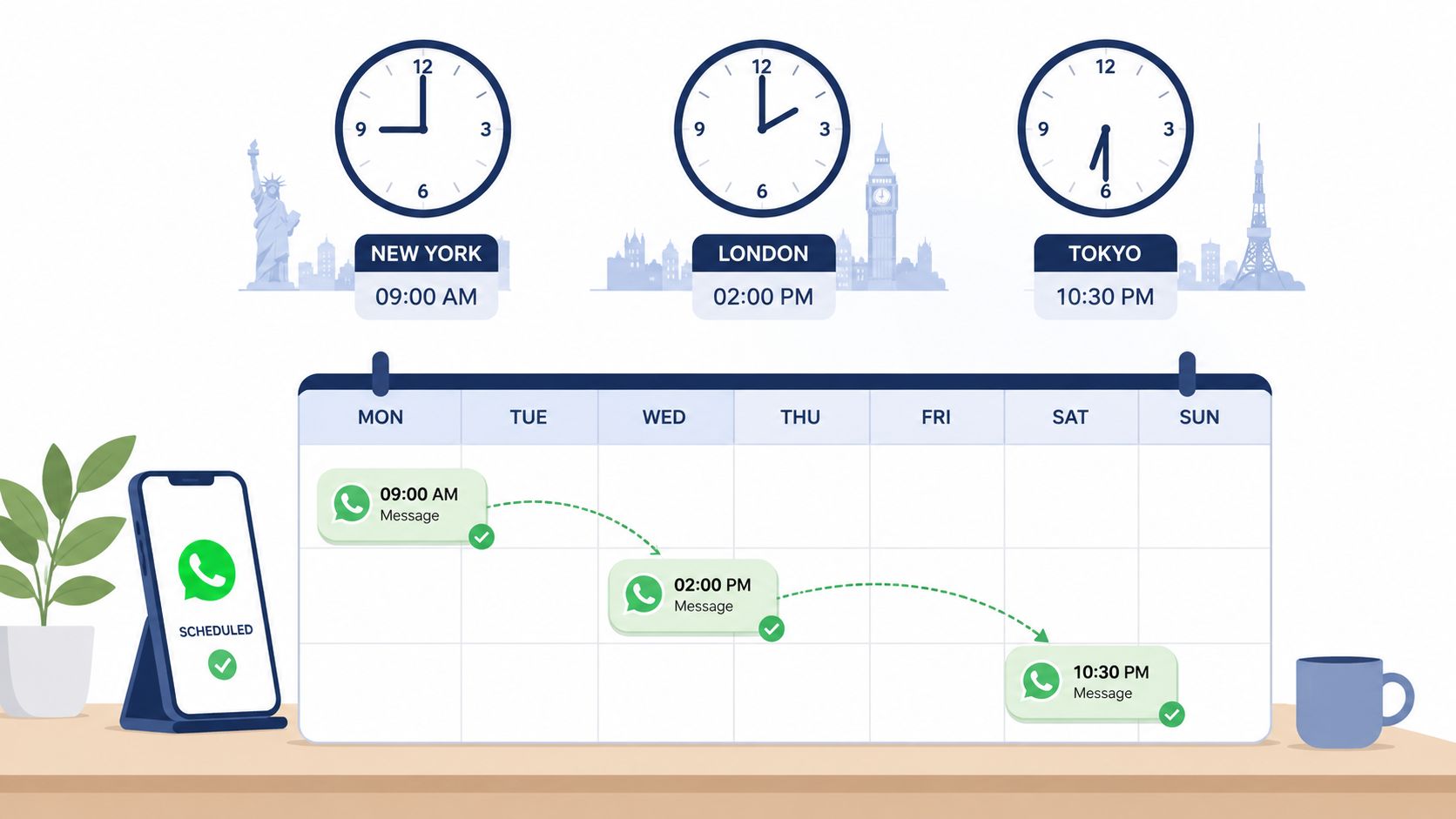
Transform Your Operations
Timed messages are a core operational tool that gives you incredible precision over your campaigns.
Think about a global product launch. Instead of forcing team members to wake up at odd hours to send manual broadcasts, you can schedule announcements to go out at 9 AM local time in every single market, whether it's New York or Tokyo. This ensures your message always lands during peak activity, driving way more engagement.
For agencies juggling a dozen client accounts, this is a total game-changer. It lets your team pre-load an entire week’s worth of communications—from appointment reminders to lead nurture sequences—guaranteeing nothing ever falls through the cracks.
Gain a Competitive Edge
For a long time, scheduling on WhatsApp wasn't a native feature, which forced businesses to get creative with a mix of third-party apps and complex API-driven platforms. As you can explore in our complete guide for businesses, this workaround ecosystem exists because scheduling gives you critical control. It allows your team to pre-write messages and coordinate campaigns across time zones without having to be online to hit "send."
By mastering message scheduling, you transform WhatsApp from a simple chat app into a proactive marketing channel. It gives you the power to be consistent, timely, and relevant at scale, providing a significant competitive edge over those still stuck in a reactive mindset.
This proactive approach lets you manage everything from simple birthday wishes to complex, multi-touchpoint marketing funnels. The benefits are crystal clear:
- Improved Engagement: Reach users exactly when they are most likely to be active and responsive.
- Operational Efficiency: Automate all those repetitive communication tasks and free up your team for more important strategic work.
- Global Reach: Seamlessly coordinate campaigns across different time zones without any manual intervention.
- Consistent Branding: Ensure every scheduled message perfectly adheres to your brand’s voice and standards.
Comparing Your WhatsApp Scheduling Options
When it comes to scheduling WhatsApp messages, there’s no one-size-fits-all answer. The right tool depends entirely on your goal—are you sending a simple birthday reminder, or are you running a full-scale marketing campaign? The options have grown, reflecting just how essential scheduling has become for both personal and professional use.
Let's break down the most common methods, from simple workarounds to more robust solutions.
Native and Third-Party App Workarounds
For personal use, you can get by with a few clever tricks on your smartphone. On Android, users often turn to automation apps like SKEDit, which can directly send a message for you at a preset time. It gets the job done for one-off sends, but you're handing over a lot of permissions to a third-party app.
The iPhone approach is a bit different, thanks to Apple’s tighter security. Most people use the native Shortcuts app to create a personal automation. It’s more of a notification-based workaround than true scheduling—it pings you at the set time, and you still have to manually hit "send." You can find more detail on these kinds of methods over at Bot.space.
What about for business? The WhatsApp Business app gives you a taste of automation with its "away messages." This feature is great for letting customers know you're off the clock, but it’s reactive, not proactive. You can't use it to schedule a specific message for a future date or time.
The truth is, these free workarounds are pretty limited. They usually need your phone to be on and connected to the internet, and they offer zero scalability for business. They're simply not built for sending messages to large contact lists reliably.
Here’s a quick rundown of what you’re getting with these entry-level tools:
- Android Apps (like SKEDit): Good for hands-off, automated sending for individual messages. The downside? They can be unreliable and bring up security concerns with the permissions they require.
- iPhone Shortcuts: It's a free, native solution on iOS, so no third-party app is needed. But it isn't true "set it and forget it" scheduling; it’s an automation that just reminds you to send the message yourself.
- WhatsApp Business Away Messages: A professional way to manage customer expectations automatically after hours. However, it only works outside your business hours and can't be used for targeted, timed campaigns.
These methods are fine for personal reminders or tiny operations. Many of the core concepts of scheduling—timing, audience, and content—apply across all social platforms, and this 2026 guide to scheduling tweets offers some great transferable insights.
But when you're talking about serious marketing or customer communication, you need a solution built for scale and reliability.
To make it easier to choose, here’s a quick comparison of the main scheduling methods available today.
WhatsApp Scheduling Methods Compared
| Method | Ideal User | Key Limitation | Scalability |
|---|---|---|---|
| Android Apps | Personal users, casual schedulers | Security risks, requires phone to be on | Very Low |
| iPhone Shortcuts | iPhone users for personal reminders | Not automated; requires manual sending | None |
| WhatsApp Business App | Small business owners | Only for "away" and "greeting" messages | Very Low |
| WhatsApp API | Developers, marketing agencies | Requires technical setup and coding | Very High |
| Third-Party Platforms | Businesses of all sizes | Subscription-based cost | High |
As you can see, the free, app-based methods are great for getting started, but they hit a ceiling fast. For anyone serious about using WhatsApp for business, the conversation quickly moves toward the WhatsApp API or a platform built on top of it.
When you're ready to move beyond simple workarounds and build truly scalable messaging, the WhatsApp Cloud API is the industry standard. This is the official, powerful solution for developers and agencies who need direct integration and complete control.
Of course, just saying "use the API" isn't helpful. So let's break down what that actually means.
At its core, the API works by sending a POST request to the /messages endpoint. This request includes a JSON payload—think of it as a set of digital instructions—that tells WhatsApp who to message and what to send.
This approach is how professional platforms deliver enterprise-grade automation. While personal tricks and third-party apps have their place, the API is the foundation for serious business communication.
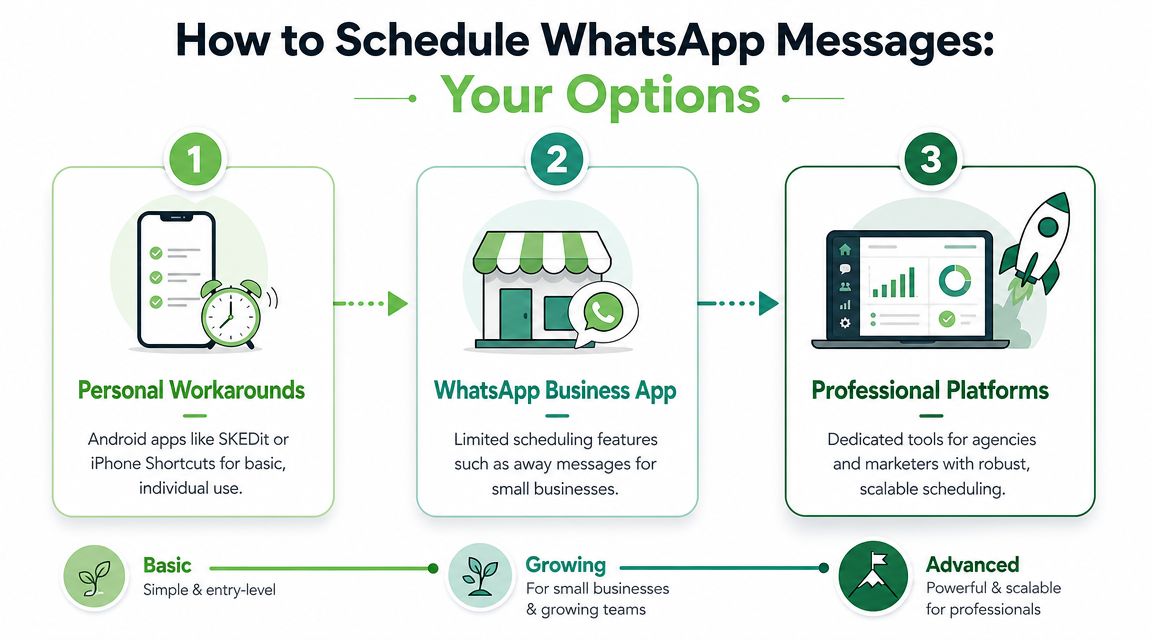
The Technical Essentials
Getting started with the API isn't a simple plug-and-play process. It's a framework designed for building your own custom tools and integrations. Before you can send your first message, you’ll need a few things set up.
Here are the key components you'll need:
- A Meta App: This is your home base within the Meta for Developers ecosystem where you'll configure your integration.
- A WhatsApp Business Account (WABA): This account officially links your business profile and phone number to the API.
- Authentication Tokens: You need a system to generate and manage secure access tokens to authorize your API calls.
With these prerequisites in place, you can start building Message objects. The API doesn't have a built-in scheduler; you're responsible for that part. Your own server-side logic will trigger the API call at the right time.
This gives you total control to build complex, automated workflows that go far beyond what any off-the-shelf app can manage.
The All-in-One Solution for Agencies and Marketers
While the API gives you raw power and workarounds offer a temporary fix, a dedicated platform is the most direct path for any business needing to schedule WhatsApp messages reliably and at scale. This is where integrated solutions like Double My Leads come in. They are purpose-built to eliminate the headaches that come with every other method.
Forget about sifting through complex API documentation. With a dedicated platform, you can connect your number in minutes with a simple QR code scan. This completely sidesteps the need for Meta verification or pulling in developer resources, making it accessible right out of the box.
The Agency-First Workflow
The true game-changer of an all-in-one platform is how it brings everything a marketing team needs under one roof. You can write messages on the fly or pull from pre-approved templates, pick your recipients directly from a synced CRM, and then schedule the delivery for the exact date and time you want.
The dashboard gives you a clean, visual calendar of all your scheduled communications.
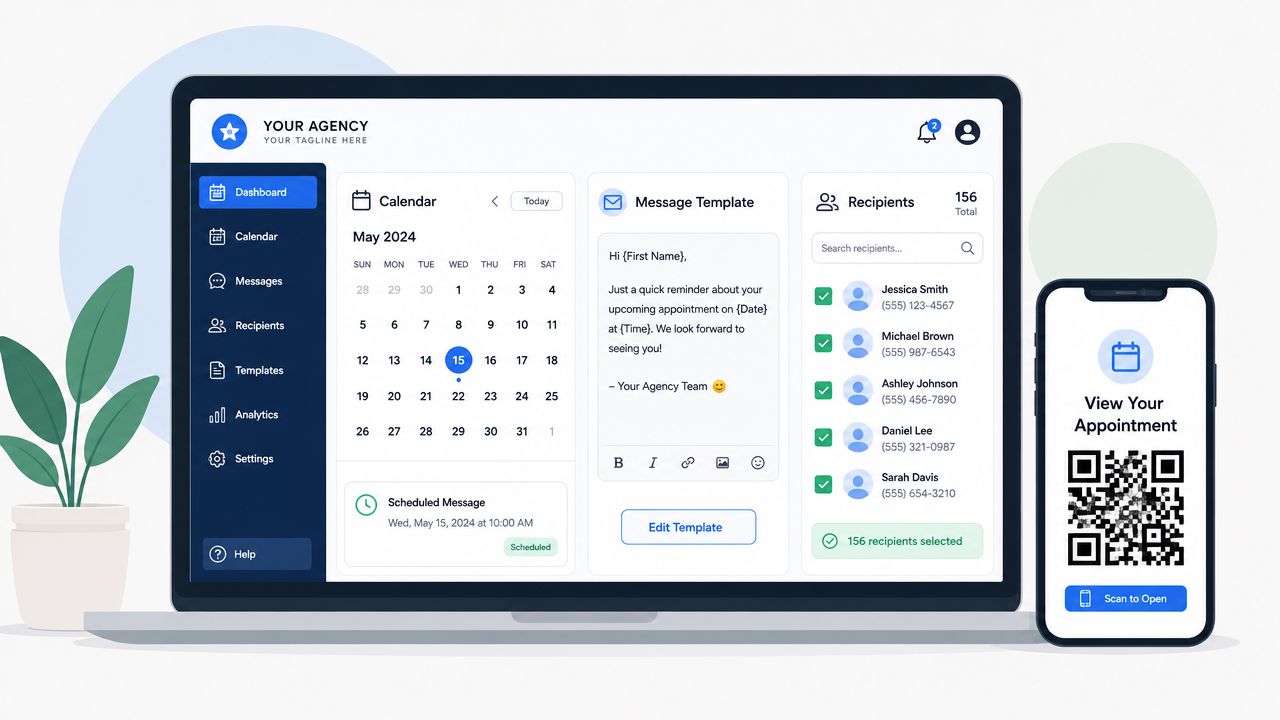
This kind of intuitive setup transforms a technical chore into a straightforward marketing operation. It lets your team focus on crafting great campaigns instead of fighting with the technology. For businesses and agencies seeking expert help to implement more advanced automation, consulting an AI automation agency can provide a significant strategic advantage.
For agencies, the biggest wins are predictability and control. Platforms like Double My Leads often run on a flat monthly fee, which gets rid of the volatile per-message costs you see with the API. This makes it far easier to build a profitable and scalable service for your clients.
Beyond Simple Scheduling
The best platforms don't just stop at scheduling. They offer features specifically designed for agencies that want to grow.
- White-Labeling: Present the platform as your own branded solution, using your domain and company colors. This reinforces your brand identity and delivers a polished client experience.
- Broadcast Integrations: Move beyond one-on-one chats by scheduling announcements and updates to large WhatsApp Community groups.
- Predictable Costs: Ditch the confusing and variable per-message fees. A subscription model makes it simple to calculate your margins and price your services with confidence.
This powerful combination of easy onboarding, robust features, and agency-focused tools makes a dedicated platform the most efficient and scalable solution on the market. It’s built for businesses that have graduated from basic workarounds and now require a professional-grade tool to master their WhatsApp marketing. Ultimately, it’s the fastest way to learn how to schedule WhatsApp messages for real business growth.
Best Practices for Timed WhatsApp Campaigns
Knowing how to schedule WhatsApp messages is just the technical part. The real skill is in crafting a strategy that works. The most effective campaigns aren't just scheduled—they’re built on smart timing, deep personalization, and a solid grasp of audience behavior.
Forget generic blasts. Success on WhatsApp comes from delivering the right message at exactly the right moment.
The first step is to nail down the optimal sending time. Don’t just guess or default to your own business hours. You have to dive into your audience data. When are they most active and receptive?
For a global e-commerce brand, this means scheduling a flash sale announcement for 7 PM local time in each target region, not just a single broadcast. A local service business, on the other hand, should schedule appointment reminders 24 hours in advance to dramatically reduce no-shows.
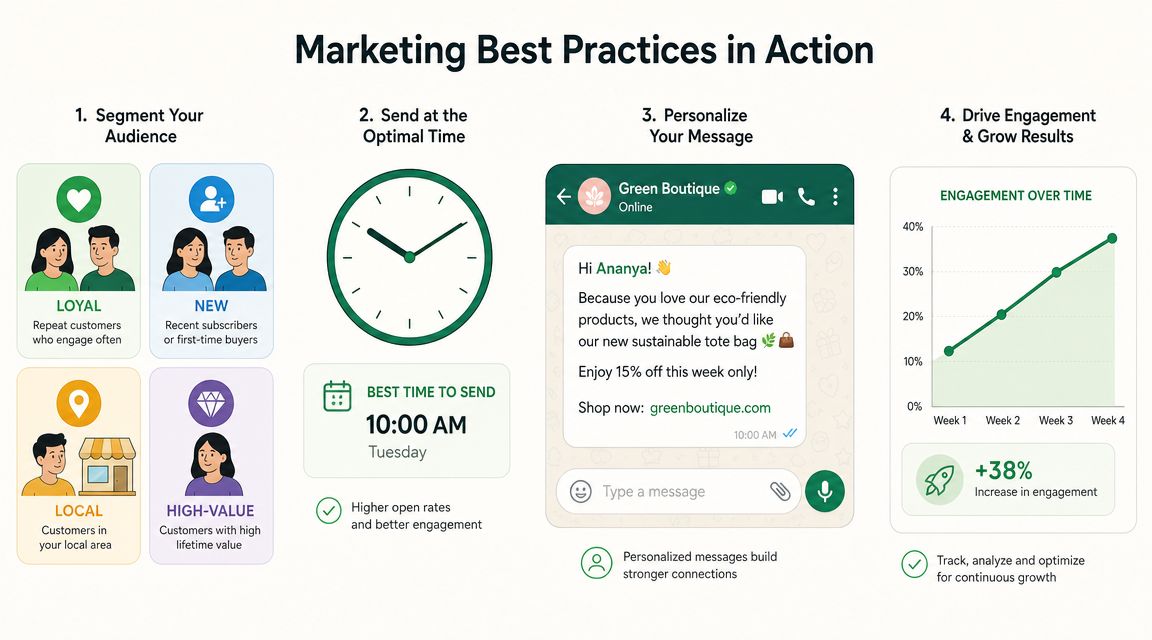
Make Every Message Count
Even an automated message needs to feel personal. Use dynamic placeholders to insert a customer's name, reference a past purchase, or mention a specific appointment time. This simple touch transforms a robotic notification into a helpful, one-on-one communication.
Audience segmentation is just as critical. Instead of sending one generic promo code to your entire list, create targeted segments:
- New Subscribers: Schedule a welcome message with a small introductory discount.
- Loyal Customers: Time a special offer to coincide with their average purchase cycle.
- Inactive Users: Schedule a re-engagement message with a compelling "we miss you" offer.
A scheduled WhatsApp campaign isn't just a delayed message; it's a timing optimization tool. Your goal is to align your communication with your audience's daily rhythm for maximum impact.
The strategic importance of timing is crystal clear when you look at the data. By 2026, it's expected that 80% of users will read messages within five minutes of receiving them. When timed correctly, promotions can see click-through rates skyrocket to 45–60%.
Sending at the right hour directly influences visibility and conversions, a key insight highlighted in recent WhatsApp marketing statistics.
Of course. Here is the rewritten section, formatted in markdown and reflecting the expert, human-written style of the provided examples.
Common Questions About Scheduling WhatsApp Messages
Once you start digging into scheduling WhatsApp messages, a few practical questions always come up. It's one thing to know the methods exist, but it's another to understand the real-world implications.
Let's clear up some of the most common concerns so you can pick the right approach with confidence.
Can I Schedule WhatsApp Messages for Free?
Yes, but there's a big catch. You can definitely schedule messages for free using built-in phone features like the Shortcuts app on an iPhone or by downloading an Android automation app like SKEDit.
The problem is that these free solutions are notoriously unreliable. They often require your phone to be unlocked and online at the exact moment the message is supposed to send. For a personal birthday wish, that might be fine. For any kind of professional communication, it’s a recipe for failure.
Is It Safe to Use Third-Party Apps?
The safety of third-party scheduling apps really runs the gamut. Some of the simpler, non-API-based apps require you to grant them sweeping permissions over your device and WhatsApp account, which is a major security red flag. Handing over that much control should make any business owner nervous.
A much safer bet is to stick with a solution built on the official WhatsApp Cloud API. Platforms that prioritize security, like Double My Leads, offer a secure connection through a simple QR scan, which bypasses the risks and technical headaches of managing API keys yourself.
Can I Edit a Scheduled Message?
This completely depends on the tool you're using. If you’re relying on a basic workaround on your phone, editing is usually impossible. You’d have to hunt down the automation, delete the whole thing, and start from scratch. It’s clunky and inefficient.
Professional scheduling platforms, however, are built for this exact scenario. Any decent dashboard will give you a clear view of all your pending messages and let you edit, reschedule, or cancel them with a click, right up until they're sent.
Does the Recipient Know the Message Was Scheduled?
No, and that’s the beauty of it. The message lands in their chat looking exactly like any other message you’d send manually.
There’s no "sent via…" tag or any other indicator. This is what allows your communication to feel personal and perfectly timed, even if you planned it weeks in advance. It's the secret weapon for maintaining a genuine touch at scale.


