
You already know the pattern. A campaign looks healthy in the dashboard, the send goes out, and then replies are thin, CRM records are messy, and your sales team starts asking why half the leads never answer. In a lot of lead-capture systems, the problem isn't the copy or the offer. It's that bad addresses slipped in before anyone had a chance to qualify them.
Mailgun email validation is useful because it acts like a gate, not a cleanup chore. It checks whether an address looks deliverable before you commit that contact to a form flow, CRM sync, or batch import, which is a very different job from simple syntax checking. For teams that work with prospects and lead sources, that distinction matters, and a useful framing is the one Mail Tracker uses for qualifying leads and prospects, because validation helps you separate raw capture from contacts worth routing downstream.
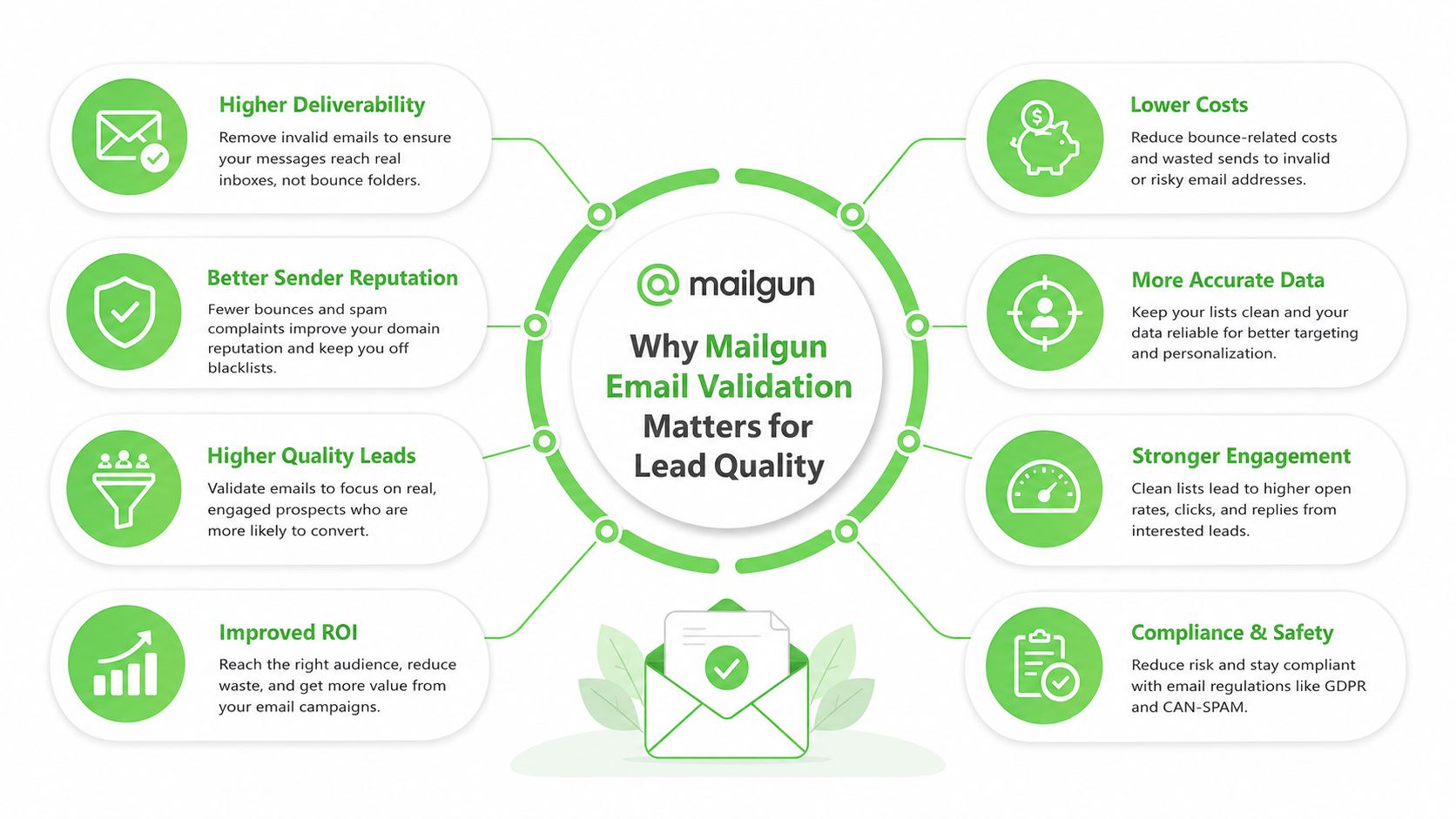
Table of Contents
- Why Mailgun Email Validation Matters for Lead Quality
- Enabling Mailgun Email Validation in the Dashboard
- Calling the Mailgun Validate API and SDK Examples
- Choosing the Right Validation Mode for Each Use Case
- Wiring Validation Into Lead-Gen and WhatsApp Workflows
- Rate Limits, Costs, and Quota Planning for Agencies
- When Validation Stops Paying Back in 2026
Why Mailgun Email Validation Matters for Lead Quality
A campaign usually fails in a mundane way. The segment is fine, the subject line is fine, and then a quiet block of addresses never receives the message because the form captured typos, disposable inboxes, or mailboxes that no longer accept delivery. That's why validation belongs at acquisition time, not after the list is already polluted.
Mailgun's validation product doesn't behave like a regex filter. It is built around three checks, pinging the originating email server to inspect MX records, verifying domain authenticity with DNS lookup, and assessing whether an address is valid without sending a message. Mailgun also frames validation inside a developer-first platform, which matters because it pushes teams toward API-driven workflows instead of manual list scrubbing. The same technical framing is why validation is relevant for lead-gen systems that want to reduce bad signups before they hit CRM or automation layers. Mailgun's validation product overview
Why the backend checks matter
MX records are the routing signals that tell mail systems where delivery should go, so a validation pass is really a live infrastructure check. If the domain can't be resolved properly or the mailbox path looks broken, you don't want that contact sitting in a sales queue as if it were ready. In practice, this is the difference between a contact that exists and a contact that can receive mail.
That distinction also helps teams decide how much manual review to do. If you're running acquisition for agencies or reselling seats, validated contacts are the ones you want to route into nurturing, onboarding, or follow-up automation. Unvalidated addresses create downstream noise, and that noise burns time in the exact places where sales and support teams need clean data most.
Enabling Mailgun Email Validation in the Dashboard
The cleanest setup starts in the control panel, not in code. Log into the Mailgun dashboard, find the validation area tied to your sending domain, and make sure the feature is enabled for the environment you use in production. If you're working inside an agency account, check the role assignment first, because validation access is limited to admin and developer roles.
That permission rule is a common blocker. Teams often share a login structure across operations, media buying, and fulfillment, then discover that the person building the workflow can't run validation at all. If validation isn't visible, the first thing to check is whether the account role has the right level of access.
Practical rule: verify permissions before you test volume. If the role is wrong, the dashboard looks broken even when the account is fine.
Watch the quota before you import anything
Mailgun also enforces a hard validation quota that can disable validation once the limit is exceeded. That matters most during a list import spike, when a CRM migration or lead dump can consume quota faster than the team expects. The safest move is to check usage before you launch a bulk cleanup job, then reserve capacity for the addresses that matter most.
After that, run a single-address validation from the dashboard. That gives you a quick sanity check that the account is live, the role is right, and the feature is responding before you spend time wiring the API or connecting automation. For agencies, that one test saves you from debugging a workflow that was never allowed to run in the first place.
Calling the Mailgun Validate API and SDK Examples
The endpoint is the part developers wire into a form handler, CRM gate, or enrichment service. Mailgun exposes validation through /v4/address/validate, which is the programmatic entry point for checking an address at scale. The same pattern works whether you're validating one signup at a time or batch-processing imported leads.
A minimal request starts with your API key and the address parameter. Mailgun's API docs show the validation endpoint as a GET request, and the response comes back in JSON. For a quick implementation pass, a cURL request is enough to prove the flow before you wrap it in a Python or Node service. A useful companion if you want to compare implementation styles is EmailScout's guide to email validation, which is a good reference point for API-based validation patterns.
A simple request pattern
A clean implementation usually follows this shape, even if your SDK hides some of the HTTP details.
- Authenticate with the API key. Keep validation in server-side code, not in the browser, so the key stays private.
- Send the address to the validate endpoint. Pass one email address per request when the form submit needs an immediate decision.
- Read the response fields. Use the result and risk markers to decide whether the address should be accepted, reviewed, or blocked.
- Keep the branch logic simple. If the response suggests a disposable or role-based inbox, don't route it into a high-value nurture path.
The response fields matter because they separate deliverability from policy decisions. The result tells you whether the address looks deliverable, the risk flag helps you score how cautious to be, and the helper fields can surface obvious problems like a misspelled domain. That's where validation becomes operational, not theoretical.
If the address looks close but not clean, treat it as a routing decision, not a binary truth. A typo fix may be worth prompting on a signup form, while a risky lead in a CRM import may be better left for manual review.
Choosing the Right Validation Mode for Each Use Case
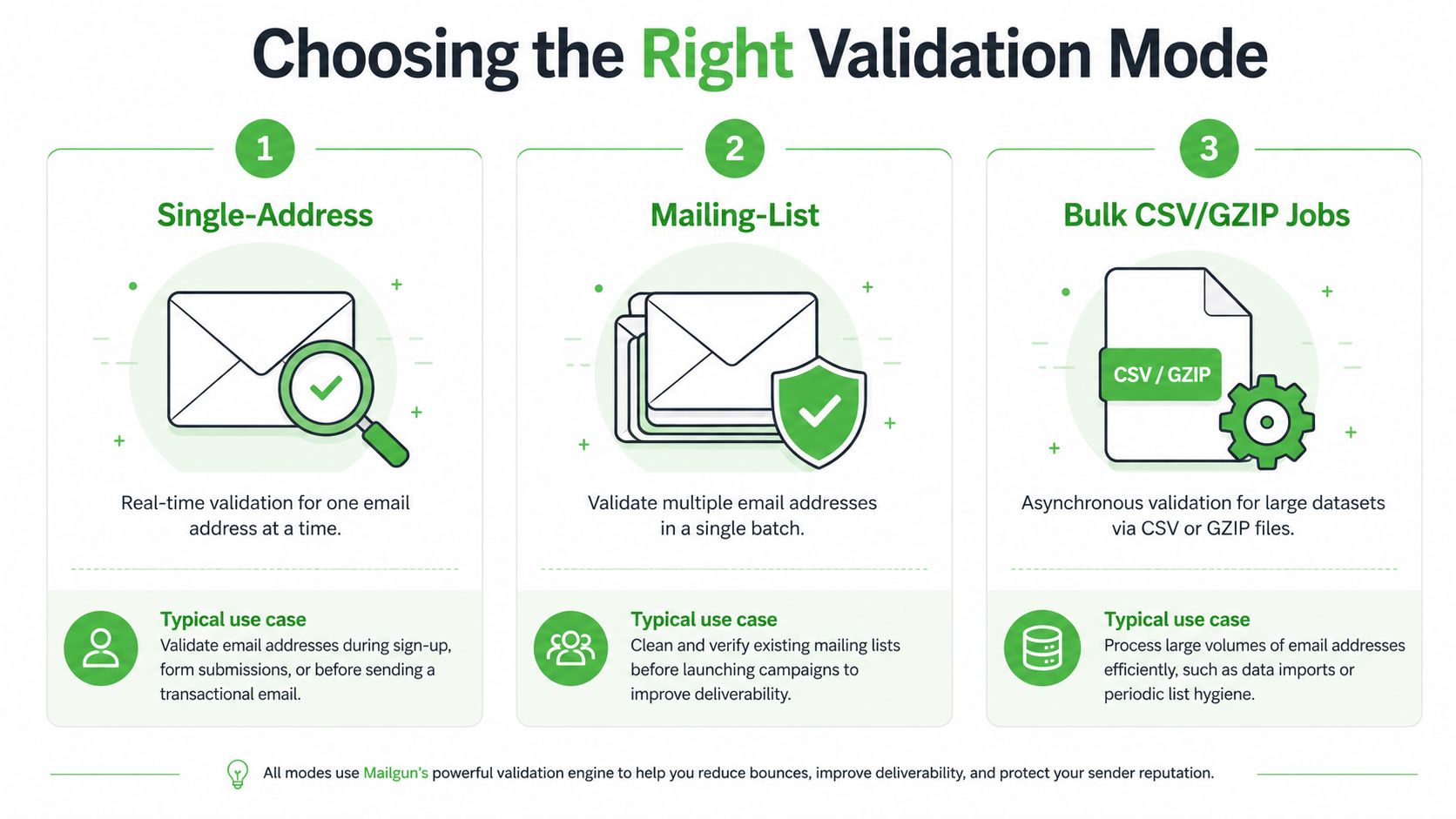
The common mistake is treating validation as a single setting. Mailgun supports three operational modes, and the right one depends on whether you care most about latency, cleanup, or batch throughput. The choice changes the economics and the user experience.
Single-address checks fit live capture
Use single-address validation when the user is still in the form flow. That's the mode that protects high-intent landing pages, quote requests, and demo forms where you want immediate feedback before the contact enters automation. It's the best fit when you'd rather reject or correct a bad address than pay downstream costs for it.
Mailing-list validation fits CRM cleanup
Mailing-list validation works better when you already have a dataset inside a CRM or email platform and want to clean it without rebuilding the form experience. That makes sense for imported leads, stale nurture lists, and agencies that inherit messy databases from clients. It's less about speed and more about restoring trust in the contact base.
Bulk jobs fit large imports
Mailgun also supports bulk CSV/GZIP jobs for larger datasets, and the documented flow is straightforward, create or select a mailing list, submit the POST job, then poll the same endpoint with GET until a download_url is returned. The output comes back as CSV and JSON result files, which is exactly what a migration or legacy cleanup needs. That asynchronous pattern is slower than a real-time call, but it's the right trade when volume matters more than immediate user feedback. Mailgun's bulk validation workflow
Wiring Validation Into Lead-Gen and WhatsApp Workflows
Validation pays for itself when it sits between capture and routing. A practical flow looks like this, a form submission lands, validation runs, the result branches, and only then does the contact move into CRM, WhatsApp messaging, or a manual review queue. That keeps bad data from contaminating the systems that carry the most value.
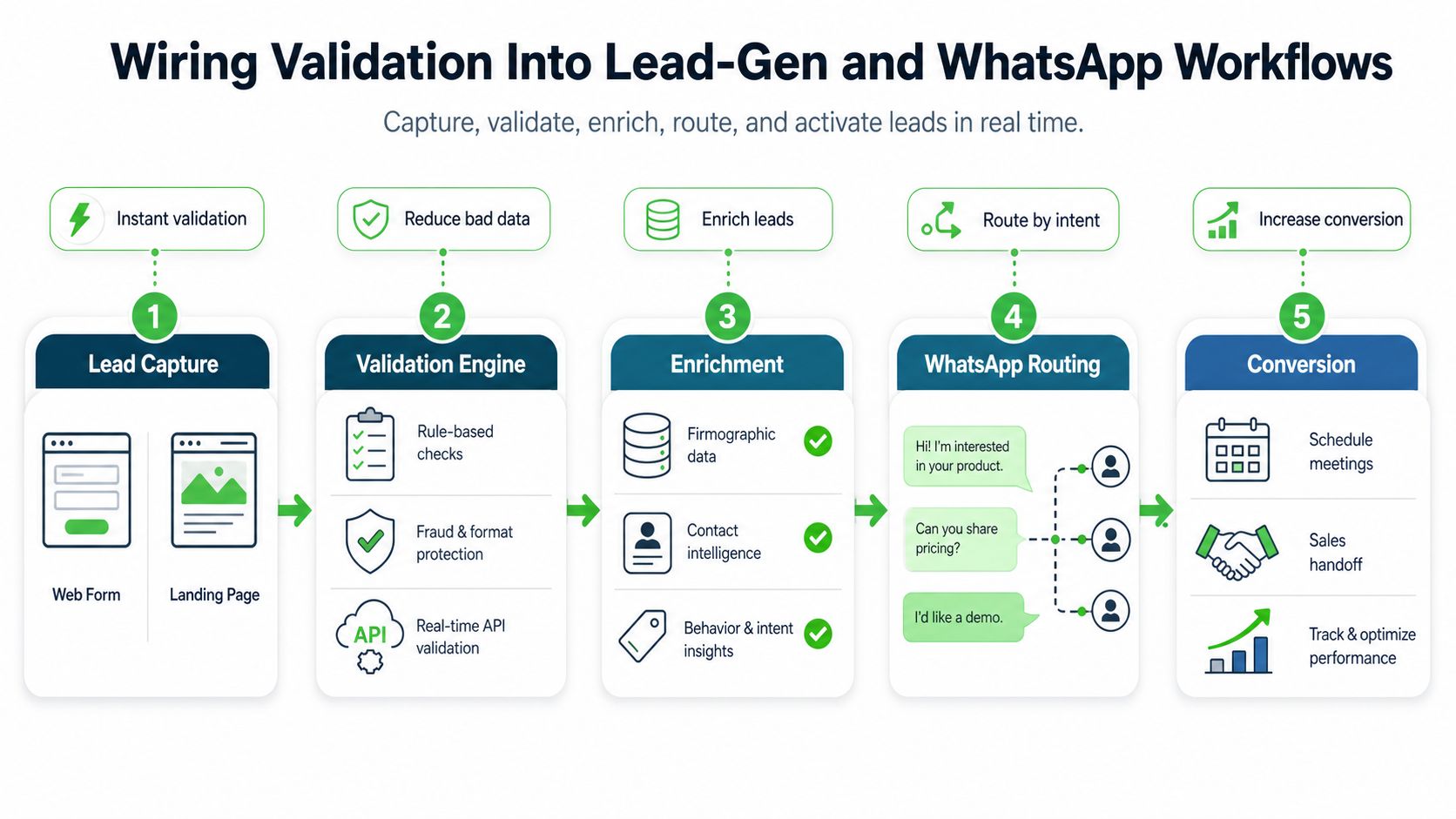
For agencies, this matters because the contact isn't just an email address. It's a potential CRM seat, a WhatsApp opt-in, a booked call, or a resold automation workspace. If the address is junk, the rest of the workflow becomes an expensive way to move bad data around.
Routing principle: validate before you sync, not after. Once a bad contact lands in a CRM or broadcast list, every downstream tool has to compensate for the mistake.
Routing logic by validation outcome
| Validation Result | Recommended Action | Destination |
|---|---|---|
| Deliverable and low risk | Accept and route immediately | CRM, WhatsApp onboarding, or nurture |
| Deliverable but questionable | Hold for review or slower nurturing | Manual queue or secondary campaign |
| Not deliverable | Reject or suppress | Do not sync downstream |
The best teams also preserve attribution. If a paid campaign or partner source generates a lot of unusable contacts, you want that signal early, not after deliverability suffers. That's especially important in WhatsApp and CRM-led offers, where the cost of a bad lead isn't just one failed email, it's wasted onboarding time, broken automation, and a weaker margin on the account you're reselling.
Rate Limits, Costs, and Quota Planning for Agencies
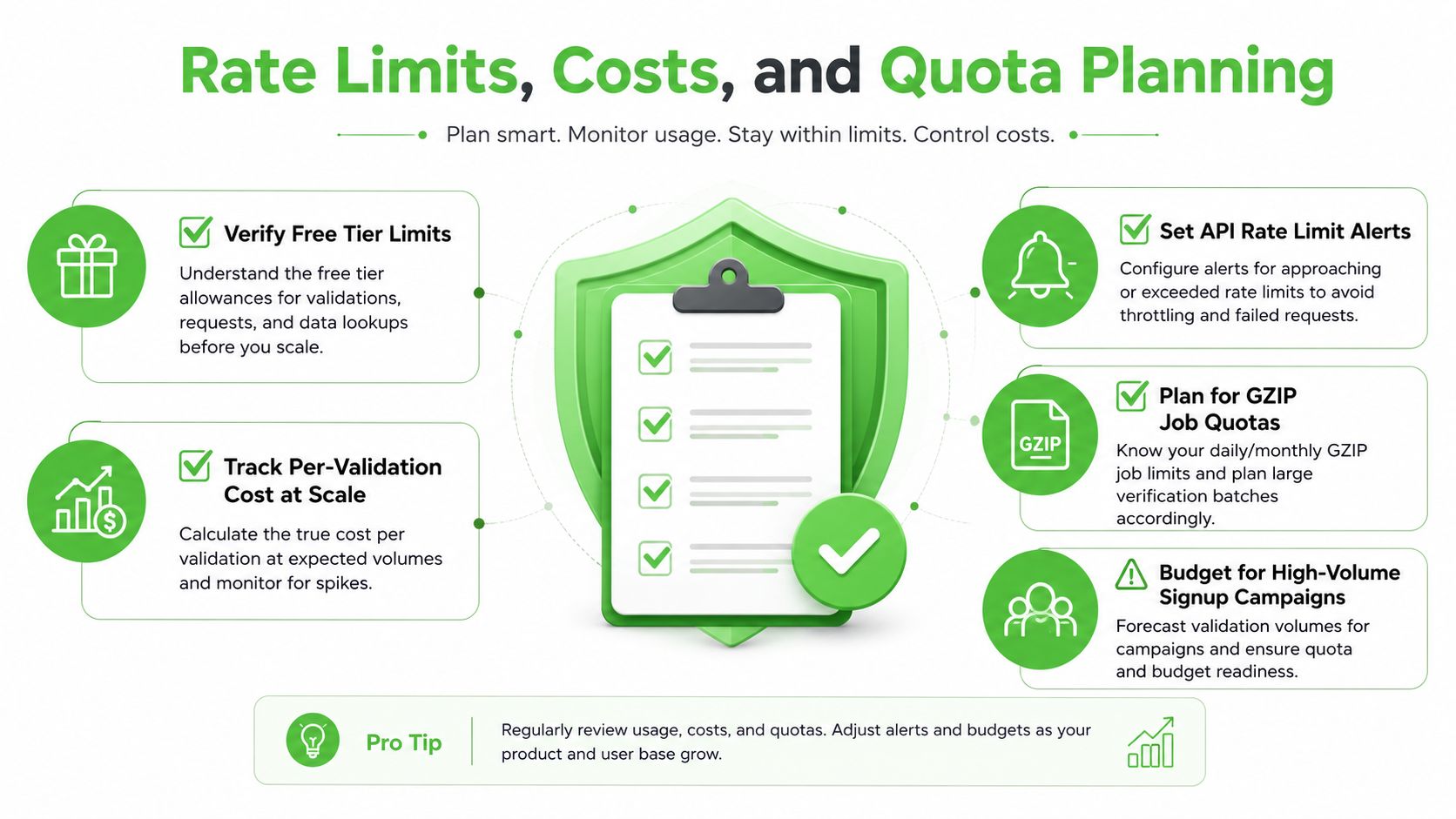
Validation is a budget line, not a free hygiene task. Mailgun's pricing moved beyond the first 100 free validations per month to $0.01 per validation, so high-volume signup flows can turn a neat idea into a real operating expense. That's why agencies should compare validation spend against the cost of letting bad leads enter CRM, support queues, and messaging tools. Mailgun pricing note on validation economics
The planning mistake is assuming every lead deserves the same treatment. A paid landing page with ugly traffic often justifies real-time checks because the bad-data rate is easy to feel in the rest of the stack. A slower organic list, on the other hand, may do better with periodic cleanup rather than an always-on gate at every form.
A simple planning check
- Estimate inbound volume. Count expected monthly signups or imports before you choose a mode.
- Separate live and legacy flows. Use real-time checks for form captures and batch jobs for stale lists.
- Reserve quota for spikes. If a client import lands mid-campaign, quota exhaustion can leave you blind at the worst moment.
- Include downstream cost. CRM seats, WhatsApp seats, and send volume all get more expensive when invalid leads slip through.
Mailgun's validation access rules matter here too, because quota control and role control are both part of production planning. If the agency team can't run validation when the list arrives, the workflow fails before the savings ever show up. A useful comparison for agencies thinking in acquisition terms is Sendvo's effective lead generation for agents, because the ROI question is always about lead quality, not just lead quantity.
When Validation Stops Paying Back in 2026
The right question in 2026 isn't whether validation works. It's whether always-on validation still earns its keep in every part of the funnel. For high-intent forms and paid traffic with messy lead quality, the answer is usually yes. For older lists, weaker intent sources, or imported CRM data, a periodic bulk run often protects margin better than checking every touchpoint in real time.
Mailgun's deliverability history is useful context, but it's not a guarantee. A deliverability test associated with Mailgun reported 76.42% of 65,051 emails landing in the main mailbox, which underscores an important point, validation and deliverability are linked in practice, but they are not the same thing. You still need to check actual inbox performance, not just assume a clean validation result means a strong campaign outcome. Mailgun deliverability test context
That leads to a simple rule. Validate aggressively where acquisition is expensive or messy, then back the decision up with deliverability outcomes, not dashboard comfort. If a source keeps producing risky or invalid contacts, the fix might be in the traffic source, the form design, or the routing logic, not just in more validation calls.
Double My Leads gives agencies a white-labeled WhatsApp platform for capturing, routing, and monetizing leads without the usual setup drag. If you're building lead-gen workflows that depend on clean contact data, visit Double My Leads and see how it fits alongside your validation and CRM pipeline.


