
You've probably seen the same pattern repeat: a client message lands in a shared Gmail login, someone replies from a personal account, another teammate follows up from a forwarded thread, and nobody can say with confidence who owns the conversation. That setup can limp along for a while, but once multiple people touch the same inbox, the lack of traceable ownership starts creating missed replies, duplicate responses, and messy handoffs.
A true shared inbox for teams is not just a mailbox everyone can open. It's a workflow layer with individual credentials, assignment rules, internal notes, and auditability, so the team can see what's happening without sharing passwords or guessing who's on point. That shift matters because Microsoft 365's built-in reporting is limited for shared-mailbox operational visibility, so admins often have to lean on audit logs, Power BI, or third-party analytics to understand workload and response behavior, while built-in email activity reports only go back up to 180 days and can be exported for deeper analysis (Microsoft support material on shared mailbox statistics).
The market has also moved. One projection says the shared inbox for teams category will reach USD 2.4 billion by 2026, growing at a 12.4% CAGR from 2021 to 2026 (shared inbox market projection). That doesn't mean every team needs a flashy tool, but it does mean the old “just share the login” model is getting harder to defend.
If you're still routing client mail through forwarding rules and inherited access, the next step is to replace that chaos with a governed system that can be managed, audited, and reported on. For teams building client-facing workflows, even simple operational resources like the ability to partner with UGC creators can fit into the same broader need for controlled, trackable communication.
Table of Contents
- Why Your Team Inbox Is Probably Broken
- Core Workflows That Make Shared Inboxes Work
- Feature Checklist for Agencies and SaaS Resellers
- Implementation and Integration Considerations
- Common Pitfalls and How to Avoid Them
- Evaluating Vendors for Your Specific Use Case
- Your Shared Inbox Rollout Plan
Why Your Team Inbox Is Probably Broken
A lot of teams think they have a shared inbox when they really have a shared password and a prayer. The pattern is familiar. One inbox address gets forwarded to three people, everybody keeps a tab open, and each person assumes somebody else will take the thread. That is not collaboration, it is a coordination problem disguised as email.
The difference between access and ownership
A real shared inbox for teams gives each person their own login and makes ownership explicit. That matters because a shared mailbox or shared inbox is supposed to let multiple people send, receive, and manage messages from the same address without passing around a password, and without the ambiguity that comes with everyone living in the same thread view (Gmelius on shared mailboxes, Missive on what a shared inbox is). In practice, that means the team can see who is working a message, who needs context, and whether the thread has been resolved.
The breakage shows up fast in agency work. A sales lead gets answered twice. A support request gets archived by someone who did not realize another teammate was already drafting a reply. A client asks for a status update, and nobody can tell whether the original message was handled or buried. These are not edge cases, they are the normal outcome of a mailbox that has access but no workflow.
Practical rule: if you cannot tell who owns a thread in under a few seconds, your inbox is not managed well enough for client-facing work.
Why the market keeps pushing teams away from shared passwords
The category exists because teams need more than simple access. The shared-inbox-for-teams market has become a real software segment, and that demand for collaborative inbox tools is no longer niche. Once volume rises, shared passwords become brittle, accountability gets fuzzy, and the inbox stops being a system of record.
A proper setup also matches the direction of security guidance. Teams are moving away from shared passwords and toward per-user access and MFA. That is not just a security preference, it is a governance requirement when multiple people need visibility without the risk of inheriting each other's credentials. If a team still treats a mailbox like a communal login, they are carrying operational risk that gets worse as the client base grows.
For agencies, the migration gap is the part that gets ignored. The hard work is not choosing a label for the inbox, it is preserving thread history, keeping live client operations moving, and replacing invisible ownership with traceable handoffs. That is where a shared inbox starts to separate cleanly from the old shared-password setup, especially when the team needs to partner with UGC creators while still keeping response ownership clear.
The useful mindset shift is simple. A shared inbox is not a convenience feature. It is the operational layer that makes team communication visible, measurable, and defensible. Without that layer, the team is just taking turns inside the same mess.
Core Workflows That Make Shared Inboxes Work
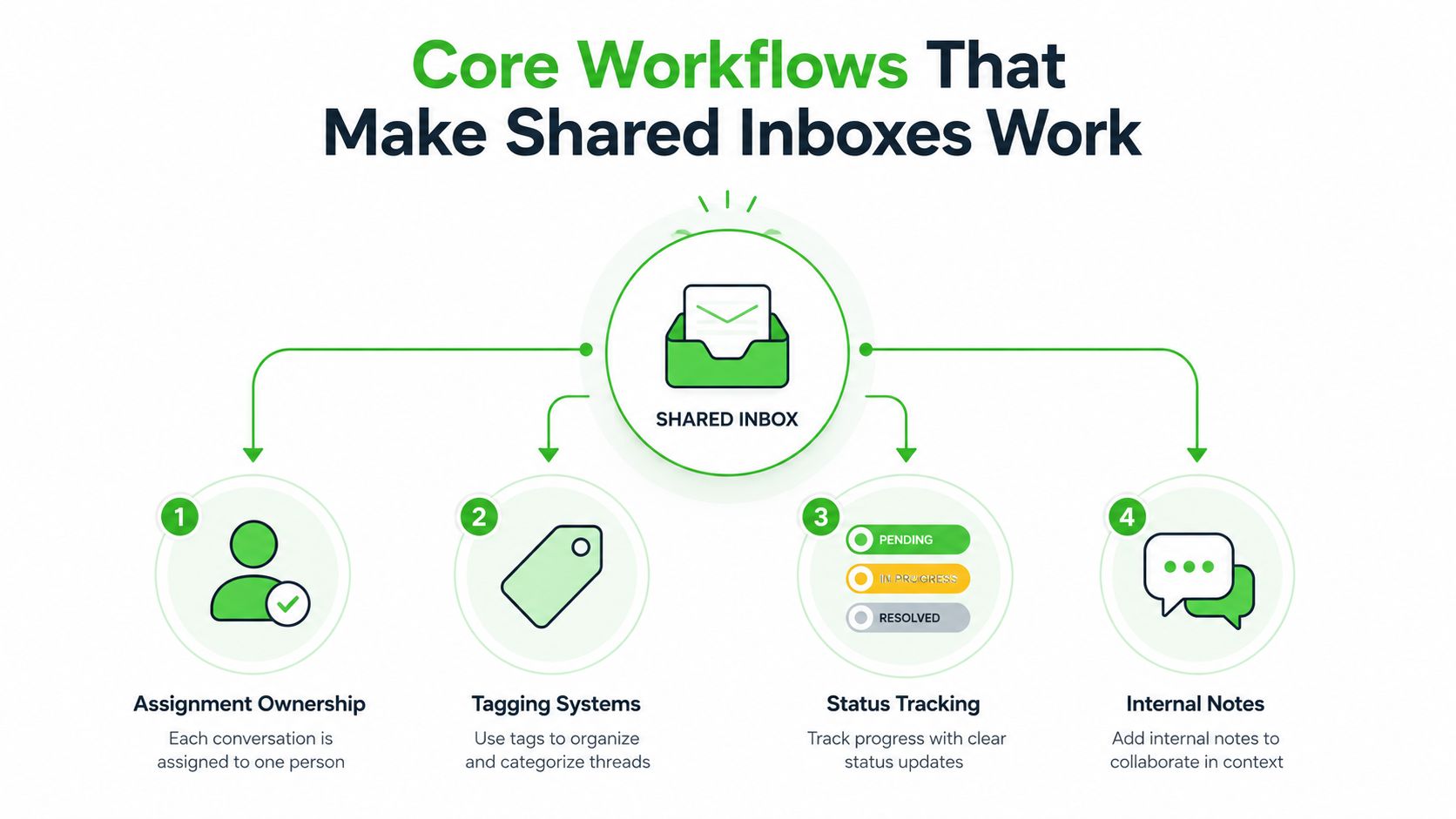
A shared inbox only holds up when it behaves like a workflow system. The mechanics matter more than the label. If the tool doesn't support assignment, tags, status handling, and private context, the team ends up right back in forwarded-thread chaos.
Assignment creates a single owner
The cleanest model is assignment-based ownership. One message, one responsible person. Experts who work on team inbox design recommend defining an Inbox Owner, a Triage Lead, and Responders, then piloting the workflow on one mailbox before rolling it out more broadly (shared inbox accountability and design guidance). That structure reduces ambiguity, which is usually the root cause of duplicate work.
In agency practice, this is easiest to see with support email. A billing question lands in the queue, the triage lead assigns it to finance, and everyone else can see it's taken. If that assignment never happens, the message sits in a gray zone where several people notice it but no one feels responsible. That's how replies get delayed without anyone intending to drop the ball.
Tags, status, and internal notes keep the queue readable
Tagging rules are what keep the inbox from becoming one giant, unfiltered feed. Messages can be grouped by client, priority, issue type, or workflow stage. Internal notes keep the team's reasoning inside the thread without exposing it to the customer. That separation is critical because it lets people discuss options, ask for context, or hand off a thread without rewriting the customer-visible message history.
A shared inbox works best when every message has a visible status, a visible owner, and a private place for team context.
Collision detection is equally important. If two people start drafting at the same time, the software should show that another teammate is already active in the thread. That's not a nice-to-have feature, it's what stops the awkward double-send that makes a team look disorganized.
Routing turns the inbox into an auditable event stream
Shared inboxes scale better when incoming messages can trigger downstream actions. Recommended setups use tagging rules, templates, and integration hooks, and Microsoft documents that this kind of workflow automation often requires Power Automate because built-in Teams features don't fully handle shared-inbox automation natively (workflow scaling guidance). In practical terms, a new message can post to a Teams channel or create a Planner task, which gives the team a trail of what happened after intake.
That turns the inbox from a passive folder into an operational queue. The value isn't just speed, it's traceability. When an agency can see assignment, tagging, status change, and handoff history in one place, it can manage client work with much less guesswork.
Feature Checklist for Agencies and SaaS Resellers
Agency buyers and SaaS resellers shouldn't evaluate inbox tools like internal support teams do. The question is whether the platform can be packaged, governed, and scaled across multiple client accounts without turning margin into a mess. A tool can be great for one team and still be a poor fit for resale.
What to verify before a demo gets too far
- White-labeling: Check whether the product supports your own domain, branding, and color system. If a vendor can't let you present the inbox as your own service, resale gets awkward fast.
- Multi-workspace management: Ask whether one operator can manage dozens of client accounts from a single dashboard. If every workspace feels isolated, your team will spend too much time switching context.
- Multi-channel support: Email alone is often not enough. For agencies handling WhatsApp or social channels, the platform should route conversations in one place instead of forcing separate tools for each channel.
- CRM sync and source attribution: Participant sync matters when you need contact history and origin data to flow into a CRM. Without attribution, reporting gets muddy and follow-up gets inconsistent.
- API access: Resellers and automation shops need a way to build around the inbox, not just inside it. If the API is weak, custom workflows become brittle.
For a concrete example of what a more workflow-ready offer looks like, you can explore sales navigator capabilities if lead tracking and contact movement are part of your stack. The point isn't that every agency needs the same tool, it's that the inbox has to fit the rest of the revenue system.
Pricing model matters more than most teams admit
Flat-fee pricing is often the difference between a workable reseller offer and one that compresses margins as usage rises. Per-seat or per-message pricing can be fine for internal teams, but it creates friction when you're packaging a service for clients. Resellers need predictable costs so they can define pricing, scope support, and avoid getting punished for success.
The practical test is simple. During the trial, ask what happens when you add workspaces, add users, and increase message volume. If the answer requires a pricing spreadsheet and a support ticket, the product is probably not built for agency resale.
Video guidance:
A reseller-ready inbox also needs to preserve operational clarity as the account count grows. That's where branding, routing, and cost control stop being features and start becoming business infrastructure.
Implementation and Integration Considerations
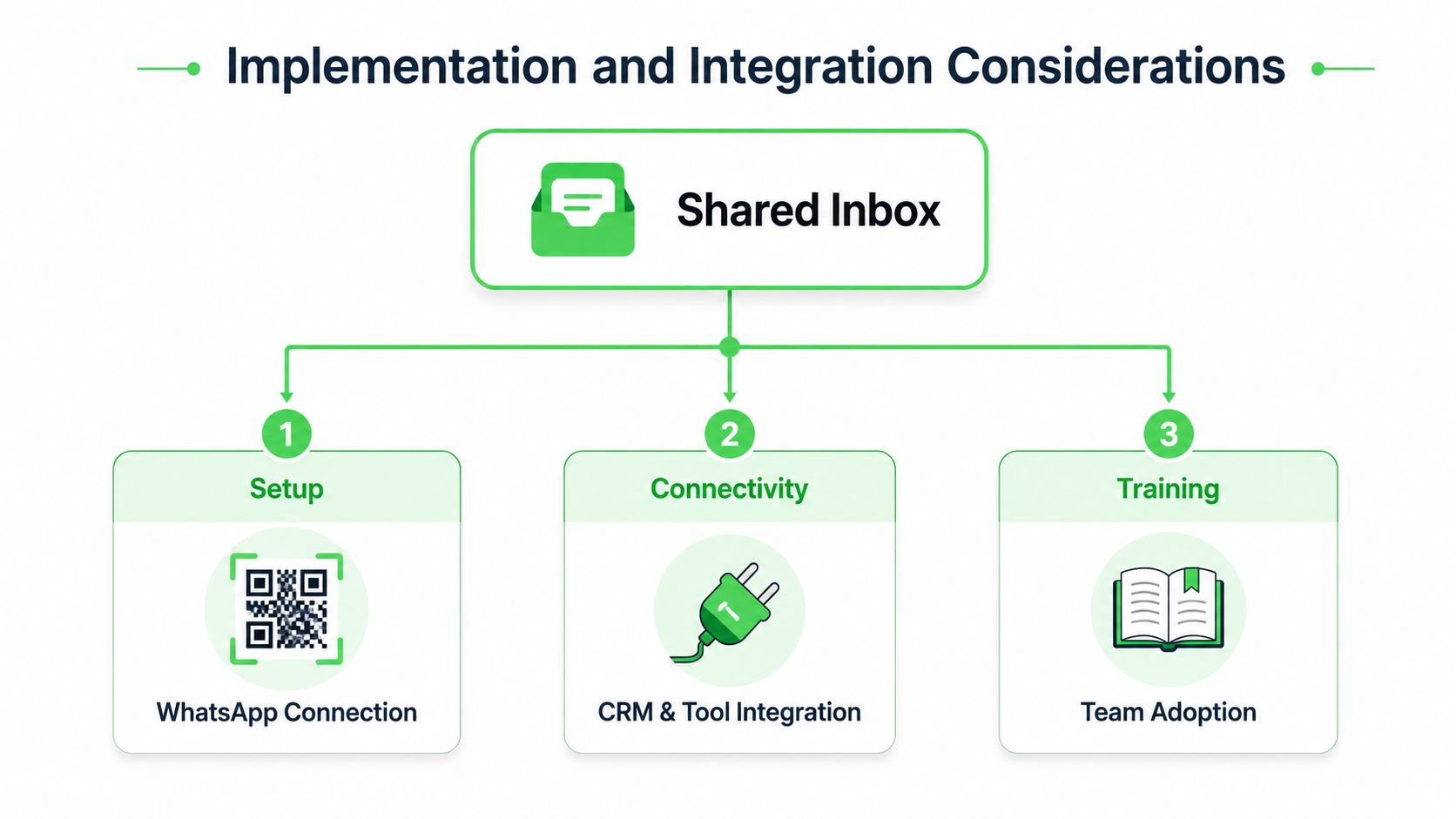
Deployment is where most inbox projects slow down. The software demo looks clean, then someone has to connect the live channels, preserve history, and keep the team working while the old setup is still active. That's the part teams underestimate.
Migration is an operational project, not a toggle
The hardest issue is usually identity and history. Teams often come in with a mix of personal mailboxes, forwarded addresses, and shared passwords, and they want to move into a governed system without losing access or confusing clients. That gap is underexplained in a lot of shared inbox coverage, even though it's the exact pain point agencies hit during rollout. A basic Microsoft 365 discussion shows how confusing the model can get across mailboxes, Groups, and Teams, and the confusion itself is a warning that the setup needs to be planned carefully (Microsoft 365 shared mailbox confusion thread).
The safest approach is to preserve the old routing while the new inbox is being tested. Cut over one mailbox first, confirm that replies, ownership, and internal notes work the way they should, then move the next one. That keeps the business live while reducing the chance of losing active threads.
Connectivity should support the channels clients actually use
For WhatsApp-heavy teams, QR-based connection is a practical on-ramp because it avoids the friction of a more complex verification process. The point is to get a working queue into the team's hands quickly, then layer in controls and automation after the flow is stable. CRM sync is the next priority, because contact data has to move with the conversation if you want a unified client record.
Implementation rule: connect the live channel first, then automate it second. Teams that reverse that order usually automate confusion.
If you use a platform like Double My Leads, the relevant pieces are the WhatsApp team inbox, assignments, notes, tags, quick replies, white-label branding, and CRM participant sync. That kind of stack works best when it's treated as a migration from personal handling into a governed workspace, not as a shortcut around process.
Training closes the gap between tool and behavior
Even strong tools fail when teams keep old habits. People still reply from personal inboxes, skip tags, or forget to assign ownership. Training should focus on the behaviors that protect the workflow, not on every button in the interface.
The first week should make three things obvious. Where messages land, who owns them, and how the team hands off without breaking the thread. If those three points are clear, the rest of the rollout gets much easier.
Common Pitfalls and How to Avoid Them
Shared inbox rollouts usually fail for boring reasons, not dramatic ones. A team wants faster responses, measures speed alone, then wonders why the inbox starts rewarding quick replies over clean ownership.
Speed is useful, but it can create the wrong behavior
A faster first reply is not always a better outcome if it creates collision replies, shallow answers, or unowned threads. The better target is clear ownership with quality control. Guidance on shared inbox management and reporting now treats reporting, collision detection, internal notes, and assignment discipline as baseline features, which points to a shift toward performance-managed inboxes rather than simple shared access (shared inbox management and reporting discussion).
That matters for client work because speed without coordination looks sloppy. Customers notice duplicate answers, or one rushed reply that misses the core issue, and trust drops.
The other failure modes are procedural
Skipping the pilot is a common mistake. So is rolling out automation before the team understands the manual workflow. For teams mapping automation before full rollout, Lynkro.io's automation guide provides a useful framework for structuring workflow triggers. If nobody defines clear ownership roles, messages sit unassigned long enough for the queue to back up.
Practical fix: start with one mailbox, one triage owner, and a short list of tags. Add complexity only after the team can process threads cleanly.
Training is another weak point. Teams often assume that because the interface feels familiar, the behavior will follow naturally. It won't. People need to know when to assign, when to escalate, when to leave an internal note, and when to move the thread to resolved. Without that, the inbox becomes a graveyard of almost-finished conversations.
The right correction is straightforward. Use assignment rules, measure reassignment events, and review threads where ownership bounced more than once. Those are the places where the workflow is breaking, especially during migration from shared passwords to a traceable team inbox. Fix the process before you add more volume.
Evaluating Vendors for Your Specific Use Case
The right shared inbox depends on how the team works, not on the longest feature list on a sales page. An agency moving clients off shared passwords needs traceable ownership, clean message history, and controls that survive live traffic. A creator community, a support team, and an automation shop all judge the same category by different failure points.
A useful trial starts with the current mess. Ask the vendor how they handle a mailbox that already has active threads, multiple internal owners, and a few clients who still reply to old addresses. Then watch what happens to assignment history, tags, and replies when the team starts using the inbox under real volume.
Vendor Evaluation Priorities by Use Case
For marketing and lead-generation agencies, the test is whether the inbox can replace shared-password chaos without breaking client operations. Branding matters, but so does the ability to separate workspaces, preserve thread history, and keep ownership traceable when multiple people touch the same conversation. If pricing makes each client account harder to profit from, the product will be painful once it carries real volume.
For community managers and creators, the question is whether the inbox handles announcements, replies, and ongoing follow-up without turning the workflow into a support desk. Broadcast tools matter here, but so does simple routing that keeps the team from missing member questions in a busy channel. If the interface makes every message feel like a ticket, adoption usually stalls.
For AI automation agencies, the trial should focus on how the system behaves when logic gets more specific. API access, webhook handling, and routing rules matter because the inbox has to fit into custom workflows, not sit beside them. A polished interface helps, but it does not make up for a platform that breaks as soon as the workflow stops being standard.
How each buyer should think during a trial
Ask vendors to show the hardest version of the workflow, not the demo path. A marketing agency should request a live walkthrough of moving one client off a shared password setup, preserving the open threads, and assigning new messages without losing accountability. If the vendor cannot explain how old conversations remain traceable, that is a warning sign.
Community teams should push on moderation and handoff behavior. Who sees the message first, how quickly does it route to the right person, and what happens when two people try to answer the same thread. If the answer relies on everyone remembering the process manually, the workflow will drift once the inbox gets busy.
Automation shops should test edge cases, not just the happy path. Ask what happens if a webhook fails, a custom rule fires twice, or a message needs to move between workspaces. If the vendor talks mostly about convenience and avoids failure handling, the platform is probably weaker than the demo suggests.
A practical scoring rubric
Score each vendor on five things: traceable ownership, migration fit, routing control, integration depth, and pricing predictability. Traceable ownership means you can see who touched the thread and when. Migration fit means existing client history survives the move. Routing control means the inbox can separate incoming work without constant manual cleanup. Integration depth means the platform can connect to the systems you already use. Pricing predictability means adding clients or workflows does not create surprise cost jumps.
Use a simple pass-fail note for each category, then add a short comment about where the tool breaks under load. A vendor that is strong in routing but weak in migration may work for a fresh setup, but it can cause trouble if you are replacing shared passwords in live accounts. A vendor that scores well on surface features yet hides the history or ownership trail is usually the wrong choice for agency work.
Red flags to watch during demos
Be careful if the demo only shows a clean inbox with no messy history. Real accounts have old conversations, duplicate senders, delayed responses, and internal notes that need to stay attached to the thread. If the vendor avoids showing those cases, ask directly.
Watch for vague answers about workspace separation, ownership logs, and admin visibility. If the platform cannot show who handled a client thread after the fact, accountability gets weak fast. That matters more than a polished UI when a client asks why a message was answered twice or not answered at all.
Pricing deserves the same scrutiny. If the model makes it hard to estimate cost as you add clients, teammates, or automated workflows, the tool may look affordable at first and become awkward later. Ask for the pricing rule that applies when usage grows, then compare that answer against your actual operating model.
Your Shared Inbox Rollout Plan
Start with one mailbox and one owner. That pilot should confirm that assignment, tags, internal notes, and escalation rules work in live traffic before anyone asks the rest of the team to change habits.
Then define the operational rules. Decide who triages, who responds, what counts as overdue, and how reassignment gets logged. After that, connect the integrations that matter, move the active legacy threads into the new system, and only then scale to additional mailboxes.
The fastest rollout is not the one with the most automation. It's the one where the team can tell, at any moment, who owns the message and what happens next.
The metrics to watch are straightforward. Response-time consistency, assignment coverage, reassignment frequency, and tag-routing accuracy. If those numbers are getting cleaner, the inbox is doing real work. If they aren't, the tool has only replaced one kind of chaos with another.
A CTA for Double My Leads.


