
WhatsApp Business is not one product. It's a business suite that includes a free WhatsApp Business app for small businesses and a scalable API-based platform for larger teams, and by Q4 2024 the app alone had over 764.38 million monthly active users worldwide while WhatsApp overall had more than 3.3 billion monthly active users by January 2026.
If you've ever asked, “What is WhatsApp Business?” the underlying question is usually different: Which version of WhatsApp Business fits the way my team works? Most articles answer with a feature list. That misses the operational decision that matters to an agency owner, consultant, or growing business.
The confusion starts because people talk about WhatsApp Business as if it were a single app with a few extra buttons. It isn't. Meta presents WhatsApp for Business as a portfolio that spans a free app, APIs, and related business tools, which is why beginner explanations often leave smart buyers with the wrong mental model of what they're evaluating (Meta's WhatsApp for Business overview).
Table of Contents
- Answering What WhatsApp Business Really Is
- The Two Faces of WhatsApp Business App vs Platform
- Core Features and Operational Limitations
- Key Business Use Cases Sales Support and Marketing
- Understanding the Pricing Models and Compliance Rules
- How to Get Started The Setup and Integration Paths
- Beyond Chat The Future of Conversational Commerce
Answering What WhatsApp Business Really Is
WhatsApp Business is a set of tools for businesses to communicate with customers on WhatsApp. At the simplest level, it lets a business present a professional profile, organize chats, and respond more efficiently. At the more advanced level, it becomes a programmable communications layer that connects to your CRM, helpdesk, automation, and internal systems.
That distinction matters because WhatsApp is no longer a niche support channel. Industry estimates cited by Infobip say over 200 million businesses actively use WhatsApp Business, and WhatsApp business messages have a 98% open rate, which helps explain why the channel now sits at the center of support, sales, and marketing for many companies (Infobip's WhatsApp statistics roundup).
Here's the practical takeaway. When someone asks, “What is WhatsApp Business?”, they often think they're shopping for an app. In reality, they're choosing a business communication model.
Practical rule: If your team can run customer conversations from one device with mostly manual replies, the app may be enough. If you need shared access, automation, or system integrations, you're already in platform territory.
There's also a strategic reason agency owners should care. Clients don't buy “WhatsApp presence.” They buy outcomes like faster lead response, cleaner handoffs, support coverage, and campaign delivery. So the useful definition of WhatsApp Business isn't “a business version of WhatsApp.” It's the business layer built on top of WhatsApp, with different tools for different growth stages.
The Two Faces of WhatsApp Business App vs Platform
A lot of bad implementation starts with one bad assumption: that the app and the platform are basically the same thing. They're not.
A simple way to think about it
Think of the WhatsApp Business App as a well-organized local shop. The owner can greet customers, answer common questions, label conversations, and show a product catalog. It's simple, direct, and useful when the volume is manageable.
The WhatsApp Business Platform is more like a distribution center connected to a call floor, a CRM, and an automation engine. It's built for process, routing, system logic, and multiple people working from the same operational spine.
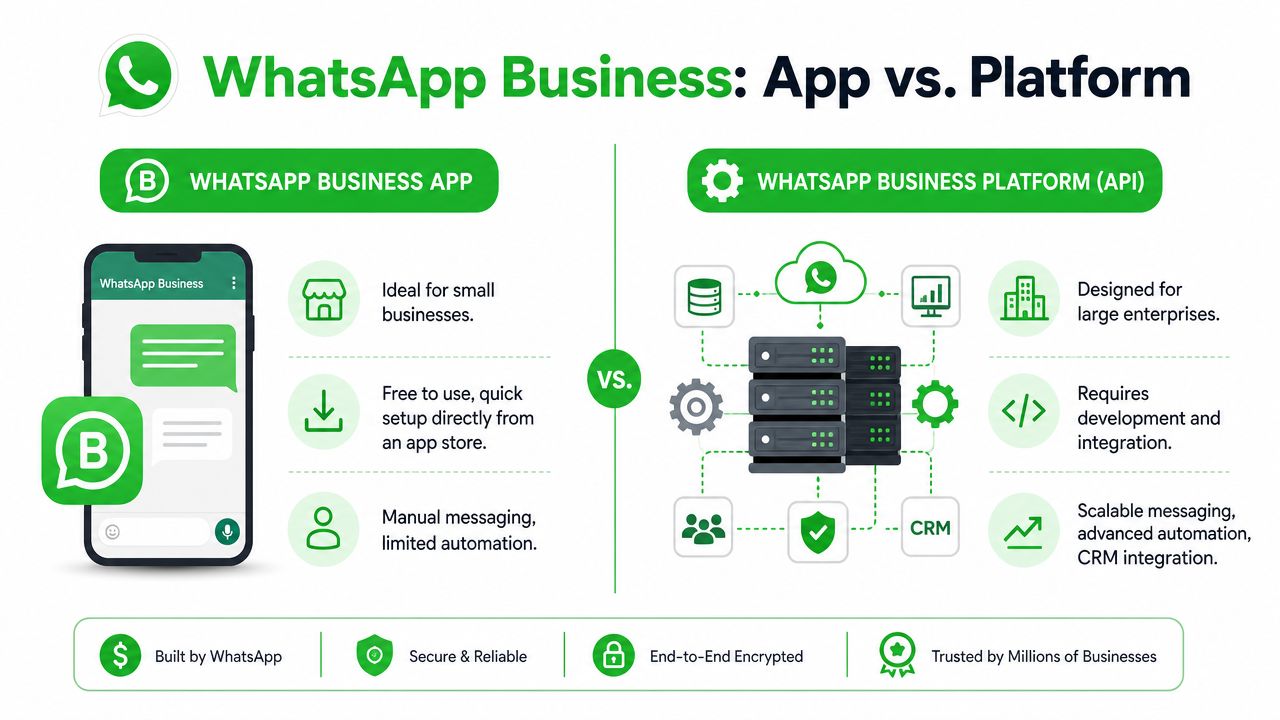
The technical difference is even sharper than the naming suggests. The WhatsApp Business Platform is an API-based messaging infrastructure, not a phone app. Businesses integrate with it through HTTPS/REST calls and real-time webhooks, with the Cloud API hosted on Meta servers using JSON payloads and OAuth-style authentication (technical explanation of how the WhatsApp API works).
That's why people get stuck. They download the free app expecting enterprise behavior, or they hear “API” and assume it's only for giant companies with a full engineering team.
A short walkthrough helps clarify the split:
WhatsApp Business App vs Platform at a Glance
| Feature | WhatsApp Business App | WhatsApp Business Platform (API) |
|---|---|---|
| Setup style | Download and configure from an app store | Integrate through API or use a partner platform |
| Best fit | Small businesses and owner-led operations | Larger teams, agencies, and system-driven workflows |
| Messaging style | Mostly manual | Programmatic and automated |
| Team access | Limited | Built for shared, multi-agent handling |
| CRM or helpdesk connection | Minimal to none | Designed for integration |
| Technical requirement | Low | Higher unless a partner abstracts the complexity |
Where businesses usually make the wrong choice
The mistake usually isn't choosing the app. It's staying on the app after the business has changed.
A solo consultant can answer every inquiry manually. A five-person agency handling leads for clients usually can't. A local clinic can manage appointment questions on one device for a while. A chain with multiple staff, handoffs, and reporting needs more than one inbox on one phone.
Most beginner guides don't clarify the point where a team has outgrown the simple app, which is why businesses make expensive workflow mistakes as they scale.
If you're deciding between the two, ignore the marketing labels for a minute and ask operational questions instead:
- Who needs access? If multiple people must reply, assign, or review chats, the app starts to strain.
- How repetitive are the conversations? If the same flows happen daily, automation becomes valuable.
- What systems need context? If sales or support data must sync with a CRM, the platform exists for that reason.
- How much control do you need? Templates, routing, triggers, and webhooks belong to a platform mindset, not an app mindset.
Core Features and Operational Limitations
WhatsApp Business took off quickly after launch. Statista reports that the product was launched in 2018 and had over 764.38 million monthly active users by Q4 2024, which was more than a 6% increase versus the beginning of 2024 (Statista's WhatsApp Business MAU data). Adoption isn't the hard part now. Choosing the right operating model is.
What the app handles well
The WhatsApp Business App covers the basics that many small businesses need:
- Business profile: Add your business name, hours, category, and contact details so customers know they've reached the right account.
- Catalogs: Show products or services inside the chat environment.
- Labels: Organize conversations into simple buckets such as new lead, pending payment, or follow-up.
- Quick replies: Reuse common answers instead of typing the same message again and again.
For a florist, a coach, or a neighborhood service business, that can be enough. One person handles incoming chats, sends photos, answers pricing questions, and closes work without switching systems all day.
But the app's strength is also its limit. It's designed for small-scale management, not for a team that needs workflow discipline.
Where the platform changes the operating model
The WhatsApp Business Platform changes the question from “How do I chat?” to “How do I run this channel as part of the business?”
That opens several capabilities the free app doesn't handle well on its own:
- Programmatic messaging: Your systems can trigger messages from events and workflows.
- Shared inbox models: Multiple agents can work incoming conversations through a connected tool.
- Automation: Bots, routing logic, and structured flows can handle repetitive first-touch interactions.
- System integration: CRM, ticketing, and sales platforms can store and use conversation data.
If your WhatsApp process depends on screenshots, forwarding, or asking a teammate to “check the phone,” you don't have a messaging strategy. You have a bottleneck.
There's also a technical reason the platform can support serious scale. Industry system-design analyses describe WhatsApp's architecture as a highly scalable client-server system built with Erlang/BEAM, Ejabberd/XMPP, and Mnesia for distributed storage, with estimates of roughly 40 million messages per second at peak globally (system design analysis of WhatsApp's architecture). You don't need to know Erlang to use WhatsApp Business, but it helps explain why the API model exists. It was built for industrial messaging behavior, not just for one person on a phone.
A good self-test is simple. If your business needs memory, routing, and accountability, the platform is usually the better fit. If it only needs a cleaner business-facing inbox, the app may still do the job.
Key Business Use Cases Sales Support and Marketing
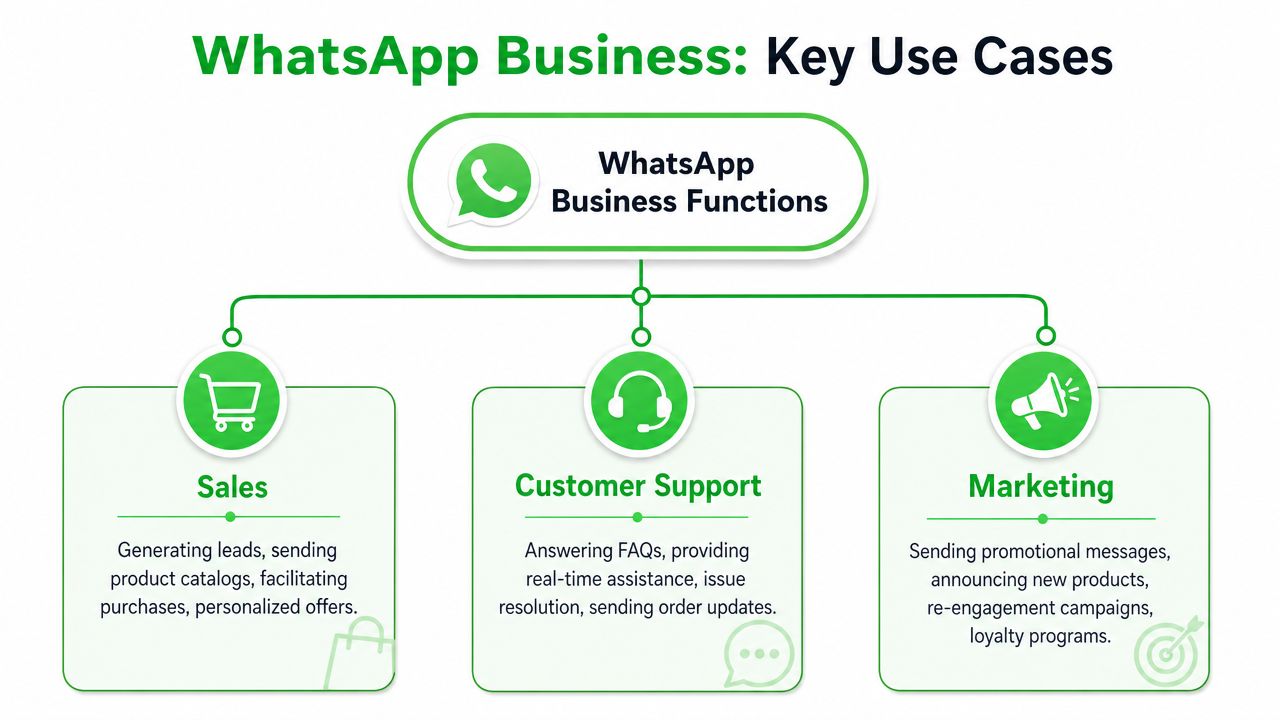
The most useful way to understand WhatsApp Business is to look at what teams do with it.
Sales conversations that move faster
A prospect clicks a click-to-WhatsApp ad, lands in chat, and asks a question that would normally sit in an email inbox for hours. With the app, the owner replies directly. With the platform, the team can route that lead, qualify intent, and send structured follow-up from the sales stack.
Common sales uses include:
- Lead qualification: Ask a few starter questions before a rep joins.
- Product discovery: Share catalog items, service options, or next-step details in the thread.
- Quote follow-up: Continue a live conversation instead of waiting for email replies.
- Appointment coordination: Confirm interest, timing, and handoff to the right person.
The key point isn't that WhatsApp replaces your pipeline. It shortens the distance between interest and response.
Support that doesn't depend on one person's phone
Support is where the app-versus-platform difference becomes obvious. If one staff member owns the phone, support quality rises and falls with that person's availability. If the business uses a shared inbox tied to the platform, any trained agent can step in with context.
A simple example: an ecommerce customer asks where an order is, then follows up with a return question, then sends a photo. In a mature setup, the support team sees the thread, internal notes, prior status, and ownership history in one place. In a basic setup, everyone asks each other who replied last.
Good support on WhatsApp feels continuous to the customer, even when multiple agents are involved behind the scenes.
Marketing that feels like a conversation
Marketing on WhatsApp works best when it respects the channel. People treat chat as personal space, so blunt mass messaging usually ages badly. The stronger use cases are opted-in, timely, and relevant.
That might include:
- Launch announcements: A product drop, class opening, or event reminder.
- Re-engagement: Reaching back out to customers who asked to hear from you.
- Loyalty messages: Updates for subscribers, members, or repeat buyers.
- Content delivery: Sending useful media, reminders, or prompts that lead into a sales or community flow.
For agencies, integration holds particular importance. Marketing isn't just “send a message.” It's trigger logic, segmentation, lead source context, and follow-up paths that connect with the rest of the client's stack.
Understanding the Pricing Models and Compliance Rules
Why do some businesses say WhatsApp Business is free, while others budget for software, setup, and message costs? They are usually talking about two different layers of the same ecosystem.
The WhatsApp Business App costs nothing to download. For a small operation, that makes sense. It is a simple front desk. You get a business profile, basic messaging tools, and a familiar mobile experience.
The WhatsApp Business Platform works more like plumbing behind the walls. Customers still see WhatsApp. Your team, however, is working through connected systems, inbox tools, automations, and CRM data rather than a single phone. That difference changes the cost structure.
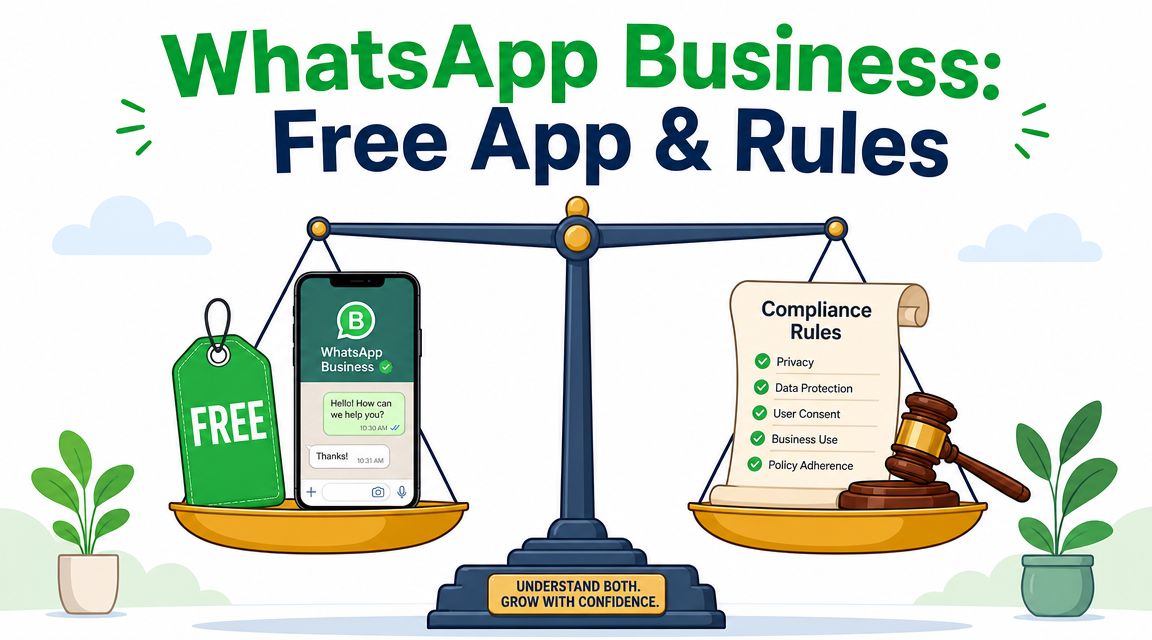
A useful way to evaluate pricing is to separate access cost from operating cost.
With the app, access cost is basically zero. Operating cost shows up in staff time, manual work, and the limits of one-device-or-one-owner workflows.
With the platform, access usually involves Meta conversation charges, provider fees, implementation work, or all three. Operating cost then depends on how much infrastructure you need around the channel. A shared inbox, approved templates, routing logic, bot flows, reporting, and CRM sync all affect the total bill.
That is why “What does WhatsApp Business cost?” is not one question. A better question is, “What stage is my business at, and what kind of conversation volume and team coordination am I paying for?”
For a small local business answering a manageable number of chats, the free app may be the right answer. For a brand running support queues, appointment reminders, lead qualification, and outbound campaigns across multiple agents, the platform usually becomes the practical answer because labor, response quality, and oversight matter more than download price.
Where pricing decisions go wrong
Agency teams often compare tools by monthly subscription alone. That hides the true tradeoff.
A cheaper platform tool can still become expensive if it lacks the basics your client needs, such as shared visibility, template management, campaign controls, or clean handoff between automation and human agents. A more expensive option can be the lower-cost choice if it reduces manual handling and prevents missed leads.
Price only makes sense in context. The right benchmark is not “app versus platform” in the abstract. It is “simple owner-managed conversations versus repeatable team operations.”
Compliance is part of the operating model
WhatsApp is a permission-based channel. Businesses need consent before sending proactive messages, especially marketing messages. If email feels like a billboard, WhatsApp feels more like someone's text inbox. People notice unwanted outreach faster, and the platform treats misuse seriously.
That affects how you design your process from day one:
- Collect consent at the source: checkout, lead forms, booking flows, and onboarding are common entry points.
- State what the person is signing up for: order updates, support follow-ups, promotional offers, or all three.
- Store proof of consent: your team should be able to trace where and when permission was given.
- Use the right message format for the situation: service communication and promotional outreach are not handled the same way.
- Train teams on timing: replying to an active customer conversation is different from starting a new promotional conversation later.
A lot of compliance problems start with a simple mistake. A business gets a customer's phone number and assumes that means open permission to market on WhatsApp. It does not. Consent for purchase updates is narrower than consent for campaigns.
The safest mindset is straightforward. Treat WhatsApp access like borrowed attention. Earn it, document it, and use it with restraint.
How to Get Started The Setup and Integration Paths
How do you start without choosing a setup that fits today but breaks six months from now?
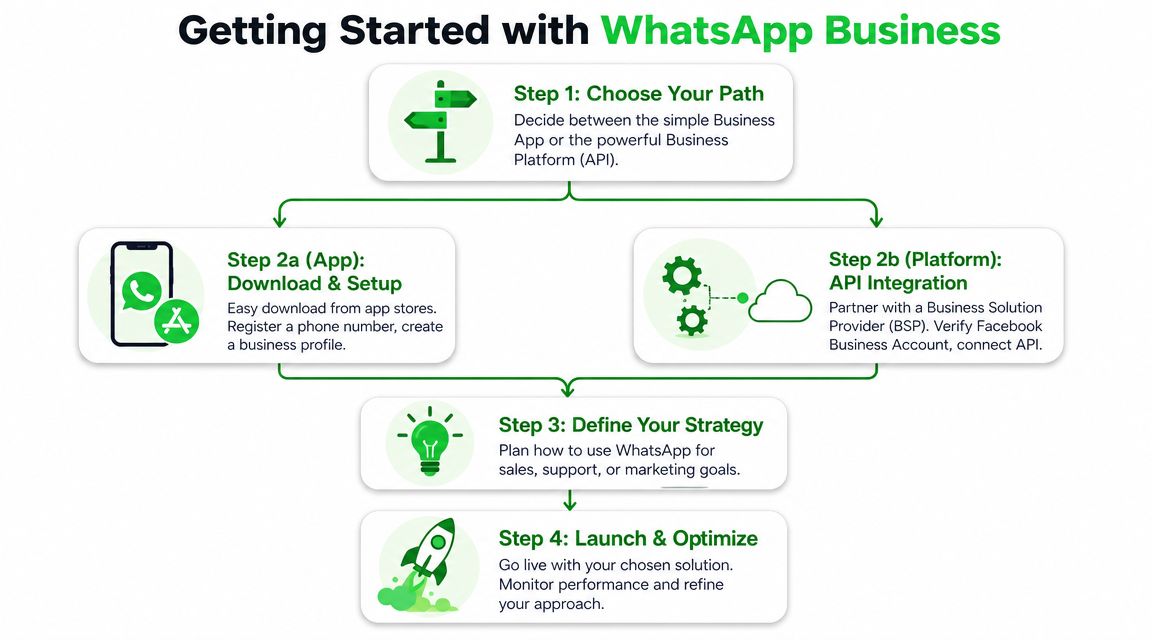
That is the fundamental setup question. WhatsApp Business is not one installation path. It is a choice between a simple business inbox and a connected messaging system. The right starting point depends on who needs access, what should happen after a message arrives, and how much of the workflow must connect to your existing tools.
Start with the lowest-friction option that still fits your workflow
A solo consultant, local service business, or owner-led shop can usually begin with the WhatsApp Business App. Setup is straightforward. Register a business number, complete the profile, add a catalog if you sell products, and prepare quick replies for common questions.
At that stage, the app works like a front desk run by one person. It is good at handling direct conversations. It is not built to run a larger operation with routing rules, shared ownership, CRM syncing, and automation across teams.
That distinction matters early. If one person is answering messages and the process lives mostly in their head, the app is often enough. If leads need to move to sales reps, support tickets need assignment, or multiple clients need separate workspaces, you are already in platform territory.
The three setup paths to the Platform
Once you need the WhatsApp Business Platform, there are three common ways to get there.
- Direct integration with Meta works for businesses with in-house technical ownership. You get closer control over implementation, but your team also handles more of the configuration work.
- A provider inside your CRM or communications stack makes sense when WhatsApp should live alongside email, support, calling, or customer records.
- A managed or white-label workspace tool fits agencies and SaaS teams that want usable operations quickly, without building the whole layer themselves.
A simple way to choose is to ask where complexity should live.
If your business treats messaging as a custom product capability, direct integration can make sense. If messaging is one channel inside a broader customer operations stack, a provider route is usually easier to manage. If your business model is selling a repeatable service to clients, a managed layer often creates less operational drag.
How agencies usually make the call
Agency owners rarely get stuck on the idea of WhatsApp. They get stuck on the handoffs around it. One client needs branded access. Another needs shared inbox permissions. A third wants broadcasts, lead capture, and reporting. Very quickly, the question stops being "can we use WhatsApp?" and becomes "how many separate systems do we need to run this profitably?"
That is why many agencies choose a workspace layer instead of a raw API build. The goal is usually to deliver a client service, not to maintain messaging infrastructure.
Double My Leads is one example of that model. It offers a white-label WhatsApp workspace approach with QR-based number connection, shared inbox functions, broadcast tools, and API access for teams that need deeper integration.
A practical selection checklist
Choose based on your operating model, not feature envy.
- Choose the App if one person or a very small team handles conversations directly.
- Choose direct Platform access if your developers need custom workflows and want control over implementation details.
- Choose a provider ecosystem if WhatsApp must sync with your existing support, CRM, or engagement software.
- Choose a white-label operations layer if you sell WhatsApp capability to clients and need account setup, team access, and repeatable delivery under your own brand.
There is one more test worth using. Ask what should happen after a message comes in.
If the answer is "reply and move on," the app may be enough. If the answer is "route it, tag it, store it, trigger follow-up, and report on it," you need the Platform through the setup path that best matches your team. Teams that also need structured ways to pull outside web content into downstream workflows sometimes pair their messaging setup with tools like LLM Scrape API.
A good setup feels boring in the best way. Messages arrive, the right person or system handles them, and your team does not have to invent the process every day.
Beyond Chat The Future of Conversational Commerce
WhatsApp Business matters because customer communication is moving closer to the place where intent happens. People don't always want to fill out a form, wait for an email, or call a number. They want to send a message and keep moving.
That's why the app-versus-platform decision is bigger than software selection. It's a choice about how your business handles conversational commerce. Small teams may only need a clean, professional chat presence. Agencies, multi-agent support teams, and growth-focused businesses usually need a system that can route, automate, and connect conversations to the rest of the operation.
If you're building that kind of system, it helps to keep your data portable and your workflows inspectable. For teams experimenting with automation, extraction, and structured messaging workflows, tools like LLM Scrape API can be useful when you need to pull web content into downstream processes in a cleaner, developer-friendly way.
The broader point is simple. WhatsApp is no longer just a messaging app customers happen to use. For many businesses, it's becoming a front door. The only real question is whether you need a front desk or an operating system.
If you want to offer WhatsApp as a service to clients without building everything from scratch, Double My Leads is one option to evaluate. It's built for agencies and SaaS teams that want a white-labeled WhatsApp workspace, shared inboxes, broadcasts, automation, and QR-based setup in a single environment.


