
An Android connector app is a phone-based bridge that lets a business route WhatsApp or SMS traffic through a real mobile device or paired SIM, instead of through Meta's Cloud API. That matters in a market where Google Play has about 1.66 million Android apps, and roughly 97% are free, so generic search results are crowded before you even start comparing tools or permissions Google Play Console stats AppBrain Google Play statistics.
The popular advice to “just use the official API” overlooks the core decision. For many agencies, the question is not whether a connector exists, it's which connection model fits the workflow, what access it needs on the device, and how the economics change once you start reselling workspaces.
Table of Contents
- Why the Term Android Connector App Confuses Most Buyers
- How an Android Connector App Routes WhatsApp and SMS
- Android Connector App vs WhatsApp Cloud API vs SMS Gateway
- Setting Up an Android Connector in Under Five Minutes
- Security, Permissions, and Account Safety You Should Plan For
- Scaling for Agencies and SaaS Resellers
- Troubleshooting the Most Common Connector Failures
- Choosing the Right Connection Model for Your Business
Why the Term Android Connector App Confuses Most Buyers
The phrase android connector app sounds precise, but it usually points to several different tools at once. Search results often mix Bluetooth pairing utilities, GPS or network helpers, device-sharing products, and WhatsApp bridge tools. That is why buyers keep jumping from page to page and still cannot tell whether they need a device connector, a network connector, or a messaging connector.
The keyword hides a decision, not a product
That ambiguity matters because the search term is often a category query, not a brand query. A marketer looking for WhatsApp automation may land on app-store listings, SDK docs, or niche utilities that solve a different problem entirely. A developer looking for device communication may open a page that only explains messaging flows.
The choice sits behind the keyword. You are choosing a connection model, not just a product label.
Practical rule: if a page does not say what connects to what, and through which channel, it has not answered the buyer's actual question.
Why the market noise is so high
The Android catalog is large, and much of it is free. Search results therefore surface broad utility apps before they surface a narrow business use case, especially for terms that can describe several workflows at once AppBrain Google Play statistics. Google Play's own stats framework also shows how Android app measurement moved from install counts to engagement and revenue signals like DAU, MAU, and Revenue, which points to a market that now rewards product fit and retention more than discovery alone Google Play Console stats.
For agencies and SaaS resellers, that creates a simple filter. Do not ask, “What is the app?” Ask:
- What connects to what? A phone, SIM, WhatsApp number, CRM, or another device.
- What permissions does it need? Contacts, notifications, accessibility, SMS, or location.
- What does it cost over time? Flat fee, usage fee, or message-based billing.
If you keep those three questions in view, the category becomes easier to sort. The rest of the confusion mostly disappears once you match the tool to the connection model and the permission footprint. If you are comparing messaging-oriented tools, you can also browse Capgo plugin pages for a narrower look at how Android-side retrieval and handoff patterns are implemented.
How an Android Connector App Routes WhatsApp and SMS
An Android connector app sits between your team's workspace and a live phone number, which is why the category is easy to misunderstand. The web inbox is where agents work. The paired Android device or SIM is where the actual send and receive action happens. That split is the core difference from a pure Cloud API setup, where the platform talks much more directly to the messaging layer.
The four pieces that make the route work
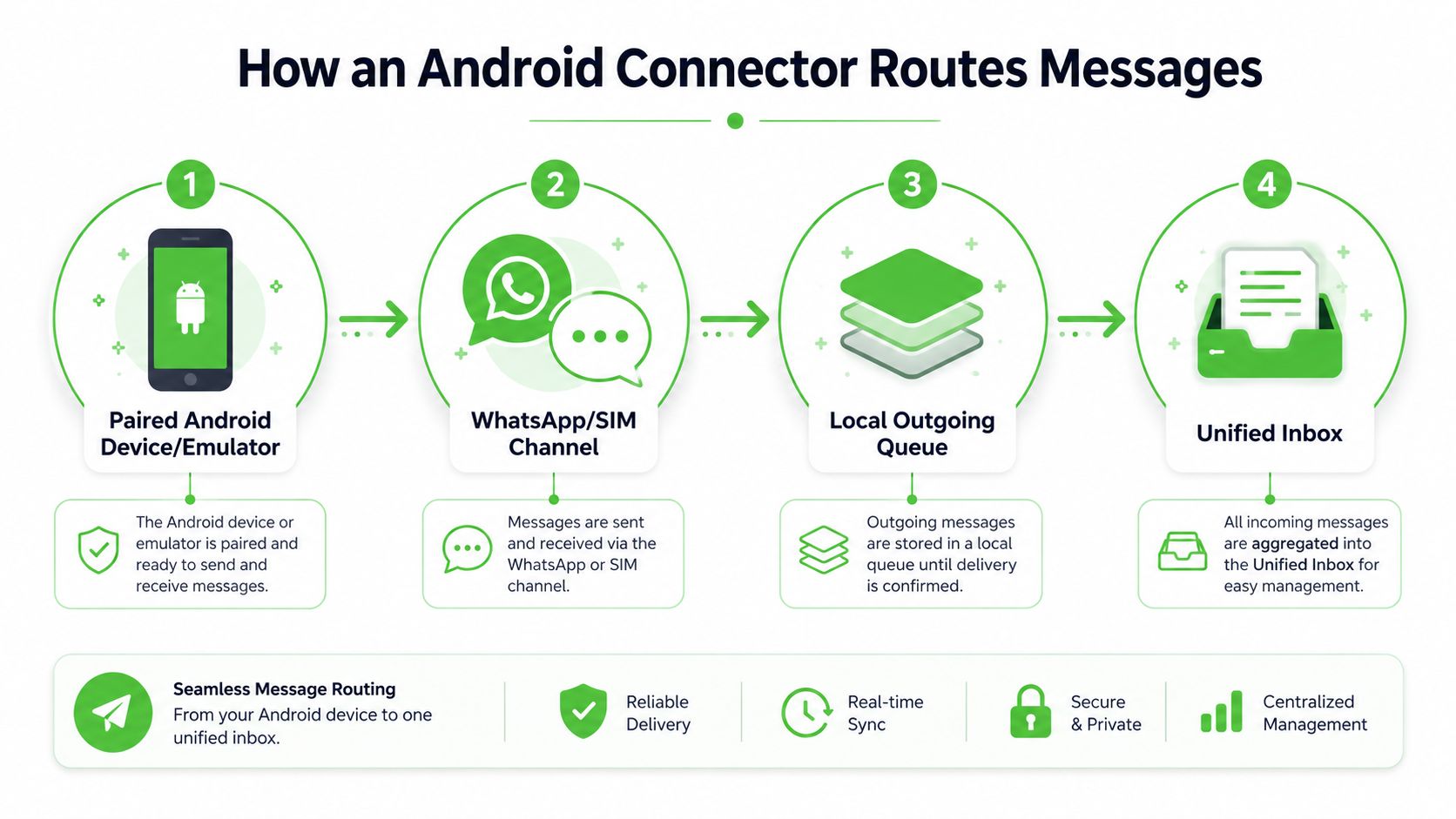
The routing path usually has four building blocks.
- A paired Android device or emulator holds the active number.
- The WhatsApp or SIM channel carries the actual message traffic.
- A local outgoing queue keeps messages lined up when the device is busy.
- A unified inbox lets the team read, assign, and answer from one place.
A message starts in your workspace, moves into the queue, leaves through the paired device, and comes back as a reply in the inbox. That sequence matters because it shows where delay, duplication, or sync failures can appear.
The Android side also gives teams a few transport options for device-to-device and device-to-system communication, including Bluetooth Classic, Bluetooth Low Energy, Wi‑Fi, Wi‑Fi Direct, Wi‑Fi Aware, Wi‑Fi RTT, USB, and cellular. In connector-style apps, teams usually settle on Wi‑Fi or USB tethering because they are easier to keep steady in day-to-day use. For a narrower look at related Android-side retrieval patterns, browse Capgo plugin pages.
A direct way to picture the message flow
A non-technical team member usually understands the flow fastest when you reduce it to a physical setup.
The connector is the front desk, the paired phone is the handset, and the inbox is the logbook.
That model helps during setup calls. If the pair breaks, the handset is the problem. If messages pile up, the queue needs attention. If replies land in the wrong thread, the routing layer is misconfigured.
Here is how that flow works in practice:
The message originates in the workspace, the connector hands it to the paired Android device, and the device sends it through the active WhatsApp or SMS channel. When a reply comes back, the connector pulls it into the unified inbox so the team can see it in one place.
Android Connector App vs WhatsApp Cloud API vs SMS Gateway
The choice is not which tool sounds more modern. It is which connection model fits the way your team sells, routes, and bills for messaging. The label android connector app gets used loosely, so buyers often compare three very different paths as if they were interchangeable. They are not.
| Criterion | Android Connector App | WhatsApp Cloud API | SMS Gateway |
|---|---|---|---|
| Setup speed | Usually fast, because teams can pair a number and start testing quickly | Slower, because the business has to work through Meta-native setup and verification flow | Moderate, depending on carrier and provider setup |
| Cost shape | Often easier to package as a flat monthly fee | Usually better for formal API-led programs with volume planning | Usually message-based or carrier-based pricing |
| Compliance overhead | More device and account discipline is required | More official Meta alignment, which suits teams that want platform-native governance | Governed by telecom and regional delivery rules |
| Deliverability fit | Strong when you need a real mobile identity tied to a device | Strong when the workflow is built for API-managed WhatsApp sending | Strong when you need reach beyond WhatsApp-heavy markets |
| Agency and reseller fit | Good for white-label workflow resale and quick onboarding | Good for larger programs that can handle verification and governance | Good as a fallback or parallel channel |
The table hides an important point. An Android connector app is usually a device-backed workflow, so the business is managing a live phone or phone-like session as part of the system. The WhatsApp Cloud API is a hosted API path with more formal governance. An SMS gateway sits in a different lane altogether, because it moves text over telecom infrastructure rather than a WhatsApp session. Those differences affect support load, margin, and how much operational control your team needs.
For agencies, the question is not just technical. It is how the product is packaged, how fast new clients can be onboarded, and how much margin stays in the resale model. As noted earlier, recurring usage matters more than a single activation. That is the same reason platforms track active usage and retention instead of only installs, because reseller businesses live or die on whether workspaces stay active and keep paying.
Buyer test: if you need fast launch and a simple resale package, the connector path usually feels lighter. If you need Meta-native governance and can accept a more formal setup, the Cloud API is a better fit.
For teams comparing integrations, it helps to look at how no-code orchestration layers are packaged. If you want a broader integration context, connect apps without code shows how platform wrappers turn direct API work into a simpler business workflow. That same logic explains why connector products exist at all.
Setting Up an Android Connector in Under Five Minutes
A clean setup usually starts with one action, scan the QR code from the paired Android account into the workspace. That shortcut matters because it removes the long setup chain some teams expect from API-based onboarding, and it gets you to a live inbox faster.
The first pass from empty inbox to first message
The setup usually follows a practical sequence. First, the team creates the workspace and opens the connector panel. Then they scan the QR code on the Android device, confirm the number, and wait for the inbox to show the active channel.
After that, the useful work begins. Contacts get imported, and the team can start sending texts, images, videos, voice notes, and documents from one place. In most real onboarding calls, the pairing itself takes a few minutes, and the contact import takes a few more if the source file is clean.
A good setup also includes the operational layer around the inbox.
- Assignments help route the right chat to the right teammate.
- Notes preserve context between sales and support.
- Tags separate leads, customers, and follow-ups.
- Quick replies reduce repetitive typing on common questions.
For broadcast-style use cases, Community Announcement Groups can be part of the rollout when the goal is to distribute updates to a defined audience rather than manage one-to-one support. That's useful for an agency onboarding a new client before lunch, because the team can go from account creation to a first live workflow without waiting on a long technical approval chain.
Here's the video walkthrough that matches the basic flow.
What to expect on the first day
The first day should feel like a working proof, not a migration project. You're checking whether messages send, replies land in the inbox, and the team can manage threads without jumping back to the phone.
Keep the first rollout narrow. One number, one inbox, one client workflow.
That keeps your team from confusing setup issues with process issues. Once the basics are stable, you can layer in scheduling, automation, and CRM sync without changing the underlying connection model.
Security, Permissions, and Account Safety You Should Plan For
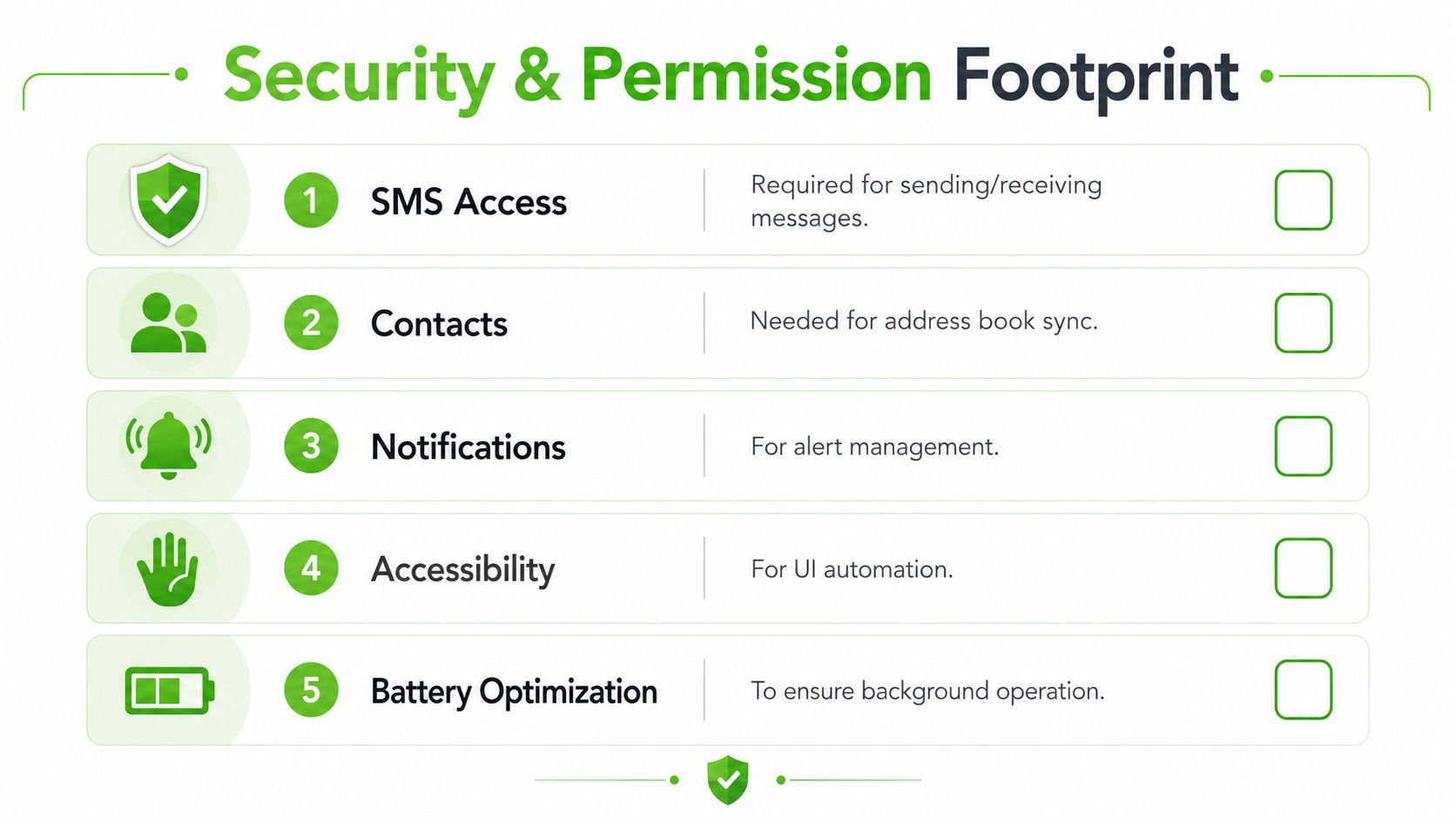
Permission design is the part of connector software that usually decides whether a rollout feels trustworthy or fragile. A connector can ask for SMS, contacts, notifications, accessibility, and battery optimization, and each one changes the risk profile if it's handled carelessly.
What each permission means in practice
SMS access is obvious, it lets the device send and receive messages. Contacts support address book sync, which helps teams identify who they're talking to, but it also means the app touches a sensitive personal data set. Notifications keep the inbox responsive, while accessibility can support UI automation on the device itself.
Battery optimization is less glamorous, but it matters because a connector that's constantly suspended in the background stops behaving like a reliable bridge. If the app depends on live device presence, power management choices become part of your operational plan.
Android's newer data-sharing patterns show where the platform is heading. For Health Connect integrations, the current SDK guidance requires Android 8.0 (API 26)+, uses a module dependency such as androidx.health.connect:connect-client:1.2.0-alpha04, and route permissions are not enough by themselves, because reading or writing exercise routes also requires the related exercise session permissions Health Connect get started. That's a good reminder that controlled, explicit access is now the default direction on Android.
Why trust is the real buying criterion
The contrarian question is not “does it connect?” It's “what is the least invasive connection method that still works?” That matters because nearby-device, GPS, Bluetooth, USB, and network access all sit on a spectrum of control and risk.
The safest connector is usually the one that asks for the fewest permissions and still supports the job.
For onboarding, resellers should standardize a few safeguards. Use dedicated devices for production numbers, turn on two-factor authentication for the paired account, and rotate QR sessions on a schedule instead of leaving them open indefinitely. That keeps the operational surface area smaller and makes support easier when a device gets replaced or a login needs to be reissued.
Scaling for Agencies and SaaS Resellers
The reason agencies like connector-style products is simple, the business model is easier to wrap than a pure API build. A white-label workspace can carry the agency's custom domain, branding, colors, and billing, while the underlying number still runs through the connector layer.
Why flat-fee packaging changes the margin math
A flat monthly fee changes the conversation from message cost to workspace value. Instead of pricing every interaction separately, the reseller can package the inbox, the automations, the broadcast tools, and the CRM handoff into one subscription.
That matters because the operating math becomes easier to explain to clients. The buyer pays for a working communication system, not a pile of technical line items.
In a reseller workflow, several features tend to compound together:
- Smart links and QR codes bring leads into the right workspace.
- Auto-welcome flows handle the first reply without manual triage.
- Scheduling lets campaigns go out at the right time.
- CRM participant sync with source attribution helps teams know where each contact came from.
For deeper automation, the REST API and MCP Server let a team connect the inbox to other systems, which is useful when an agency wants to turn a messaging channel into a broader workflow layer. WhatsApp Cloud API or SMS via Android can sit beside that as a premium tier when a client needs a different delivery path or a more formal setup.
What to bring to a partner call
A useful packaging sketch is straightforward. One tier can be the connector inbox with white-label branding, another tier can add broadcasts and CRM sync, and a higher tier can include API-led automation or alternative delivery channels. That structure gives the reseller room to segment clients by complexity instead of forcing every customer into the same stack.
For marketers, the point is not that one model is universally better. It's that the connector model turns communication infrastructure into something you can package, position, and resell without asking every client to think like a developer.
Troubleshooting the Most Common Connector Failures
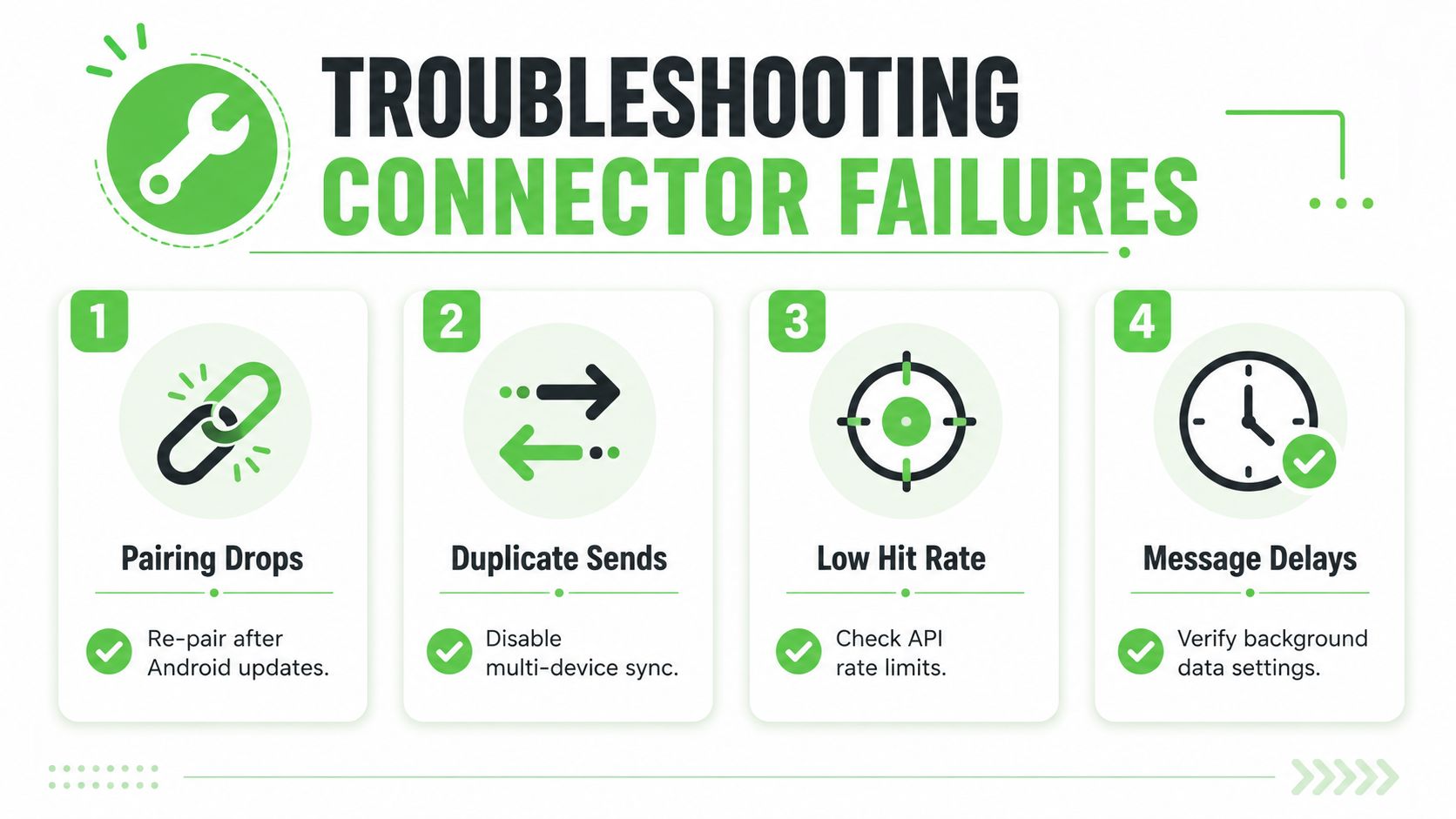
Most connector rollouts fail in predictable ways, and the fix is usually plain rather than clever. Work is identifying whether the problem sits with pairing, duplication, rate pressure, or sync.
The four problems you'll see most often
Pairing drops after an Android update. The inbox may stop showing the device as connected, which usually means the update changed background behavior or cleared the session. Re-pair the device, then check that battery optimization is not interrupting the app.
Duplicate sends when two devices share a number. A message can go out twice or appear in two places when device sync conflicts with overlapping session control. Keep one production number tied to one active sending path.
Low hit rate during broadcasts. A batch can send, yet only part of the audience receives it on time. That usually points to rate pressure or a channel throttling limit. Slow the send pattern and review the connector's delivery rules before the next blast.
Message delays after a contact import. Replies may arrive later than expected or sit in the queue when background data is restricted or CRM sync breaks. Verify background data access, then re-check the import mapping before restarting the workflow.
Android connectivity has several possible routes, and that flexibility is useful, but debugging still starts with the simplest stable path. Support teams should test that path first, then move outward only if the issue remains.
If a connector fails twice in the same way, treat it as a setup problem before you call it a product problem.
A short field checklist
- Re-pair after updates.
- Keep one number on one live session.
- Throttle broadcasts when delivery slows.
- Check background data and sync settings after imports.
Choosing the Right Connection Model for Your Business
The decision gets much simpler once you ignore the label and focus on the model. Pick an Android connector if you want speed to launch, a device-backed number, and a flat-fee package that's easy to resell. Pick the WhatsApp Cloud API if your team can handle Meta's verification flow and you care more about formal governance and high-volume API management. Pick SMS via Android if you need a fallback channel or stronger reach outside WhatsApp-heavy regions.
Three rules that remove most of the confusion
Rule one, choose the connector path when time-to-launch and resale margins matter more than native API branding. Rule two, choose the Cloud API when compliance structure and programmatic control matter more than setup simplicity. Rule three, choose SMS-via-Android when your audience or geography makes WhatsApp alone too narrow.
That's the answer hidden inside the search term. An android connector app is less a product category than a connection model, and the right model is the one that matches your attention window, risk tolerance, and reseller economics.
If you're building a white-labeled WhatsApp offer or comparing connector workflows for agency clients, Double My Leads gives you a way to package the inbox, broadcasts, and CRM sync in one place. Visit Double My Leads to see how the connector model can fit your own workflow and client onboarding plan.


