
You sent a campaign for a client. The creative is solid, the offer is clear, and the list looks healthy. Then the report comes back and it feels wrong. Opens are flat, replies are missing, and the client starts asking the question you were hoping to avoid.
Are my emails going to spam?
That question matters more for agencies and SaaS resellers than it does for a single in-house team. If one brand has a deliverability issue, it hurts one program. If you manage multiple client domains, one weak process can subtly damage retention, campaign performance, and your credibility as the operator behind the system.
The fix isn't guessing. It isn't swapping subject lines ten times, and it isn't declaring victory because the ESP says the message was delivered. You need a repeatable way to verify inbox placement, isolate the root cause, and roll out fixes without breaking working mail flows for other clients.
Table of Contents
- Why Even Good Emails Land in Spam
- The Diagnostic Toolkit How to Know for Sure
- Foundational Fixes Mastering Email Authentication
- Building Reputation Content and Engagement Strategies
- Advanced Deliverability for Agencies and Resellers
- Your Go-Forward Deliverability Checklist
- Frequently Asked Questions About Email Deliverability
Why Even Good Emails Land in Spam
You can do honest marketing and still get filtered.
That isn't just bad luck. It's the environment every sender operates in. Worldwide email traffic is projected at 392.5 billion emails per day in 2026, up from 281.1 billion per day in 2018, while spam made up 45.6% of all email traffic in 2023, according to Debounce's email spam statistics roundup. When nearly 1 in 2 emails moving through the ecosystem can be classified as spam, mailbox providers don't have the luxury of being relaxed.
Trust gets scored before your copy gets read
Gmail, Outlook, Yahoo, and other providers don't look at one thing. They weigh technical trust, sender history, user behavior, and message patterns together. That's why a clean-looking campaign can still land in junk. A provider may distrust the domain, dislike the sending pattern, or see enough weak engagement to treat the message as risky.
Agencies often misdiagnose this because the visible part of email is the campaign itself. The hidden part is what determines placement. Authentication records, domain reputation, complaints, list quality, sending consistency, and inbox provider history all matter before the recipient ever sees your subject line.
Good creative doesn't rescue a weak sender reputation. It just gives you a better message that still may not reach the inbox.
The real problem isn't just spam filters
For agency owners, the operational problem is that deliverability failures look like marketing failures. The client sees poor performance and blames the campaign. Your team starts revising copy, offers, and design. Meanwhile the root issue sits at the infrastructure and reputation layer.
That's why every serious sender needs a process to build a positive sender reputation instead of treating deliverability as a one-time setup task. If you run outbound, lifecycle, newsletters, or client promotions across multiple domains, reputation management belongs inside your service stack.
Three broad forces decide whether mail lands in inbox or spam:
- Technical trust: SPF, DKIM, and DMARC tell providers whether your mail is legitimate.
- Reputation history: complaint patterns, bounce behavior, and consistency shape how much trust you've earned.
- Campaign signals: content, cadence, and audience targeting either reinforce trust or erode it.
The Diagnostic Toolkit How to Know for Sure
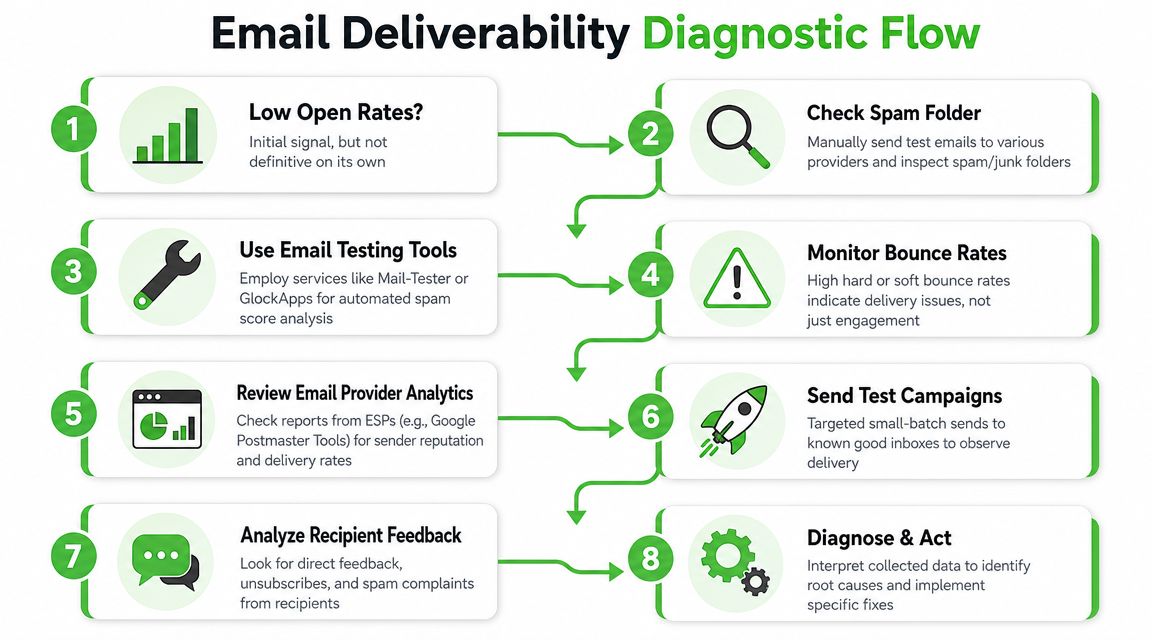
Low open rates are a clue. They aren't proof.
A campaign can underperform because of poor targeting, weak subject lines, bad send timing, image-heavy design, or deliverability problems. If you want a real answer to "are my emails going to spam," you need inbox placement data, not assumptions.
Start with placement not opens
The strongest practical method is seed-list testing. It shows where messages land across providers such as inbox, promotions, or spam. Mailtrap's deliverability guidance also notes that a strong marketing email inbox rate is often benchmarked at 90%+, that deliverability scores above 80 usually indicate good health, and that scores below 70 suggest meaningful issues. It also warns against relying on delivered status alone because delivered doesn't tell you where the message landed. Those benchmarks are summarized in Mailtrap's deliverability guide.
If you run client accounts, use seed tests before and after major changes. New domain? Test it. New sending subdomain? Test it. Big list expansion? Test it. New automation sequence? Test it.
A simple rule works well here:
Practical rule: If you can't verify inbox placement across major providers, you don't know whether the campaign failed because of offer, audience, or filtering.
Build a basic inspection workflow
You don't need an enterprise stack on day one. You do need a disciplined sequence.
- Send to seed accounts first. Use Gmail, Outlook, Yahoo, Apple Mail-linked addresses, and any provider common in your client base. Check inbox, promotions, and spam manually.
- Run a placement tool. Services like GlockApps and Mail-Tester help identify technical and spam-folder signals before a wider rollout.
- Review mailbox-provider data. Google Postmaster Tools is especially useful for Gmail reputation visibility. If Gmail is a major share of your client audience, this isn't optional.
- Inspect bounce patterns. Hard bounces point to data quality problems. Soft bounces can signal throttling, temporary provider resistance, or infrastructure issues.
- Check complaint and unsubscribe feedback. A rise in negative feedback often explains placement drops faster than another creative review ever will.
- Run a controlled small-batch resend. Send to your most engaged recipients first. If placement improves there and worsens on the broader list, the issue is often audience quality or reputation drag from inactive contacts.
A small ops table helps teams stay consistent:
| Check | What it tells you | What to do next |
|---|---|---|
| Seed test | Actual inbox or spam placement | Compare by provider |
| Postmaster data | Provider-specific reputation trend | Isolate Gmail issues |
| Bounce review | List or sending quality problems | Remove bad contacts |
| Complaint review | Negative trust signals | Slow volume and tighten targeting |
The important part isn't the tool brand. It's the sequence. Verify placement, inspect trust signals, then change one variable at a time.
Foundational Fixes Mastering Email Authentication
If authentication is broken, everything after it gets harder.
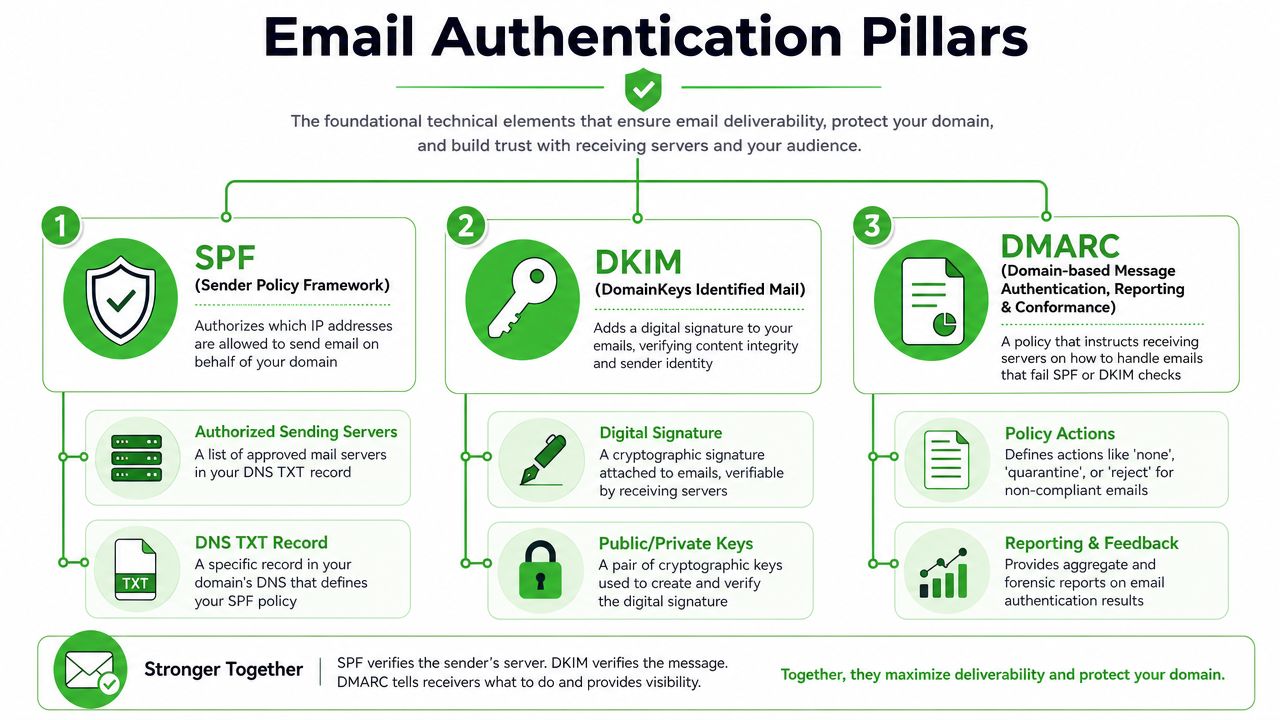
Mailbox providers want proof that the domain sending the message is authorized to do so. That proof sits in three records many senders talk about constantly and still implement sloppily: SPF, DKIM, and DMARC.
What each protocol actually does
Think of them as separate jobs.
- SPF checks whether the sending server is allowed to send on behalf of your domain.
- DKIM attaches a cryptographic signature so receiving systems can verify the message wasn't altered and came from an authorized source.
- DMARC tells receiving providers what policy to apply when SPF or DKIM checks fail, and it gives you reporting visibility.
Most agency problems happen because one of these is half-configured. A CRM sends one type of mail, the newsletter platform sends another, sales sends from a separate tool, and no one checks whether all legitimate sources are aligned. The result is fragmented trust.
For teams handling multiple client accounts, standardize onboarding. Every client domain should go through the same authentication checklist before campaigns launch. Keep ownership clear. One person approves DNS-related changes, one person verifies alignment, and one person checks reports after the update.
This external walkthrough of Reachly's spam avoidance strategies is useful because it treats spam avoidance as an operating discipline, not a one-click fix.
Roll out DMARC without breaking mail
DMARC is where many teams either procrastinate or overreach.
A safer path is phased deployment. According to Red Sift's guide, DMARC is typically rolled out with p=none first for monitoring, then quarantine, then reject once authentication exceeds 95%. That sequence matters because it lets you discover unknown or misconfigured senders before enforcement starts blocking legitimate mail.
Use that rollout as an agency policy, not a one-off decision.
- Start with monitoring: Gather reports and identify every service sending as the domain.
- Fix alignment gaps: Make sure each approved platform passes the expected checks.
- Move carefully to enforcement: Increase strictness only after you know what legitimate traffic exists.
- Document exceptions: Client teams forget which tools send operational or support mail. Your documentation prevents accidental disruption.
A short explainer can help clients understand the trade-off:
DMARC enforcement protects the brand, but rushed enforcement can block valid email. Monitoring first gives you evidence instead of guesswork.
Later in the process, show the client the reporting changes and explain what was cleaned up. That turns a technical task into visible account stewardship.
A useful overview of the mechanics sits in this video:
Building Reputation Content and Engagement Strategies
Authentication gets you recognized. Reputation decides whether you're welcome.
Many senders stall here. They pass technical checks, then keep sending to stale lists, push irrelevant offers, and ignore weak engagement until placement slips. The inbox providers notice long before the client does.
Landbase reports average global inbox deliverability at 83.1%, meaning about 16.9% of legitimate emails still fail to reach inboxes. The same source reports that senders in the 50,001 to 200,000 monthly email band have the highest average spam rate at 29.31%, which shows that sending volume and pattern directly affect where messages land. Those figures come from Landbase's email deliverability statistics roundup.
Reputation is behavior over time
Every campaign adds to or subtracts from sender trust. Agencies should frame this for clients like account hygiene, not just campaign execution.
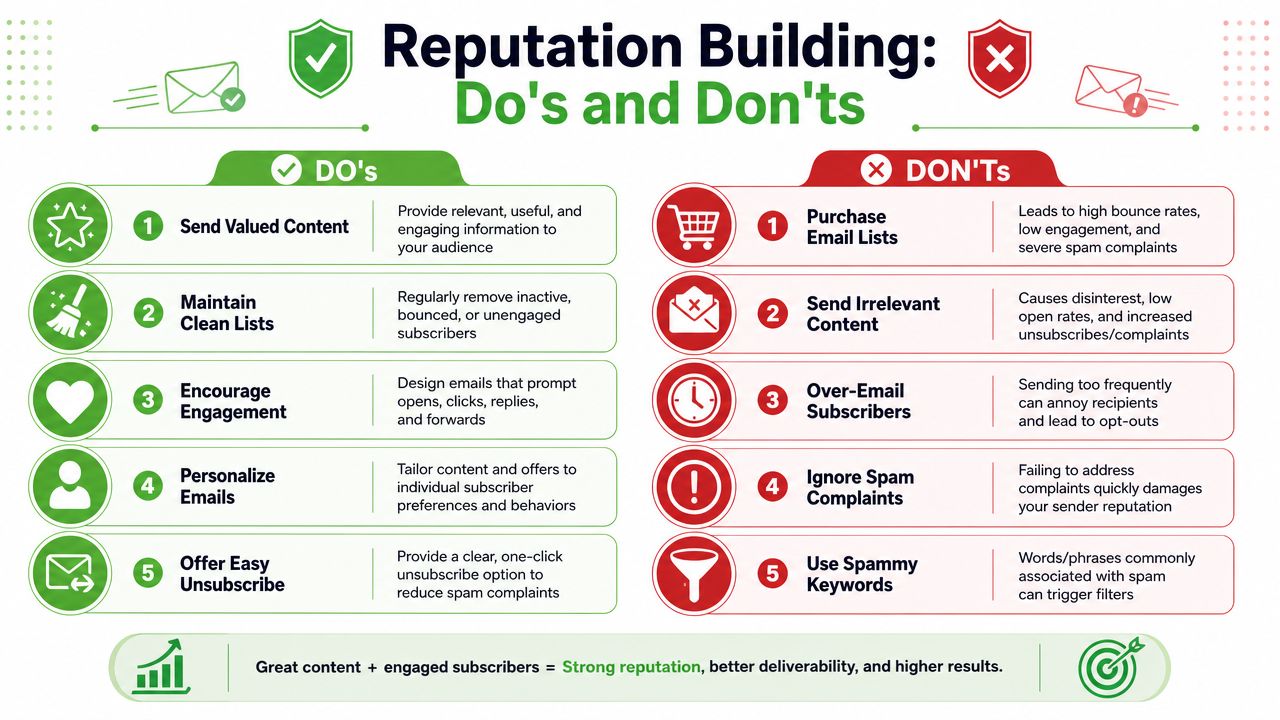
The most common reputation drains are easy to recognize:
- Inactive lists: old contacts who never open, click, or reply.
- Aggressive volume jumps: sudden spikes that don't match past behavior.
- Weak targeting: broad sends that generate indifference instead of engagement.
- Complaint blindness: teams focus on clicks and ignore the recipients who mark mail as spam.
The strongest countermeasure is list discipline. Keep engaged segments separate from aging segments. Build re-engagement flows for inactive contacts. Remove subscribers who consistently ignore mail rather than forcing volume for reporting optics.
Content choices that help or hurt
Content doesn't cause every spam issue, but it can make a borderline reputation worse.
What usually helps:
- Clear expectation match: The email should look and feel like what the subscriber signed up for.
- Readable formatting: Clean structure, balanced text, and working links build trust.
- Specific offers: Precision beats hype. The more obvious the value, the better the engagement tends to be.
- Easy exits: A visible unsubscribe option is healthier than trapping unhappy recipients.
What usually hurts:
- Misleading subject lines: Short-term curiosity often creates long-term complaints.
- Overdesigned templates: Too many images and promotional blocks can weaken trust signals.
- Spray-and-pray segmentation: One generic message to everyone often depresses engagement across the full file.
- Purchased or borrowed lists: These create reputation problems fast and usually lead to arguments later.
If recipients don't want the email, passing authentication won't save it. Inbox providers care whether users welcome the message.
For agencies, the practical move is to review content and audience together. A solid campaign sent to the wrong segment damages reputation. A modest campaign sent to the right segment often strengthens it.
Advanced Deliverability for Agencies and Resellers
Most agencies still treat deliverability as a support issue. That's leaving money and control on the table.
If you manage multiple client domains, deliverability should be a defined service line with onboarding, monitoring, escalation rules, and reporting. Clients rarely buy "authentication setup" because they don't think in those terms. They buy stable campaign performance, lower risk, and confidence that their outbound and lifecycle systems won't unexpectedly break.
Turn deliverability into an operating system
Mailgun points to a real gap in the market: practical, provider-by-provider diagnostic workflows for teams that send at scale, especially as Gmail and Yahoo now require SPF, DKIM, and DMARC for many senders. It also highlights seed testing and Google Postmaster as critical verification tools in its guide to avoiding spam placement.
That gap is your opportunity.
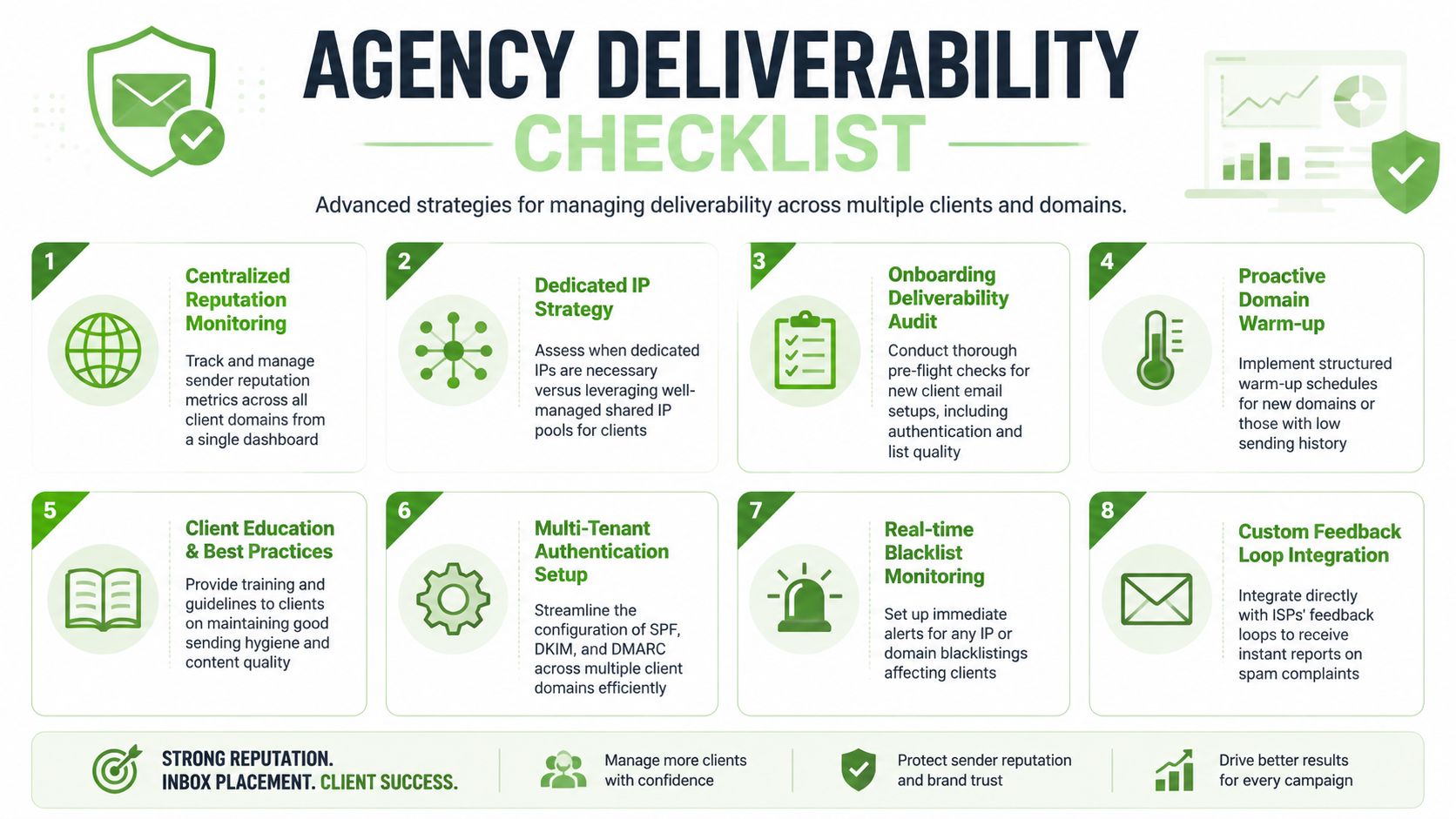
Package deliverability around repeatable operations:
- Onboarding audit: confirm sending tools, domain ownership, authentication state, and list sources.
- Centralized monitoring: review reputation signals, placement tests, and mailbox-provider feedback on a schedule.
- Warm-up management: gradually ramp new domains or underused sending identities instead of launching at full volume.
- Complaint handling: route negative feedback into suppression and segmentation workflows quickly.
- Client education: train account owners to avoid list purchases, random blasts, and unmanaged tool sprawl.
Agencies that do this well reduce preventable fire drills. They also gain a cleaner way to explain campaign outcomes. When placement data is visible, your team can distinguish creative problems from infrastructure problems without guessing.
The agency that can prove inbox placement has a stronger client conversation than the agency that can only explain open rates after the fact.
Shared versus dedicated infrastructure decisions
This part needs judgment, not ideology.
A shared environment can work well when the provider manages it tightly and the client's volume or consistency doesn't justify separate infrastructure. A dedicated setup can make sense when a client sends enough mail, needs tighter control, or has unique reputation requirements across brands or business units.
Use simple decision criteria:
| Situation | Better fit |
|---|---|
| Smaller or inconsistent sender | Well-managed shared pool |
| Large, consistent sender with internal discipline | Dedicated environment |
| Client with frequent reputation swings | Fix process before isolating infrastructure |
| Multi-brand sender needing tighter control | Consider separate sending identities |
The mistake is assuming infrastructure alone solves spam placement. If the client keeps mailing poor-quality segments, even a pristine setup will degrade. Agencies should sell governance with the technical work, not technical work in isolation.
Your Go-Forward Deliverability Checklist
If you need a working process, use this as the baseline. It works for a single brand, and it scales much better when you're responsible for several client accounts at once.
Immediate diagnostics
Start here when performance drops or a client asks whether their emails are reaching inboxes.
- Verify placement directly: Run seed tests across major providers and manually inspect where mail lands.
- Check provider reputation views: Review Gmail reputation through Postmaster Tools if Gmail matters to the audience mix.
- Inspect bounce and complaint signals: Separate list-quality issues from true placement issues.
- Use a structured troubleshooting reference: If you want another practical walkthrough, this guide can help you diagnose email deliverability problems without jumping straight to content rewrites.
One-time technical fixes
These don't solve everything, but they create the minimum trust foundation.
- Standardize authentication: Confirm SPF, DKIM, and DMARC are correctly aligned for every approved sender.
- Inventory all sending tools: Marketing automation, CRMs, support systems, forms, and sales tools often send from the same brand.
- Roll out DMARC in phases: Monitor first, then tighten policy only after you know what's authentic and what's not.
- Document domain ownership and change control: Someone needs to approve and verify every mail-related change.
Ongoing operating habits
Here, inbox placement is won or lost long term.
- Prioritize engaged segments: Start with recipients who are most likely to open, click, or reply.
- Apply list hygiene consistently: Suppress dead, invalid, and chronically inactive contacts.
- Watch sending cadence: Avoid sudden spikes that don't match normal behavior.
- Review campaigns before scale sends: New templates, new domains, and new automations deserve pre-send validation.
- Report deliverability as its own KPI: Don't bury it inside campaign commentary. Clients should see it as a managed performance layer.
A lot of revenue problems that look like weak messaging are inbox placement problems. When you operationalize deliverability, client retention gets easier because you're solving the issue earlier and proving your team knows where the bottleneck really is.
Frequently Asked Questions About Email Deliverability
How fast can spam issues be fixed
A client notices lead flow dropped this week, and the first question is always the same: how long until it is fixed?
Configuration issues can be cleaned up fast. A broken DNS record, an unauthorized tool sending from the domain, or a misaligned return-path can often be found and corrected in days. Inbox providers do not restore trust on that timeline. If a sender has built a bad pattern over weeks or months, recovery usually requires a controlled period of cleaner sending, tighter segmentation, and close monitoring across campaigns.
For agencies, the practical answer is two timelines. One for remediation. One for reputation recovery.
Will changing ESP fix it
It can help if the current provider is a bad operational fit. Some platforms make it hard to segment properly, monitor domain health, control warm-up, or separate client sending streams. In those cases, migration can reduce risk.
If the root problem is poor acquisition, loose suppression rules, or sudden campaign bursts, switching ESPs will not solve it. It may even slow the team down while domains, templates, automations, and reporting are rebuilt. Agencies should treat an ESP move as an infrastructure decision, not a deliverability shortcut.
Do low opens always mean spam
No. Opens are a weak diagnostic signal on their own, especially after privacy protections changed how some mailbox providers report them. Low opens can come from bad targeting, weak positioning, or a list that has stopped paying attention.
The better question is whether multiple signals point in the same direction. If inbox placement tests drop, complaint rates rise, replies dry up, and subscribers start saying they never saw the email, then you are looking at a deliverability problem. Serious teams verify inbox placement instead of inferring it from one campaign metric.
If SPF, DKIM, and DMARC pass, am I safe
You are authenticated. You are not guaranteed inbox placement.
Mailbox providers still judge how you send. A sender with perfect authentication can still get filtered after a sharp volume spike, a recycled cold list upload, or a campaign that generates complaints faster than normal. For agencies managing several client accounts, this is why authentication checks belong in onboarding, while reputation monitoring belongs in monthly service delivery.
What should agencies report to clients
Report the few things that change decisions.
Show inbox placement trends by provider, note whether the account is stable or slipping, flag list segments creating risk, and document what changed since the last review. Include actions taken, actions pending, and the business impact if the issue continues. That keeps client conversations tied to pipeline, revenue, and retention instead of vanity metrics.
If you want to sell deliverability as a service, standardize this reporting across accounts. The agencies that retain clients longest are the ones that catch sender risk early and present a clear fix plan before poor placement turns into missed targets.
If your agency is expanding beyond email and wants a channel you can white-label, Double My Leads gives you a practical way to launch and resell WhatsApp workflows under your own brand. It's built for agencies and SaaS teams that want fast onboarding, predictable margins, and a cleaner way to manage conversations, campaigns, and client workspaces without adding another fragile layer to the stack.


