
You're probably here because you need the same message to go out more than once. Maybe it's a daily appointment reminder, a weekly follow-up, a monthly renewal prompt, or a WhatsApp check-in sequence that your team keeps sending by hand.
That sounds simple until you try to automate it. Consumer messaging apps make one-time scheduling easy enough, but true repeating sends are where things break. The result is usually a messy mix of phone hacks, reminders to remind yourself, and workflows that work for a day and then quietly fail.
For personal use, a workaround can be fine. For an agency, it's not. If a recurring message supports lead response, client retention, or no-show prevention, the standard has to be reliability, visibility, and control.
Table of Contents
- Why Repeating Text Messages Are a Game Changer
- Sending Repeating Texts from Your iPhone or Android
- Graduating to Dedicated SMS Automation Platforms
- Unlocking Recurring WhatsApp Messages for Business
- Sending Repeating Messages Without Getting Blocked
- Choosing Your Recurring Messaging Strategy
Why Repeating Text Messages Are a Game Changer
Repeating messages save teams from the worst kind of work. The small, constant, easy-to-forget tasks that still matter. A front desk sends reminders every morning. A sales rep nudges cold leads every Friday. A community manager posts the same weekly update to members. None of it is difficult. All of it steals time.
For a business, recurring texts aren't just convenience. They create consistency. When reminders go out on time, appointments are less likely to slip. When follow-ups happen on a schedule, leads don't go stale because someone got busy.
That's why agencies start looking for automation quickly, especially when clients need a dependable system for reminders and follow-up. In service businesses, pairing recurring messaging with software to cut no-shows often solves a very practical operations problem, not just a marketing one.
Native messaging apps aren't built for this
The catch is that the apps people use every day don't handle this well. A 2024 Stack Overflow survey found that 68% of mobile developers struggle with iOS and Android automation limitations for daily SMS, which matches what many developers discover after a few minutes of trying to build a repeat send flow in native tools, as noted in this Google Messages support discussion.
That gap matters because the use case is common, but the built-in solution usually isn't there.
Practical rule: If the message matters to revenue, attendance, or lead response time, don't trust a consumer app workaround as your primary system.
Personal reminder versus business process
There are really two different jobs people mean when they ask how to send a repeating text message:
| Use case | What “good enough” looks like |
|---|---|
| Personal reminders | A simple repeat or scheduled prompt that helps one person remember |
| Business messaging | Reliable sending, timing control, list management, and a record of what went out |
That distinction is where most advice online falls apart. It treats a phone shortcut and a production workflow as if they're the same thing. They're not. One helps an individual remember to text. The other runs a communication process that a business depends on.
Sending Repeating Texts from Your iPhone or Android
If you want the free route first, start with your phone. Just know what you're building. This is a workaround for light personal use, not a durable business system.
What works on iPhone
Apple's native Messages scheduling lets users send later, but only as a one-time send. Apple documents that iPhone users can schedule a text up to 14 days into the future using “Send Later” in Messages in the Apple Support guide for scheduled texts. That's useful, but it doesn't create a true daily repeating message.
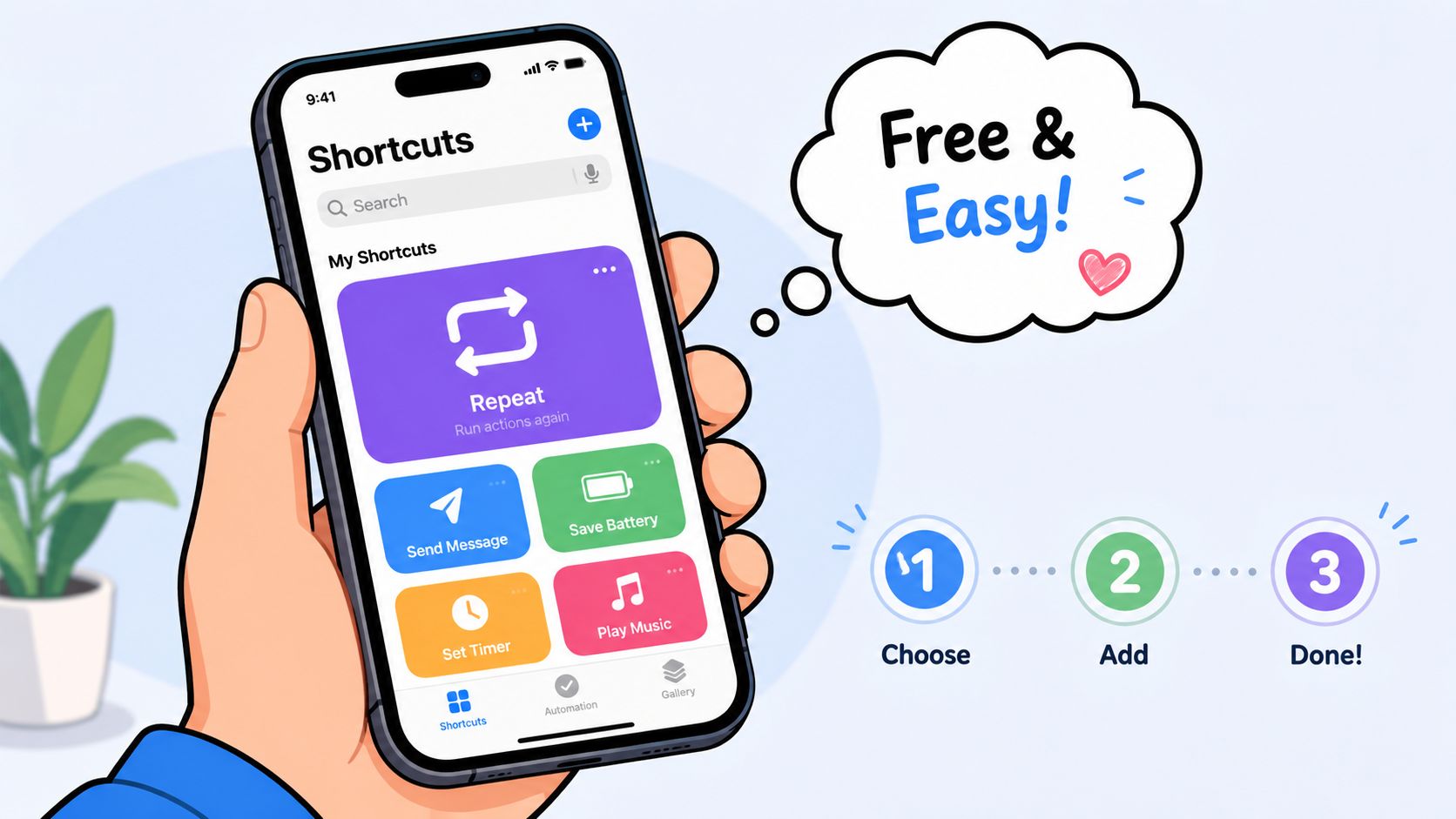
For repeated sending on iPhone, the practical workaround is Shortcuts. The basic pattern is:
- Create a new shortcut in the Shortcuts app.
- Add a Repeat action and choose how many times it should loop.
- Place a Send Message action inside that loop.
- Set the recipient and message.
- Run and test it before trusting it for anything important.
That works because Shortcuts can chain actions together, including loops. It does not mean iPhone has native recurring daily automated texting. It doesn't.
Here's the issue agencies run into. Shortcuts is fine when one person wants to automate one repetitive action on one device. It's weak when multiple contacts, timing windows, visibility, approvals, or client accounts are involved.
A shortcut is a personal automation. It isn't a messaging system.
If you need campaign-level scheduling, list handling, or business-grade sending controls, you'll outgrow the phone fast. At that point, it makes more sense to look at a platform built for bulk SMS message scheduling rather than trying to force a personal device into business duty.
What Android users can and cannot do
Google Messages supports scheduled sends, but only for single future messages. It does not provide native recurring daily sends. That's the limitation that trips up Android users expecting a “repeat every day” option.
So the Android answer is simple:
- For one message later: Google Messages can handle that.
- For repeating sends: you'll need a third-party app or a dedicated messaging platform.
- For business use: skip the device-level workaround and move to software with repeat logic built in.
This is the part most tutorials blur. They answer “Can I schedule a text?” when the actual question is “Can I send it repeatedly without thinking about it?” On Android and iPhone, those are different questions.
Graduating to Dedicated SMS Automation Platforms
Once recurring messages stop being personal reminders and start becoming operational, dedicated SMS software becomes the first serious upgrade. At this point, tools like SimpleTexting and TextSpot make sense. They replace fragile device logic with actual campaign controls.
What dedicated SMS tools do better
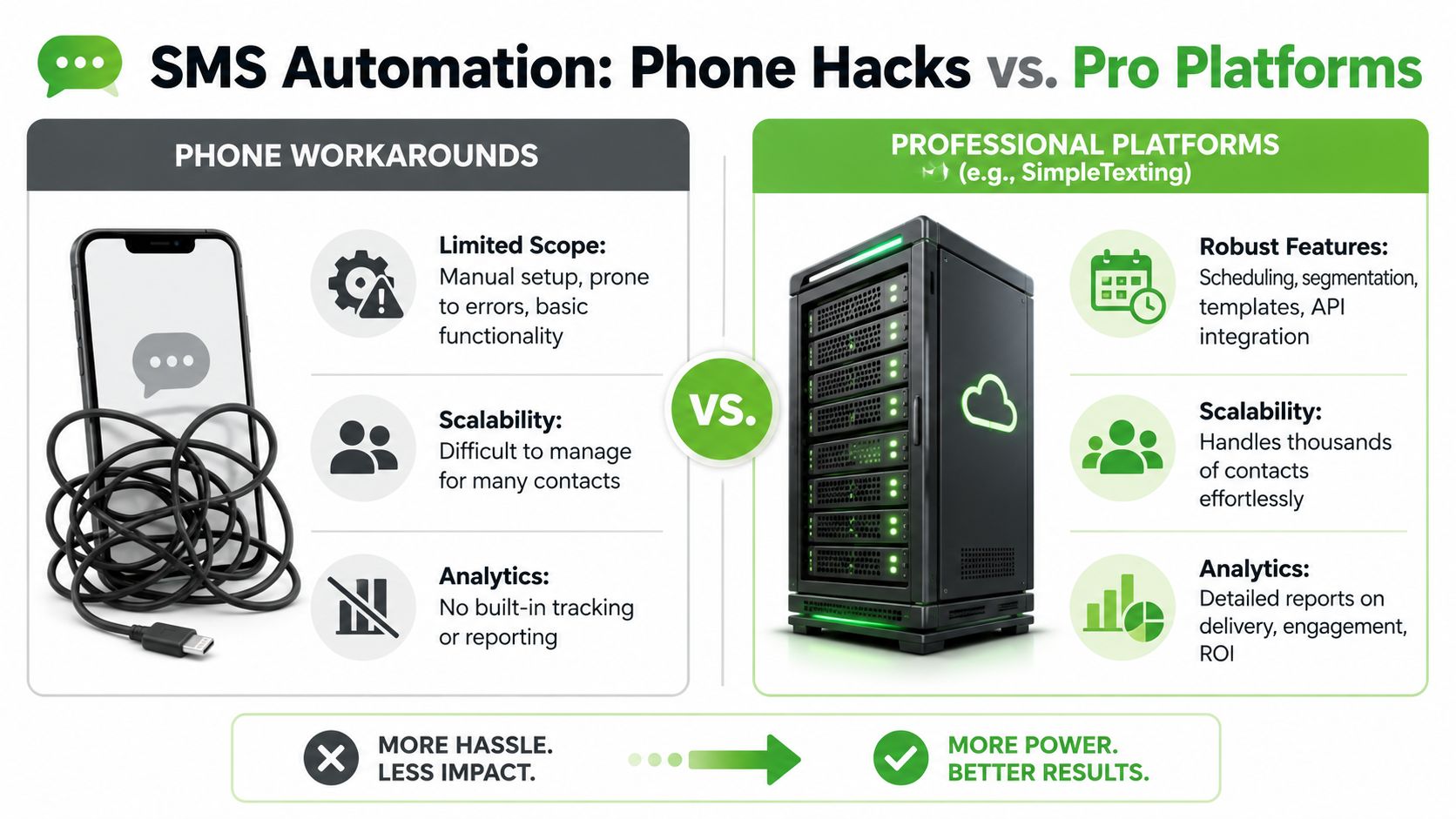
The core difference is that these platforms treat repeat messaging as a native feature, not a hack. SimpleTexting allows users to choose Recurring under send options, then set the frequency to Daily, Weekly, or Monthly, along with a start date, time, and ending condition, as described in SimpleTexting's guide to repetitive text messages.
That matters because a recurring campaign needs more than a send button. It needs control.
Here's what professional SMS platforms typically solve better than phone workarounds:
- Scheduling logic that supports repeat intervals and end dates
- Contact management so you're not manually selecting recipients every time
- Privacy because recipients get individual messages instead of being dropped into a visible group thread
- Repeatability across teams and clients, not just one person's phone
Some teams also want broader messaging workflows that combine inbox, automation, and campaign tools. Reviewing IllumiChat's key features is useful if you want a sense of what a more complete business messaging stack looks like beyond simple send-later functions.
Where SMS platforms still have limits
Dedicated SMS tools are a real step up, but they aren't the final answer for every agency. They're strongest when the job is straightforward recurring outreach through SMS. Reminders, promotions, renewals, follow-ups, those fit well.
Their limits show up when clients want richer conversations, media, community-style communication, or a channel that feels more natural for two-way engagement. SMS can do the job. It just doesn't always give agencies the experience or flexibility they want at scale.
That's usually the point where teams start asking the next question. Not just how to send a repeating text message, but which channel should carry the recurring communication in the first place.
Unlocking Recurring WhatsApp Messages for Business
For agencies, WhatsApp often becomes the better channel once recurring messaging moves beyond plain reminders. Clients want richer communication. Teams want replies in the same thread. Prospects want something that feels more conversational than standard SMS.
Why WhatsApp changes the equation
WhatsApp is strong for recurring business communication because it supports an ongoing relationship better than a bare-bones text thread. Agencies use it for lead nurturing, onboarding, support follow-ups, event reminders, and community announcements because the conversation can continue in context.
But the native app still doesn't solve recurring automation. Even where scheduling exists, native scheduling doesn't equal auto-repeat. To create repeating WhatsApp messages, you need automation tooling layered on top.
That's where many setups go wrong. The visible part looks easy. The hidden part is trigger logic, webhook handling, send frequency, and guardrails.
What automation tools solve
A common failure point is the trigger configuration itself. In one walkthrough on recurring WhatsApp automation, 68% of new users fail to disable the default 24-hour cooldown trigger, which leads to delayed replies and can reduce engagement conversion by up to 42%, as shown in this WhatsApp automation tutorial.
That's not a small setup mistake. It changes the entire behavior of the campaign.
A solid recurring WhatsApp setup usually needs these pieces working together:
- A repeat trigger that fires every time the intended event happens, not once per day by accident
- Immediate webhook acknowledgment so inbound notifications don't loop or duplicate unexpectedly
- Controlled sending logic so the system doesn't behave like a bot blast
- Centralized visibility so team members can see what was sent, to whom, and why
The difference between a useful recurring WhatsApp flow and a broken one is rarely the message itself. It's the automation logic behind it.
This is why agencies shouldn't treat WhatsApp recurrence like a simple phone feature. It's closer to workflow automation than message scheduling. If a client expects reliability, your system has to manage triggers, timing, replies, and exceptions without depending on one person's device or memory.
For a solo user, that may sound like overkill. For an agency with multiple clients, it's the minimum standard.
Sending Repeating Messages Without Getting Blocked
Recurring messaging only works if people keep receiving it. That makes deliverability, pacing, and consent just as important as the automation itself.
Too many teams focus on how to send repeated messages and ignore how to send them in a way that lasts. That's where accounts get flagged, numbers lose trust, and recipients start blocking.
The operating rules that matter
For high-volume recurring WhatsApp messaging, the safest benchmark is no more than 1 message per minute. Pushing past 4 messages per minute triggers number flagging in 92% of cases, and warming up a number while segmenting outreach windows reduces that risk by 76%, according to Wassenger's guide to automated WhatsApp messaging.
That gives agencies a practical framework. Send slower. Warm numbers up. Break outreach into controlled windows instead of dumping volume all at once.
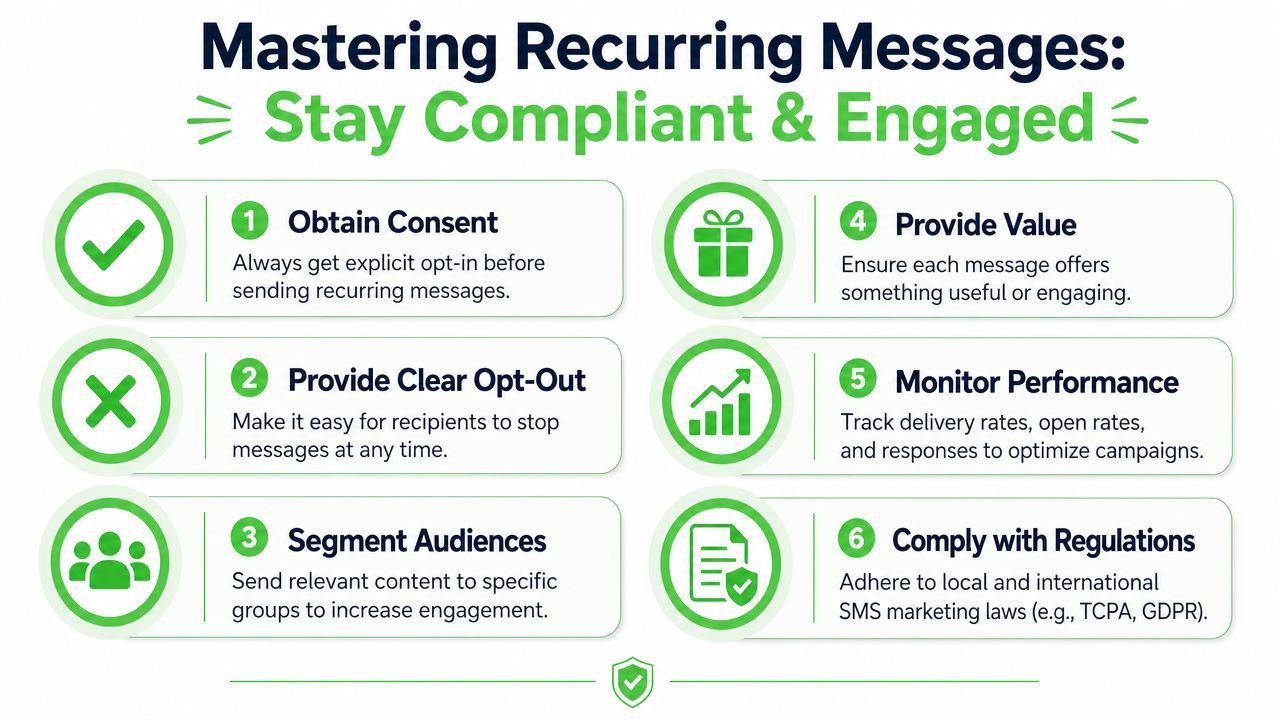
A clean operating model looks like this:
- Start with consent. Don't send recurring messages to people who didn't clearly opt in.
- Use drip delivery. If you need volume, pace it instead of blasting.
- Warm the number. New sending profiles shouldn't jump straight into aggressive repeat campaigns.
- Segment the audience. Timing and message relevance matter more than automation complexity.
- Respect the channel. Promotional, reminder, and reply-based flows don't all behave the same way.
Field note: Fast automation looks efficient inside the dashboard and reckless to the platform detecting it.
What causes recurring campaigns to go bad
The biggest mistake isn't usually technical. It's repetition without variation. People block when the messaging becomes predictable, irrelevant, or excessive.
A major user concern is avoiding that reaction. 42% of users report spam fatigue from repeated daily messages, and a 2025 FTC report noted that 31% of blocked contacts were due to unvaried recurring messages. That's the operational risk most “set it and forget it” tutorials skip.
Use this checklist before launching a repeating campaign:
| Check | Why it matters |
|---|---|
| Opt-in is explicit | Recurring sends without consent create immediate trust and compliance problems |
| Message copy varies | Small changes reduce fatigue and make the sequence feel intentional |
| Audience is segmented | The same cadence doesn't fit leads, customers, and inactive contacts equally |
| Cadence matches purpose | Daily might fit reminders, but it can overwhelm promotional sequences |
| Exit path is obvious | People should be able to stop messages cleanly |
If you manage client accounts, treat recurring messaging like sender reputation management. Every campaign teaches the platform and the recipient what kind of sender you are. Good habits compound. Bad habits do too.
Choosing Your Recurring Messaging Strategy
The right method depends on what happens if the message fails.
If you're sending a reminder to yourself or looping a simple personal text, the phone workaround is acceptable. It's cheap, fast to set up, and good enough when there's little downside if it breaks.
If you run a small business and need dependable recurring SMS for reminders, promotions, or follow-ups, a dedicated SMS platform is the sensible middle ground. You get repeat scheduling, list controls, and a cleaner operating environment than any device-level hack can provide.
If you're an agency, a community operator, or a business building recurring conversations at scale, the long-term answer is usually WhatsApp automation. Not because it's trendy. Because it aligns better with how modern clients want to communicate, and because the workflow can support richer, ongoing engagement.
A simple decision filter
Use this if you're deciding quickly:
- Choose your phone if the task is personal and non-critical.
- Choose an SMS platform if you need dependable recurring business texts.
- Choose a WhatsApp automation platform if you need scale, richer messaging, team visibility, and recurring communication that behaves like a business system.
The biggest mistake is sitting in the middle too long. Teams try to stretch shortcuts, reminders, and manual sends far beyond their design. That usually creates hidden labor, inconsistent follow-up, and more recipient fatigue than necessary.
When agencies ask how to send a repeating text message, the underlying question is usually this: what system can do it reliably without annoying people or burning the number? That answer has less to do with clever hacks and more to do with choosing the right layer of infrastructure.
If recurring messaging is becoming a real client service, it's worth using a platform built for agencies instead of patching together personal tools. Double My Leads gives teams a white-labeled WhatsApp setup with broadcasts, scheduling, inbox management, QR-based number connection, and scalable workflows that are easier to deploy and resell.


