
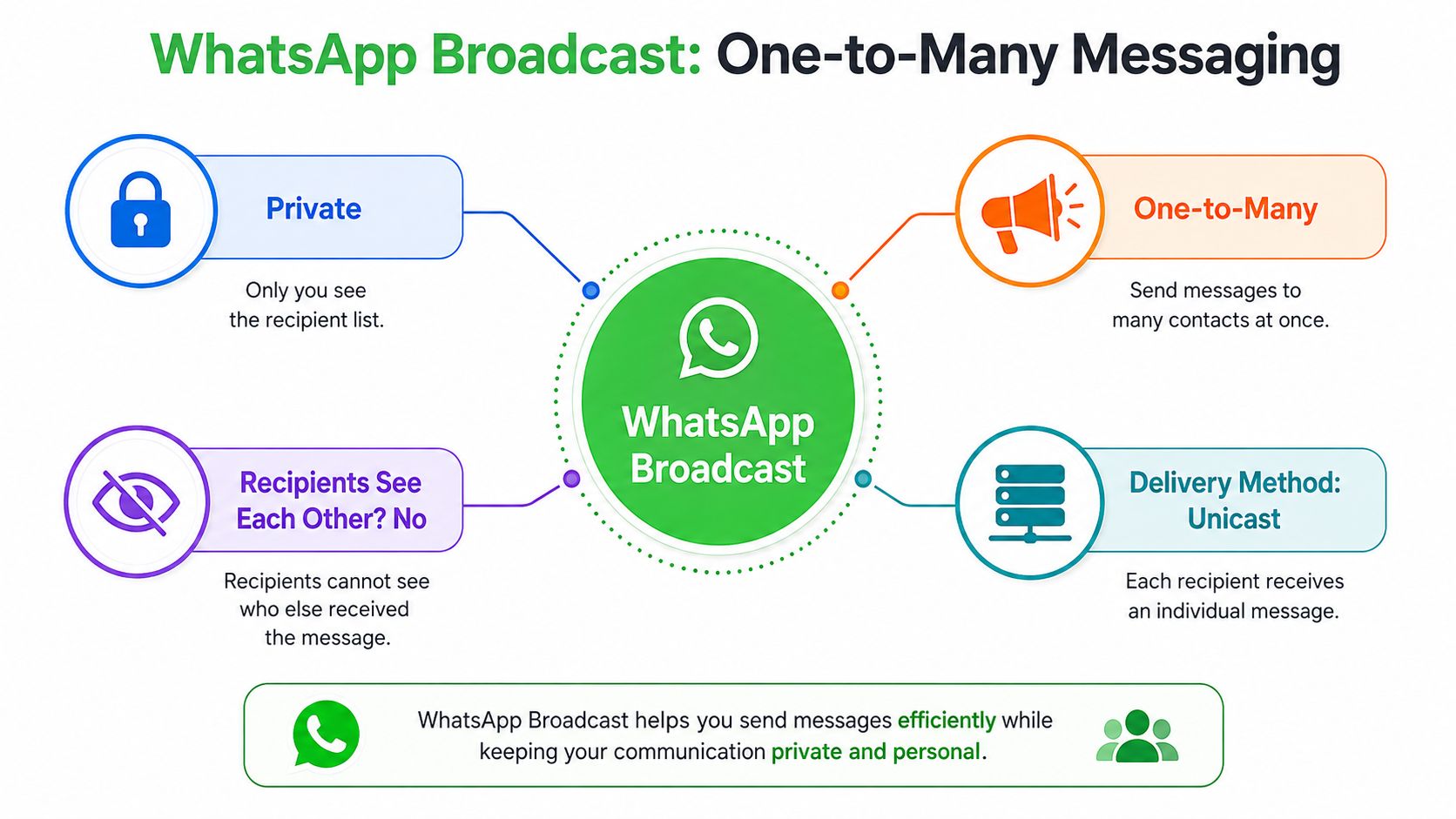
A WhatsApp broadcast is a one-to-many private messaging format, so the same message is delivered to each recipient as an individual chat, and they never see who else received it. In the free WhatsApp Business app, each broadcast list is capped at 256 contacts, which makes it useful for segmented small audiences, but not for broad distribution.
That's the feature most agencies reach for when a client wants a fast promotion, a reminder, or a launch update without turning the message into a noisy group thread. The question is not whether broadcast exists, it's how much it can carry before the app ceiling, delivery rules, and workflow limits force a different setup.
Table of Contents
- Understanding WhatsApp Broadcast as a Private One-to-Many Channel
- How WhatsApp Broadcast Works Under the Hood
- Broadcast Lists Versus Groups Channels and Community Announcements
- Setting Up and Scaling Broadcast Campaigns Beyond the App Limit
- Best Practices and Use Cases That Drive High Engagement
- Scaling Broadcast at Scale with Double My Leads
- Common Misconceptions About WhatsApp Broadcast
Understanding WhatsApp Broadcast as a Private One-to-Many Channel
A client sends a last-minute flash sale and wants it in front of a few hundred warm leads before lunch. A group chat would expose every recipient to everyone else, and a mass email could sit untouched in an inbox pile. WhatsApp broadcast fits between those options. It sends one message to many people, but each person receives it as a private chat.
That private delivery model is the main reason agencies still use it. The official WhatsApp help documentation describes broadcast lists as a built-in way to send one message to multiple contacts, and the app-based flow generally works best when recipients have the sender saved in their address book. In practice, that makes the format behave more like a controlled outreach list than an open mailing blast (WhatsApp help on broadcast lists).
Why the format feels personal
The recipient does not enter a shared thread, and they do not see the other people on the list. The message lands as a direct message, so the tone stays private even when the sender is speaking to many contacts at once.
Practical rule: if a campaign needs privacy, direct response, and minimal public clutter, broadcast is the better starting point than a group.
Agencies use broadcasts for announcements, reminders, and promotions where the message needs to feel close to the recipient. It works well when the list is already segmented, because one audience slice can get a message without exposing that segmentation to anyone else. That is useful for agency work, because the strategic gap is not just audience size, it is delivery control. App-based broadcast lists are useful for smaller, manual sends, while API or Community-powered broadcast setups are the route when the same private one-to-many pattern has to scale beyond the app's contact ceiling.
Why agencies prefer it over groups
A group chat is built for interaction among members. Broadcast is built for directed delivery from sender to recipient. That difference matters when a client wants control over the message, the reply path, and the customer experience.
A broadcast also reduces the social friction that groups create. Nobody has to sort through a pile of replies, nobody has to manage interruptions from strangers, and nobody has to worry that a simple promotion turns into a public discussion. For agencies, that makes broadcast a cleaner fit for one-to-one style outreach, especially when the campaign needs to stay private while still reaching many people at once.
How WhatsApp Broadcast Works Under the Hood
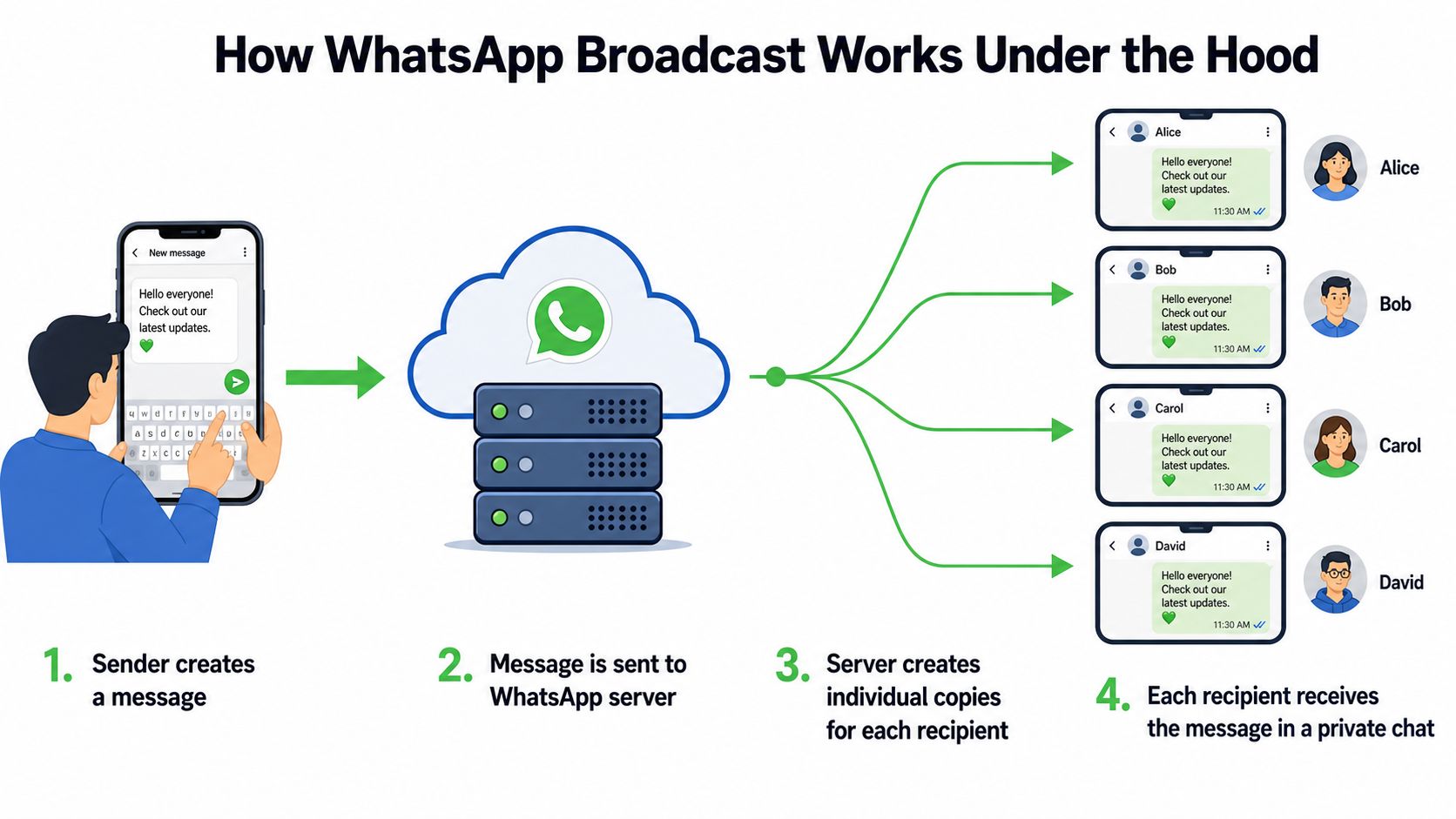
WhatsApp broadcast is not a magical bulk pipe. It is implemented as one-to-many unicast delivery, which means the server accepts the message once and then sends separate private messages to each recipient over individual TCP connections (CNTheory). That is a very different model from true multicast, and it explains why broadcasts preserve privacy and independent delivery acknowledgments.
The practical benefit is reliability. Each recipient is handled as its own delivery event, so one failed path doesn't define the outcome for everyone else. That matters for agencies because a campaign can partially arrive, partially fail, and still give you meaningful delivery feedback instead of a single all-or-nothing result.
Why the protocol design matters
WhatsApp's messaging stack is designed for low-bandwidth, high-concurrency delivery. Its FunXMPP layer uses binary encoding and compression that can cut bandwidth usage by roughly 50 to 70 percent versus standard XMPP, and Erlang/OTP is used for highly concurrent connection handling and fault-tolerant session management (GetStream on how WhatsApp works).
That technical choice is not just trivia. It explains how the platform can fan out many copies of the same message without paying the same overhead as a text-heavy protocol, which is useful when a campaign needs to land quickly on mobile networks. The server can also deduplicate and compress payload handling so the same content isn't reprocessed unnecessarily for every recipient, which helps keep the broadcast pipeline efficient.
The useful mental model is simple, the sender creates one message, WhatsApp fans it out as many private deliveries, and each delivery gets its own acknowledgment path.
What that means for campaign operations
For an agency, this delivery model means the broadcast is closer to a controlled message distribution system than a social channel. If one recipient is unreachable, blocked, or offline, the rest of the list still proceeds normally. That's a real advantage when the message is time-sensitive.
Broadcast Lists Versus Groups Channels and Community Announcements
Most mistakes happen because people treat every WhatsApp distribution format like it's the same thing. It isn't. Broadcast lists, groups, channels, and community announcements all solve different problems, and agencies lose time when they choose the wrong one for the campaign goal.
Side by side comparison
| Format | Privacy | Reply Behavior | Audience Limit | Best Use Case |
|---|---|---|---|---|
| WhatsApp Broadcast | Private, recipients do not see each other | Replies go back privately to the sender | 256 contacts per list in the app | Reminders, promotions, segmented outreach |
| WhatsApp Group | Visible to all members | Everyone sees the thread | Larger shared room, but not built for private one-to-many delivery | Discussion, support circles, team coordination |
| WhatsApp Channel | Followers are anonymous | No direct replies in the main flow | Built for broad reach | News, creator updates, passive announcements |
| Community Announcement Flow | More structured than a group, less personal than broadcast | Announcement-style posting | Depends on the community setup | Newsletter-like updates, community notices |
The strategic split is straightforward. Broadcast is strongest when you need private delivery with direct response potential. Groups are strongest when the audience needs to talk to each other. Channels are strongest when the goal is reach without reply friction. Community announcements sit in the middle when a team wants a more organized publishing flow for a known audience.
How to choose without overthinking it
If the message is a customer reminder, a reactivation nudge, or a launch alert, broadcast usually wins. If the message needs audience discussion, moderation, or peer visibility, a group is the better fit. If the message is more like a feed update, channels are easier to live with because they remove reply load.
Decision rule: choose the format based on who needs to see the replies, not just who needs to see the message.
That simple rule prevents a lot of bad builds. A lead-gen agency that uses a group for a private offer creates noise. A creator who uses broadcast for a public content feed can end up over-managing responses that should've been passive.
Setting Up and Scaling Broadcast Campaigns Beyond the App Limit
A WhatsApp broadcast setup looks simple until a team starts repeating the same process across multiple audiences. The free WhatsApp Business app works for small, hand-managed sends, but it runs into limits fast once segmentation gets more specific, workflow control matters, or a list approaches the 256-contact ceiling per broadcast list. That limit does not make the feature weak, it just defines the use case.
The practical split is clear. The app handles small broadcasts. The API-based model handles larger, governed distribution with approved templates and analytics. Community-style announcement flows give teams another route when the goal is structured publishing rather than direct one-to-one selling.
What the basic app can do well
The app works well when the audience is narrow and already known. It is also the easiest place to test message angles because a team can build a list, send, watch replies, and adjust without adding a full automation stack.
The trade-off is manual handling. Contact hygiene, segmentation, and repeat sends all depend on a person doing the work, which is where mistakes show up. If the same audience needs to be messaged again and again, the workflow gets fragile quickly.
What the API changes
Industry guides describe the API-based model as the route for scaling beyond the app ceiling with approved templates and analytics for larger audiences (Qualimero on WhatsApp broadcast). At that point, agencies stop treating broadcast as one list and start treating it as governed audience segments.
That model fits campaigns that need consistency, reporting, and operational control. It also fits teams that want broadcast tied into CRM logic, so the message is triggered from a workflow instead of from someone's phone.
Practical setup disciplines that save pain later
- Start with opt-in hygiene. If you do not know why the contact exists, the list is already messy.
- Segment before you send. New leads, buyers, and inactive contacts should not get the same message.
- Use approved templates when the workflow requires them. That keeps the campaign aligned with business messaging rules.
- Schedule deliberately. A good message sent at the wrong time still underperforms.
- Keep the list source visible. If you cannot explain where a contact came from, you will struggle to defend the campaign later.
A platform such as Double My Leads can support broadcast workflows with WhatsApp Community Announcement Groups, smart links, QR codes, auto-welcome flows, scheduling, rich-media campaigns, and CRM participant sync with source attribution. That is one operational option, not a universal answer, because the right stack still depends on whether the agency needs manual control or a governed system.
Best Practices and Use Cases That Drive High Engagement
A broadcast message performs when it lands at the right moment, speaks to a clear need, and gives the recipient a reason to open it on a phone. It falls flat when it looks like a careless mass send. In agency work, that is the practical reason WhatsApp often gets more attention than email for targeted outreach. Reported open and click behavior is frequently discussed in this context, with open rates commonly cited at 85 to 98 percent, some measured estimates closer to 60 to 68 percent, and click-through rates often in the 5 to 15 percent range or higher for tightly targeted campaigns.
What improves engagement
The strongest broadcast messages read like a short service interaction, not a flyer. A segmented reminder, a specific product alert, or a direct invitation usually gets better attention because the recipient can tell why the message is reaching them.
A good broadcast answers one question quickly, why should this person care right now?
One message, one job. If a broadcast tries to educate, sell, and survey at the same time, it usually turns muddy and the response quality drops. Agencies get cleaner patterns when the ask stays narrow and the call to action stays obvious.
Use cases that fit the format
- Lead nurturing: Send a follow-up after an inquiry with one next step, such as a call booking prompt or a reply keyword.
- Event reminders: Keep attendance steady with a short reminder that includes the time, date, and action.
- Product launches: Announce availability to a warm list before the wider audience sees it.
- Customer support updates: Share order or appointment updates in a private format that reduces support friction.
- Creator newsletters: Deliver concise content updates to a known audience that wants regular touchpoints.
These use cases fit the mechanics of broadcast. The format is private, direct, and low-friction for the recipient. It does not replace every channel, but for targeted mobile-first outreach it is often the cleaner operational choice. Agencies working across multiple campaign types usually see the best fit when the audience is already known, the action is simple, and the message can be sent without dragging the contact into a larger thread.
How to measure without overcomplicating it
Track reply patterns, the quality of the response, and whether the next action gets completed. A campaign that opens well but produces weak replies usually has a targeting problem, not a delivery problem. A campaign with strong replies but poor conversion usually needs a better handoff, not a louder message.
For broader campaign context, UFO's proven marketing insights are useful when broadcast is only one part of a lead generation stack. They help teams compare WhatsApp activity with the rest of the acquisition mix instead of judging it in isolation.
Scaling Broadcast at Scale with Double My Leads
Agency teams usually hit the same wall. They want broadcast-style reach, but they don't want per-message complexity, fragmented inboxes, or a setup process that depends on API credentials and a long technical implementation cycle. Double My Leads is built around that operational problem, with WhatsApp Community Announcement Groups, smart links and QR codes for lead capture, auto-welcome flows, scheduling, rich-media campaigns, CRM participant sync, and a flat monthly fee model that replaces per-message charges.
That model matters for agencies that resell WhatsApp workflows under their own branding. Instead of managing one-off sends as a service burden, they can package a workspace with their own domain, colors, and Stripe billing, then keep margins predictable as usage grows. The system also supports connecting numbers via QR code without API keys or Meta verification, which lowers the setup friction for smaller teams and white-label operators.
For teams that want broader performance context, UFO's proven marketing insights are a useful companion read, especially when broadcast is part of a lead generation stack rather than a standalone tactic.
Common Misconceptions About WhatsApp Broadcast
The biggest myth is that broadcast becomes unlimited if you keep adding lists. It doesn't. The app still stops at the 256-contact cap per list, so scale only becomes realistic once the workflow moves into a governed platform or a different distribution format.
Another mistake is assuming every contact will receive every send. Business guides and WhatsApp's own help material note that app-based broadcasts generally depend on the recipient having the sender saved in their address book, so reach is tied to relationship quality, not just list size. That makes cold, unsanctioned blasting a poor fit for the feature.
A third misconception is treating broadcast like spam with a cleaner label. Broadcast still depends on consent, list quality, message relevance, and platform rules, and business-initiated messaging on the WhatsApp Business Platform sits inside approved-template and opt-in requirements rather than free-form mass sending.
The final trap is assuming the app, the Business API, and third-party platforms all behave the same. They don't. The app is a small-list tool, the API is a governed scaling layer, and third-party systems may add workflow, analytics, or white-label control on top. Agencies that pick the wrong layer usually run into one of two problems, the campaign stalls on limits, or the operation becomes harder to manage than it should be.
For agencies, the practical test is simple. If the use case is a tight, relationship-based audience, the app can work well. If the send needs repeatable routing, permission control, reporting, or coordination across multiple client workspaces, the broadcast model needs a platform behind it.
If you're building WhatsApp outreach for clients and want broadcast workflows that are easier to package, resell, and scale, take a look at Double My Leads. It gives agencies a way to run WhatsApp campaigns, capture leads, and keep the operating model predictable without starting from scratch.


