
Agencies lose money when lead response depends on someone checking an inbox. Every extra handoff adds delay, and delay cuts into contact rates, close rates, and client trust.
Email to WhatsApp works best as an agency service, not a one-off automation. Clients pay for faster routing, fewer missed opportunities, and a process their team will use. Agencies keep margin when the setup is easy to support, clear on compliance, and repeatable across accounts.
The operational question is simple. What needs to happen after the email arrives?
For some clients, the right answer is a click-to-chat path from an email campaign into a WhatsApp conversation. For others, it is an internal alert sent to a sales rep or dispatch team the moment a lead hits the inbox. Larger clients usually need more than forwarding. They need parsing, filtering, routing rules, template controls, logging, and fallback logic so messages reach the right person without creating support overhead.
That is the difference between a quick demo and a service you can sell at scale. A basic workflow can look fine in Zapier, then fail in production because email formats change, attachments break the parser, WhatsApp template rules block outbound messages, or multiple reps reply from disconnected numbers.
The agencies that make this profitable design the delivery model first, then choose the tool stack. Zapier and Make are good for fast deployment. Email Parser by Zapier, Mailparser, HubSpot, the WhatsApp Business Platform, and providers such as Twilio or 360dialog are better fits once a client needs control, reporting, and stability.
Table of Contents
- Why Every Second Counts From Email to WhatsApp
- Choosing Your Email to WhatsApp Strategy
- The Direct Path Using Smart Links and Chat Widgets
- Automating Lead Alerts with Zapier and Make
- Building a Reliable Bridge with APIs and Email Parsers
- Agency Best Practices and Troubleshooting
- Frequently Asked Questions
Why Every Second Counts From Email to WhatsApp
Response time shapes revenue. Teams usually monitor WhatsApp faster than shared inboxes, and that gap changes how an agency should design lead handling, support escalation, and internal approvals.
As noted earlier, WhatsApp consistently gets seen faster than email. The practical implication matters more than the headline metric. If a client's highest-value events arrive in email but the people who need to act live in WhatsApp, email becomes a holding queue.
That shows up fast in service businesses. Sales reps reply in WhatsApp between calls. Support leads catch urgent issues in chat before they work through a support inbox. Owners approve quotes and exceptions from their phones, not from a thread buried under newsletters, receipts, and automated notifications.
Practical rule: Use email for intake and recordkeeping. Use WhatsApp for speed, escalation, and action.
I would not sell this as "send every email to WhatsApp." That creates noise, trains teams to ignore alerts, and makes the system harder to defend when a client asks what they are paying for. The profitable version is selective routing. Send only the messages that need a fast human response, and leave everything else in the inbox or help desk.
The Agency Opportunity
Agencies can build a service with clear ROI. Clients do not buy an automation because it uses Zapier, Make, webhooks, or a parser. They buy faster lead follow-up, fewer missed handoffs, quicker support escalation, and better accountability across the team.
The use cases that usually justify the service fastest are straightforward:
- New lead notifications: Form submissions, booking requests, qualification emails, and high-intent inquiries.
- Support escalation: Priority emails that should jump past the queue and reach a manager or on-call rep.
- Billing or account flags: Messages tied to churn risk, failed payments, renewals, or contract issues.
- Internal approvals: Inbound emails that need a quick yes or no from an owner, account lead, or sales manager.
The margin comes from turning those moments into a managed operating system. Agencies that package email-to-WhatsApp well do more than connect two channels. They define what qualifies for escalation, who gets alerted, how message formatting works, what happens if the alert fails, and how results are reported back to the client.
That is what makes the service stick. Faster handling for the client. Recurring revenue for the agency.
Choosing Your Email to WhatsApp Strategy
Agencies usually have three viable ways to offer email to WhatsApp. The wrong move is treating them as interchangeable. They solve different problems, carry different compliance risks, and support different pricing models.
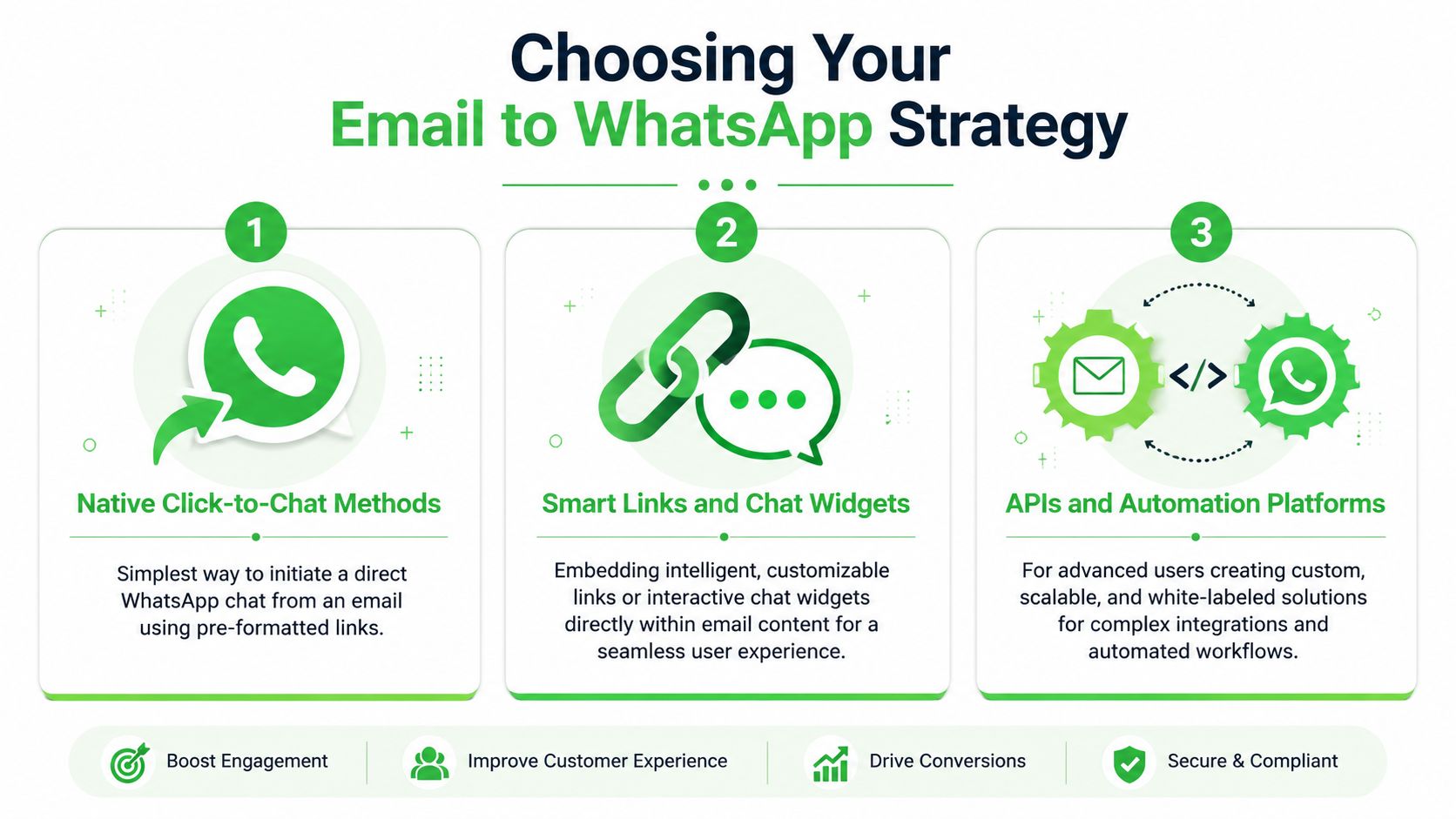
Three models agencies actually sell
The first model is native click-to-chat. This is the simplest path. You place a WhatsApp link, button, or QR code inside emails so the recipient starts the conversation. That's ideal for newsletters, support autoresponders, demo follow-up, and handoffs from email into chat. It's easy to launch and usually the lowest-risk option because the user initiates the conversation.
The second model uses automation platforms like Zapier or Make. Most agencies start with these for internal alerts. A lead email hits Gmail or Outlook, the automation extracts fields, and a WhatsApp message is generated for the sales rep or team inbox. This works well for small to mid-sized implementations, especially when you want speed without building custom infrastructure.
The third model is direct API and webhook integration. This is the agency-grade build for scale. You parse email content, structure the data, route it through webhooks, and control delivery logic through the WhatsApp Business API or a platform sitting on top of it. This is the path for white-labeled service delivery, complex client routing, and higher-volume operations.
Most agencies don't need to start with APIs. But the agencies that want predictable delivery, cleaner debugging, and better margins usually end up there.
Email-to-WhatsApp Method Comparison
| Method | Best For | Complexity | Cost | Scalability |
|---|---|---|---|---|
| Native click-to-chat methods | Marketing emails, support handoffs, demo follow-up | Low | Low | Moderate |
| Smart links and chat widgets | Tracked handoff from email into WhatsApp conversations | Low to moderate | Low to moderate | Moderate |
| APIs and automation platforms | Lead alerts, routing, white-labeled client workflows | Moderate to high | Moderate to high | High |
A useful way to choose is by asking what the client needs.
- Need a conversation starter: Use click-to-chat or a widget.
- Need internal alerts from incoming email: Use Make or Zapier first.
- Need structured routing across people, clients, or departments: Build with parsers, webhooks, and API logic.
What works best by client type
For local service clients, the simplest deployment often wins. A smart WhatsApp link in email follow-up can move people from passive reading to active conversation with almost no training required.
For B2B lead-gen clients, alerting matters more. They already have forms, CRMs, and notification emails. The job is to route the few messages that require immediate action, not to mirror the whole inbox.
For agencies serving multiple accounts under one operational model, direct integrations usually become necessary. That's where you can standardize parsing, template handling, routing logic, and reporting instead of rebuilding fragile automations for every client.
The Direct Path Using Smart Links and Chat Widgets
The easiest version of email to WhatsApp doesn't automate a message from your system to theirs. It invites the person reading the email to open WhatsApp and start the conversation themselves. That difference matters because user-initiated chat is cleaner operationally and easier to keep compliant.
Why user-initiated chat is the cleanest option
When someone clicks from an email into WhatsApp, they've chosen the channel and opened the thread. That reduces friction. It also avoids a common agency mistake, which is trying to force outbound WhatsApp messages from email events before the customer has started the conversation.
This approach is especially effective in a few places:
- Email signatures: Add a WhatsApp contact option for warm prospects.
- Support autoresponders: Offer "continue this in WhatsApp" for urgent cases.
- Sales follow-up emails: Push high-intent prospects toward live chat.
- Newsletters: Give readers a direct response path instead of asking them to reply by email.
The key is to make the link useful, not generic. A plain WhatsApp number works, but a pre-filled message works better because it frames the conversation. If the email was a demo follow-up, the pre-filled text should say that. If the email came from support, the pre-filled text should identify the issue type. That small change helps the receiving team triage faster.
A smart link isn't just a shortcut. It's a routing signal disguised as a call to action.
How to deploy it for clients
Agencies can roll this out fast with a repeatable checklist.
Define the use case first
Don't start with the link. Start with the moment. Are you moving newsletter readers to chat, giving support contacts a faster lane, or turning follow-up emails into WhatsApp replies?Create message-specific links
Build separate links for sales, support, billing, and campaign follow-up. That way the opening message tells the team where the contact came from.Track source and placement
Put different links in signatures, nurture emails, and autoresponders. If you don't separate placements, you won't know which email touchpoints produce conversations.Use a widget where context matters
A chat widget embedded on landing pages linked from email can preserve campaign context better than a bare number. This is useful when the recipient clicks through from email and needs one more layer of qualification before chatting.
Dropping the same WhatsApp number everywhere, without tracking, message prefill, or a routing rule, usually doesn't work. That setup creates conversations, but it doesn't create an agency asset. You want a workflow you can optimize, document, and replicate.
For agencies, this method is also a strong front-end offer. It's easy to explain, fast to deploy, and a good entry point before pitching more advanced alerting or API work.
Automating Lead Alerts with Zapier and Make
For most agencies, the first serious use case is simple. A lead email arrives. The right person gets a WhatsApp alert immediately. No inbox monitoring. No manual forwarding. No rep saying they "just saw it."
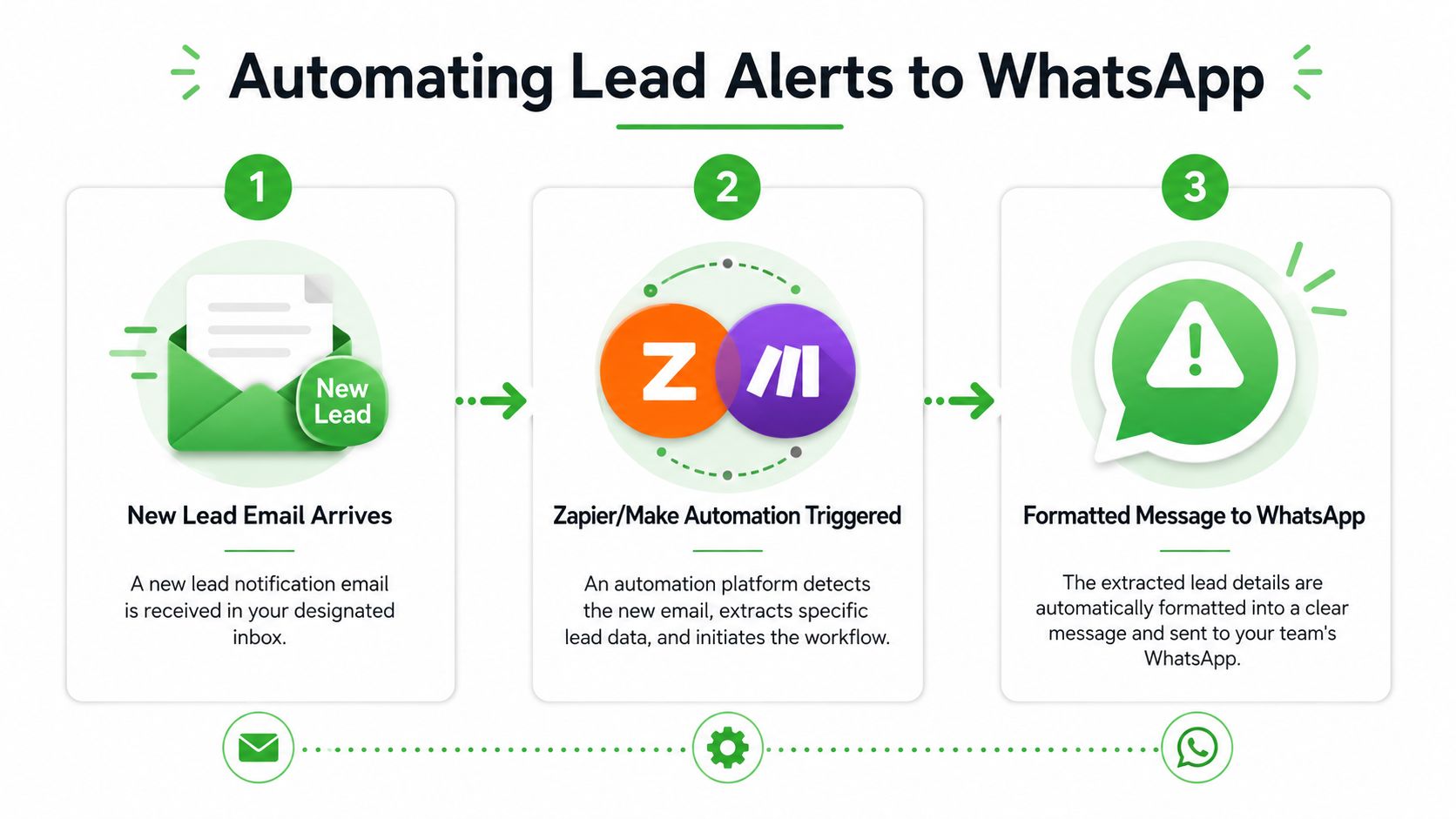
A workflow that works for most agencies
The practical build in Zapier or Make usually looks like this:
Trigger on a filtered inbox event
Use Gmail or Outlook triggers that watch for new emails matching a label, sender, or subject pattern. Don't trigger on the whole inbox unless you want noise.Extract only the fields the team needs
Pull name, phone, inquiry type, source, and any booking detail. If parsing fails on the first build, fix the email format before adding more logic.Format the WhatsApp message for action
Keep the alert compact. The best alerts tell the rep what happened, who the lead is, and what to do next.Route by team or client
A plumbing client's emergency requests shouldn't hit the same destination as a SaaS demo inquiry. Build separate paths.
If you're building more advanced developer-friendly workflows around Make, it's worth reviewing resources like connect PostPulse to Make for developers to think more clearly about how event-driven integrations should be structured and maintained.
A solid alert message often includes the lead's name, source, urgency, and a link back to the CRM or inbox. What it shouldn't include is the entire raw email body. That creates clutter and makes WhatsApp harder to scan.
After the first version works, test real cases. Send different lead emails through the flow. Check whether phone numbers parse correctly, whether internal notification emails get ignored, and whether duplicate alerts fire when inbox rules and automation overlap.
Later in the build, a video walkthrough can help teams visualize the moving parts before they start wiring their own scenario:
The compliance constraint most tutorials skip
Most no-code tutorials make this look easier than it is. The major issue is WhatsApp template compliance outside the customer service window. As noted by ChatArchitect's discussion of the email-to-WhatsApp compliance gap, users often want to route important emails to WhatsApp without triggering mandatory pre-approved templates, but that isn't how the WhatsApp Business API works outside the customer-initiated window.
That means your automation design has to reflect reality:
- If the customer started the conversation recently: you may have more flexibility inside the active session.
- If they didn't: your outbound message usually needs an approved template.
- If the alert is internal: routing to your team's WhatsApp environment can be simpler than messaging the customer directly.
Agencies frequently stumble on this point. They promise "instant email to WhatsApp forwarding" and only discover later that free-form outbound messaging is constrained. Existing tutorials often ignore this, which is why so many workflows work in a demo but fail when deployed for real client traffic.
Treat customer-facing WhatsApp sends and internal team alerts as two different products. They have different rules, different failure points, and different support requirements.
Zapier and Make still work well here. You just need to position them accurately. They are excellent orchestration layers. They are not magic ways around WhatsApp policy.
Building a Reliable Bridge with APIs and Email Parsers
Once an agency is managing several clients, several inbox formats, and several WhatsApp destinations, simple no-code forwarding starts to break under real traffic. Parser plus webhook architecture gives you a cleaner service model. You convert incoming emails into structured fields, apply routing rules once, and send only usable data into WhatsApp.
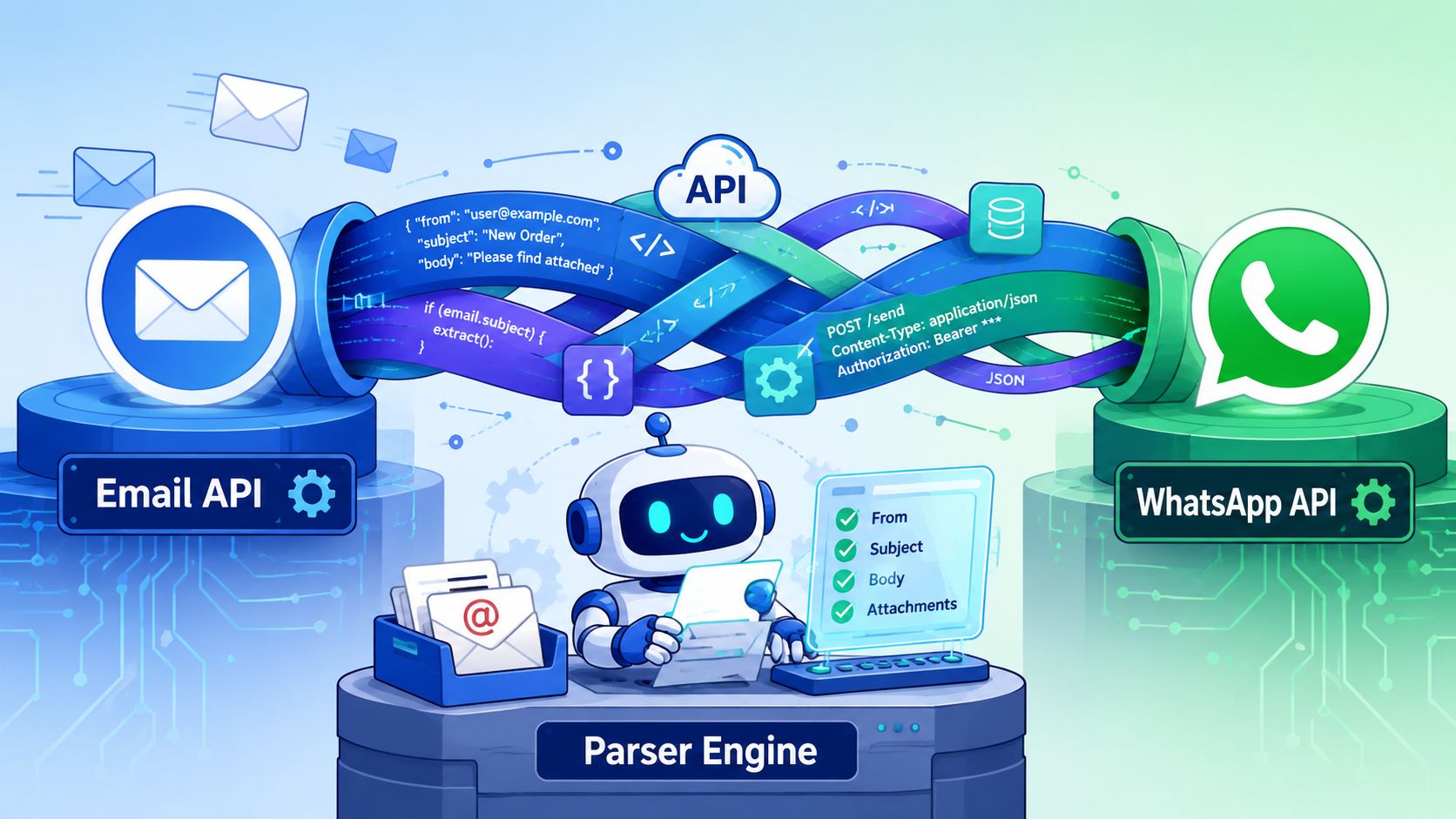
A five-part build agencies can standardize
ChatArchitect's methodology for intelligent email routing with WhatsApp triggers gives agencies a practical model: get API credentials, configure email rules, apply routing logic, use AI classification to screen out irrelevant messages, and test the workflow end to end. That matters because parser-based systems only stay profitable when the build pattern is repeatable across clients.
A production setup usually looks like this:
The parser receives the email
Tools like Mailparser.io, Parseur, or Parserr extract fields from messy inbox content. Subject line, sender, body copy, attachments, and timestamps become structured data your automation can use.A webhook sends the payload to middleware
The parsed data moves into Make, Zapier, n8n, or a custom app. This is the control layer, not just a pass-through.Routing logic assigns the right destination
Sales leads can go to one WhatsApp thread, urgent support notices to another, and account alerts to an internal escalation queue. Good agencies build this around a routing table, not hardcoded one-off rules.Filtering removes noise before delivery
Autoresponders, thread history, signatures, and low-value notifications should never hit WhatsApp. AI classification can help here, but rule-based filtering still handles a lot of the work at lower cost.The delivery layer formats the final message
Internal alerts, customer updates, and escalation notices should each have their own templates, logging rules, and fallback path.
For agencies packaging this as a wider automation offer, it helps to evaluate connected stacks that support more than one channel. Platform integrations for AI employees is useful reference material when a client wants WhatsApp alerts tied to ticketing, CRM updates, and task creation instead of isolated notifications.
Why parser-based systems scale better
The immediate benefit is cleaner data. The bigger benefit is service standardization.
Email sources rarely match. A Facebook Lead Ads notification, a website form submission, and a booking confirmation email all structure data differently. A parser lets your team map those inputs into one schema, which means one downstream workflow instead of three custom automations that each need separate maintenance.
That saves time during onboarding and protects margin later.
It also gives you better failure handling. If a parser misses a field, you can log the error, send the record to Airtable or Google Sheets for review, and stop bad data before it reaches WhatsApp. If the routing logic sees an unknown client, region, or message type, the workflow can push that item into a human review queue instead of guessing and sending the wrong alert.
Keep parsing and routing separate. Parsing extracts the data. Routing decides what to do with it. Agencies that combine both into one tangled scenario usually end up rebuilding the whole thing every time a client changes an email template.
This is also where resale becomes practical. You can create a parser template library, a standard routing matrix, and prebuilt delivery modules for common client cases such as new leads, support escalations, payment failures, and booking updates. That shortens setup time, lowers support overhead, and makes the service easier to price with confidence.
What does not scale is manual forwarding, stacked inbox rules, and a pile of one-off Zaps nobody wants to audit six months later.
Agency Best Practices and Troubleshooting
Agencies make money on this service when alerts arrive in the right WhatsApp thread, in the right format, without someone babysitting the workflow every week.
The gap between a demo and a retainer is operations. Clients judge this service on three things: delivery reliability, response speed, and how fast your team fixes exceptions. If any one of those slips, margin disappears into support time.
Where implementations usually break
The failures I see are rarely caused by Zapier, Make, or the WhatsApp API itself. They come from weak client onboarding, unclear ownership, and routing logic that nobody documented after launch.
According to Digital Micro Enterprise's benchmark summary on email-to-WhatsApp automation, email-to-WhatsApp routing can achieve 95% to 98% message read rates, but inadequate Meta Business Verification causes 30% to 40% of failed integrations, and poorly designed routing tables lead to 25% misdelivered alerts.
That tracks with agency delivery work. The technical build usually takes less time than getting the client's Meta assets, approved sender setup, escalation rules, and destination teams sorted properly.
Watch for these failure patterns:
- Verification gets rushed: Sales promises a fast launch, but the client has not finished Meta Business verification, phone number setup, or template approval.
- One destination becomes a dumping ground: Lead alerts, support alerts, and booking notices all hit the same group chat. Response times fall because nobody knows what deserves attention first.
- Routing names are too loose: Labels like "new lead" or "priority inquiry" sound fine until five systems use them differently.
- No owner for message changes: The client edits a form, CRM notification, or inbox rule, and the automation breaks unnoticed because nobody owns change control.
- Outbound rules are misunderstood: Teams assume every incoming email can trigger any WhatsApp reply. Session windows and template rules still apply.
Use a runbook, not guesswork.
| Problem | Likely Cause | First Check |
|---|---|---|
| Messages not sending | Verification, template, or session issue | Meta account status, approved templates, conversation type |
| Alerts sent to wrong team | Routing table mismatch | Parsed fields, client ID, destination mapping |
| Too many alerts | Weak filtering or noisy inbox source | Trigger rules, sender filters, event classification |
| Duplicate notifications | Two automations firing on the same event | Inbox rules, Zap history, Make scenario paths |
| Delayed delivery | Rate limits, parser lag, or task backlog | Platform logs, queue timing, webhook retries |
For larger agency accounts, add one more control. Send failed events into a review queue in Airtable, ClickUp, or a shared support inbox instead of retrying forever. That gives your team a clean place to inspect bad payloads, fix mapping issues, and prove to the client that incidents are being handled.
Support scope needs to be written into the offer. Clients will ask who updates routing rules, who handles Meta rejections, and what response time they can expect when a notification path fails. Put that in the proposal and statement of work. If you need a reference point for how to present service coverage, spell out your available support channels and response windows before launch.
How to package this as a service
Price this around business risk and support load, not around how many Zaps you built.
A practical structure is three tiers. The first covers WhatsApp entry points in email signatures, buttons, and tracked chat links. The second covers operational alerts such as new leads, missed calls, support escalations, and booking changes. The third covers custom routing, parser maintenance, API work, monitoring, and monthly optimization.
That model protects margin because each tier has a clear delivery boundary:
- Entry tier: Get more conversations into WhatsApp.
- Operations tier: Push high-value email events to the right team fast.
- Managed tier: Maintain routing logic, exception handling, reporting, and change requests.
The profitable version of this service includes guardrails. Set a monthly cap on routing edits. Charge separately for new inbox sources. Include a stabilization period after launch. Require one client-side owner who approves logic changes. Agencies that skip those controls end up selling "automation" and delivering unlimited support.
A good package also includes reporting the client can understand. Do not send screenshots from Zapier task history and call it a monthly report. Show delivered alerts, failed events, median handling time, top error types, and the business actions tied to those alerts. That is what keeps the service tied to revenue and service performance instead of looking like back-office plumbing.
Frequently Asked Questions
Can I send the full email body to WhatsApp?
You can, but it usually creates messy alerts. Agencies get better results by sending a short summary, the key fields, and a link back to the original system. WhatsApp is best for action, not archival reading.
What about attachments in the email?
Treat attachments selectively. Important documents can be passed along if the workflow and message type support it, but teams should route a notice plus a link to the file rather than dumping every attachment into chat.
How do I stop notification loops from auto-replies?
Filter aggressively at the email layer. Exclude common autoresponder patterns, internal domains, and thread markers. If the inbox is noisy, add classification before the WhatsApp step.
Can one agency manage multiple inboxes and clients?
Yes, if routing rules are separated by client, inbox source, and destination team. Shared logic is good. Shared destinations are where confusion starts.
Is this service worth offering long term?
Yes, when you position it around response speed and revenue operations rather than "automation for its own sake." That's even more compelling when customer value is considered. Jesty CRM's WhatsApp marketing statistics state that individuals acquired via WhatsApp show 134% higher lifetime value than those acquired through email. That makes a well-run email to WhatsApp service more than a convenience feature.
If clients ask how support should be organized around these systems, a practical reference point is to define clear available support channels before launch so issues don't bounce between email, chat, and account management with no owner.
If you want to turn email to WhatsApp into a service your agency can resell, Double My Leads is built for that model. It gives agencies a white-labeled WhatsApp platform with smart links, chat widgets, unlimited real-time inbox messaging, CRM sync, and Cloud API options when you need deeper automation. It's a practical way to launch client workspaces quickly, keep margins predictable, and offer WhatsApp as a managed revenue channel instead of a one-off setup.


