
A lot of agencies are still running expensive work on cheap processes. A lead comes in from Facebook Lead Ads, Typeform, or a landing page. Someone on the team copies it into a CRM, posts a message in Slack, updates a tracker, and hopes the sales rep follows up fast enough. Then another lead arrives from a different source, with a different format, and the same mess starts again.
That's where Zapier automation earns its keep. It's not the strategy. It's the glue that keeps your agency's tools moving in the same direction, especially when you're juggling lead generation platforms, CRMs, reporting tools, and newer channels like WhatsApp. If your agency sells speed, responsiveness, and clean client reporting, the handoffs between systems can't stay manual.
Table of Contents
- Why Your Agency Is Wasting Hours on Manual Tasks
- The Building Blocks of Zapier Automation
- Powerful Zapier Use Cases for Modern Agencies
- Connecting WhatsApp into Your Lead Generation Funnel
- Zapier Versus The Alternatives
- Best Practices Security and Pricing
- Troubleshooting Common Zapier Issues
Why Your Agency Is Wasting Hours on Manual Tasks
Most agency bottlenecks don't look dramatic. They look ordinary. A coordinator checks inboxes for form fills, an account manager updates a pipeline, someone else sends the same “new lead” Slack message again, and reporting gets patched together at the end of the week.
Those jobs feel small until they pile up. Then you get slower lead response, messy attribution, duplicate records, and client questions your team has to answer by digging through three different tools.
Manual work creates two kinds of cost. The first is obvious. Staff time disappears into admin. The second is the one agencies feel later: missed follow-up, delayed outreach, weak reporting confidence, and no clear source of truth across the stack.
The real problem isn't one task
Agencies usually don't lose time because one person is inefficient. They lose time because the workflow between apps is broken.
A common example looks like this:
- Lead capture breaks at intake: A form submission lands in one platform, but the CRM entry waits for a human.
- Sales handoff gets delayed: The rep doesn't see the lead until someone manually tags or assigns it.
- Reporting drifts from reality: Spreadsheet trackers stop matching what happened inside HubSpot, GoHighLevel, or Salesforce.
- Client communication lags: The agency can't tell the client what happened without checking multiple systems.
Practical rule: If a task happens on every lead, every client, or every campaign, it shouldn't rely on memory.
That's why Zapier sits in so many agency stacks. It has reached $310 million in annual revenue in 2024, and over 2.2 million businesses and 3 million users globally rely on the platform to automate workflows, according to Zapier usage and revenue statistics compiled by SQ Magazine. Agencies don't adopt tools at that scale because they're interesting. They adopt them because disconnected systems are expensive.
Where agencies feel the pain first
The first cracks usually show up in three places:
Lead leakage
A lead submits a form outside business hours, and nobody touches it until morning.Client reporting
Your team spends Friday rebuilding what should have updated automatically all week.Channel fragmentation
Leads start on a landing page, move to email, then ask questions on WhatsApp or text. The conversation history ends up split across tools.
Zapier automation helps when the work is repetitive and the apps don't talk cleanly on their own. It won't fix a bad offer, weak traffic, or poor sales scripts. It will fix the plumbing so your team can respond faster and operate like the systems are connected, because they are.
The Building Blocks of Zapier Automation
Zapier automation is easier to understand when you stop thinking about “automation” as a big abstract system and start thinking in handoffs. One event happens. That event triggers the next step. Then the next.
What a Zap actually does
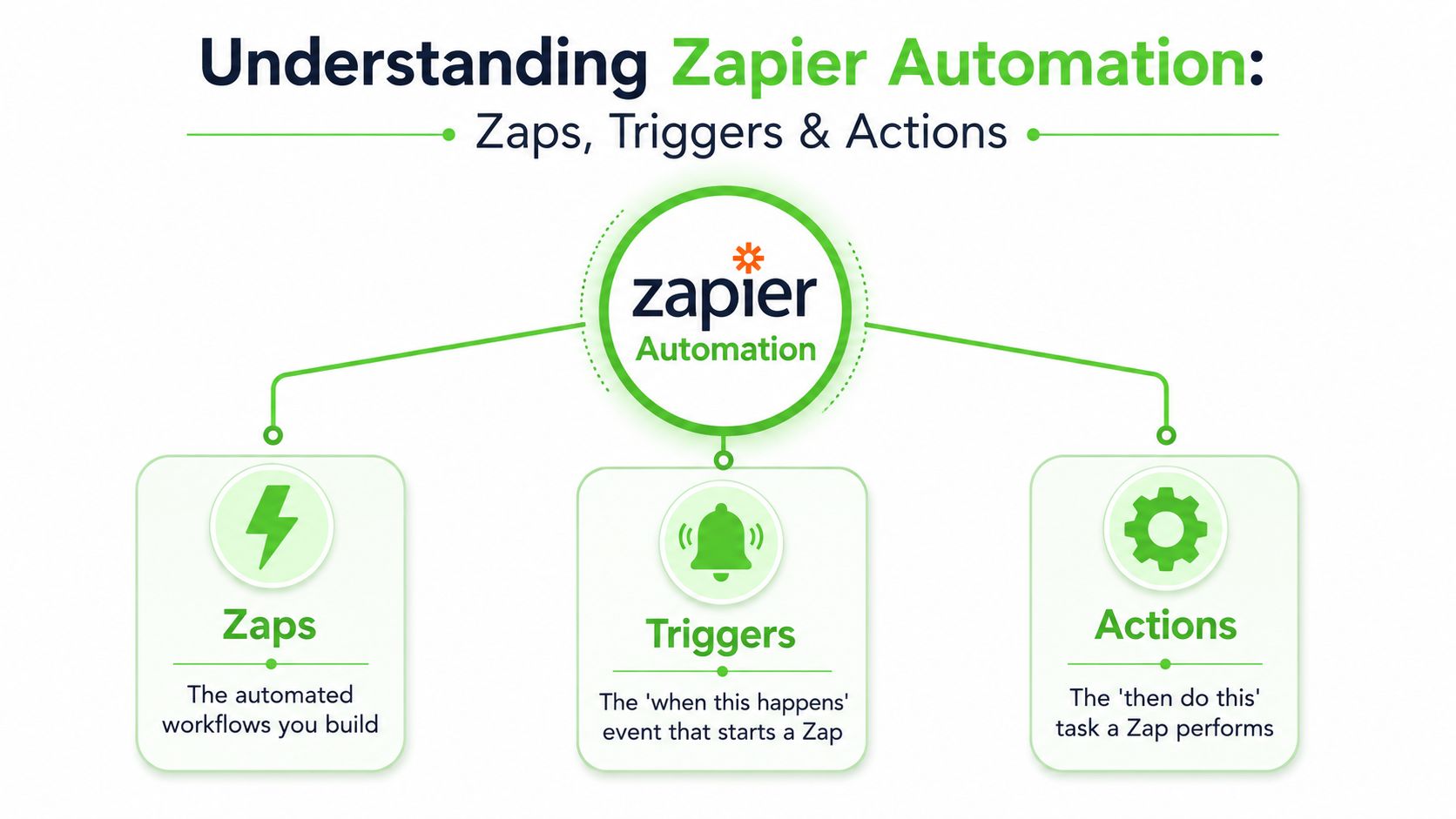
A Zap is the workflow. It's the container for the logic.
Inside that workflow, the first event is the Trigger. That's the “when this happens” moment. A new lead in Facebook Lead Ads. A booked call in Calendly. A new row in Google Sheets. A status change in HubSpot.
The next step is the Action. That's the “do this next” part. Create a contact, send a Slack alert, update a pipeline stage, or push data into a reporting sheet.
It's like digital dominoes:
- Trigger: a form gets submitted
- Action: create contact in CRM
- Action: assign owner
- Action: notify sales channel
- Action: add lead source to tracker
That's the basic shape of most useful agency automations.
Zapier's own analysis of 1,500 knowledge workers says a task is a strong candidate for automation only if it occurs on a predictable schedule, involves moving information between apps, and is repetitive, as outlined in Zapier's report on marketing automation ROI. That's a clean test for agencies. If your staff repeats the same data movement every day, it belongs on the automation shortlist.
The logic tools that matter
Once you're past a simple trigger and action, four tools do most of the actual work.
- Filters decide whether the Zap should continue. If the lead source equals “high intent,” proceed. If not, stop.
- Paths split the workflow. A booked demo can go one way, a pricing inquiry another.
- Formatter cleans messy data. It standardizes names, dates, phone numbers, and text before the data reaches the next app.
- Webhooks let Zapier send or receive data with tools that don't have a clean native workflow for your use case.
Good automation is less about adding more steps and more about making each step predictable.
For agencies, that matters because your tools rarely arrive in a neat, single-vendor stack. You've got ad platforms, CRMs, call booking tools, spreadsheets, inboxes, and reporting dashboards all feeding each other. If you want a broader view of how non-developers are approaching AI-driven workflow optimization, that overview is useful because it frames automation as process design, not just software setup.
A practical way to build your first useful Zap is to map the human steps first. Write down exactly what happens after a new lead arrives. Then replace the repeated handoffs one by one. Don't start with the fanciest workflow. Start with the one your team touches every day and complains about every week.
Powerful Zapier Use Cases for Modern Agencies
The best agency automations don't feel clever. They remove delay where delay hurts revenue, delivery, or client trust.
Zapier runs at serious scale. Users execute over 1.5 billion automated tasks per month, and approximately 69% of Fortune 1,000 companies use Zapier in their tech stacks, according to Fueler's roundup of Zapier usage and enterprise adoption. That scale shows up in the kinds of workflows agencies build every day.
Lead routing that happens immediately
A paid social agency launches campaigns for multiple local service clients. Leads arrive from Meta forms, landing pages, and booking widgets. If those leads sit in separate platforms, follow-up speed collapses.
A practical Zapier flow looks like this:
- Trigger: New lead from Facebook Lead Ads or Typeform
- Action: Create or update contact in HubSpot or GoHighLevel
- Action: Tag by source and campaign
- Action: Send Slack alert to the correct sales channel
- Action: Create task for the assigned rep
The value isn't just speed. It's consistency. Every lead gets the same intake treatment, source tagging, and internal visibility.
Client reporting without spreadsheet drag
Reporting is where agencies burn hours. Team members export data, paste it into a master sheet, format the same columns, then email a summary no one trusts because the process was manual from the start.
A stronger setup uses Zapier to move campaign or pipeline data into a reporting sheet or reporting database on a schedule. Then the account manager reviews the output instead of rebuilding it.
Here's where this works well:
- Weekly performance snapshots for clients that still want a spreadsheet or email recap
- Lead delivery reconciliation when clients question whether leads were passed over correctly
- Pipeline visibility for agencies that manage both media and appointment-setting
Agencies don't need more dashboards. They need fewer manual reconciliations.
Internal operations that stop relying on memory
Some of the highest-return automations aren't client-facing at all.
When a proposal gets signed, a Zap can create the project in Asana, notify the fulfillment team in Slack, and add the client to your onboarding tracker. When a support ticket changes status, another Zap can alert the account manager and update the internal notes tool. When a content piece is approved, Zapier can move it from draft management into a publishing queue.
A few reliable agency patterns:
New client onboarding
Signed deal triggers project creation, internal notification, and checklist generation.Creative approvals
Approval form updates a task board and pings the next stakeholder.Review request workflows
A completed job triggers a review request email or internal reminder for the account team.
The thread running through all of them is simple. Zapier automation is strongest when it removes handoffs that people forget, delay, or handle differently each time.
Connecting WhatsApp into Your Lead Generation Funnel
A common agency failure looks like this. A prospect submits a form from a paid ad, the lead lands in the CRM, and then sits there until someone notices it. By the time a rep reaches out, the prospect has already replied to a competitor on WhatsApp.
That gap is expensive.
For agencies running paid media, local lead gen, or appointment funnels, WhatsApp often gets faster replies than email and less resistance than a phone call. The problem is operational, not strategic. Lead sources, CRMs, and messaging tools usually sit in different systems, so the handoff breaks unless something connects them reliably.
The workflow pattern that works
Zapier handles the handoff layer. It connects the lead source your agency already manages to the communication channel the prospect is likely to answer.
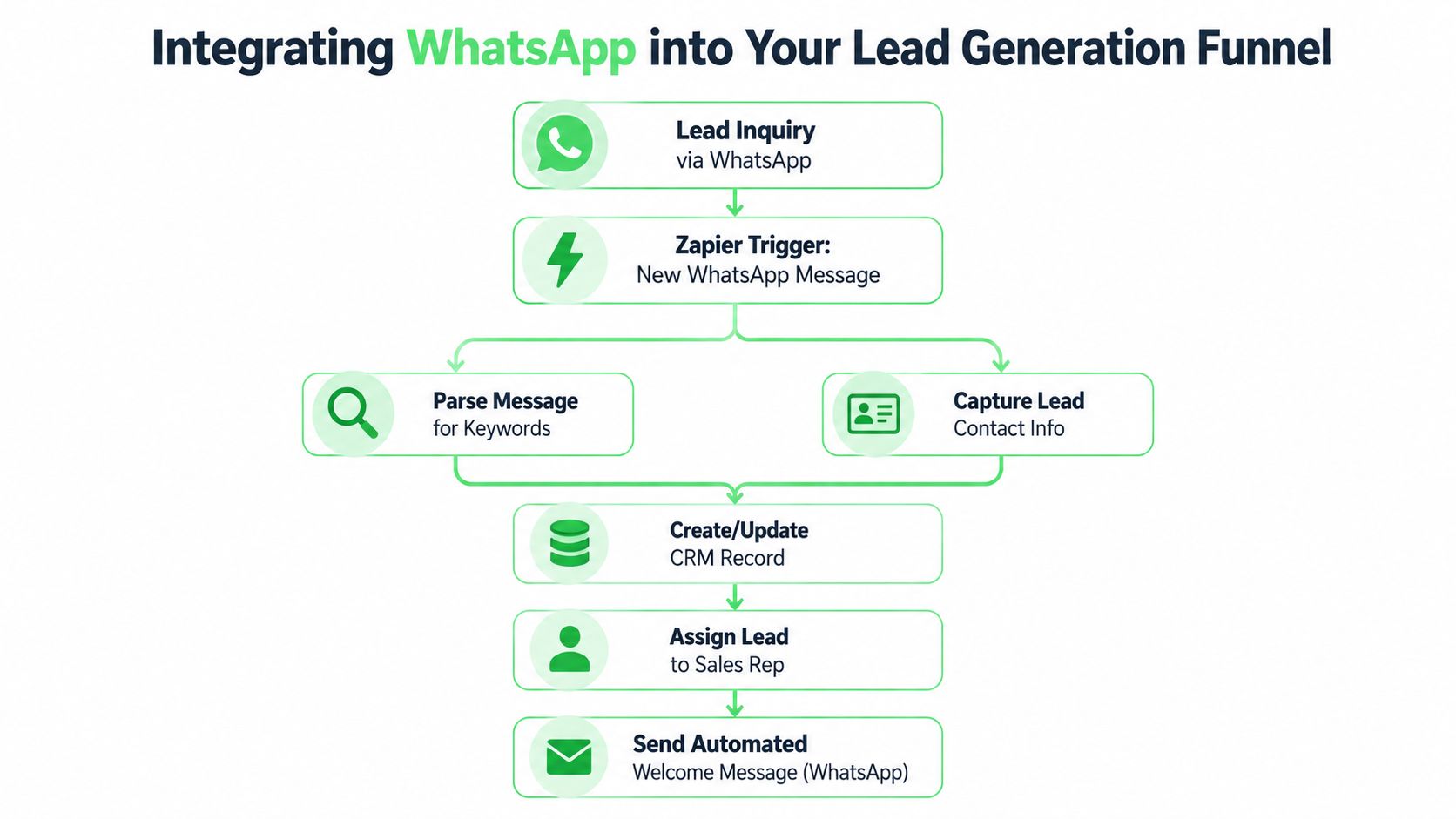
In practice, the pattern is simple. A new lead enters through a form, CRM update, or booking tool. Zapier catches the event, standardizes the data, applies routing rules, and sends the payload to your messaging system through a webhook or app action. The messaging platform starts the WhatsApp workflow, and the CRM gets updated so the account team can see what happened.
A clean version of that flow looks like this:
Trigger the intake event
New form submission, new CRM contact, or booked appointment.Clean the lead data
Format phone numbers, normalize names, and map campaign or client fields correctly.Apply routing logic
Hold incomplete leads, split by location or offer, and assign the right owner.Send the lead to the messaging layer
Use Webhooks by Zapier or a direct integration to pass the data into your WhatsApp system.Write status back to the source of record
Update the CRM with assignment, delivery status, or a note that the contact entered a WhatsApp flow.
Zapier explains this well in its AutomationBench benchmark, which evaluates whether automations reach the intended final data state across connected apps. That standard matters for agencies. The goal is not just to fire off a message. The goal is to capture the lead, route it correctly, start the conversation fast, and keep the CRM accurate so sales and reporting stay aligned.
Double My Leads fits this setup when an agency needs to move leads from forms or CRMs into WhatsApp workflows, inbox assignment, or follow-up systems without creating a separate process outside the main stack.
Here's a walkthrough that helps visualize the flow in practice:
Where agencies usually get this wrong
The weak point is usually not the webhook itself. It is the logic around the handoff.
I see four recurring problems in agency setups:
- Phone numbers are not cleaned before send. One formatting issue can break delivery or create duplicate contacts.
- Source data gets dropped. The lead reaches WhatsApp, but the campaign, form, or ad set is no longer attached for reporting.
- The CRM never gets updated. Sales reps cannot tell whether the contact already entered an automation or got a manual reply.
- Ownership rules are missing. Two reps message the same lead, or everyone assumes someone else handled it.
Each of those mistakes creates a reporting problem and a revenue problem. When the CRM does not reflect WhatsApp activity, account managers cannot prove lead handling. When routing is unclear, response time slips. When attribution disappears, the client starts questioning channel quality instead of fixing the process.
The better model is to use Zapier as the glue across the stack. Forms, ad platforms, calendars, CRMs, and WhatsApp do not need to live in one product. They do need a dependable routing layer between them.
That is the practical value here. Agencies already know how to generate leads. What usually needs work is the bridge between lead capture and the first live conversation, especially when that conversation happens in WhatsApp instead of email.
Zapier Versus The Alternatives
Zapier is the default choice for a reason, but it isn't the right answer for every workflow. Agencies make better decisions when they treat automation like a stack decision, not a brand decision.
The biggest trade-off is this: Zapier is excellent at structured, repeatable handoffs across apps. It's weaker when the workflow needs dynamic reasoning in the middle.
A cited 2025 claim says 68% of businesses report automation failures in multi-step reasoning scenarios due to rigid logic, in a comparison discussed by MindStudio on AI-powered automation and Zapier's limitations. That doesn't make Zapier a bad tool. It means agencies should use it for deterministic workflows and stop forcing it into problems that need judgment.
Where Zapier fits best
Zapier is usually the right fit when:
- your apps already connect well enough through Zapier
- the logic is clear before the workflow starts
- the process is repetitive and rule-based
- your team needs something marketers and operators can maintain without engineering help
Native integrations can be simpler if two tools already sync exactly how you need. A direct HubSpot-to-Slack or Calendly-to-CRM integration often has fewer moving parts.
Make or similar iPaaS tools can be attractive when your team wants more visual branching or different pricing mechanics. They can also suit teams that are comfortable with more technical workflow design.
Custom API work makes sense when the workflow is core to your service delivery, needs precise control, or must handle unusual edge cases with reliability.
Where another option makes more sense
Here's a practical comparison.
| Method | Best For | Cost Model | Complexity |
|---|---|---|---|
| Zapier | Fast deployment across common agency tools | Typically task-based | Low to moderate |
| Native integrations | Simple direct sync between two apps | Usually bundled into app pricing | Low |
| Make or similar iPaaS | More technical multi-step scenarios | Varies by platform usage model | Moderate |
| Custom API solution | Business-critical or unusual workflows | Build and maintenance cost | High |
| AI agents | Workflows that require adaptation and reasoning | Varies by tool and usage | Moderate to high |
Pick Zapier when the problem is operational friction. Don't pick it because you hope a linear workflow will behave like a thinking system.
For agencies, the dividing line is practical. If you're routing leads, syncing records, pushing updates, and sending notifications, Zapier is often enough. If you need the system to interpret ambiguous inputs, retry strategically, and change course based on context, you're in a different category of automation.
Best Practices Security and Pricing
A handful of Zaps can help a team. A large set of undocumented Zaps can turn into agency debt fast.
Treat automations like agency infrastructure
If a Zap controls lead intake, assignment, client reporting, or onboarding, treat it like a production system.
That means:
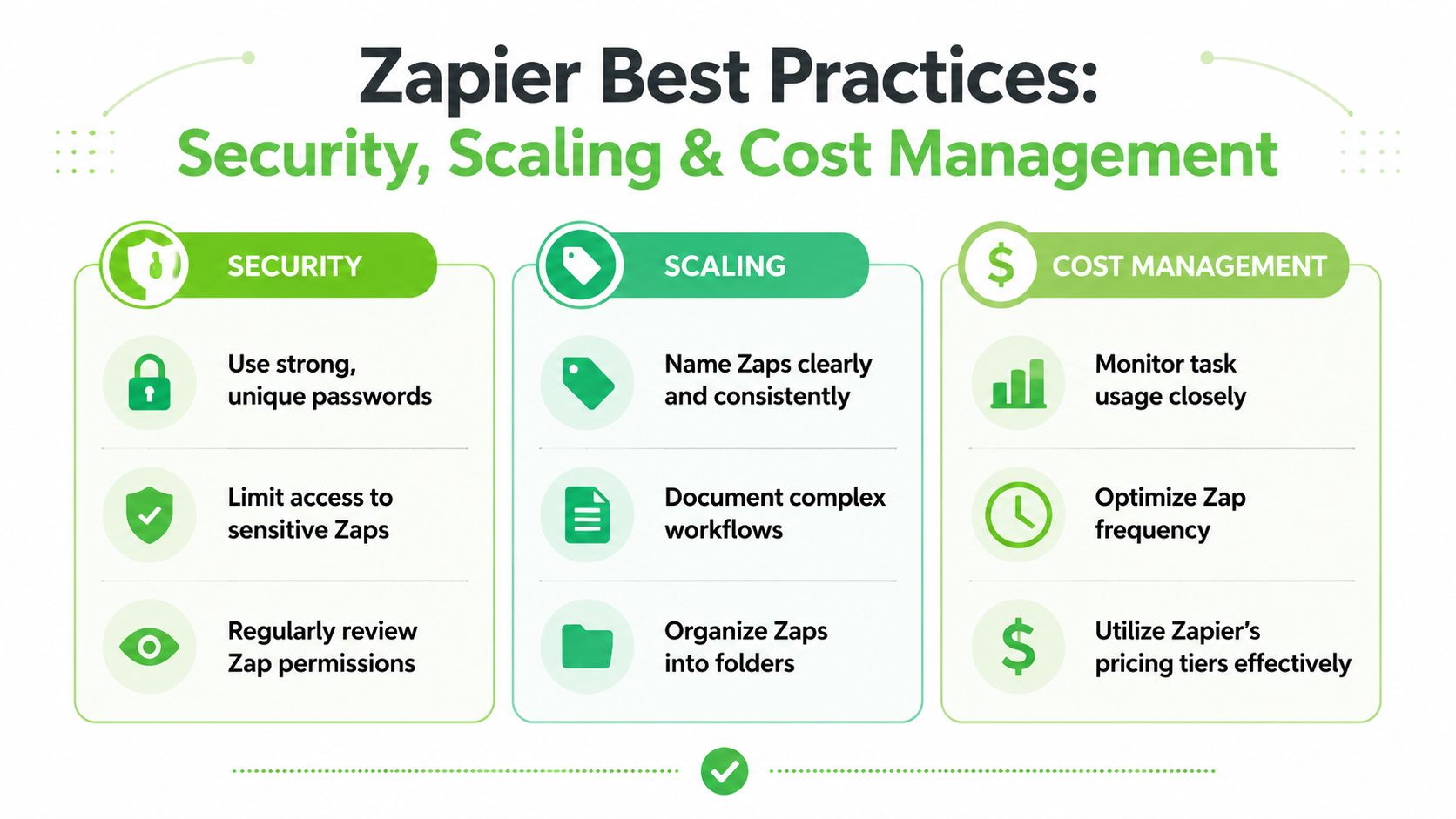
Name every Zap clearly
Include the client or department, trigger source, and outcome. “HubSpot New Lead to Sales Slack” is better than “Lead Alert.”Use folders and ownership
Group Zaps by client, function, or internal department so one person doesn't become the only human who understands the setup.Document edge cases
If a workflow depends on a field always existing, write that down. If one Path handles VIP leads differently, document why.Restrict access
Teams should only touch the workflows they manage. Shared logins and scattered credentials create risk.
A reliable automation system is boring to operate. That's a compliment.
Security in agency automation is usually less about dramatic threats and more about sloppy process. A former team member still has access. A client-facing Zap uses a personal login. An API credential lives in someone's notes app. Those are avoidable problems.
Price for usage not optimism
Zapier pricing gets expensive when agencies build first and monitor later. The trap is simple. Each small action feels harmless, but high-volume lead flow, multi-step updates, and duplicate runs can drive usage faster than expected.
A better approach is to design for efficiency:
- Use Filters early so low-value records don't consume downstream tasks.
- Avoid duplicate actions when one write-back can replace three notifications.
- Watch polling and frequency choices if a workflow doesn't need instant execution.
- Reserve premium workflows for client-facing or revenue-connected processes.
Don't choose a plan based on what you hope the agency will automate. Choose it based on what the agency is already processing and what the workflow absolutely needs to do.
Troubleshooting Common Zapier Issues
A Zap usually fails for ordinary reasons. A form sends a blank phone number. A CRM field gets renamed. An action expects one format and receives another. For agencies, those small breaks create real costs, especially when a lead should have been routed to a rep, pushed into the CRM, and handed off to WhatsApp in minutes.
The fix starts with evidence, not guesswork. Zap History shows whether the problem came from the trigger, the data payload, or a downstream app step.
Start with Zap History not guesswork
Check these four points in order:
Did the trigger fire?
If it did not, check the app connection, trigger rules, and whether the source record matched the Zap conditions.What data came through?
Review the raw payload. Missing email addresses, malformed phone numbers, and unexpected field labels cause a large share of agency automation failures.Which step failed?
Isolate the exact action. Troubleshooting one broken step is faster than reviewing the whole workflow.Was the error repeatable?
A required field missing every time points to a design problem. A one-off app timeout points to a temporary service issue.
Fix the workflow not just the error
Replaying a failed task gets one lead through. It does not prevent the next ten from failing for the same reason.
Use the workflow patterns that reduce repeat failures:
Add Formatter before critical steps
Standardize phone numbers, dates, names, and text before they hit the destination app.Put Filters before fragile actions
Stop incomplete leads before they create bad CRM records or failed message sends.Create fallback Paths
Route incomplete or suspicious records into a review queue instead of letting them fail silently.Use webhooks when the native action is too limited
Native Zapier steps are fast to deploy, but they do not cover every edge case. Webhooks give agencies more control when client systems or messaging flows need stricter logic.
A stable automation system handles messy inputs on a busy Tuesday, not just clean test data on setup day.
That matters even more when Zapier is acting as the glue across the agency stack. One lead can start in Meta Lead Ads, pass through enrichment, hit the CRM, trigger an assignment rule, and then move into a WhatsApp conversation. If one field breaks in the middle, the lead does not just stall. It often disappears into the gap between platforms.
Agencies that want tighter control over that handoff should evaluate Double My Leads as part of the stack, as noted earlier. It fits the common agency need to bridge lead generation sources and WhatsApp follow-up without forcing the team to manage that messaging layer manually.


