
Friday at 4:47 p.m., a customer messages about a package that still hasn't arrived. Another wants to change a shipping address before fulfillment locks. A third is asking for a return on the item they bought two hours ago because they picked the wrong size. Your client's paid traffic is still running, orders are still coming in, and the support inbox is now the place where margin gets protected or burned.
That's the moment many agencies realize ecommerce customer support isn't a side service. It's a retention system, a conversion layer, and a post-purchase sales function. If you already manage media, lifecycle, CRO, or CRM for ecommerce brands, support is the missing operational piece that lets you influence the full customer journey instead of just the front end.
The opportunity is bigger than answering tickets. Agencies can package support as a white-labeled, recurring service with clearer scope, tighter delivery systems, and stronger client stickiness than one-off project work. But that only works if the operation is built for speed, context, and predictable labor.
Table of Contents
- Why Ecommerce Support Is Your New Sales Team
- Building Your Omnichannel Support Foundation
- Structuring Your Support Team for Efficiency
- Leveraging Automation and AI for Scale
- Mastering Critical Ecommerce Support Workflows
- Measuring What Matters for Continuous Improvement
- Packaging Support as a White-Label Service for Agencies
Why Ecommerce Support Is Your New Sales Team
The old model treated support like cleanup. Orders came in, operations handled problems, and marketing chased the next conversion. That separation doesn't hold anymore.
In 2025, 95% of ecommerce professionals said customer service drives revenue, and 74% of customers expected online shopping capabilities to match what they could do in person or by phone, according to Salesforce ecommerce statistics. The same source notes that U.S. retail e-commerce sales reached $310.3 billion in Q3 2025 and represented 16.4% of all U.S. retail sales. When that much buying happens digitally, support stops being a back-office function. It becomes part of the storefront.
A support agent who resolves a delayed shipment well can save a repeat customer. A live chat rep who answers a pre-purchase sizing question can prevent a return. A WhatsApp conversation that confirms stock, shipping windows, or bundle details can close a sale that might otherwise stall.
Practical rule: Treat every support touchpoint as either revenue protection, revenue recovery, or conversion support.
That doesn't mean forcing agents to sell on every interaction. It means designing support so it removes friction without creating more of it. Good ecommerce customer support lowers refund pressure, reduces duplicate contacts, and gives buyers enough confidence to complete the order.
For agencies, that changes the commercial logic. If your team already influences acquisition and retention, adding support lets you control one more place where client revenue is won or lost. It also gives you a stronger story than “we answer tickets.” You're selling response systems, customer continuity, and operational trust.
Building Your Omnichannel Support Foundation
Speed sets the baseline. Customers don't care how elegant your stack looks if nobody answers quickly enough to help.
According to eDesk's ecommerce customer service statistics, 64% of shoppers expect a response within one hour. The same source reports 85% satisfaction for live chat, compared with 80% for email and 78% for phone. That doesn't mean every brand should force customers into chat. It means channel choice should follow urgency, complexity, and the kind of reassurance the buyer needs.
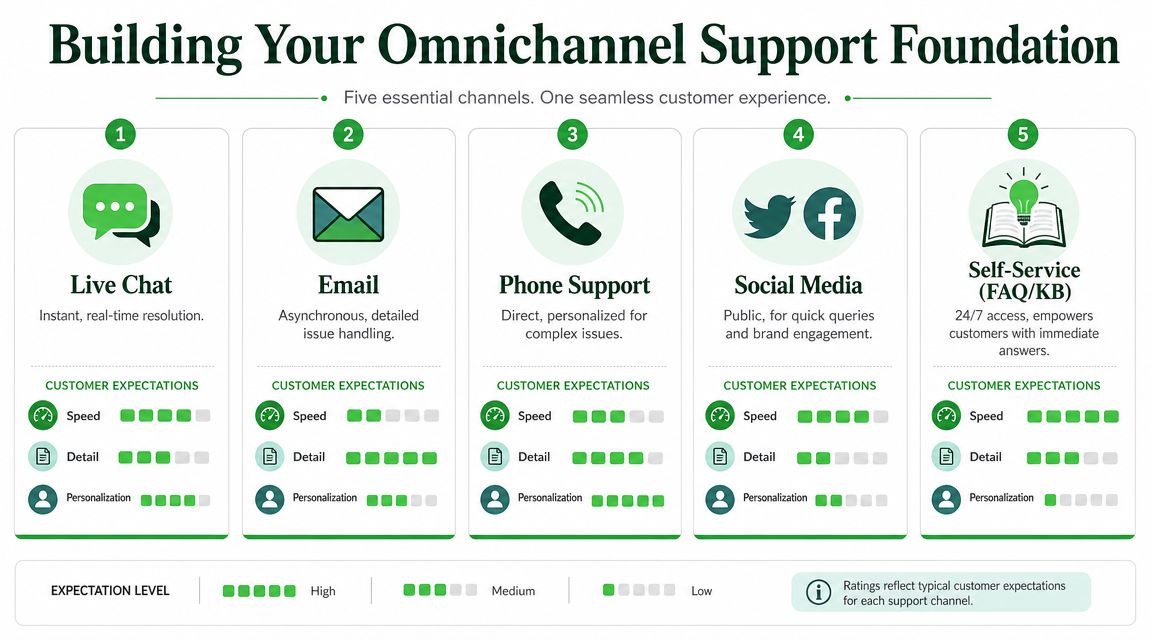
Pick channels by buying behavior, not habit
Most agencies inherit support setups instead of designing them. The client has a shared inbox, an old phone line, scattered DMs, and maybe chat installed because a previous app partner recommended it. That's not a strategy.
Use a simple channel model:
| Channel | Expected Response Time | Avg. CSAT | Best For |
|---|---|---|---|
| Live chat | Within the same session | 85% | Pre-purchase questions, urgent order issues, checkout friction |
| Same day or next available support window | 80% | Detailed cases, attachments, policy-heavy requests | |
| Phone support | Immediate when staffed | 78% | Escalations, sensitive complaints, complex exceptions |
| Fast conversational replies | Qualitatively strong for ongoing threads | Post-purchase updates, conversational commerce, repeat buyers | |
| Self-service FAQ and knowledge base | Instant | Depends on article quality | Returns policy, shipping policy, order tracking, basic troubleshooting |
Email still matters because some issues need space. Customers send photos, explain timelines, or need written confirmation. Phone still matters when the issue is emotional or expensive. But neither should be the default for everything.
Live chat works best when customers are deciding. If someone is comparing variants, worried about delivery timing, or asking whether a product will fit a use case, that's a live conversation. The fastest helpful answer often wins the order.
Where WhatsApp fits
WhatsApp is different from both email and site chat. It sits closer to how customers already communicate with friends, family, and local businesses. That matters because support quality improves when the channel feels natural.
For ecommerce brands, WhatsApp is especially strong in situations like these:
- Post-purchase reassurance: Shipping updates, delivery clarifications, and address corrections are easier in an ongoing message thread.
- High-intent pre-sale questions: Customers can ask for sizing, availability, compatibility, or custom options without opening a formal ticket.
- Reactivation and follow-up: If a customer asked a question yesterday and didn't buy, messaging gives the team a softer way to continue the conversation than another email.
- Media-rich service: Photos, screenshots, voice notes, and product videos can speed up diagnosis and reduce confusion.
If a customer has to switch channels to get help, the business has already added friction.
The best omnichannel setups don't try to make every channel equal. They give each channel a job. Email handles documentation. Chat handles immediacy. Phone handles escalation. WhatsApp handles continuity. Self-service handles repetition.
For agencies, that means you shouldn't sell “omnichannel” as channel sprawl. Sell it as channel orchestration. Fewer, better-defined lanes outperform a messy everywhere-at-once support setup.
Structuring Your Support Team for Efficiency
A bad team design can wreck a good channel strategy. Tickets sit untouched, escalations bounce around, and simple issues get handled by expensive senior staff while nuanced cases wait in line.
A scalable support function needs clear ownership first. Then it needs staffing that matches order volume, product complexity, and support hours.
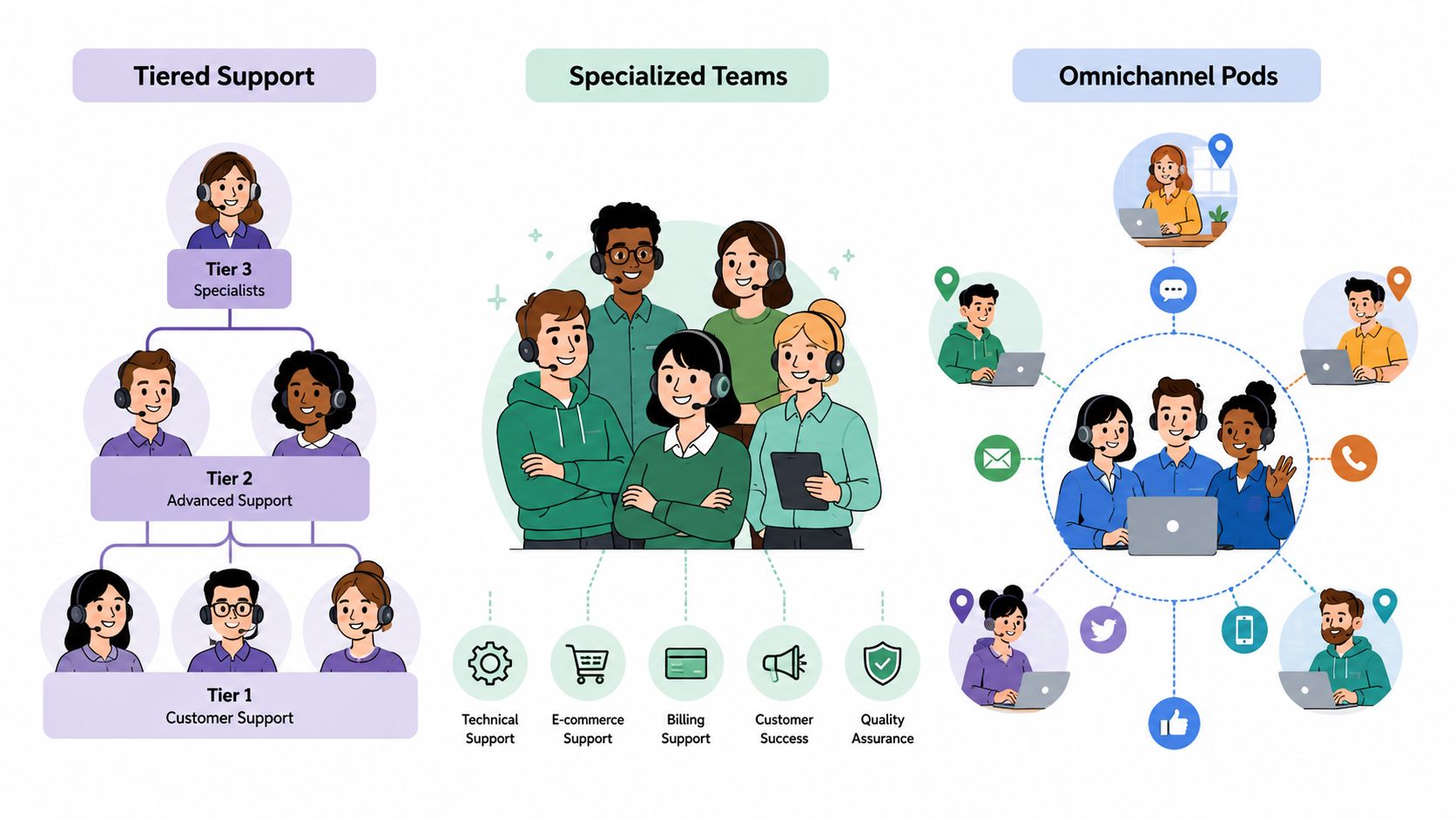
Two models that work
The tiered model is the simplest to operationalize. Level 1 handles common tickets like WISMO, address changes, return eligibility, and policy questions. Level 2 handles exceptions, carrier disputes, chargeback-adjacent complaints, VIP customers, and anything that needs judgment.
This model works well when ticket volume is high and issue types are repetitive. It's also easier to train and quality-control because new agents don't need to know everything on day one.
The downside is handoff risk. If your notes are weak or routing logic is sloppy, customers repeat themselves and satisfaction drops.
The dedicated agent model assigns the same person or pod to a client account, product line, or shift window. That agent learns the catalog, common issues, fulfillment quirks, and tone faster. For premium brands or complex products, this often produces better customer conversations.
The downside is coverage. Dedicated structures can be less flexible when volume spikes or agents are out.
A hybrid usually works best for agencies:
- Shared Level 1 pool: One team covers standardized tasks across several clients.
- Client-specific escalation layer: Senior agents or account pods handle exceptions and brand-sensitive cases.
- Specialist support access: A small group handles subscriptions, fraud-adjacent cases, warranty questions, or technical troubleshooting when needed.
If you need offshore or nearshore staffing without sacrificing written English or Spanish coverage, Bilingual Virtual Assistants can be a useful staffing option for agencies building multilingual support capacity.
What to hire for
Most agencies overvalue speed and undervalue judgment. Fast typing is nice. It won't save a mishandled refund dispute.
Hire for a mix of traits:
- Written clarity: Agents need to explain policy without sounding robotic or defensive.
- Platform comfort: Shopify, help desks, carrier portals, and macros shouldn't intimidate them.
- Pattern recognition: Strong agents spot repeated issues and flag root causes.
- Composure under load: Peak season exposes weak operators fast.
- Empathy with boundaries: They should sound human without improvising policy on the fly.
Later in the build, train routing rules around issue type, order status, sentiment, and channel. That keeps simple conversations moving while protecting senior time for cases that need it.
A quick visual primer can help when you're mapping roles and ownership across teams:
Leveraging Automation and AI for Scale
Automation gets oversold when vendors frame it as labor replacement. In practice, the best ecommerce customer support systems use automation to remove low-value work and preserve human attention for cases where judgment matters.
That distinction matters because support usually breaks at the handoff point, not at the first reply. Many teams can automate a greeting. Fewer can move a customer from bot to agent without making them restate the entire problem.
The three automation layers that matter
Start with proactive notifications. Customers shouldn't need to ask for shipping updates, delivery delays, or return receipt confirmations if the business can send that information first. Proactive messaging reduces avoidable contacts and makes support demand more predictable.
Then build self-service. A searchable FAQ, policy hub, and order help center should answer the common repetitive questions before they become tickets. This only works if the content is current and written in plain language. Dense legal copy doesn't deflect anything.
The third layer is agent assistance. This includes macros, suggested replies, prefilled order data, auto-tagging, and workflow rules that speed up repetitive actions. If you want a practical breakdown of implementation options, Helmsly's guide to customer service automation is a useful reference for thinking through what to automate first.
Automation should remove steps for the customer first, then remove clicks for the agent.
How to prevent bad handoffs
The most important automation principle is continuity of context. Recent guidance on ecommerce support highlights that the problem isn't just speed, but continuity of context across channels, especially during bot-to-human escalation, as noted in Hire Horatio's ecommerce customer service article.
That means a clean handoff needs more than “transferring now.”
The bot or workflow should pass:
- Customer identity and order reference
- Intent summary, such as delayed order, exchange request, missing item, or billing confusion
- Actions already taken, including which article was shown or which step was completed
- Conversation transcript
- Priority cues, such as upset tone, repeat contact, or order value tier
When those fields transfer correctly, the human agent can open with resolution, not interrogation. “I can see your package is delayed at the carrier scan point and you've already confirmed the address. I'm checking the next step now” is far better than “Can you share your order number and explain the problem?”
What doesn't work is over-automation. If the bot tries to force every issue through the same flow, it creates repeat contacts and customer fatigue. The fix is simple. Automate routine paths, expose a clear escape hatch, and make escalation fast.
For agencies, this is one of the most profitable service layers to manage because clients often buy software without configuring the operational logic. The margin sits in implementation discipline, not in the tool itself.
Mastering Critical Ecommerce Support Workflows
Most ecommerce support volume clusters around a few workflows. Returns. Refunds. WISMO. Address changes. Damaged item claims. If those flows are unclear, agents improvise, customers get mixed answers, and the brand pays for inconsistency.
The most effective setup connects support directly to the ecommerce platform so agents can see purchase history and shipping state inside the inbox, while self-service and automation handle common requests, as described in SupportYourApp's ecommerce customer service best practices.
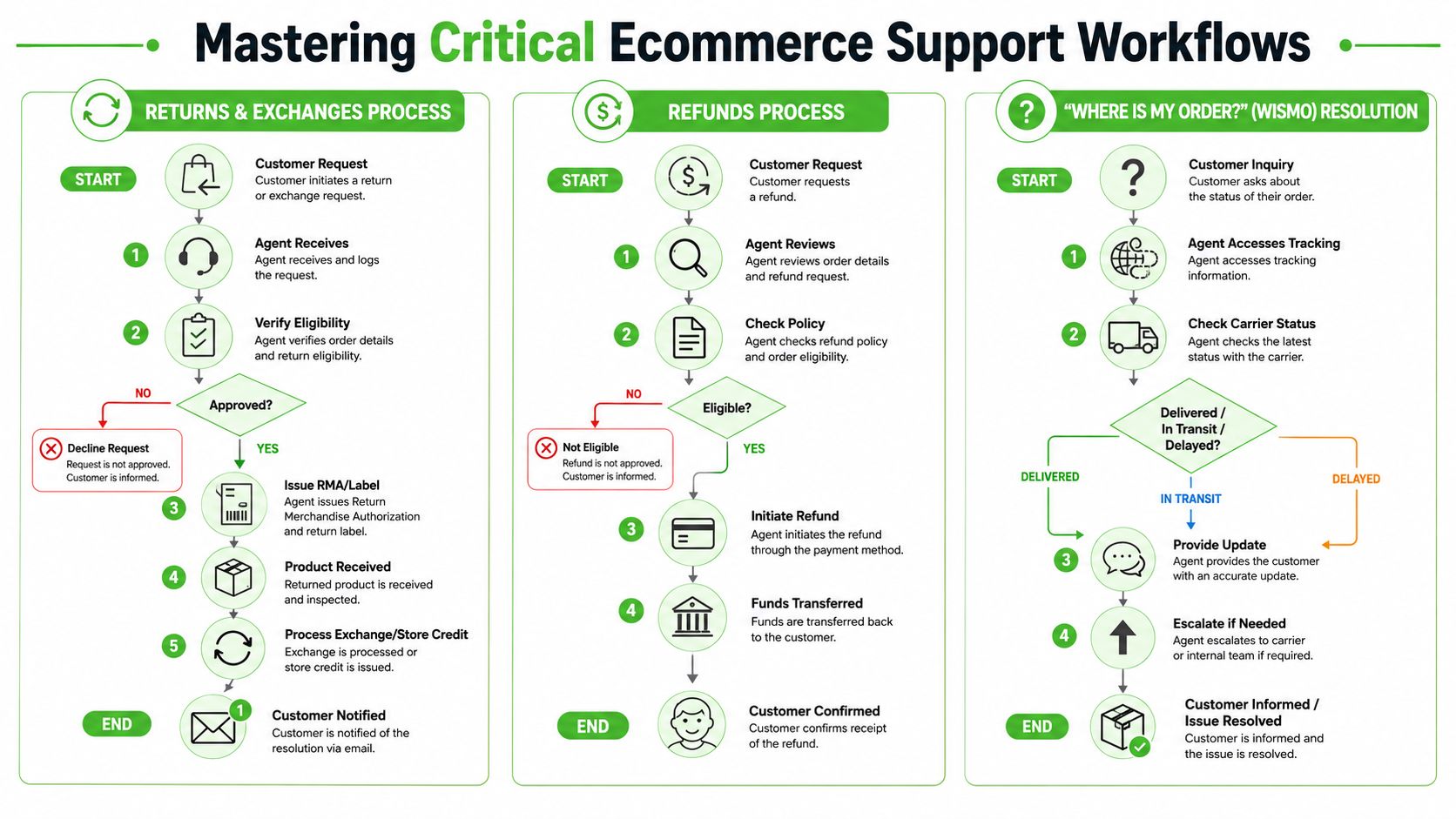
Returns and exchanges
A good returns workflow feels predictable to the customer and low-friction for the team. The inbox should show the order date, item details, delivery status, prior contacts, and policy eligibility without forcing the agent to jump between systems.
A practical sequence looks like this:
- Receive the request through email, chat, or WhatsApp.
- Verify eligibility using order date, item type, return window, and condition rules.
- Offer the right path, which may be exchange, store credit, or refund request review.
- Issue instructions with label details or next steps.
- Confirm receipt once the return is scanned or processed.
- Close the loop with a clear customer update.
The mistake many teams make is answering only the immediate question. If a customer asks, “Can I return this?” the strong answer includes eligibility, the next step, expected timing, and any exceptions. That cuts follow-up contacts.
A workflow is only complete when the customer knows what happens next.
For agencies, map these flows into macros and decision trees. Don't leave policy interpretation to each agent's writing style.
Refunds and WISMO
Refunds are emotional because they involve money and trust. WISMO is emotional because the customer already paid and feels exposed to uncertainty. Both need a calmer process than most brands give them.
For refunds, agents should follow a consistent review path:
- Check the request reason: duplicate order, cancellation, damaged goods, return completed, or service failure.
- Review policy and order status: not every refund scenario starts from the same trigger.
- Confirm resolution path: full refund, partial refund, store credit, replacement, or escalation.
- Send written confirmation: customers want certainty more than clever wording.
For WISMO, the support team should start with tracking clarity before making promises. Agents need direct access to carrier status, fulfillment milestones, and any internal notes on split shipments or delays.
A strong WISMO response usually includes:
- Current shipping status
- What that status means in plain English
- What the customer should expect next
- When support will step back in if movement doesn't resume
That last part matters. Customers hate being told to wait with no threshold for action.
The reason integrated inboxes matter so much here is simple. When agents can see order history, shipping state, and previous contacts in one place, they spend less time investigating and more time resolving. When they can't, every ticket becomes a scavenger hunt.
If you're building this as an agency service, productize the workflows before you scale headcount. The clients who feel “high maintenance” usually have weak process design, not uniquely difficult customers.
Measuring What Matters for Continuous Improvement
Agencies get into trouble when they report support the way call centers used to report support. Total tickets handled. Total messages sent. Agent utilization. Those numbers describe activity. They don't tell you if the operation is helping the client keep customers.
The support metrics worth managing are the ones that expose speed, resolution quality, and customer confidence.
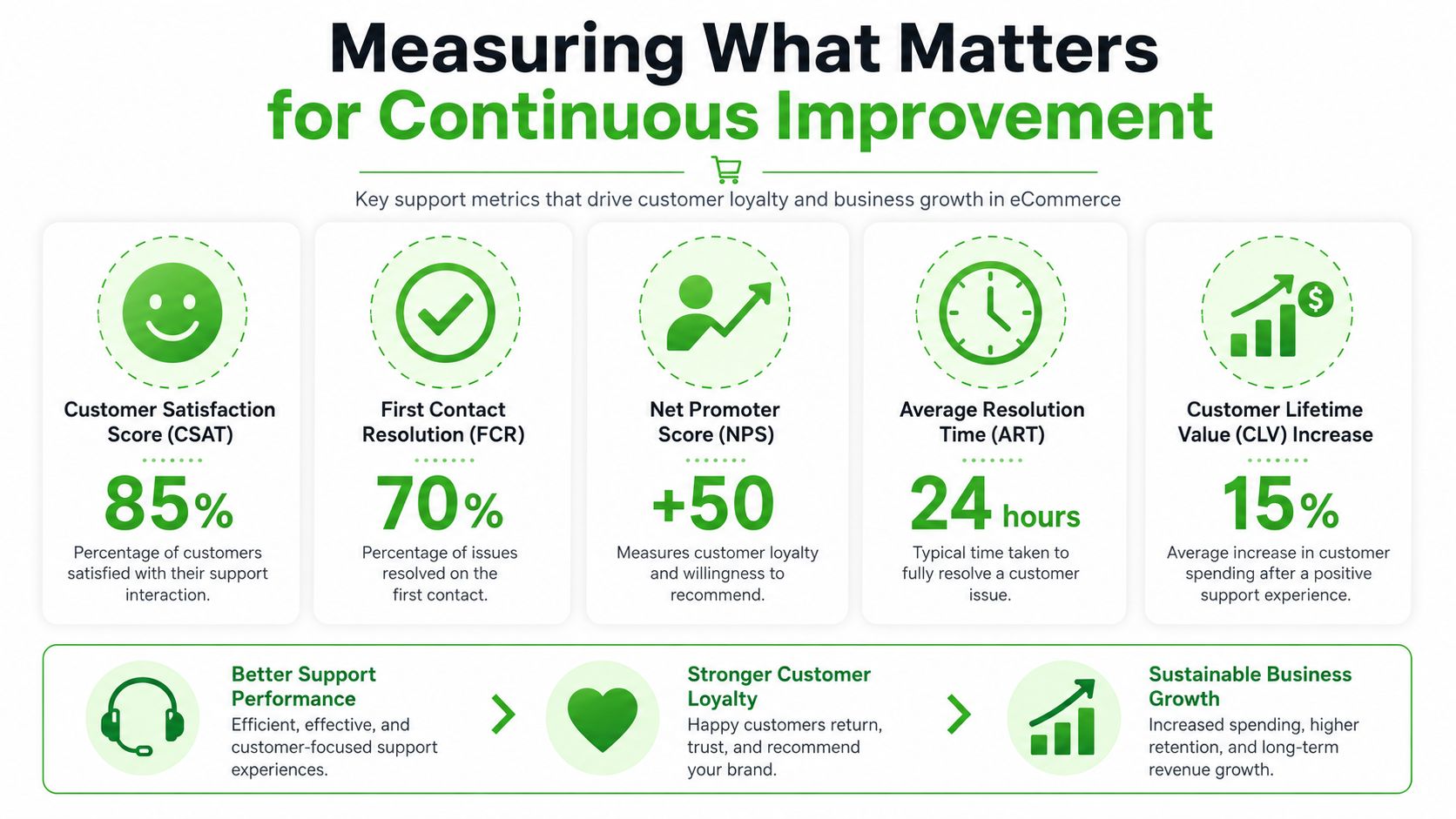
The metrics worth managing
Start with First Response Time. If customers feel ignored, the interaction is already under pressure before the agent solves anything. This is one of the clearest indicators of staffing fit and routing health.
Then track CSAT. Not as a vanity badge, but as a way to spot channel issues, agent coaching opportunities, and workflow friction. Low scores after delayed-delivery tickets tell you something different from low scores after returns.
Third, measure Full Resolution Rate or first-contact completeness, depending on how your help desk labels it. The point is to know whether the customer got a real answer without unnecessary back-and-forth.
A short operating scorecard for agency reviews should include:
| Metric | What it reveals | What to do when it slips |
|---|---|---|
| First Response Time | Queue health and staffing pressure | Rework schedules, routing, and channel coverage |
| CSAT | Customer-perceived quality | Review transcripts and isolate failure patterns |
| Full Resolution Rate | Process quality and agent judgment | Tighten macros, permissions, and training |
How agencies should use the data
The value isn't in the dashboard. It's in what you change because of the dashboard.
If one agent has solid response times but poor CSAT, review tone, empathy, and whether they're overusing canned replies. If response times are fine but full resolution is weak, check whether agents lack order visibility or approval authority. If one channel keeps creating repeat contacts, the issue may be workflow design, not staffing.
Use transcript reviews for three things:
- Coaching: Show agents where they created friction, missed context, or failed to set expectations.
- Ops feedback: Surface product defects, packaging issues, and carrier confusion to the client.
- Automation tuning: Find the questions that still reach humans too often and improve self-service or flows.
Support data is one of the clearest customer-voice datasets an agency can access. Most teams waste it by reporting volume instead of diagnosis.
A support offer becomes strategic. You're no longer just running an inbox. You're feeding the client better information about where the customer journey breaks.
Packaging Support as a White-Label Service for Agencies
Support becomes profitable for agencies when it's packaged as an operating system, not sold as loose labor. Hourly support retainers sound flexible, but they punish efficiency. If your team gets better, the client questions the hours. If volume spikes, margin gets squeezed.
A better model is a flat-fee service with defined channels, service windows, workflows, escalation rules, reporting cadence, and optional add-ons.
How to productize the offer
Keep the offer simple enough to sell and strict enough to deliver.
A practical agency packaging structure looks like this:
- Foundation tier: Shared inbox coverage, core channels, FAQ setup, basic macros, and weekly reporting.
- Growth tier: Added WhatsApp support, workflow automation, branded knowledge base upkeep, and deeper escalation handling.
- Premium tier: Extended hours, dedicated client pod, custom QA reviews, and advanced automation support.
Scope by operating variables, not vague promises. Define what channels are included, which workflows are covered, who approves exceptions, and how after-hours contacts are handled.
Your value proposition should sound like this in plain English: the agency gives ecommerce brands faster customer responses, cleaner workflows, better context across channels, and support reporting that helps the business improve beyond the inbox.
How to protect margin
Margin comes from standardization. If every client gets a custom process map, custom macro library, and custom staffing logic on day one, the service becomes expensive to operate.
Protect margin with these rules:
- Use a common workflow backbone: Returns, refunds, WISMO, cancellations, and damaged-item claims should start from templates.
- Limit custom exceptions: Let premium tiers buy deeper customization.
- Centralize QA: Review conversations with the same scorecard across accounts.
- Control tool sprawl: Fewer systems mean faster training and easier reporting.
- Sell setup separately when needed: Migration, policy cleanup, and knowledge base reconstruction are projects, not freebies.
For white-label delivery, the strongest setup is one where the client experiences the service under your brand, your reporting, and your billing while your team keeps one repeatable backend process. That's what turns support into a durable agency revenue line instead of a messy add-on.
The hidden advantage is retention. When your agency owns acquisition, lifecycle, and support operations together, clients have a much harder time replacing you with a narrower specialist.
If you want to launch a white-labeled WhatsApp support and messaging offer without building custom infrastructure from scratch, Double My Leads gives agencies a practical way to do it under their own brand. You can resell workspaces, keep billing predictable with a flat monthly model, and add WhatsApp inbox, broadcasts, automation, and AI workflows as part of a broader ecommerce support service.


