
You probably have a client like this already. The salon has solid demand, a busy team, and a decent local reputation, but the operation still runs on scattered tools. Bookings come from Instagram DMs, phone calls, a website form, and walk-ins. Client notes live in a front-desk notebook, a stylist's memory, and maybe a spreadsheet nobody fully trusts. Follow-ups happen when someone remembers.
That setup creates a real opening for agencies and SaaS resellers. Salon CRM software isn't just another software category to sell. It's a way to turn fragmented client operations into a managed service with recurring value. If you implement the right platform, connect it to the right communication channels, and package onboarding and automation properly, you're not selling “software.” You're selling retention infrastructure.
For agencies, that distinction matters. Salons don't usually need a long digital transformation pitch. They need fewer no-shows, more rebookings, cleaner staff workflows, and a better way to keep client history usable. The opportunity is to position salon CRM software as the system that ties those outcomes together, then build a service layer around setup, migration, messaging, training, and optimization.
Table of Contents
- What Is Salon CRM Software and Why It Matters Now
- The Core Features of Modern Salon CRM
- Strategic Benefits Beyond Simple Organization
- How to Choose the Right Salon CRM Software
- The Integration Imperative Unlocking Power with WhatsApp
- Your Implementation Plan for Agencies and Resellers
What Is Salon CRM Software and Why It Matters Now
A salon usually feels the need for CRM before it knows the term. The pressure shows up as booking mistakes, missed follow-ups, inconsistent client service, and front-desk staff spending too much time chasing confirmations instead of managing the day. When client preferences aren't available at the moment of service, the business looks disorganized even if the team is talented.
Salon CRM software fixes that by acting as the central operating system for the client relationship. It stores the profile, appointment history, communication trail, preferences, and service context in one place so the business can act on that information instead of rebuilding it every visit.
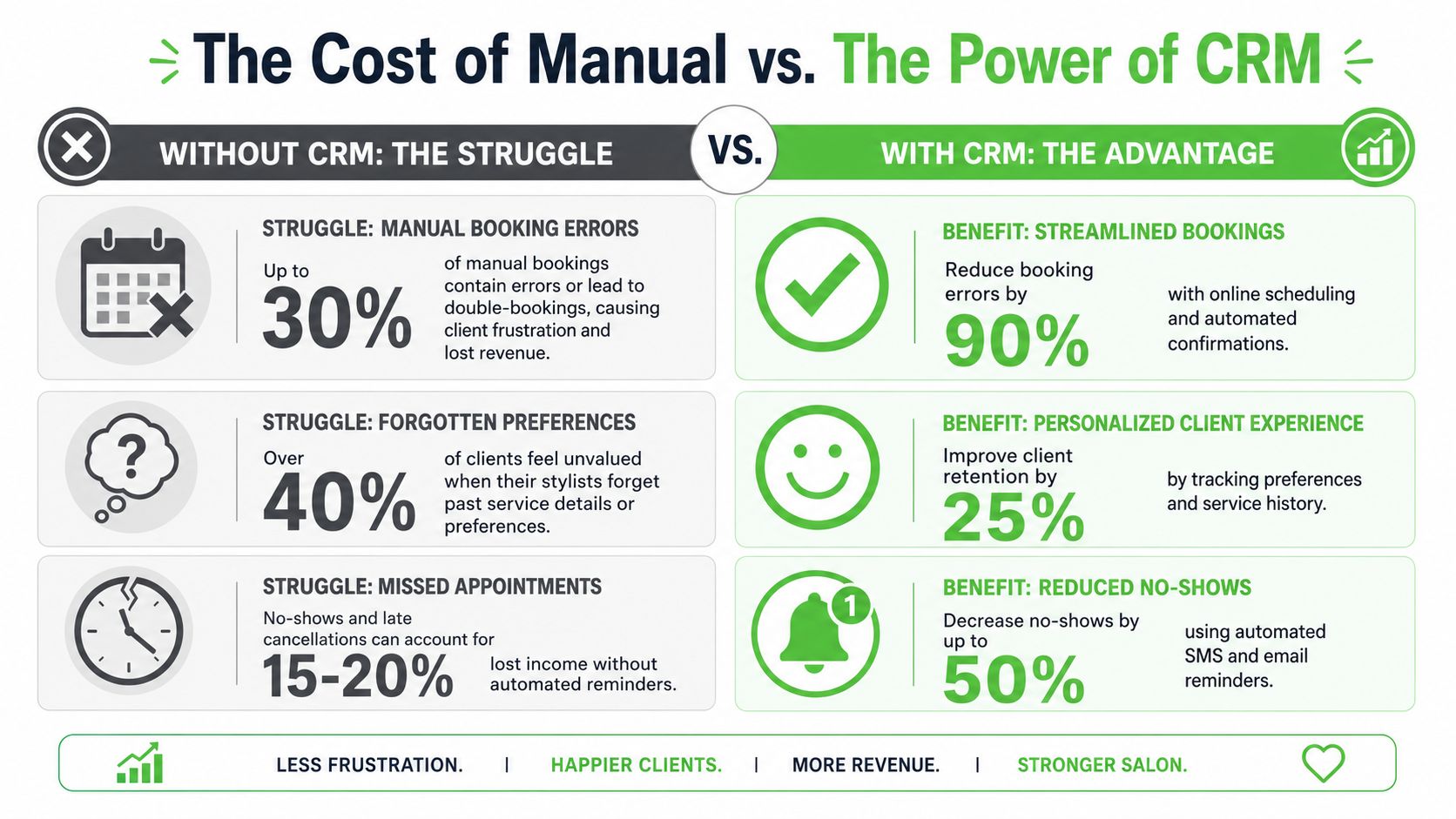
This isn't a niche category anymore. Grand View Research's spa and salon software market report estimates the global market was $1.57 billion in 2025 and projects it will reach $3.75 billion by 2033, with a projected 11.5% CAGR from 2026 to 2033. That matters because appointment scheduling is described as the largest segment, which tells you the buying motion is tied directly to bookings, convenience, and operational control.
For an agency, the practical takeaway is simple. The software category is moving into the core stack for salons, not the “nice-to-have” stack. If you already help clients with lead generation, local marketing, automation, or retention, it makes sense to understand how CRM software drives growth because salon owners increasingly expect those functions to connect.
Practical rule: If a salon can't reliably track who booked, what they bought, what they prefer, and when they're due back, its marketing will stay reactive.
That's why salon CRM software matters now. It gives agencies a service line that connects operations, retention, and communication into one recurring relationship.
The Core Features of Modern Salon CRM
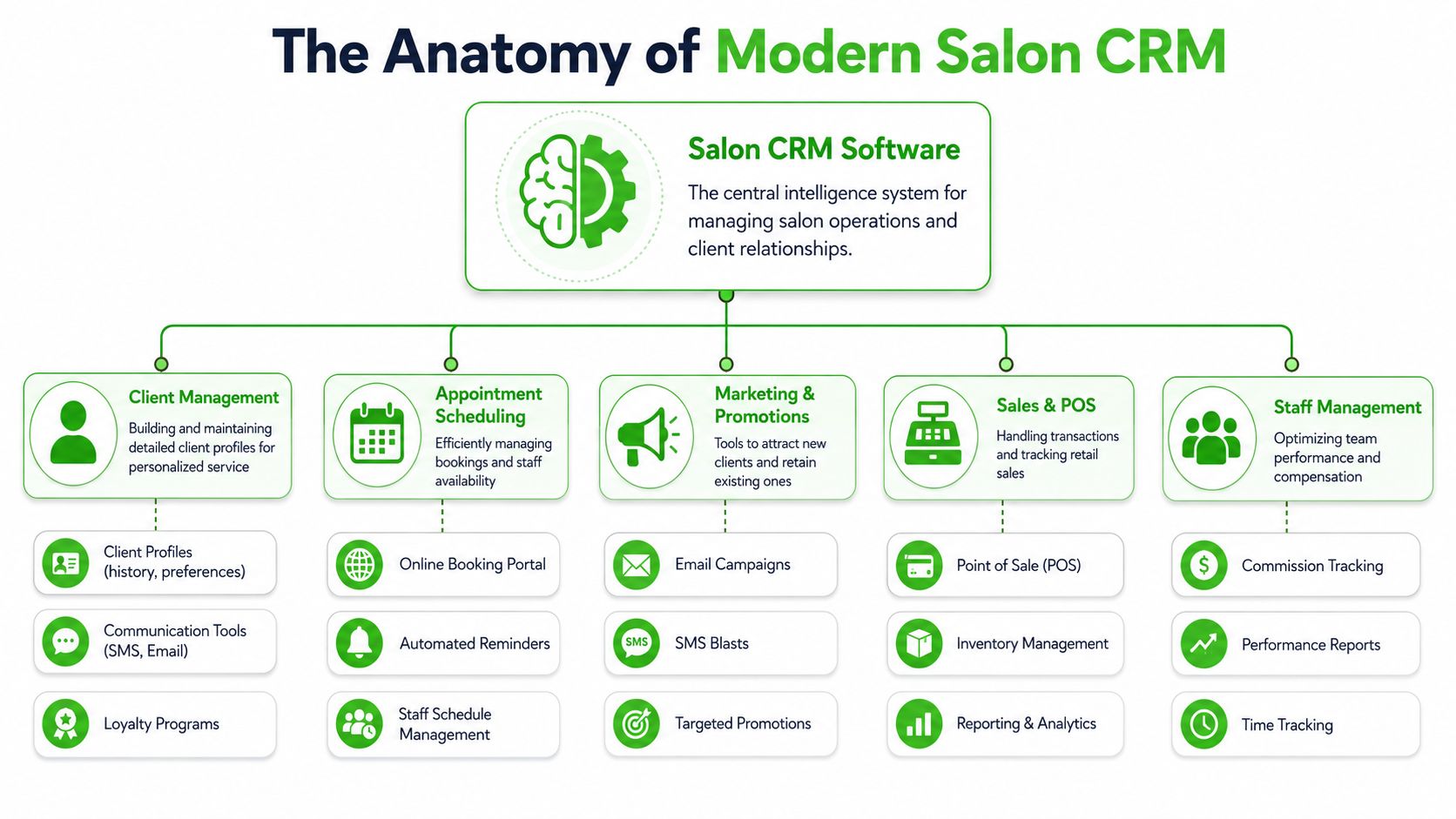
The best way to think about salon CRM software is as the salon's central nervous system. A strong platform doesn't just collect information. It connects booking, revenue, communication, and service history so staff can work from the same record instead of guessing.
Early in the evaluation process, it helps to show clients the category visually.
Booking and the client record have to stay connected
The technical value of salon CRM software is the linkage between scheduling and the client profile. Respark's explanation of salon CRM software describes the key advantage well: every booking, purchase, and communication event writes back to a single customer profile. That's what enables confirmations, follow-ups, and rebooking prompts to happen from real client history instead of from a disconnected calendar.
If that connection is weak, the system becomes cluttered fast. You get duplicate profiles, incomplete service notes, and marketing that doesn't reflect actual buying behavior.
The booking layer should cover:
- Online scheduling: Clients need a clean booking path that updates availability without manual intervention.
- Staff calendars: Teams need visibility into who's available, where the gaps are, and how appointments affect throughput.
- Reminder logic: Confirmations and pre-visit reminders should fire automatically from the appointment event, not from a separate list.
A salon can survive with a basic calendar. It grows better with a calendar tied to client memory.
The operating stack that actually matters
Once booking and profiles are connected, the next question is whether the rest of the workflow lives in the same environment. In practice, these are the features that matter most:
| Component | What it does | Why it matters to agencies |
|---|---|---|
| Client profiles | Stores visit history, preferences, notes, and purchase records | Powers personalization and segmented campaigns |
| POS integration | Connects transactions to services and clients | Makes reporting and offer targeting more accurate |
| Inventory tracking | Monitors retail and treatment product usage | Helps multi-service businesses avoid stock surprises |
| Marketing automation | Sends reminders, follow-ups, and promotional messages | Creates recurring optimization work for your team |
| Loyalty and retention tools | Tracks return behavior and rewards repeat visits | Turns CRM into a revenue retention engine |
| Reporting | Shows rebooking, retention, and sales patterns | Gives agencies something measurable to manage |
Here's a useful product demo to frame the conversation with clients before you get into vendor comparisons.
What doesn't work is buying a platform because it has a long feature checklist but weak workflow logic. I've seen salons end up with a system that technically includes reminders, POS, and loyalty, but each module feels bolted on. Staff then revert to texting clients manually, tracking product counts elsewhere, and treating the CRM as a booking app instead of a business system.
A CRM implementation fails quietly when the team only uses the calendar and ignores the rest of the record.
What agencies should package around the software
The software alone won't create value. Agencies need to define what they're implementing.
A strong salon CRM offer usually includes:
- Profile structure design: Decide what fields staff need, such as preferences, treatment notes, visit patterns, and purchase history.
- Automation setup: Build reminders, follow-ups, rebooking prompts, and inactivity workflows.
- Review generation flow: After service, salons often need a clear process for reputation capture. If you're building that layer, this guide on how to get more reviews is a useful complement to CRM-based follow-up.
- Dashboard cleanup: Keep reporting focused on actions, not vanity screens full of unused widgets.
For agencies and resellers, that's the key distinction. Don't pitch features in isolation. Pitch a working operating system that staff will use.
Strategic Benefits Beyond Simple Organization
A lot of salon owners initially see CRM as an admin tool. That's understandable, but it undersells the business case. Once the system is configured properly, the bigger value isn't cleaner records. It's stronger retention, better timing, and more consistent client recovery.
Retention is the revenue lever
The most important shift is this: modern salon CRM software is built to influence repeat business, not just document it. Pipedrive's salon CRM overview notes that a 5% increase in client retention can increase profits by 25% to 95%. It also highlights retention-focused features such as identifying clients who haven't visited in 60+ days, tracking rebooking and client lifetime value, and running automated win-back campaigns.
That changes how agencies should position the category. If you sell salon CRM software as “organization,” clients compare it to a cheaper scheduling tool. If you sell it as a retention system that can spot at-risk clients and trigger the right follow-up, the budget discussion becomes different.
Retention improves when the salon can do a few basic things well:
- Recognize inactivity: The system should surface clients who are drifting instead of leaving that pattern hidden.
- Send relevant follow-up: Generic blasts don't do much. Service-based reminders and return prompts perform better because they match visit behavior.
- Support loyalty logic: The CRM should make it easy to reward repeat visits without extra admin work.
Efficiency shows up in margins and service quality
There's another benefit agencies can use in sales conversations. A strong CRM removes low-value tasks from the front desk and from stylists. Staff stop hunting for notes, checking multiple tools, or manually messaging every upcoming appointment. That time goes back into service delivery and scheduling flow.
It also improves consistency. A salon that remembers product preferences, service history, or prior issues doesn't just look organized. It feels more professional to the client.
The best CRM setups reduce mental load for staff. That's often the hidden reason adoption sticks.
Operationally, this matters because many salons don't lose clients in one dramatic moment. They lose them through small failures. Forgotten preferences. No follow-up. A delay in responding. A rebooking opportunity missed at checkout.
That's why CRM should be treated as a profit system. It protects revenue already earned, makes repeat visits easier, and gives agencies an ongoing optimization lane instead of a one-time setup project.
How to Choose the Right Salon CRM Software
Most salon software demos look good for the first fifteen minutes. The calendar is clean, the booking flow seems simple, and the reporting screen looks polished. The critical decision happens underneath that surface. Agencies need to evaluate the system the way an operator would, because once client history, payments, notes, and marketing live inside one platform, changing course gets harder.
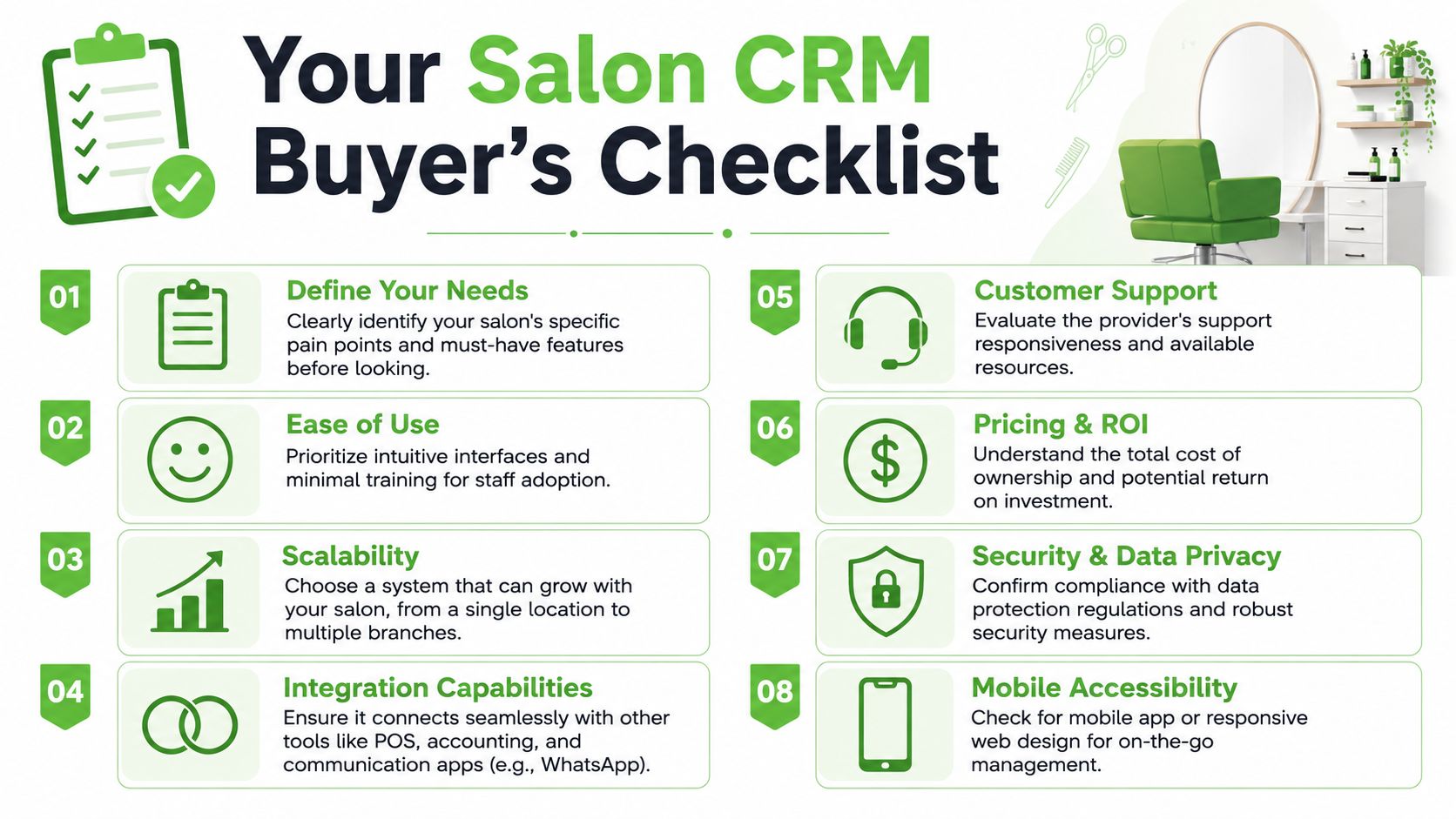
Evaluate the system like an operator, not a shopper
The right buying criteria usually aren't the flashy ones. They're practical.
Start with these:
- Ease of use: If front-desk staff and service providers can't learn it quickly, adoption will stall.
- Workflow fit: The platform should match how the salon books, checks out, records notes, and follows up.
- Scalability: A single-location salon may need simplicity today, but an owner with growth plans needs something that won't break under multi-location complexity.
- Integration flexibility: You want to know what connects natively, what needs middleware, and what becomes a custom project later.
- Support quality: Setup friction is manageable if vendor support is responsive. It's expensive if it isn't.
If you want a broad market scan before going deeper into demos, this roundup can help you find salon management software and compare the common categories buyers encounter.
Questions that expose hidden switching risk
The overlooked issue in salon CRM selection is data portability. The U.S. Chamber's review of salon software options points out a key challenge: vendor lock-in. Because these systems often combine appointments, payments, and marketing, the cost of switching isn't just moving contacts. It's preserving service context, treatment history, formulas, and the practical details that keep operations running smoothly.
That means agencies should ask direct questions during vendor evaluation:
What data can be exported in a usable format?
Contacts alone aren't enough. You need to know whether notes, visit history, purchase records, and service context move cleanly.How does migration work for historical appointments?
If years of booking data disappear or import poorly, reporting and retention workflows lose value.Which integrations are native and which are paid add-ons?
A low monthly fee can look less attractive once key connections are treated as extras.How long does onboarding typically take for a salon with legacy data?
Migration time affects downtime, staff frustration, and agency labor.
Ask every vendor to show a sample export before you recommend them. If they dodge that request, treat it as a warning.
A practical selection scorecard
A simple scorecard helps agencies avoid “demo bias.” Rate each platform on the factors that affect long-term delivery.
| Decision area | What good looks like | What to watch for |
|---|---|---|
| Usability | Staff can navigate core tasks without heavy training | Too many clicks for basic booking or checkout |
| Data structure | Client profiles hold meaningful service context | Notes are shallow or hard to retrieve |
| Automation | Reminders and follow-ups are event-based | Messaging requires manual exports |
| Integration | Communication and sales tools connect cleanly | Important apps require workarounds |
| Portability | Exports are usable and complete | History is trapped in proprietary formats |
| Commercial model | Pricing is predictable | Fees expand once modules are added |
The best choice usually isn't the platform with the most features. It's the one your client's team will use, your agency can support repeatedly, and the business can leave if it ever needs to.
The Integration Imperative Unlocking Power with WhatsApp
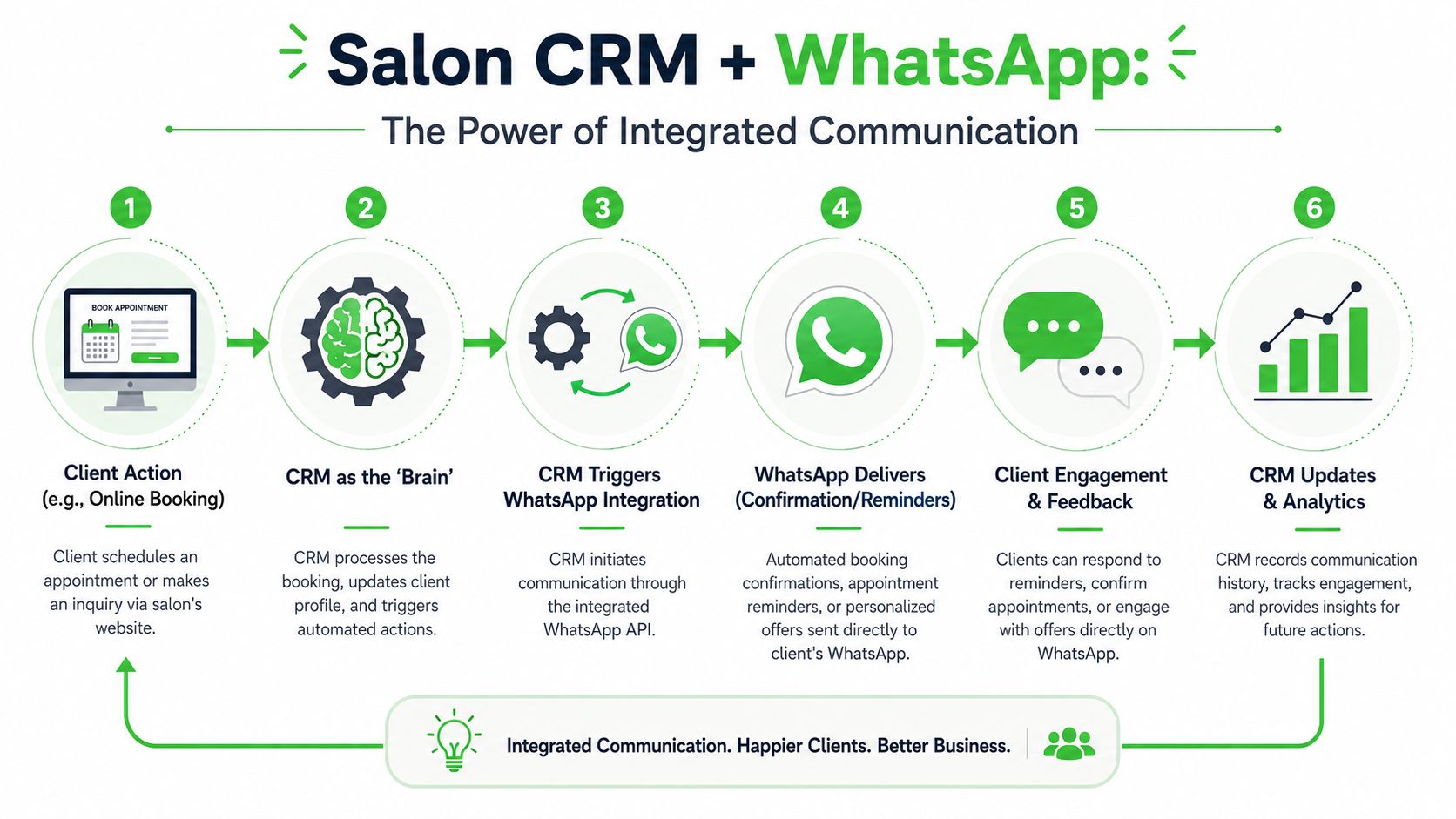
A salon CRM on its own is useful, but it becomes much more valuable when it connects to a direct communication channel the client will indeed notice and respond to. That's where WhatsApp changes the equation.
The CRM is the brain. WhatsApp becomes the voice that delivers the right message at the right point in the client lifecycle.
Why WhatsApp changes the value of the CRM
The main advantage isn't novelty. It's workflow depth. Vagaro's comparison of salon CRM platforms notes that advanced salon CRMs can identify behavioral groups such as clients who haven't returned in 60+ days. When that logic connects to a direct channel like SMS or WhatsApp, the system can trigger targeted win-back campaigns automatically.
That turns the CRM from a passive record into a revenue recovery engine.
For agencies, this matters because email-only automation often isn't enough for service businesses. Salons need communication that feels immediate and tied to real appointments. WhatsApp supports that better than a disconnected email sequence because it can sit closer to the day-to-day client interaction.
Workflows that agencies can actually sell
The highest-value WhatsApp workflows usually aren't complicated. They're operational.
Consider a few examples:
- Appointment confirmations and reminders: Trigger from the booking event and keep the message tied to the appointment details.
- Pre-visit communication: Let clients confirm, ask a quick question, or receive simple preparation instructions.
- Post-visit follow-up: Send aftercare notes or check in after a service where follow-up matters.
- Win-back flows: If the CRM flags inactivity, WhatsApp can deliver the nudge without requiring staff to build a manual list.
- Targeted promotions: Segment by history or service type instead of broadcasting the same offer to everyone.
What doesn't work is bolting WhatsApp onto a weak CRM setup. If the client data is incomplete or the segmentation logic is poor, the messaging becomes generic fast. Then the salon blames the channel when the problem lies in the underlying record quality.
Use WhatsApp for time-sensitive, behavior-based communication. Don't use it as a dumping ground for every promotion the client wants to send.
Here, agencies can differentiate. Most competitors will install software. Fewer will connect client data, booking triggers, segmentation, and direct messaging into one clean system that the salon can truly depend on.
Your Implementation Plan for Agencies and Resellers
The easiest way to lose margin on salon CRM software is to treat each rollout like a custom consulting project. The better approach is a repeatable implementation model with clear boundaries, standard deliverables, and a defined communication layer.
A rollout model that keeps clients from stalling
Use a staged rollout.
First, assess the salon's current workflow. Map how bookings arrive, where client data lives, how reminders are sent, and what the team does after appointments. You're looking for operational reality, not what the owner thinks happens.
Next, select the platform based on fit, portability, and integration options. Don't skip export questions during sales. That's where many bad recommendations start.
Then handle migration carefully. Bring over the records that matter most to continuity, especially client history, notes, and service context. After that, configure booking logic, profile fields, reminder sequences, and basic reporting before asking staff to use it live.
Turn setup into a repeatable service line
Agencies should package implementation into a few fixed layers:
- Discovery and audit: Current tools, pain points, and migration scope.
- System setup: Booking structure, staff permissions, client fields, and automations.
- Training: Front-desk usage, provider usage, and owner reporting.
- Messaging integration: Add channels such as WhatsApp once the core CRM record is reliable.
- Ongoing optimization: Review no-show handling, rebooking workflows, and inactive-client campaigns regularly.
The long-term value isn't in the initial install. It's in becoming the team that manages the retention system after launch. That's what turns salon CRM software into a scalable agency revenue stream instead of a one-time project.
If you want to add a white-labeled WhatsApp layer to your salon CRM service, Double My Leads gives agencies and SaaS resellers a fast way to launch branded WhatsApp automation, shared inboxes, broadcasts, and CRM-connected messaging without turning every client setup into a custom build.


