
WhatsApp gets attention fast, but the first hard limit many businesses run into is much smaller than they expect. The built-in WhatsApp Business App broadcast list only reaches 256 contacts, and only if those users have saved your number, which is why it works for small sends but falls apart for serious outbound campaigns, as noted in Joyz's overview of compliant bulk sending.
That gap is where most agencies make the wrong decision. They either stay stuck with manual workarounds that don't scale, or they jump straight into the official Cloud API before they've proven demand, built packaging, or figured out who on the team will manage replies. If you want to learn how to send bulk WhatsApp messages in a way that suits an agency model, the fundamental decision isn't just WhatsApp or no WhatsApp. It's simple QR-code sync versus complex Cloud API.
Table of Contents
- Sending Bulk WhatsApp Messages Is More Than a Numbers Game
- What You Need Before You Send a Single Message
- Choose Your Path QR Sync Versus Cloud API
- Your Step-by-Step Broadcast Setup
- Advanced Tactics for Automation and Reselling
- Navigating Compliance Deliverability and Common Issues
Sending Bulk WhatsApp Messages Is More Than a Numbers Game
WhatsApp is one of the fastest channels for starting a sales conversation, and one of the fastest ways to burn a number if the setup is sloppy. Agencies feel that quickly. A campaign can produce replies within minutes, but weak targeting, vague consent, and the wrong sending method can drag down results just as fast.
WhatsApp behaves more like a direct message than an email blast. People treat the inbox as personal space. If the message feels relevant and expected, reply rates can be strong. If it feels random, recipients block the number, ignore future messages, or report it. That makes list quality, timing, and reply handling part of the offer, not backend details.
For agencies, this is a business model decision as much as a messaging decision.
The decision isn't merely "use WhatsApp or use the API." It is whether to start with a simple QR-code sync setup that a team can launch and manage without developers, or commit to the Cloud API route with Meta approvals, templates, technical overhead, and a longer path to revenue. Both paths can work. They serve different goals.
In practice, QR sync is often the better first move for agencies selling lead generation, appointment setting, or reactivation campaigns. It is faster to deploy, easier to explain to clients, and easier to package into a monthly service. Platforms such as Double My Leads fit that model well because the agency can connect a real number, run campaigns, manage replies, and start billing without turning the service into an engineering project.
Cloud API still has a place. Large-volume senders, enterprise workflows, and brands with strict system requirements may need it. But many agencies reach for the official route too early, then get stuck in setup work, approval cycles, and client delays before the first campaign even goes live.
Practical rule: If the client cannot clearly explain who opted in, why they should expect the message, and who on the team will handle replies, the campaign is not ready.
That is why bulk WhatsApp sending works best as an operating system, not a volume play. The agencies that win here do not just send more messages. They choose the right path early, keep the workflow simple, and build campaigns around conversations that a sales team can close.
What You Need Before You Send a Single Message
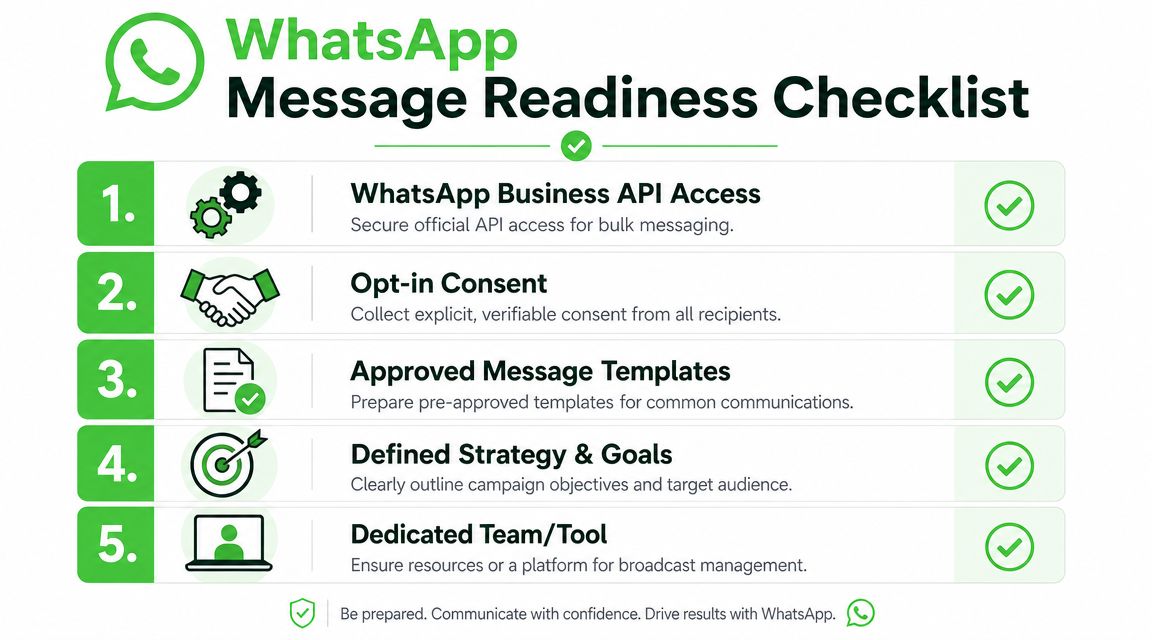
Good bulk WhatsApp campaigns are usually won before the first send. The setup determines whether the campaign turns into booked appointments and managed replies, or a support mess that burns team time.
Start with the operational basics
Before writing copy or building lists, lock down four things:
- A dedicated business number: one number per brand or client account
- A clear opt-in source: you should be able to point to where permission came from
- An owner for replies: someone has to handle inbound conversations quickly
- A working destination for the data: CRM, sheet, inbox, or follow-up workflow
Agencies that skip this part create friction for themselves. The campaign may launch fast, but reporting breaks, reply handoffs get sloppy, and nobody can prove where contacts came from when a client asks.
If you plan to resell WhatsApp as a service, keep the setup simple enough that an account manager can run it repeatedly. Tools with Seamless platform connections help because lead capture, inbox activity, and follow-up actions do not need to live in separate systems.
Use a real business number
Use a number assigned to the business and the campaign purpose. That sounds obvious, but plenty of teams still start with a founder's line or a rep's old mobile and regret it later.
A dedicated number gives you three practical advantages:
- Clear message identity: contacts see a consistent sender
- Cleaner team operations: access, reassignment, and client handoff are easier
- Simpler troubleshooting: if delivery or reply handling goes wrong, you know which number is involved
For agencies, this also prevents awkward ownership problems. When a client relationship changes, shared personal numbers create disputes over history, contacts, and responsibility.
Get consent organized before you build volume
Consent needs to be documented, not assumed.
For a simple QR-sync setup, the rule is still the same. People should know what they are signing up for, what type of messages they will receive, and which business will contact them. For the Cloud API route, the process gets stricter because business-initiated outreach often depends on approved templates and cleaner audit trails.
Store proof of opt-in where the team can find it. If a client says, "they filled out a form somewhere," that is not a usable process.
Good opt-in sources are usually straightforward:
- Website forms: a separate WhatsApp checkbox or subscription field with clear wording
- QR code joins: scan to receive offers, updates, reminders, or event messages
- Keyword opt-ins: the contact sends a specific word to subscribe
- Checkout or lead forms: only if WhatsApp permission is explicit and separate from general marketing consent
Weak opt-in creates avoidable risk. A support inquiry, missed call, or old lead form is not the same as permission to send promotional WhatsApp messages.
Decide how replies will be handled
Many campaigns falter at this point. Sending is easy. Managing the response load is the true effort.
If the offer is strong, replies arrive fast. That is good for performance and bad for any team that treated WhatsApp like a one-way blast channel. Before launch, decide who answers, what counts as a qualified lead, how handoff to sales works, and how quickly someone should respond.
For agency accounts, I prefer a simple rule. If no one can commit to reply ownership, the campaign is not ready.
Treat templates and message formats like assets
If you choose the Cloud API path, templates need planning early because they affect approval, timing, and campaign flexibility. If you choose QR sync, you have more speed, but the message still needs structure and discipline.
Either way, good bulk messaging usually follows the same rules:
- Write for one reader. Large sends still need to feel personal.
- State the purpose quickly. Reminder, offer, update, confirmation, or follow-up.
- Use one clear CTA. Too many choices reduce replies.
- Check every variable. Broken names and missing fields make messages look automated in the worst way.
- Plan the opt-out path. People should be able to stop messages without friction.
Short messages usually hold up better than long ones. Clear beats clever. And if the team cannot explain why this message should arrive now, it probably should not be sent yet.
Choose Your Path QR Sync Versus Cloud API
This is the fork in the road. Agencies often assume Cloud API is the serious option and everything else is a shortcut. In practice, the better question is simpler: which route fits your team, your client base, and your ability to deliver the service repeatedly without turning every account into a custom ops project?
Why agencies gravitate to QR sync
QR sync is the operator-friendly path. You connect a number by scanning a code, set up inbox access, build lists, and start running campaigns without dragging developers into every client account.
That matters when you're selling fulfillment, not infrastructure. Most agencies need speed, predictable packaging, and a workflow that account managers can own.
Common reasons teams choose QR sync first:
- Faster launch: You can move from setup to campaign work quickly.
- Lower operational friction: Fewer technical dependencies means fewer client delays.
- Cleaner service packaging: It's easier to sell a monthly WhatsApp offer when your internal setup is straightforward.
- Reply management: Many QR-based platforms are built around shared inbox workflows, not just raw sending.
This is also where tooling matters. If your campaigns depend on other systems, look for products with Seamless platform connections so lead forms, CRMs, automations, and inbox actions don't live in separate silos.
Where Cloud API makes sense
Cloud API is the official path when you need structured, compliant sending at true scale. It's the right fit for organizations that want tighter control over templates, categories, integrations, and system-level messaging operations.
It also comes with trade-offs that agencies often underestimate. Approval steps, template management, implementation complexity, and ongoing technical ownership all add weight to the service.
Cloud API usually makes sense when the client has some combination of:
- Internal technical resources
- Clear compliance processes
- A large existing consented database
- Need for deeper system integrations
- Tolerance for a more complex rollout
The mistake isn't choosing Cloud API. The mistake is choosing it too early, before you've validated the campaign model or built a delivery team that can support it.
QR Sync vs. Cloud API Comparison
| Criterion | QR Sync (e.g., Double My Leads) | Cloud API (Official Meta) |
|---|---|---|
| Setup style | Connect by scanning a QR code inside a platform | Structured API setup with more technical overhead |
| Best fit | Agencies, resellers, operators, fast-moving client teams | Enterprise teams, technical organizations, deeper system builders |
| Launch speed | Typically quicker to operationalize | Usually slower because setup has more moving parts |
| Team dependency | Can often be run by marketing or operations | Often needs developer or technical support |
| Pricing model | Commonly easier to package into flat monthly service offers | Can be harder to package when usage and operational complexity vary |
| Inbox workflow | Often built for shared-team reply handling | Depends on provider and implementation |
| Compliance posture | Depends on platform and process discipline | Official route for compliant sending at true scale |
| Good first choice for agencies | Often yes | Usually only after demand and process are proven |
If you're an agency building a WhatsApp service line, QR sync is often the commercial starting point. If a client later needs formal template governance, deeper backend integrations, or official large-scale outbound architecture, then Cloud API becomes the upgrade path instead of the starting burden.
Your Step-by-Step Broadcast Setup
Once you've picked the simpler route, the setup should feel operational, not technical. The goal is to get a working broadcast system live, keep the audience clean, and make the message easy to answer.
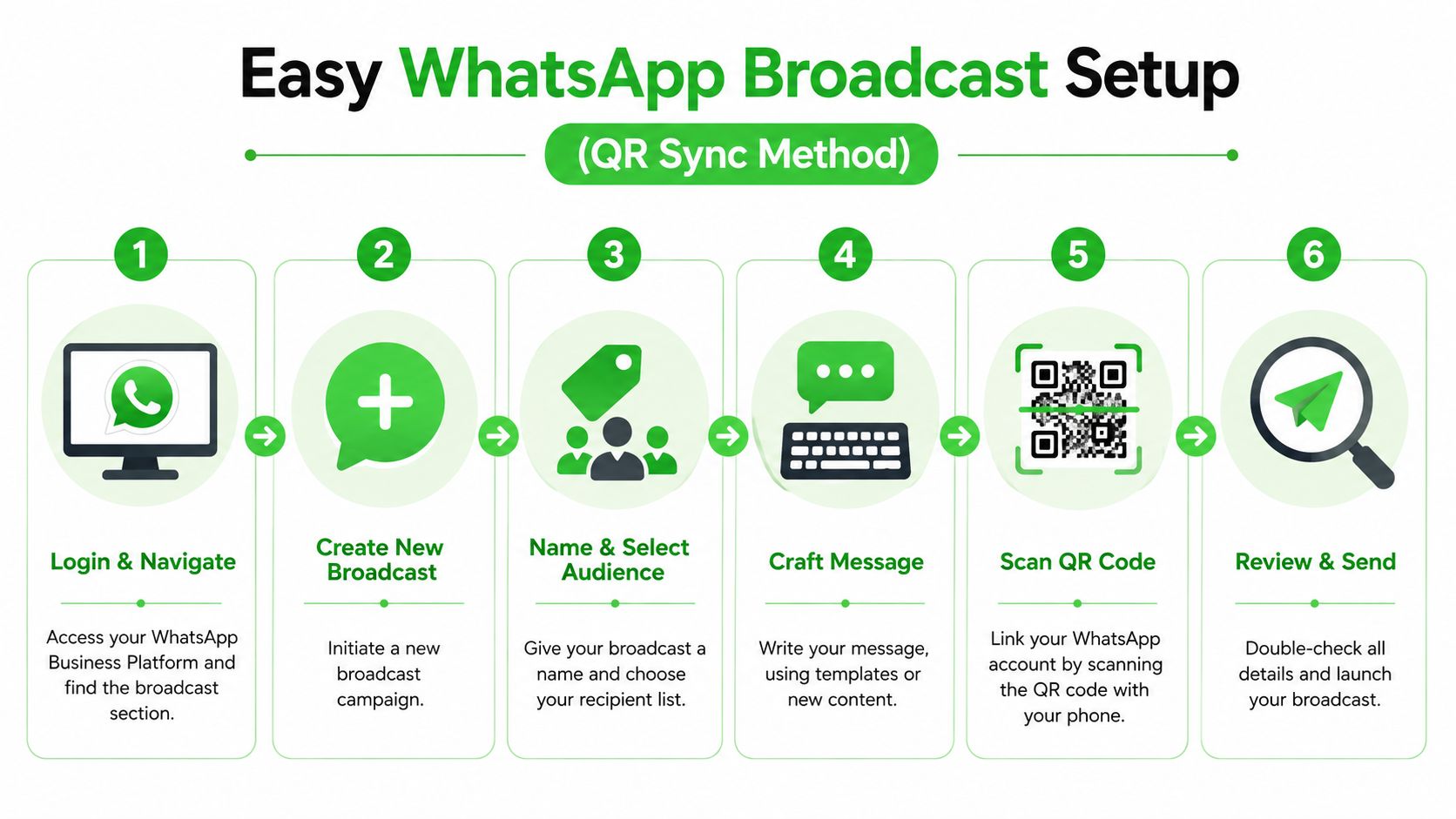
Start with the workflow below. It matches how most agency teams launch.
Connect the number and define the audience
First, create the workspace and connect the sending number. On a QR-based platform, this is usually a scan from the phone tied to the WhatsApp account.
For agency teams, the operational win is obvious. You don't need to wait for a custom deployment before testing offer-market fit.
After the number is connected, build the audience segment. Don't dump every contact into one broadcast. Segment by intent, source, or stage.
Useful segments often look like this:
- New leads from a QR code: People who opted in from an event, flyer, or landing page
- Warm pipeline contacts: Prospects who asked for pricing, demos, or follow-up
- Customers by offer type: Buyers of one product line versus another
- Local market segments: Separate sends by geography, language, or service area
If you're using a platform like Double My Leads, the practical flow is straightforward. Connect the number by QR, assign tags, sync participants from your CRM, and send through a shared inbox and broadcast workflow. That's a good fit when the team selling the service also has to fulfill it.
Write the message like a conversation
This part gets overcomplicated. Bulk doesn't mean robotic.
Good WhatsApp copy usually has four pieces:
- A clear opener tied to why the person is hearing from you
- One useful point or offer
- A direct CTA
- An opt-out line when appropriate
Example structure:
- Hi Sarah, thanks for joining our WhatsApp updates.
- We just opened bookings for next week's workshop.
- Reply BOOK and we'll send the details.
- Reply STOP to opt out.
At scale, campaign success depends on conversation and template design. Mature senders map each message to a category, add clear CTAs with opt-out text, validate placeholders, and use controls like segmentation, scheduling, frequency caps, and A/B testing. A key technical pitfall is a mismatch between placeholders and media across template versions, which can break rendering, as explained in Infobip's guide to bulk WhatsApp campaign setup.
A broken variable does more damage than plain copy. If
{{first_name}}fails, the message stops feeling personal and starts feeling automated in the worst way.
Rich media can help, but only when it supports the ask. A menu PDF, product image, short video, or voice note can lift clarity. Random attachments just add noise.
This walkthrough is useful if you want to see the flow in action:
Review timing replies and launch controls
Before launch, review the operational side, not just the message.
Check these items:
- Timing: Send when the audience is likely to see and answer.
- Links: Test every button and URL on actual devices.
- Reply ownership: Decide who handles responses and within what timeframe.
- Suppression logic: Exclude anyone who opted out, already converted, or shouldn't receive the message.
- Frequency: Protect the number by not over-mailing the same audience.
If you're using announcement-style distribution such as WhatsApp Community Announcement Groups, treat them as a broadcast asset, not a replacement for segmentation. They work best when the audience already expects updates in that format.
The final review should answer one question: if a recipient replies right now, does your team know what happens next? If the answer is vague, the campaign isn't ready.
Advanced Tactics for Automation and Reselling
A one-off blast is a service task. A repeatable WhatsApp system is a product. That's the shift agencies should care about.
The margin isn't in manually sending campaigns forever. It's in building a workflow clients keep paying for because it ties lead capture, messaging, replies, and follow-up into one service line.
Automate the first reply and the next action
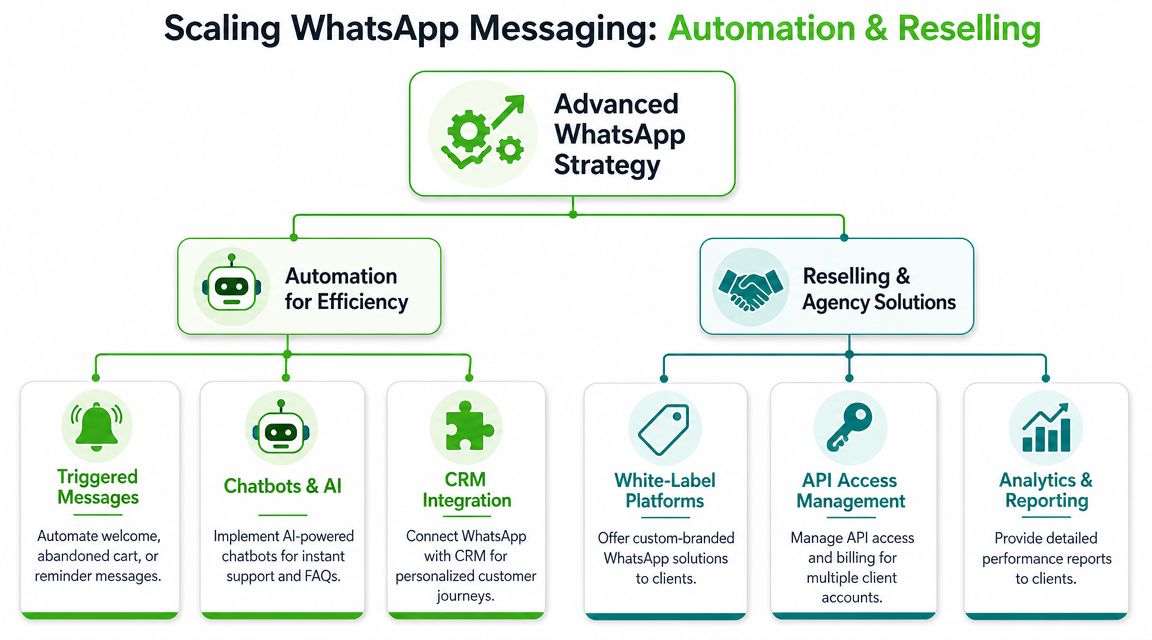
The easiest automation win is the welcome flow. A lead opts in, receives an immediate confirmation, gets routed to the right team or sequence, and then moves into a follow-up path based on what they clicked or replied.
That alone removes a lot of manual lag.
Strong automation patterns include:
- Welcome sequences: Confirm the subscription and set expectations
- Lead routing: Send hot replies to sales, support replies to service
- Reminder flows: Follow up on booked calls, unpaid invoices, or event registrations
- Re-engagement paths: Restart the conversation only for contacts who previously opted in and still fit the offer
Scheduling matters here. If your team is building recurring campaigns, this guide on how to schedule WhatsApp messages in 2026 is a useful reference for planning sends without making every campaign a live manual task.
Turn fulfillment into a recurring service
Agencies can thrive with WhatsApp because most clients don't want software. They want outcomes, fast responses, booked calls, community updates, lead nurturing, and a channel their team can use.
A resellable WhatsApp offer usually includes:
- Branded client workspaces: Separate environments for each client
- Inbox management: Assignments, notes, saved replies, and team visibility
- Broadcast operations: List hygiene, campaign creation, scheduling, reporting
- Automation setup: Opt-ins, welcome flows, routing, and reminders
- Billing structure: A monthly service fee with clear limits and responsibilities
The white-label angle matters because it changes the client relationship. Instead of recommending another tool and hoping they use it, you own the setup, the workflow, and the reporting cadence.
Clients rarely ask whether you're using a QR sync connection or the Cloud API. They ask whether leads got answered, campaigns went out on time, and the team can manage replies.
For most agencies, that makes the simpler path more profitable. It shortens onboarding, keeps technical debt lower, and gives account managers something they can operate without escalating every issue to a developer.
Cloud API still has its place. But as a resale offer, many teams make more money by starting with a model they can deliver repeatedly and upgrading only when the client's complexity requires it.
Navigating Compliance Deliverability and Common Issues
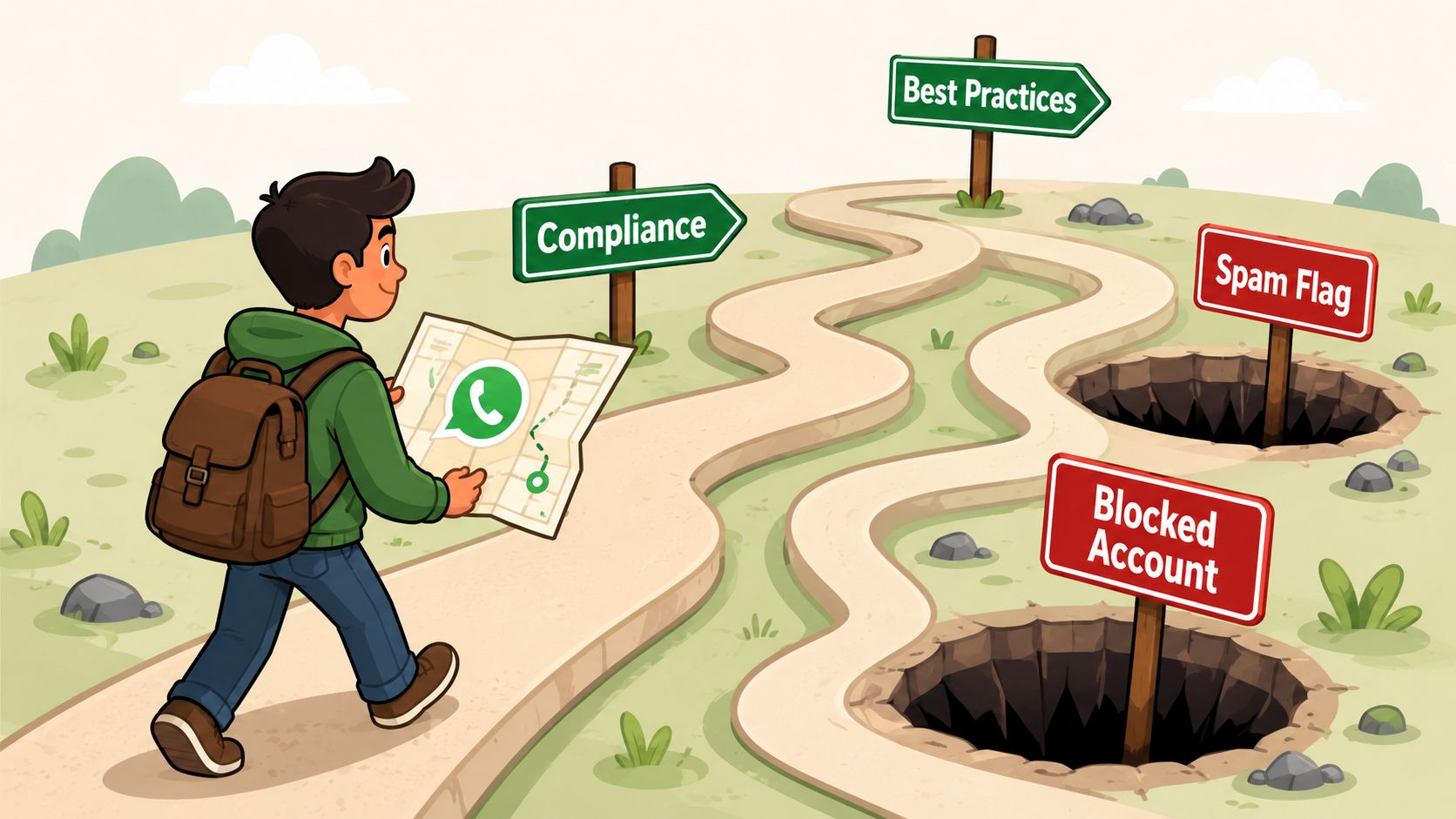
Bulk WhatsApp results usually break on process, not software. A connected number can still perform badly if consent is sloppy, segments are too broad, or the team sends every update to the same people.
Protect three things at once: the number, the audience, and the client's trust. That matters even more for agencies using a QR-code sync model, because the appeal is speed and simplicity. If operations get messy, the "easy" path becomes expensive fast.
Do this to protect the number
Before every send, run a short approval check. It should take minutes.
- Send only to people who clearly opted in: If you cannot show where the contact came from, hold the campaign.
- Keep opt-out language easy to spot: People should know how to stop messages without friction.
- Match the message to the opt-in: Promotional updates go to promotional subscribers. Appointment reminders go to booked contacts.
- Store consent records cleanly: A timestamp, source, and submission trail prevent arguments later. For broader context, review SMS and voice consent rules.
- Watch for early warning signs: Negative replies, blocks, and sudden drop-offs usually point to targeting or frequency problems.
- Reduce repeat exposure: If the same segment gets similar offers every few days, response quality drops and complaint risk rises.
Agencies get into trouble. A client imports an old list, assumes prior engagement equals permission, and wants to "test" a large send. That shortcut can burn the number faster than any platform issue.
Fix the common problems fast
Start with the simplest explanation first. In QR-sync setups, that often means list quality, campaign setup, or device stability. In Cloud API setups, the failure point can also include template status, approval flow, or configuration work that someone on the team missed.
| Problem | Likely cause | What to do |
|---|---|---|
| Messages don't land | Poor audience selection, setup error, or consent issue | Verify opt-in source, segment rules, and send settings |
| High block rate or negative replies | Message felt unexpected, too frequent, or off-topic | Tighten the segment, cut send frequency, and rewrite the message |
| Personalization fails | Variable mismatch or empty contact fields | Test with sample contacts and validate every field before launch |
| Media or buttons fail | Broken link, unsupported file, or rendering issue | Check the asset URL, file format, and the message on multiple devices |
| QR sync disconnects | Source device lost session, power, or network stability | Reconnect the number and keep the source device charged and online |
| Team misses replies | No ownership model inside the inbox | Assign conversations, add notes, and prepare saved replies before the next campaign |
The practical rule is simple. Send less often, target more precisely, and make every message feel expected.
That approach is easier to maintain with a QR-code sync workflow than a Cloud API build for many agencies. You can launch faster, train account managers sooner, and avoid turning every deliverability issue into a developer task. Cloud API still fits some clients, especially those with stricter integration needs or heavier automation. But for agencies selling WhatsApp as a service, the simpler operating model often keeps margins healthier because the team can run it well.
If you're building a client-facing WhatsApp offer and want the simpler route first, Double My Leads is one option to evaluate. It supports QR-code number connection, shared inbox workflows, broadcasts, automation, and white-label workspaces, which makes it relevant for agencies that want to launch and resell WhatsApp services without starting with a full Cloud API implementation.


