
A paid campaign goes live on Monday. Leads start calling within minutes. Your client misses two calls during lunch, one after hours, and one while the receptionist is already juggling another conversation. By the time anyone follows up, the buyer has either gone cold or booked with a competitor who answered faster.
That's a commonly underestimated aspect. A missed call isn't only a missed sale. It also wastes the ad spend that generated the lead, creates friction in the handoff between marketing and sales, and makes the business look harder to reach than it should. Agencies feel this twice. First in campaign performance. Then again when clients ask why lead quality feels weak even though traffic and form fills looked fine.
An AI call assistant ceases to be a novelty and functions as operational infrastructure. Used well, it captures intent, qualifies callers, routes them properly, updates systems automatically, and gives human teams cleaner data to work from. Used poorly, it becomes one more layer between the customer and a real answer.
For agencies and SaaS companies, the opportunity is bigger than internal efficiency. An AI call assistant can be packaged as a managed service, bundled into retention offers, or embedded into a white-label communications product. The upside comes from solving a very old problem with a modern workflow. Answer faster. collect better information. move the conversation into the right system without manual cleanup.
Table of Contents
- Introduction Why Every Missed Call Is a Leaking Bucket
- What Exactly Is an AI Call Assistant
- The Core Capabilities That Drive Automation
- Business Use Cases for Agencies and SaaS
- Implementation and Integration Considerations
- How to Choose a Solution and Measure ROI
Introduction Why Every Missed Call Is a Leaking Bucket
A prospect clicks a paid ad, calls within two minutes, hears voicemail, and books with a competitor before your client's front desk returns the call. The campaign still reports a lead. The revenue is already gone.
That gap shows up everywhere agencies and SaaS operators manage inbound demand. Home services misses emergency calls after hours. Multi-location brands route calls to the wrong store. Demo requests hit a busy sales line and disappear into a callback queue. Marketing created intent, but the phone process failed at the exact moment conversion was possible.
The cost is larger than one missed conversation.
- Paid acquisition gets less efficient: The business paid for attention, then failed to capture it.
- Operations inherit cleanup work: Staff spend time on callbacks, manual qualification, and piecing together context that should have been captured on the first call.
- Trust drops fast: Buyers judge the brand by the response they get, not by which team caused the delay.
- Reporting loses accuracy: Campaign performance looks weaker because handoff quality broke after the click.
Practical rule: If a business buys leads online but treats inbound calls as overflow work, revenue slips out before sales follow-up begins.
An AI call assistant helps close that gap, but only when it is set up as part of the revenue process. It needs clear call flows, routing rules, CRM actions, fallback paths to humans, and compliance controls that match the client's market. Without that, teams get a demo that sounds impressive and a deployment that never sticks.
That implementation gap is common. McKinsey's State of AI research found that AI adoption across business functions continued to rise, but adoption alone does not mean a tool is tied to daily operating workflows. In practice, that is the opening for agencies and SaaS companies. The value is not selling "AI" as a feature. The value is packaging call coverage, qualification, routing, logging, and white-labeled reporting into an offer clients can buy, trust, and renew.
That is why missed calls are more than a support problem. They are a packaging, integration, and service design opportunity.
What Exactly Is an AI Call Assistant
From answering machine to workflow operator
A real AI call assistant isn't a dressed-up voicemail box. It works best when it combines speech recognition, natural language understanding, and workflow automation so it can transcribe a caller in real time, infer intent, and trigger the right action such as booking, routing, or CRM updates without manual intervention, as described in ServiceAgent's explanation of AI call assistant architecture.
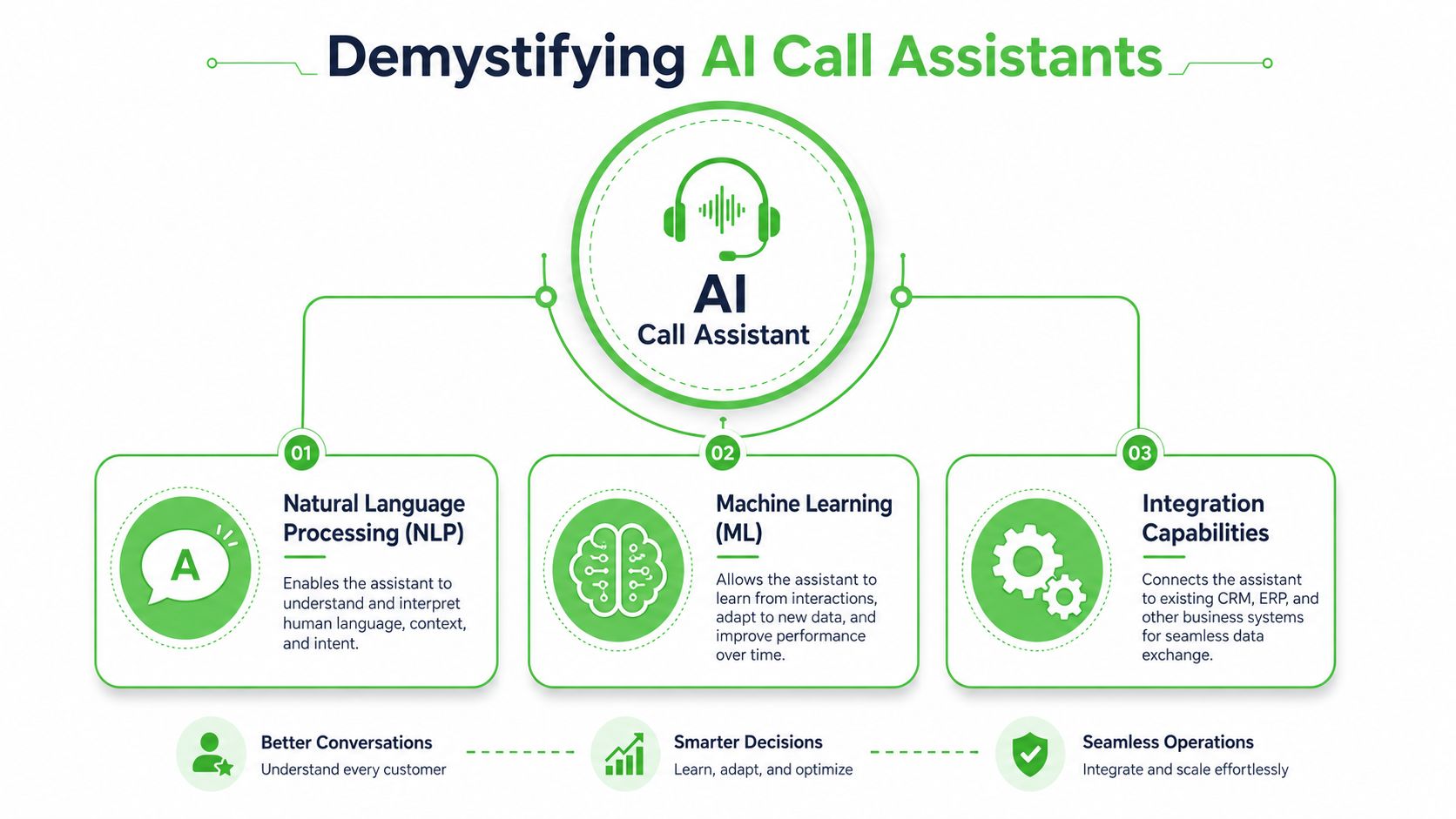
That's the line between a bot people tolerate and a system teams can build around. The assistant has to hear what the caller said, understand what they mean, and do something useful with that information. If it only records a message, it hasn't solved the operational problem.
For agencies selling this as a service, the packaging matters too. AI phone assistance has become a product category, not just a custom enterprise experiment. Aircall's AI product page listed AI Assist at $9 per month per license and AI Assist Pro at $49 per month per license, a sign of how quickly this moved into SaaS packaging for SMB and mid-market teams. The same source cites market research showing projected growth for intelligent virtual assistants and voice user interfaces, which is why buyers increasingly expect these tools to be available, configurable, and fast to launch.
The receptionist analogy is still the best one
The simplest way to explain an AI call assistant is this. Think of your best front-desk receptionist, except that person never forgets to log a note, never loses context between systems, and can follow structured workflows every time.
A weak setup sounds robotic, asks generic questions, and creates messy transcripts nobody uses. A strong setup does things like:
- Capture lead details cleanly: Name, service need, urgency, budget cues, and preferred callback window.
- Route based on intent: Sales goes to an account executive. Support goes to onboarding or help desk. Urgent issues go to escalation.
- Update systems automatically: The CRM gets notes, tags, and a call summary without human re-entry.
- Prepare the handoff: The next person sees context before they answer or call back.
What many teams miss is that voice automation isn't only about replacing human labor. It's about making the conversation machine-readable so every downstream system can act on it. That's why teams exploring broader service design may also find Mava's AI support insights useful. The same principle applies across voice, chat, and support workflows. AI becomes valuable when it improves the handoff, not when it merely adds another interface.
The best AI call flows feel boring to the customer. They get answers, get routed, and move forward without wondering what system they just spoke to.
The Core Capabilities That Drive Automation
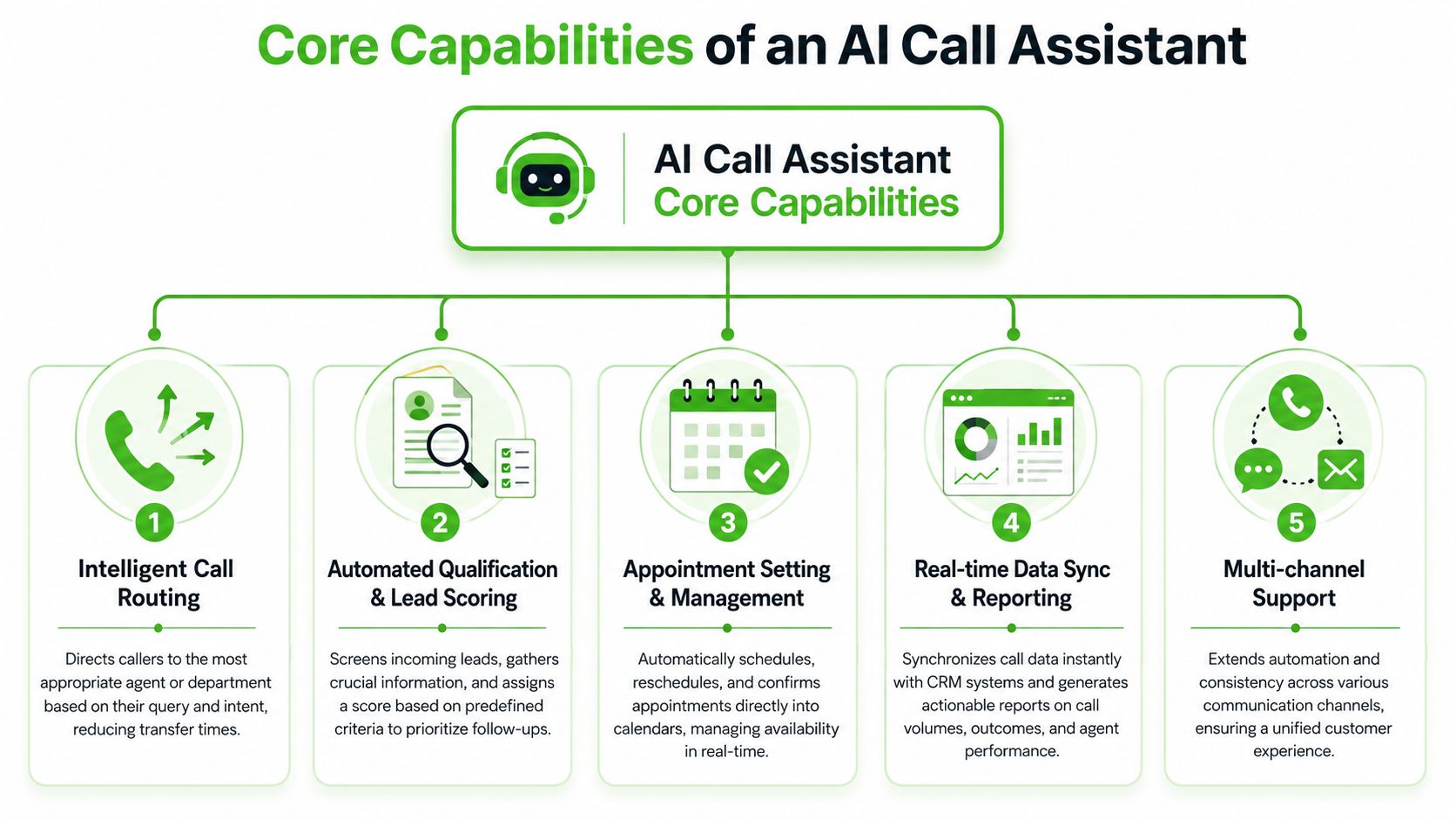
A lot of vendors present feature grids. Operators need to know which capabilities change throughput, quality, and margin. In practice, a few functions do most of the work.
What matters on the live call
Real-time transcription is the base layer. Every spoken interaction becomes searchable text. That gives sales managers cleaner review material, support teams better context, and automation systems something they can tag and route. It also reduces the “I know the lead called, but I don't know what they asked” problem.
Intent detection is where the assistant starts earning its keep. It separates a demo request from a billing issue, a cancellation risk from a general product question, or an urgent service request from a low-priority inquiry. That separation matters because each intent should trigger a different path.
Here's a simple operating view:
| Capability | What it does in practice | Business effect |
|---|---|---|
| Real-time transcription | Creates a live text record of the call | Better visibility and cleaner QA |
| Intent detection | Identifies why the person is calling | Smarter routing and fewer bad handoffs |
| Agent assist | Surfaces prompts or knowledge during the call | Faster responses and less searching |
| Intelligent routing | Sends the caller to the right queue or person | Fewer transfers and less frustration |
Agent assist is especially useful in mixed human-plus-AI environments. During a live call, the system can surface relevant knowledge articles, prompts, or next-best actions. That reduces the amount of tab-switching and memory work a human rep has to do.
What matters after the call ends
The highest-value capability for operations is often post-call intelligence. Aircall's AI Assist Pro feature overview describes how AI can automatically tag calls from transcripts with labels like Pricing Objection or Follow-up Scheduled, while agent-assist systems can surface relevant knowledge articles and next-best actions during the live call. That combination reduces after-call work and improves resolution speed because the conversation becomes actionable data.
That has several practical benefits for agencies and SaaS operators:
- Coaching gets easier: Managers can review patterns like objections, competitor mentions, or missed qualification steps.
- Follow-up improves: Sales reps see summaries instead of listening to recordings from the start.
- Reporting becomes operational: You can track themes and outcomes, not just call volume.
- Workflow automation gets cleaner: Tags can trigger tasks, pipeline movement, or nurture sequences.
Don't evaluate an AI call assistant only on whether it can talk. Evaluate whether your team can do something useful with the transcript five minutes later.
A common deployment mistake is overvaluing the voice itself and undervaluing the structured output. Nice-sounding calls are good. Searchable summaries, correct labels, CRM updates, and reliable routing are what deliver substantial impact.
Business Use Cases for Agencies and SaaS
At 4:47 p.m., a prospect calls after clicking an ad. Your client's team is tied up. The caller hangs up, tries a competitor, and the agency report still shows a “qualified lead” because the campaign generated the call. That gap is where AI call assistants make money. The strongest agency and SaaS use cases tie call handling to revenue capture, service packaging, and operational control.
Lead qualification that sales teams trust
For lead gen agencies, inbound calls are often the highest-intent moment in the funnel. They are also the easiest place to lose momentum. A good AI call assistant handles the first 30 to 90 seconds with discipline. It asks the same qualifying questions every time, captures urgency, and either books the next step or routes the call to a person with context already attached.
That works well for home services, legal intake, med spa bookings, insurance screening, and any client where speed matters but staff coverage is inconsistent. A caller asks for a quote. The assistant collects service type, ZIP code, timeline, and callback preference, then pushes that data into the CRM or scheduling tool. The rep starts with a usable record instead of a vague “missed call” notification.
This also creates a cleaner product for agencies to sell. Instead of positioning the offer as call answering, package it as qualified-call capture with CRM sync, appointment booking, and after-hours coverage. That framing is easier for clients to buy because the outcome is visible.
Smaller operators fit this model too. Teams exploring adjacent workflows for lean businesses can borrow ideas from AI solutions for solo professionals, especially when one person is covering sales, support, and scheduling.
A short demo helps teams understand the flow in practice:
Support deflection that protects the customer experience
Support automation fails when teams optimize for containment rate and ignore customer frustration. A better design automates the easy requests, gathers context for the messy ones, and escalates fast when emotion, billing risk, or account complexity shows up.
A well-scoped support deployment usually does four things well:
- Handles repetitive requests: business hours, appointment changes, account status checks, password reset guidance, policy questions
- Creates structured tickets: account details, issue category, urgency, and callback preference
- Routes by intent: billing, technical support, onboarding, cancellations, or renewals
- Hands off cleanly: summary, transcript, and captured fields move with the caller to the human team
For SaaS companies, this is often less about replacing support reps and more about reducing drag at the front of the queue. The assistant can sort simple requests, collect missing information before a rep joins, and cut the time spent on repetitive intake. That improves responsiveness without forcing every issue through a human from the start.
White-labeled call handling as a recurring service
Agencies have a bigger opportunity here than many realize. The strongest margin often comes from packaging the assistant into a managed service, not from selling software access alone. White-labeled call handling can sit inside an SEO retainer, paid media program, CRM implementation, or RevOps engagement.
The commercial model is straightforward. Set up the assistant, tailor scripts by client type, connect it to booking and CRM workflows, monitor outcomes, and charge for the managed layer. Clients pay for coverage, consistency, and reporting. The agency keeps control of the stack and creates recurring revenue that is harder to replace than campaign labor.
A few packaging options work well:
| Client type | High-fit offer | Why it sells |
|---|---|---|
| Local lead gen client | Missed-call capture plus booking | Clear tie to revenue recovered |
| B2B SaaS | Support triage plus ticket enrichment | Less rep time spent on intake |
| Multi-location business | Centralized routing and call scripts | Consistent intake across locations |
| Sales-led SaaS | Demo qualification and CRM sync | Reps spend more time on good-fit opportunities |
Agent augmentation for clients who resist automation
Many clients do not want an “AI receptionist” replacing staff. They will approve a productivity layer that makes existing staff faster and more consistent. That is the easier sale.
Package the assistant around human performance. Use it for overflow handling, qualification before transfer, summaries after calls, call QA flags, and workflow triggers. The client keeps their team. You improve response times, reduce admin work, and make follow-up more reliable.
That positioning also lowers rollout risk. It gives the client an adoption path: start with after-hours coverage, add lead qualification, then expand into support triage or appointment management once the process is stable.
If a client already has a call team, sell better utilization, cleaner intake, and faster follow-up. Those outcomes get approved faster than replacement narratives.
SaaS product extensions that create new revenue lines
For SaaS companies, AI call assistants can be more than an internal ops tool. They can become part of the product or part of the services layer around the product. That matters if you want expansion revenue without building an entirely new category.
A CRM platform can offer AI intake for missed calls. A scheduling tool can add voice-based booking and rescheduling. A vertical SaaS product for clinics, law firms, or contractors can bundle call handling as a premium add-on with setup fees, usage pricing, and managed onboarding.
The trade-off is operational. Once voice touches the customer experience, packaging, support ownership, white-label controls, and compliance review matter more than the demo. Agencies and SaaS teams that treat deployment as a productized service usually get better retention because the assistant is tied to business process, not just novelty.
Implementation and Integration Considerations
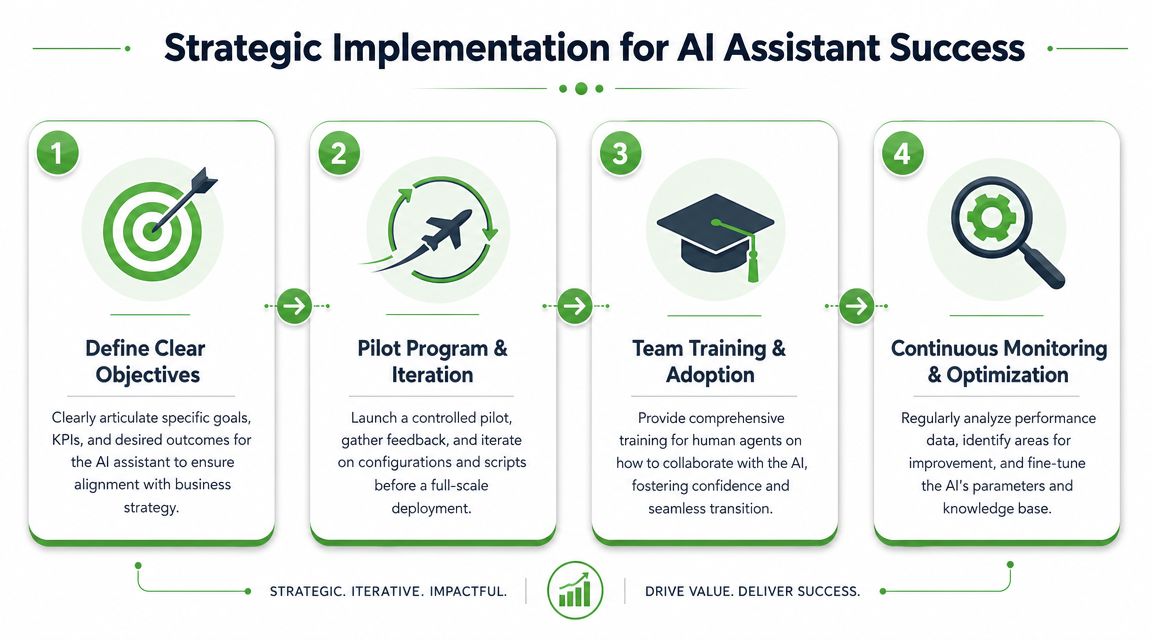
Most deployments fail for boring reasons. The script is weak. The CRM mapping is sloppy. Nobody defined escalation rules. Legal review happened after launch instead of before it.
Compliance before convenience
Caller trust is not optional. If people feel tricked, the efficiency gain disappears fast. That's especially important because RingIQ's discussion of AI call assistant adoption cites a KPMG survey showing that 56% of respondents were comfortable using AI for customer service while 67% were concerned about AI making mistakes.
That should change how you design deployments. Don't hide the assistant. Don't make escalation difficult. Don't route sensitive issues into long loops.
A practical compliance checklist usually includes:
- Disclosure: Tell callers they're interacting with an AI-enabled system when required.
- Consent handling: Review call recording and two-party consent rules by market.
- Data governance: Decide what gets stored, redacted, summarized, or synced.
- Escalation policy: Sensitive, legal, medical, financial, or high-friction cases should move to a person quickly.
The compliance question isn't “can the model answer this?” It's “should this conversation remain automated at all?”
Integration choices that affect margin
You have two broad routes. Buy a turnkey product or build around APIs and orchestration tools. Turnkey is faster to launch and easier to support. API-led builds offer more control, especially if you need custom call logic, vertical-specific prompts, or deep integration into proprietary systems.
The right choice depends on your business model.
- Turnkey fits agencies that want fast rollout, repeatable onboarding, and lower technical overhead.
- API-led fits SaaS teams that need embedded voice workflows inside their own product.
- Hybrid setups fit operators who want a stable front end with custom automations underneath.
Integration quality decides whether the assistant creates value or more admin work. At minimum, a clean handoff into tools like HubSpot, Go High Level, a ticketing layer, calendars, and messaging channels used for follow-up is essential. If transcript tags don't map to useful actions, the system is just producing extra text.
Why white-labeling changes the business model
For agencies, white-labeling is more than a branding choice. It changes retention, pricing power, and client ownership. When you package voice automation under your own brand, the offer becomes part of your service stack instead of a third-party tool your client could buy directly next month.
That matters in three ways:
- You control the packaging. You can sell setup, optimization, reporting, and support around the software.
- You improve stickiness. The more the assistant is tied into CRM stages, booking logic, and follow-up workflows, the harder it is to rip out casually.
- You protect margin. Clients buy an outcome, not a line item they can price-compare in five minutes.
The trap is white-labeling a product you can't support. If you resell this category, choose something your team can configure, troubleshoot, and explain without relying on the vendor for every small change.
How to Choose a Solution and Measure ROI
By 2026, 80% of customer-service organizations will use generative AI in some form, according to Gartner's projection referenced in this market discussion. That doesn't make every product equal. It just means buyers will have more options and more noise to sort through.
What to ask before you buy or resell
A solid selection process goes beyond feature count. Most buyers should ask questions in four buckets.
Operational fit
- Can it route reliably: Not just answer, but send the call to the right place.
- Can it escalate fast: Especially when emotion, complexity, or compliance risk rises.
- Can it handle your language: Industry jargon, qualification logic, and service categories matter.
Integration fit
- Does it write back to the CRM cleanly: Notes, tags, source fields, tasks, and ownership.
- Can it trigger downstream actions: Booking, notifications, follow-up sequences, or ticket creation.
- Will your team effectively use the output: A summary nobody reads has no value.
Commercial fit
- Can you package it profitably: Especially if you're an agency or vertical SaaS company.
- Is pricing predictable: Variable usage models can get messy when clients scale.
- Can you support it without vendor dependency: That directly affects service margin.
Brand fit
- Can it be white-labeled: If resale is part of your model.
- Can you shape the voice and flows: Generic scripts reduce trust.
- Does it feel consistent with the rest of the customer journey: Voice should match brand expectations.
How to measure business impact without fooling yourself
The wrong metric is “calls answered.” That number can look great while conversion quality stays flat or support friction gets worse.
Use a tighter scorecard:
| Metric type | Better question |
|---|---|
| Lead handling | Are more qualified appointments getting booked from inbound calls? |
| Sales efficiency | Are reps spending less time on poor-fit or incomplete conversations? |
| Support speed | Are structured handoffs reducing resolution delays? |
| Workflow quality | Are summaries, tags, and CRM updates accurate enough to trust? |
| Client retention | Is this system becoming part of the account's core operations? |
The cleanest ROI stories usually come from one narrow deployment first. Missed-call capture. Demo qualification. Support triage for a specific queue. Prove the workflow. Then expand.
If you're an agency, sell the first version as an operational fix with visible output. Better routing. Better summaries. Better booked conversations. Once the client sees cleaner handoffs and less admin work, upsells become much easier.
Double My Leads helps agencies and SaaS companies turn messaging and AI automation into a branded revenue stream. If you want to pair voice workflows with a white-labeled WhatsApp offering, unlimited team inboxes, broadcast tools, CRM sync, and AI agents under your own domain and billing, Double My Leads is built for that model.


