
WhatsApp Automatic Reply Message: Setup Guide That Works
Set up a WhatsApp automatic reply message that actually converts. Practical setup steps, trigger workflows, tested templates, and measurement tips for 2026.
A lead fills out your form at 11:47 PM, taps the WhatsApp button, and sends “Hey, is this still available?” Then nothing happens. By morning, they've already bought from the business that answered first.
That's the job of a WhatsApp automatic reply message. It's not there to sound clever. It's there to close the gap between interest and conversation, especially when your team is asleep, in meetings, or buried in other chats.
Used well, auto replies do three things fast: confirm the message was received, move the lead into the right path, and get a human involved before the conversation cools off. Used badly, they become a polite dead end. I've seen both. The difference usually comes down to setup, trigger logic, and whether the message asks the contact to do one simple next action instead of dumping information at them.
Table of Contents
- Why Automatic Replies Change the Lead Game
- Picking the Right Setup Path for Your Business
- Building Your First Automatic Reply Workflow
- Triggers That Fire at the Right Moment
- Tested Templates for Common Use Cases
- Personalization and Timing That Feels Human
- Measuring Results and Fixing What Breaks
Why Automatic Replies Change the Lead Game
Teams don't lose leads because their offer is weak. They lose them in the handoff between intent and response.
A prospect clicks an ad, lands on a page, and messages on WhatsApp because they want the shortest route to an answer. If that first message sits untouched until business hours, the buyer doesn't wait around to admire your process. They message someone else.
The first minute matters more than the brochure
WhatsApp operates at massive scale. It crossed 3 billion monthly active users in March 2025 and reached about 3.3 billion monthly active users worldwide by Q1 2026, with estimates of over 100 billion messages per day according to TimelinesAI's WhatsApp statistics roundup. That's why a WhatsApp automatic reply message isn't a side feature anymore. It's the front door to how people expect businesses to communicate.
When a contact messages you, they're not looking for a long welcome note. They want proof that they reached a real business and a fast path to the next step. That's why the strongest flows are short:
- Acknowledge the message so the lead knows they weren't ignored
- Set direction with one question or one button path
- Hand off quickly when the person is clearly sales-ready
If you're building a lead system around chat, your auto reply belongs inside the larger WhatsApp sales funnel, not as a disconnected courtesy message.
Practical rule: An automatic reply should start a conversation, not end one.
What a good auto reply actually does
The best-performing flows I've worked on don't try to answer everything upfront. They sort people by intent. A cold inquiry gets a welcome and one qualifying question. A hot lead gets routed to sales. A support issue gets pushed into the right queue.
That's the shift. A WhatsApp automatic reply message isn't just “thanks, we'll get back to you.” It's a routing layer that buys speed without sacrificing context.
Picking the Right Setup Path for Your Business
There are three realistic ways to set this up, and they are not interchangeable. Pick the wrong one and you'll either overbuild too early or hit a ceiling right when message volume starts to matter.
The simple version for low volume
If you're a solo operator or handling a light stream of inquiries, the WhatsApp Business app is usually enough to start. It gives you greeting messages, away messages, and quick replies. That's fine when one person owns the inbox and you don't need shared visibility.
WhatsApp Business itself is still a relatively recent business channel. It launched in January 2018, and by late 2024 it had over 764.38 million monthly active users. Independent reporting also notes more than 417 million downloads since launch, which says a lot about how quickly businesses adopted tools for faster replies, as summarized by Appfigures reporting on WhatsApp Business adoption.
The scale path for teams and integrations
Once multiple people need to answer messages, or you want CRM events to trigger conversations, you're in WhatsApp Business API territory through a business solution provider. That path gives you more control, template messaging, system integrations, and proper multi-agent workflows.
The trade-off is friction. You'll usually deal with template approval, setup complexity, and more moving parts than most small teams expect.
The workspace layer that sits on top
Then there's the third path. A workspace platform such as Double My Leads sits on top of WhatsApp workflows and gives operators a shared inbox, routing, automation builders, assignments, tags, and white-label options without forcing them to live in raw infrastructure.
That's why I treat native WhatsApp tools and workspace platforms as complementary layers, not rivals. Native tools are where many teams start. Workspace software is what pays off when the inbox becomes a team process instead of a personal one. For teams comparing options, it helps to review how platforms automate WhatsApp messages beyond a simple away note.
Setup Path Comparison for WhatsApp Automatic Replies
| Capability | WhatsApp Business App | WhatsApp Business API via BSP | Double My Leads Workspace |
|---|---|---|---|
| Best for | Solo operators | Growing teams with technical support | Agencies, SaaS, and teams needing a shared workspace |
| Auto replies | Basic greeting and away messages | Advanced automated flows with templates | Automated flows with shared inbox controls |
| Multi-agent handling | Limited | Yes | Yes |
| CRM integration | Minimal | Strong | Available through workspace tools and integrations |
| Build complexity | Low | Higher | Lower than raw API setup |
| White-label/reselling | No | Not by default | Yes |
| Where it breaks | Team collaboration and scaling | Setup overhead | Less relevant for very small one-person use cases |
If your team keeps asking “who replied to this lead?” you've already outgrown the basic app.
Building Your First Automatic Reply Workflow
Most businesses overcomplicate things. Your first workflow doesn't need branching logic across twenty scenarios. It needs to fire reliably, say the right thing, and route the chat somewhere useful.
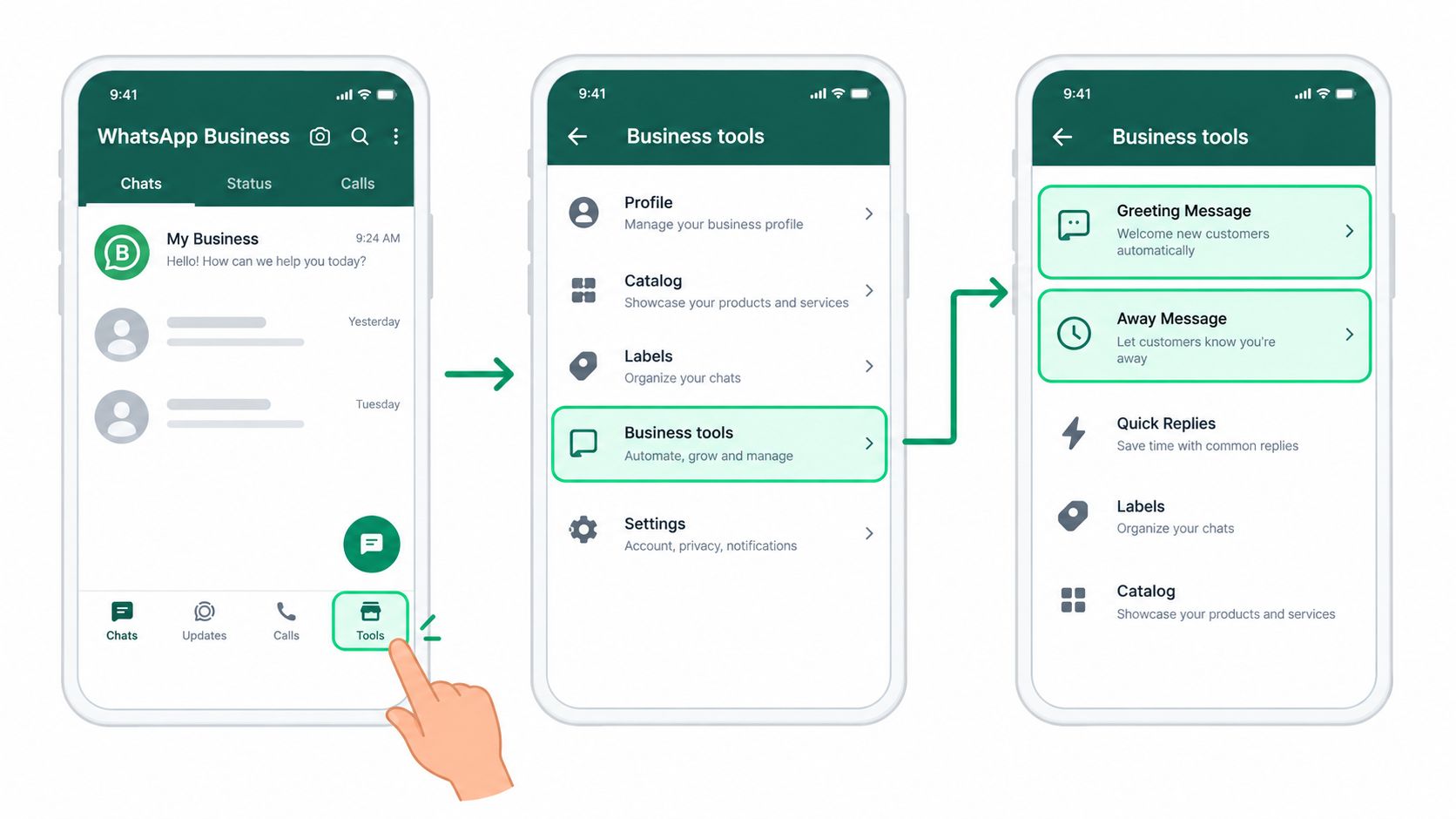
Inside the WhatsApp Business app
Open WhatsApp Business, tap the menu, go to Settings, then Business Tools. From there, you'll see Greeting Message and Away Message.
For a greeting message, turn it on, write something short, then choose who receives it. For an away message, the most important screen is the schedule setting. That's where people slip. They write the message, save it, and forget to set whether it runs always, on a custom schedule, or outside business hours.
A basic setup that works looks like this:
- Greeting message: “Hi, thanks for messaging us. Are you asking about pricing, availability, or support?”
- Away message: “We've got your message and will reply when the team is back. If you want faster routing, send PRICING or SUPPORT.”
The most-missed detail is the schedule toggle. If the timing isn't enabled correctly, the message exists but never earns its keep.
On the API route
If you're using the WhatsApp Business API, the setup is less visual and more operational. You'll submit templates in Meta Business Manager, connect the inbox you'll use, then configure webhooks for inbound message events.
The mistake here isn't usually technical. It's strategic. Teams build template approval into the project, but they forget the fallback behavior. If the inbound message doesn't match a clean path, what happens next? A proper first workflow should always include:
- An opening acknowledgement
- A qualification branch
- A handoff rule
- A fallback reply if no condition matches
Without that fallback, your “automation” only works for ideal conversations.
In a workspace builder
In a workspace platform, the flow is usually faster to build. Open the chatbot or automation builder, drop in a greeting node, connect it to a keyword or inbound message trigger, add a question, then route the conversation to a human queue if the person shows buying intent.
The critical setting here is the assignment rule. If the flow collects intent but no one owns the conversation after that, you've built a sorter, not a sales system.
A quick walkthrough helps if you want to see one of these setups in action:
A first workflow should survive messy real conversations, not just test messages from your own phone.
What to test before going live
Before you publish anything, send test messages that don't behave nicely. Try vague questions. Try one-word replies. Try sending a message outside your stated hours. Then check these points:
- Timing window: Does the auto reply fire when it should, and stay quiet when it shouldn't?
- Routing path: Does a real agent get the conversation at the right moment?
- Fallback behavior: Does the contact get stuck if they type something unexpected?
If those three hold up, your first WhatsApp automatic reply message is ready to face actual leads.
Triggers That Fire at the Right Moment
Most broken WhatsApp automation isn't broken because the copy is bad. It's broken because the trigger logic is lazy.
If every inbound message gets the same automatic reply, contacts learn fast that the bot isn't listening. That's when reply quality drops and agents inherit annoyed conversations.
Start with trigger types that match intent
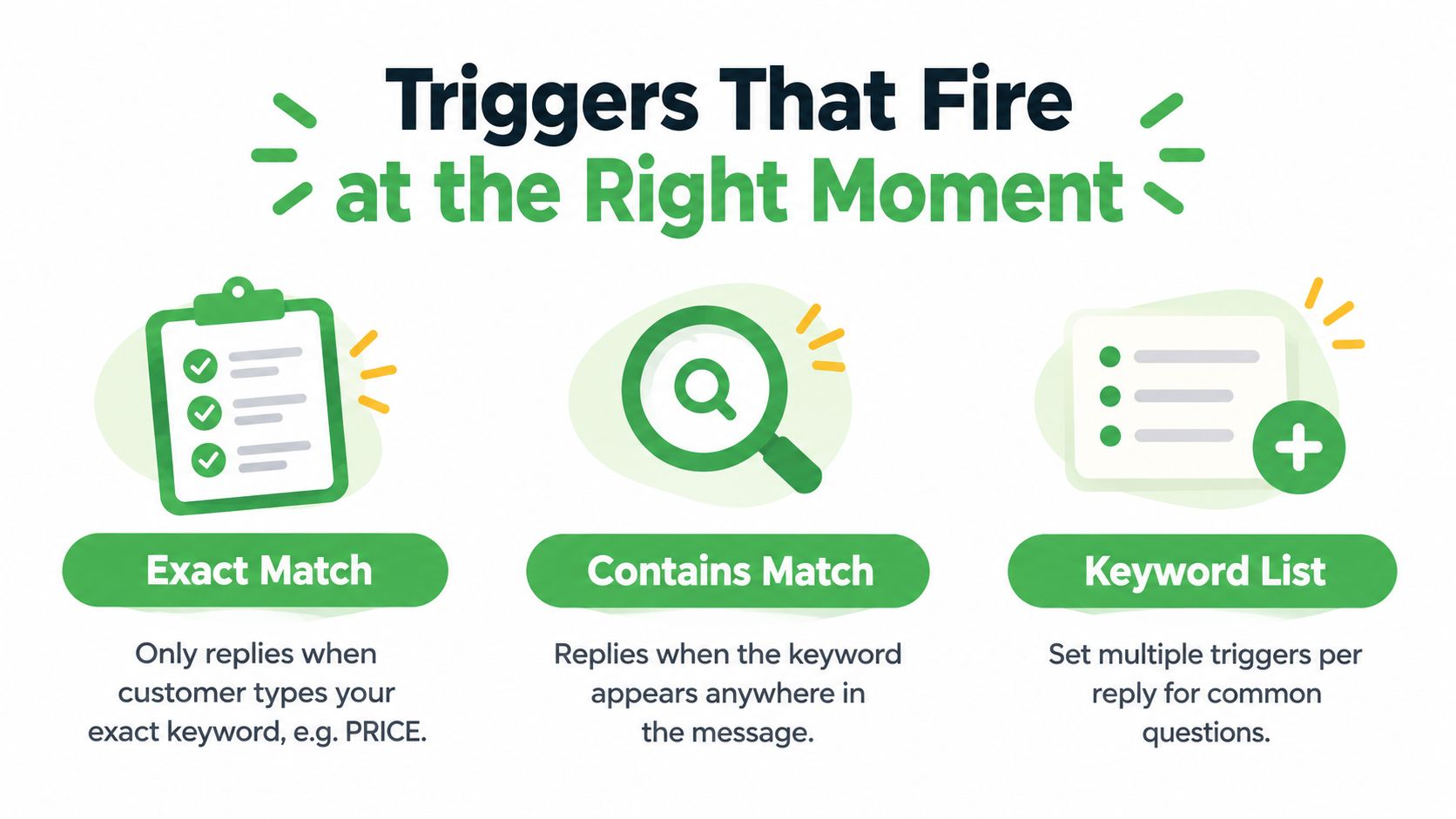
Use exact match when the campaign tells people what to send, like PRICING or DEMO. Use contains match when customers write naturally and may bury the keyword inside a sentence. Use a keyword list when several common phrases should lead to the same reply.
Then add time logic. After-hours messages shouldn't go into the same branch as live daytime inquiries. They need a reply that acknowledges the timing and sets expectation cleanly.
Layer conditions instead of blasting one message
Good trigger logic is usually stacked:
- First-time contact: welcome message plus one qualifying question
- Returning lead: route to their assigned rep or previous queue
- Post-form submission: send source-aware follow-up tied to the campaign
- Late-night inquiry: trigger after-hours flow with next available action
This is also where strong systems use AI replies with human handoffs well. If you want a practical take on that balance, this guide on AI replies with human handoffs is worth reading because it treats automation as triage, not replacement.
Don't trigger on every message. Trigger on moments that mean something.
The handoff is part of the trigger
A trigger isn't complete until a human can pick up the chat without making the lead repeat themselves.
When a conversation moves from bot to agent, pass the transcript, contact tags, and last detected intent. If the bot collected “budget,” “service requested,” or “preferred time,” put that in front of the rep before they type a word.
The worst handoff in WhatsApp is the one that starts with, “Can you tell me what you're looking for?” after the bot already asked it.
Tested Templates for Common Use Cases
Most templates fail because they try to sound polished instead of useful. A strong WhatsApp automatic reply message earns the next response line by line.
The structure matters more than the exact wording. That's why I'd rather give you frameworks you can adapt than generic scripts that sound copied.
WhatsApp Automatic Reply Templates by Use Case
| Use Case | Trigger | Template Lines | Why It Works |
|---|---|---|---|
| Lead capture | New inbound lead from ad or form | “Hi [First Name], thanks for messaging us from [Source].” / “I can help with that.” / “Are you looking for pricing or a quick call?” | Names the source, confirms relevance, asks one easy next-step question |
| After-hours | Message outside business hours | “Thanks for your message.” / “The team is offline right now, but we'll pick this up when we're back.” / “If you want, send your question now and we'll route it first.” | Acknowledges the timing without pretending someone is live |
| Broadcast follow-up | Reply to campaign or announcement | “Hi [First Name], this is about the offer we sent earlier.” / “If you want the details, I can send them here.” / “Reply YES and I'll pull it up.” | Connects back to the campaign and lowers friction with a tiny CTA |
| Abandoned cart | Cart or checkout drop-off | “You left [Product] in your cart.” / “If the hold-up is sizing, shipping, or price, tell me which one.” / “I'll help you finish it here.” | Calls out the item and invites objection handling instead of pushing a hard sell |
For more examples built around campaign and sales use cases, this library of WhatsApp message templates is useful as a pattern reference.
Lead capture that qualifies without friction
A lead capture reply should do four jobs in very few words:
- Greet naturally: not with “Dear customer,” but with a direct opener
- Name the source: ad, referral, landing page, or campaign
- Offer one route: quote, call, pricing, appointment
- Ask one question: never three at once
A simple version:
Hi Sarah, thanks for messaging us from the kitchen remodel form. I can help with pricing or availability. Which one do you want first?
Line one earns attention because it feels connected to what the person just did. Line two reduces uncertainty. Line three creates a binary choice, which is easier to answer than an open-ended “How can we help?”
After-hours replies that don't kill momentum
Bad after-hours messages sound like closed signs. Better ones keep the conversation moving.
Try this structure:
- “Thanks for messaging us.”
- “The team is offline right now.”
- “Send your question or preferred time, and we'll pick it up first when we're back.”
That works because it doesn't fake availability, but it still asks for a useful next action.
Broadcast and cart recovery templates
Broadcast follow-up should feel like continuation, not interruption. Reference the original campaign, restate the offer briefly, and give the contact a soft response path.
For abandoned cart, don't jump straight to a discount. Ask what blocked the purchase. In practice, most recoverable chats start once the customer explains the objection. Your auto reply should open that door.
Personalization and Timing That Feels Human
The fastest way to tank a reply rate is to sound like a machine with a contact list.
Personalization helps, but only when it stays restrained. Use the contact's first name, the campaign source, or the last product viewed if that context is reliable. Don't force fields that feel invasive or guessed. Full names, company names, and location assumptions often make a message feel stitched together by software.
Good tone is direct, not corporate
Bad:
- Overwritten opener: “Thank you for contacting our business. Your inquiry is important to us.”
- Hard sell CTA: “Click now to secure your offer immediately.”
- Generic ask: “Please advise how we may assist.”
Better:
- Direct opener: “Thanks for messaging us.”
- Soft next step: “Want pricing or a quick answer here?”
- Single-action CTA: “Reply PRICE and I'll send it.”
If the message sounds like legal approved it, rewrite it.
Pacing rules that keep replies natural
A few timing habits matter more than fancy copy:
- Reply fast to inbound leads: If someone started the conversation, don't let the first human follow-up drift.
- Pause before the second automated message: A short gap feels conversational. Back-to-back pings feel bot-driven.
- Don't repeat the same template: If someone ignored the first one, cloning it again usually adds irritation, not urgency.
Before activating any WhatsApp automatic reply message, read it out loud. If it sounds like something a sharp sales coordinator would text, keep it. If it sounds like a help desk announcement, cut it down.
Measuring Results and Fixing What Breaks
Look at the wrong signals first. They celebrate that messages were sent, then wonder why pipeline quality didn't change.
What matters is whether the auto reply created a real conversation and moved the lead toward a sale or qualified handoff.
The five metrics worth tracking
Independent WhatsApp customer service benchmarks published in 2026 show automated replies can cut first response time from human multi-minute or multi-hour handling down to 5 to 15 seconds, with reported averages improving from 8 min 30 sec to 15 sec in microenterprises and from 3 min 45 sec to 5 sec in large companies when AI chatbots are added. The same benchmark recommends targets under 2 minutes for most sectors and under 1 minute for top-quartile performance, while warning that fast acknowledgements without escalation rules can hide unresolved conversations, according to Aurora Inbox's WhatsApp chatbot performance benchmark.
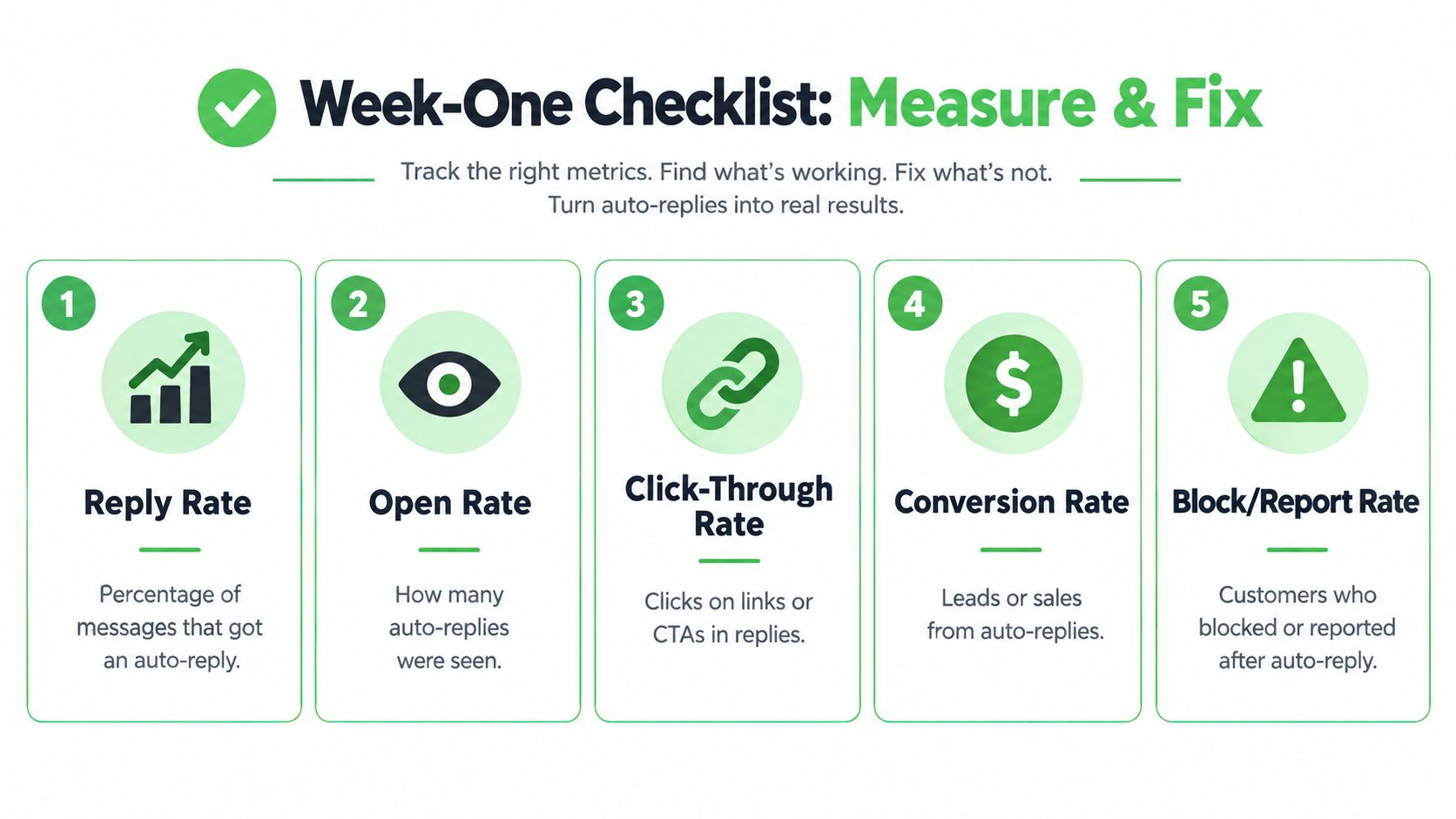
Track these five first:
- First response time: how fast the system answers the first inbound message
- Reply-to-conversation rate: how often the contact answers the auto reply
- Opt-out rate: whether people are telling you to stop
- Qualified handoff count: how many chats reach a human in a useful state
- Revenue attributed within 48 hours: whether the flow influences actual buying behavior
The visual below is a good week-one review prompt, even if I'd treat some items as secondary compared with handoff quality and attributed revenue.
The four failures I see most often
First, the timezone is wrong, so after-hours messages fire at the wrong time. Second, keyword rules overlap and multiple triggers answer the same message. Third, template and window rules create dead spots where the bot can acknowledge but not continue properly. Fourth, the user gets trapped in a loop with no clean path to a person.
A weekly review should ask:
- Did the right trigger fire for the right contact type?
- Did a human take over when buying intent was obvious?
- Did any message branch confuse or stall the chat?
- Did one template outperform another based on a single changed variable?
Swap one line at a time when testing. Change the opener, the CTA, or the qualifier. Don't rewrite the whole flow and pretend you learned something.
A WhatsApp automatic reply message is working when it shortens response time, improves handoff quality, and creates cleaner sales conversations. If your current setup can't do that consistently, it's not automation. It's an autoresponder.
If you've outgrown a one-phone setup and need shared inboxes, routing, auto-replies, templates, and WhatsApp workflows your team can operate, Double My Leads is built for that layer. It gives agencies and operators a WhatsApp-first workspace for handling inbound conversations, assigning ownership, and turning automatic replies into a real lead process instead of a placeholder message.