
Your website is getting traffic, but the contact page still feels weak. People land, hesitate, fill out a form, and then disappear into an inbox queue that nobody treats like a live sales channel.
That's why a WhatsApp contact form works so well in practice. It replaces a cold handoff with a conversation. For agencies, that matters even more because the win isn't just more replies. It's faster qualification, cleaner attribution, easier follow-up, and a service you can scale across client accounts without rebuilding each workflow from scratch.
The mistake most businesses make is treating WhatsApp like a button. The profitable approach is to treat it like infrastructure. You need the right entry point, the right data capture, and the right connection method underneath it.
Table of Contents
- The Simplest WhatsApp Contact Form A Click to Chat Link
- Building a True Form-to-WhatsApp Workflow
- Embedding WhatsApp Chat Widgets for Live Engagement
- Choosing Your Connection Cloud API vs QR Code Bridging
- Advanced Strategies for Lead Management and Automation
- Troubleshooting and Best Practices for Success
The Simplest WhatsApp Contact Form A Click to Chat Link
The fastest way to create a WhatsApp contact form is not a form at all. It's a Click to Chat link. For many businesses, that's enough to turn a passive contact page into a direct conversation channel.
WhatsApp officially supports the wa.me format, which lets someone start a chat without saving your number first. The number must be in full international format with no zeroes, brackets, or dashes, and you can also add a pre-filled message using the ?text= parameter, as shown in WhatsApp's Click to Chat documentation.
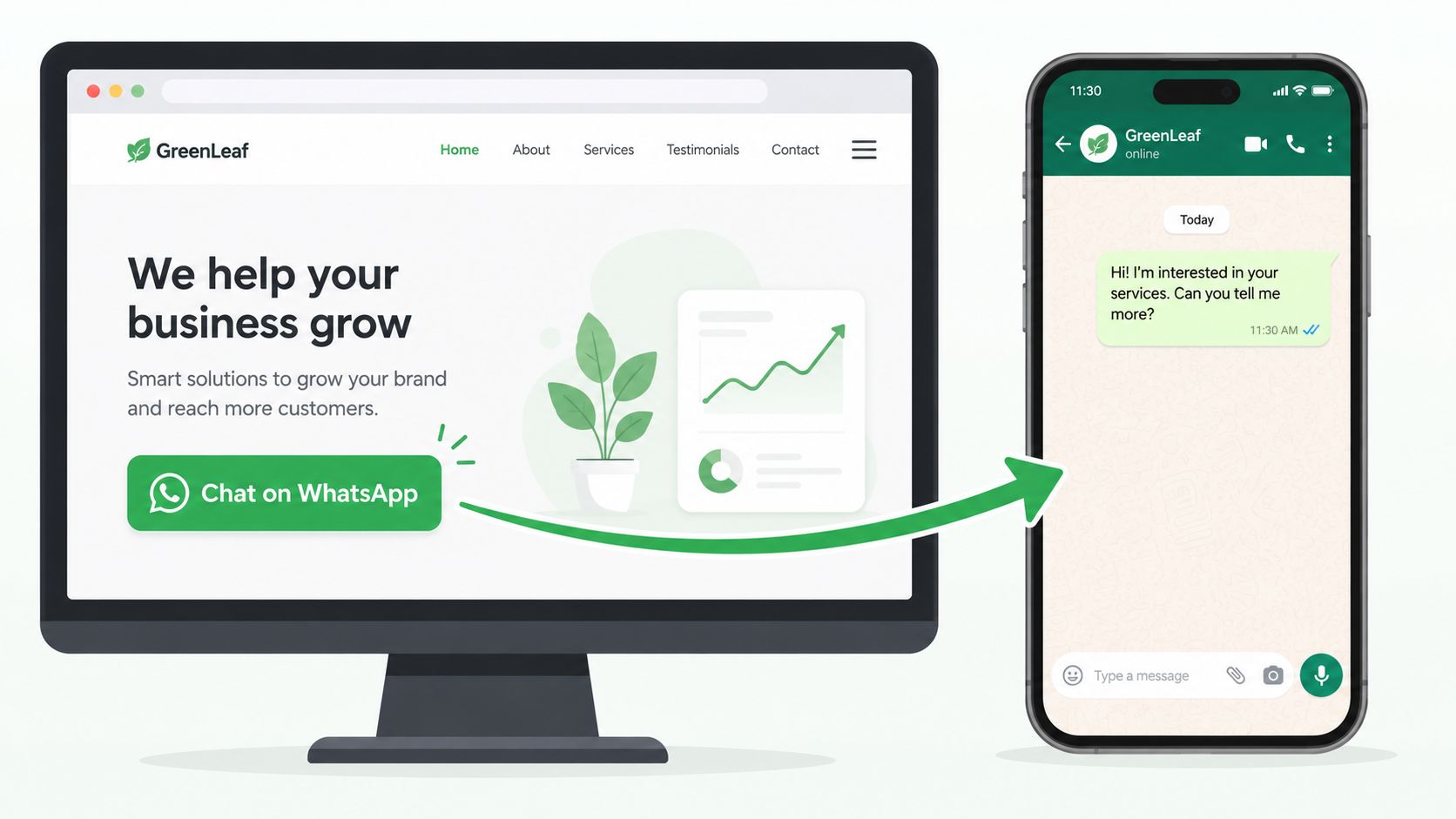
The core link format
Use this structure for a basic chat link:
https://wa.me/15551234567
Use this structure for a pre-filled message:
https://wa.me/15551234567?text=Hi%20I%20want%20to%20ask%20about%20your%20services
That second version is where most of the value sits. A generic “Contact us on WhatsApp” button is better than an email form, but a contextualized message is better than both.
Copy and paste examples
Here's a simple HTML button:
<a href="https://wa.me/15551234567" target="_blank" rel="noopener">
  Chat with us on WhatsApp
</a>
Here's a product-specific version:
<a href="https://wa.me/15551234567?text=Hi%20I%20am%20interested%20in%20your%20SEO%20package" target="_blank" rel="noopener">
  Ask about our SEO package
</a>
Agencies should create different pre-filled messages for different pages, offers, and campaigns. That gives the team immediate context before anyone types a second message.
Practical rule: If every WhatsApp button on the site sends the same default message, you lose intent data that could have helped your team qualify and route the lead.
Where this method works best
A Click to Chat setup is ideal when:
- You want speed first: You can deploy it on a site in minutes.
- The offer is simple: Local services, appointment requests, and direct inquiries fit well.
- You need low friction: Mobile visitors usually prefer tapping a button over filling multiple fields.
- You're validating demand: This is the easiest way to test whether WhatsApp will outperform your current form flow.
It starts to break down when the business needs structured intake before the chat starts. If a law firm needs case type, budget range, and preferred callback window, a plain link won't capture enough upfront.
For teams that want help formatting links correctly, Clepher's guide on easy steps to create a WhatsApp link is a useful companion because it speeds up setup without forcing a custom build.
What works and what doesn't
A basic link works because it removes friction. It doesn't work when teams expect it to replace intake logic, routing, or CRM capture by itself.
Use it when the main bottleneck is response speed. Don't use it as your final setup if the client needs qualification before the first human reply.
Building a True Form-to-WhatsApp Workflow
A real WhatsApp contact form captures data first and opens the conversation second. That distinction matters when you're managing leads for multiple clients, syncing data into a CRM, or routing inquiries by service line.
The underlying pattern is straightforward. A visitor submits a website form. A connector catches the data. That connector formats the submission and sends it into WhatsApp as a readable message for the right person or team.
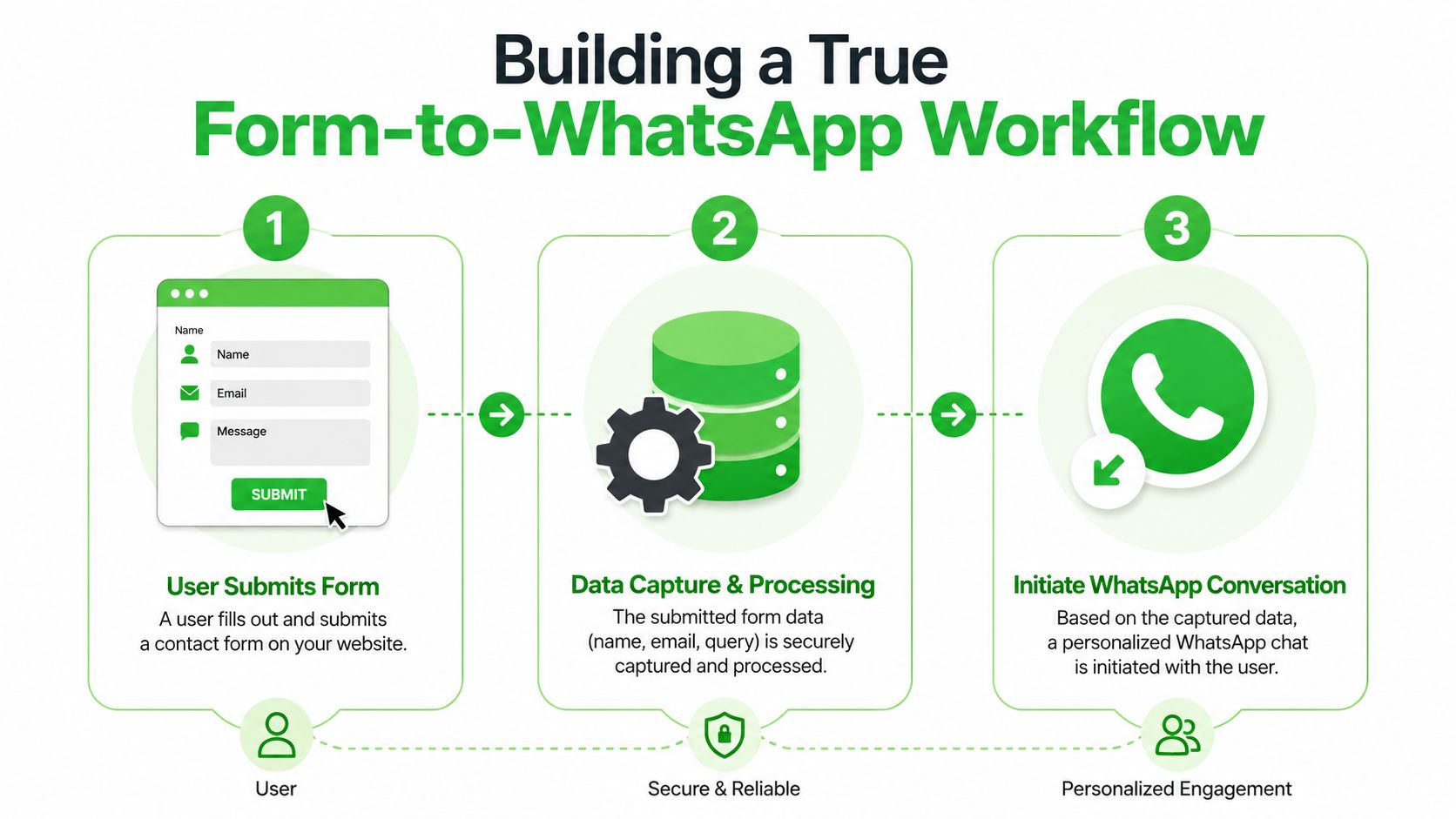
What the workflow looks like
For most agency implementations, the stack looks like this:
- Front-end form: WordPress form, custom HTML form, landing page builder form, or CRM-native form.
- Automation layer: Zapier, Make, a webhook handler, or a plugin-based connector.
- WhatsApp destination: A connected WhatsApp number or inbox where staff can reply quickly.
- CRM sync: Optional but recommended if the client needs lifecycle tracking.
This setup gives you a middle ground between a static website form and a full chat widget. The lead still gets an instant path to conversation, but the business doesn't lose the structured data.
What to collect before the chat
Keep the form tight. Most businesses only need a few fields before WhatsApp takes over.
| Field | Why it matters |
|---|---|
| Name | Lets the team personalize the reply |
| Gives you a backup follow-up channel | |
| Service or topic | Helps route the inquiry correctly |
| Message | Adds intent and urgency context |
If the client asks for too many fields, push back. Every extra field lowers completion quality. The whole point of a WhatsApp contact form is to reduce friction, not recreate a long intake packet on a smaller screen.
The best-performing form-to-chat setups collect just enough information to start the right conversation.
Common build options for agencies
If you work in WordPress, many teams start with Contact Form 7 and then use an automation layer to forward submissions into WhatsApp. If you're building landing pages across different client stacks, a webhook from the form builder into Zapier or Make is often more flexible.
A practical message format looks like this:
- Lead name: Sarah Thompson
- Email: sarah@example.com
- Service needed: Paid ads
- Message: Need help with lead generation for a local clinic
That message lands in WhatsApp with all the context in one place. The rep can then respond directly, instead of opening email, copying details into a CRM, and trying to restart the conversation manually.
Where agencies usually get this wrong
The biggest failure point isn't the form itself. It's poor message formatting and weak handoff logic.
Avoid these mistakes:
- Dumping raw field data: Make the message readable. Don't send a cluttered JSON-like blob into chat.
- No routing rules: Sales, support, and account management shouldn't all share the same intake path.
- No confirmation step: Tell the user what happens next after submission.
- No CRM record: If the WhatsApp thread lives outside the client's pipeline, someone will lose track of the lead.
This model works best when the client wants both structure and speed. It's especially useful for agencies that need proof of lead source, cleaner intake, and a repeatable setup they can deploy across many websites.
Embedding WhatsApp Chat Widgets for Live Engagement
Sometimes the best WhatsApp contact form is no form at all. A chat widget does the job better because it meets the visitor while they're still on the page, still interested, and still deciding.
That changes the tone of the interaction. Instead of “submit and wait,” the user gets “ask and get an answer.”
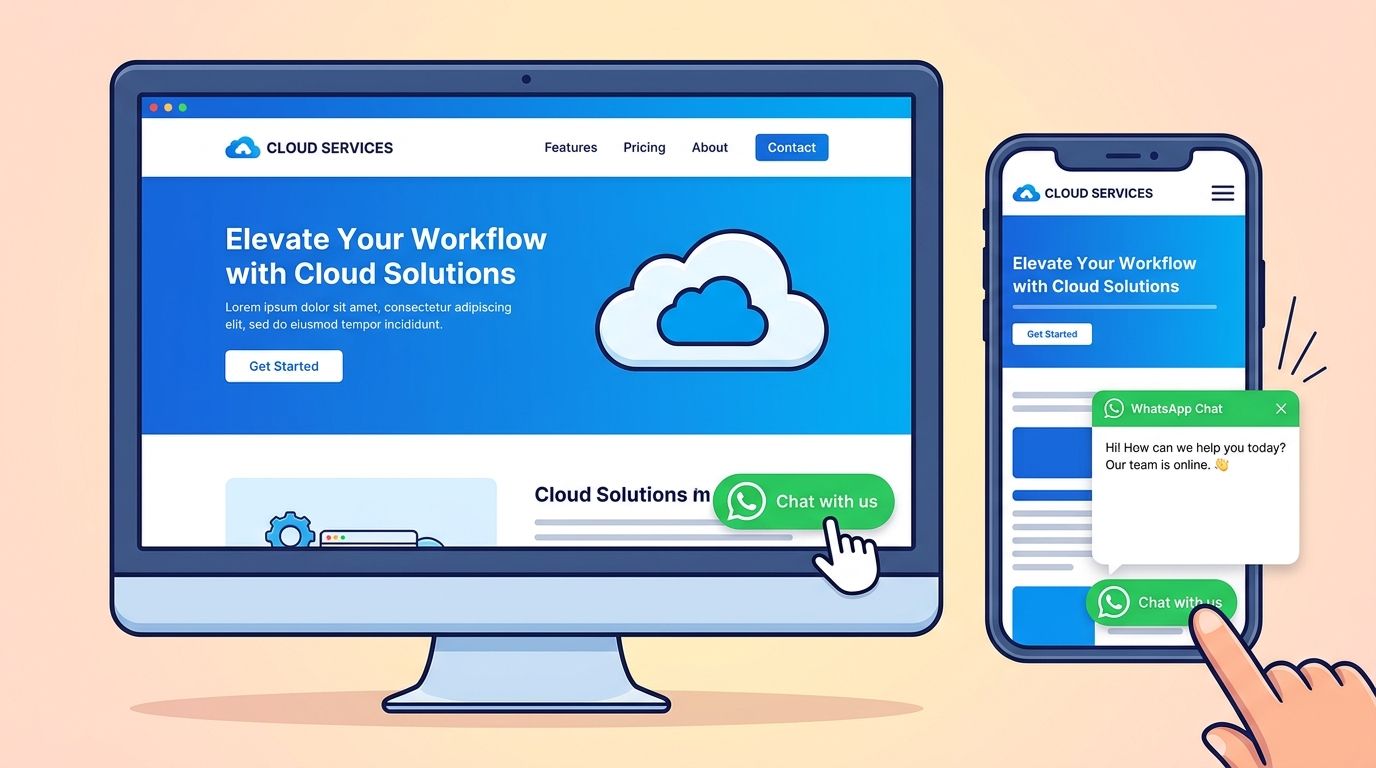
Why widgets often beat forms
Widgets reduce the mental load. Visitors don't have to decide whether their question is important enough for a form. They just click and start.
That's especially valuable for:
- Service businesses: Prospects often have one or two objections before they book.
- High-ticket offers: Buyers want a quick human check before they commit.
- Mobile-heavy traffic: A floating WhatsApp button feels natural on mobile.
- Agencies running paid traffic: The shorter the path from click to conversation, the better.
A good widget also creates a better branded experience than a plain link in a footer. You can control the greeting, display hours, and match the site style so the chat doesn't feel bolted on.
What a good setup includes
Don't just install the widget and walk away. Configure it with intent.
Use:
- A clear welcome message: Tell the visitor what they can ask.
- Availability settings: If the team replies during business hours only, say so.
- Pre-chat prompts: Ask one lightweight question before opening the thread if qualification matters.
- Channel-level tracking: Tag traffic source or page context if your tool supports it.
If attribution matters, review how platforms handle marketing attribution for chat. Agencies need more than “someone messaged us.” They need to know which ad, page, or campaign created the conversation.
Widget trade-offs agencies should think through
A widget is excellent for engagement, but it's not perfect for every client.
| Best fit | Weaker fit |
|---|---|
| Fast-response sales teams | Businesses with slow reply habits |
| Sites with clear transactional intent | Pages that need long compliance-heavy intake |
| Mobile-first audiences | Teams that don't monitor chat actively |
Here's the operational reality. A widget creates the expectation of live response. If the client can't support that expectation, a structured form with an automated acknowledgment may perform better in the long run because it sets cleaner boundaries.
A short walkthrough helps when clients need to see the user experience before approving the change:
The agency angle
Widgets are easier to standardize than custom contact pages. Once you have a working template, you can roll it out across client accounts with the same logic, similar styling, and repeatable tracking conventions.
That makes the service easier to sell. You're not pitching “a button.” You're pitching a faster lead capture layer that can be measured, managed, and improved over time.
Choosing Your Connection Cloud API vs QR Code Bridging
Most agencies spend too much time comparing button styles and not enough time choosing the connection method underneath the system. That's the decision that shapes margin, onboarding time, compliance workload, and how easy the service is to resell.
There are two common paths. WhatsApp Cloud API is the official integration route. QR code bridging connects a number by scanning and linking the account more directly through a platform.
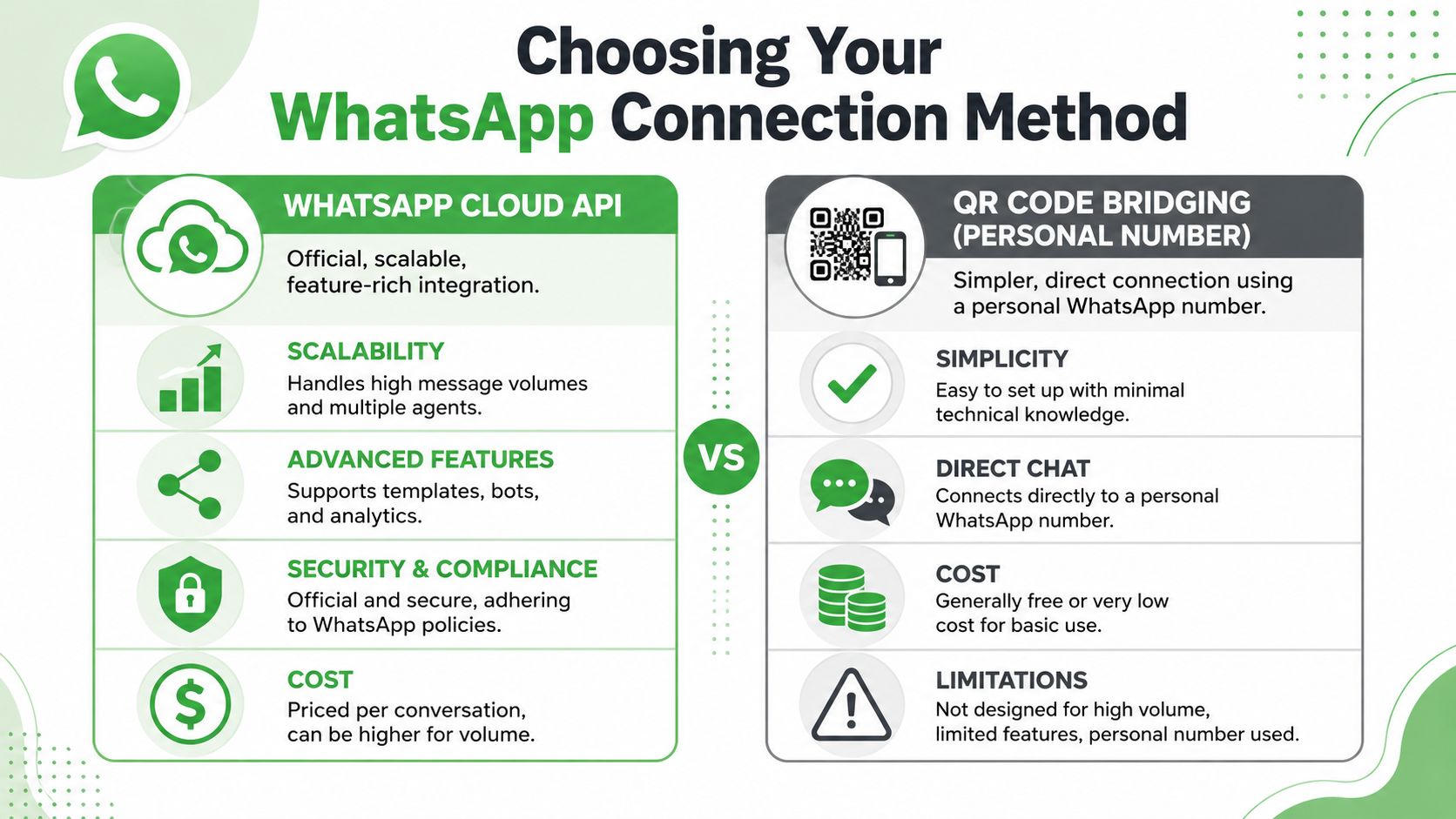
Cloud API when you need official scale
Cloud API is the right fit when the client needs a more formal infrastructure layer. It's built for deeper integrations, structured messaging workflows, bot logic, and multi-user operational control.
That matters when you're serving businesses with:
- Complex automation needs: Template-based follow-up, system-triggered messages, or custom backend workflows
- Multiple internal teams: Shared inbox logic and larger support or sales operations
- Compliance-heavy review processes: Official provisioning matters to internal stakeholders
The trade-off is setup overhead. Cloud API usually involves more verification, more configuration, and more dependency on policy-driven messaging rules. Agencies can absolutely build a profitable offer around it, but they need a tighter onboarding process and stronger implementation discipline.
QR code bridging when you need speed and resale simplicity
QR bridging is attractive for agencies because it lowers friction. The client scans, connects, and starts using the number without the same level of technical setup.
That can be the better business choice when you care about:
- Fast client launches
- White-label resale
- Predictable service delivery
- Less developer involvement
For lead generation agencies, this often aligns better with how clients buy. They don't want a long implementation project. They want WhatsApp working on the site, routed to the right people, and easy to manage.
Agency reality: The best technical option isn't always the most profitable one. The most profitable one is often the setup your team can onboard, support, and standardize without custom engineering every time.
Side-by-side decision criteria
| Decision factor | Cloud API | QR code bridging |
|---|---|---|
| Setup path | More formal and technical | Faster and simpler |
| Messaging controls | Strong for structured workflows | Better for direct conversational use |
| White-label friendliness | Possible, but heavier to implement | Often easier operationally |
| Team requirements | Better for larger, process-driven environments | Better for fast-moving client service offers |
Compliance and ban risk are not optional
Agencies get reckless. They treat WhatsApp as a bulk outreach pipe and then act surprised when accounts fail.
The confusion around a WhatsApp contact form often starts with expectations. People assume WhatsApp includes a native form widget, then jump straight into outbound messaging patterns that haven't earned user consent. That gap matters because 68% of businesses attempting bulk WhatsApp outreach in 2025 were banned due to unconsented messaging, according to this policy-focused analysis on WhatsApp outreach implementation. The same analysis also highlights the lack of practical guidance around permission-based setup and profile legitimacy.
How to make a WhatsApp channel look legitimate
If you're running either connection model, treat the business profile like a trust asset.
Focus on the basics:
- Use a recognizable logo: People are less likely to distrust the conversation.
- Fill in business hours: This sets expectations and reduces frustration.
- Add clear contact information: It signals that the number belongs to a real organization.
- Keep outreach permission-based: Don't add people to flows they didn't ask for.
For agencies, that's the bigger lesson. The profitable WhatsApp setup isn't the one that sends the most messages. It's the one clients can keep using safely, with a profile that looks official and a workflow built around consent.
Advanced Strategies for Lead Management and Automation
A WhatsApp contact form only creates value if the lead keeps moving after the first message. Agencies that stop at capture leave money on the table. The better play is to turn the conversation into an operational system that sales teams can run.
Route by intent, not by whoever is available
Not every lead should hit the same inbox. If someone comes in from a pricing page, they need sales. If they came from an onboarding page, they may need support or account management.
Build routing rules around the information you already collect:
- Service selection: Send SEO inquiries to one rep and web design to another.
- Location or territory: Useful for franchises and multi-market clients.
- Lead type: New prospect, existing client, partner, vendor.
- Urgency markers: “Need help today” should not sit in the same queue as a general question.
Pre-filled messages and structured form fields start paying off operationally. They provide the data needed to route quickly without making the visitor repeat themselves.
Push every chat into the CRM
If the WhatsApp thread lives outside the client's system of record, reporting becomes messy fast. Sales reps will remember some leads, forget others, and argue later about where the opportunity came from.
The clean setup is simple:
- Create or update the contact when the form is submitted or the chat starts.
- Log source data from the page, campaign, or widget entry point.
- Attach notes or tags based on the inquiry type.
- Assign ownership so one person is accountable for the next step.
This is the same logic behind broader benefits of marketing automation. The point isn't automation for its own sake. It's removing manual handoffs that slow response and break attribution.
A WhatsApp lead without CRM sync is still better than an ignored email lead, but it won't scale cleanly across multiple clients or teams.
Use auto-welcome flows carefully
Automation should support the conversation, not replace it with robotic clutter.
Good auto-welcome messages do three jobs:
| Purpose | What the message should do |
|---|---|
| Confirm receipt | Reassure the lead that the inquiry was received |
| Set expectations | Tell them when a human will reply |
| Support consent | Reinforce that the conversation is starting by their request |
You can also use quick replies and templates to standardize common responses, especially for intake questions, scheduling, and qualification. Just don't let the automation stack become so aggressive that the lead feels trapped in a support maze.
Attribution is where agencies protect margin
Clients will happily say they “got more messages.” That's not enough. You need to know which entry points produce useful conversations, qualified leads, and booked outcomes.
Track:
- Page-level source: Which service page or landing page started the chat
- Campaign source: Paid social, organic, referral, email
- Entry method: Click to Chat link, embedded form, or widget
- Agent handling: Which rep took the conversation and what happened next
When agencies track those details, they can improve the system account by account. They can also defend retainers with clearer reporting because they're tying WhatsApp conversations back to the marketing work that created them.
Troubleshooting and Best Practices for Success
Most WhatsApp contact form problems aren't hard technical failures. They're small implementation mistakes that compound into missed leads, broken trust, or account risk.
Fix the obvious failures first
When a setup stops working, check the fundamentals before changing tools.
- Broken Click to Chat links: Confirm the phone number uses full international format with no extra characters.
- No message received after form submit: Test the automation step between the form and WhatsApp destination. Most failures happen in mapping or trigger logic.
- Widget not showing on site: Check whether the script was added to the correct template and whether it's hidden on mobile or specific pages.
- Unread inbound volume: This isn't a software bug. It's a staffing problem.
A lot of “conversion issues” are response issues. If nobody owns the inbox, no setup will save the lead.
Build around consent and expectations
WhatsApp works best when the user understands what they're opting into. Don't hide that.
Use clear language near the form or widget:
- State that replies will happen on WhatsApp
- Explain who will respond
- Set business-hour expectations
- Avoid adding people into unrelated outreach streams
That protects user trust and reduces the chance that the number gets treated like a spam source.
Fast response gets attention. Clear permission keeps the channel usable.
Know who supports what
If the issue is with WhatsApp's own services, the official support path matters. WhatsApp states that support inquiries for Meta company products and services must go through the in-app chat feature or the website contact form, and legitimate support communication should come only from email addresses ending in @support.whatsapp.com, as described in WhatsApp's support contact guidance.
If the issue is with your widget, automation logic, inbox routing, or white-label environment, that's a platform support question, not a WhatsApp support question. Agencies save a lot of time once they separate those two lanes.
The long-term best practice
Treat WhatsApp like a core revenue channel. That means documented ownership, response standards, message templates for common scenarios, and regular testing of every entry point.
A WhatsApp contact form works when it's part of a system. It fails when it's installed like a gimmick.
If you want to turn WhatsApp into a repeatable, white-label service for clients, Double My Leads gives agencies a practical way to launch quickly. You can offer chat widgets, tracked links, shared inboxes, automation, and both QR-based and Cloud API connection paths without building the stack from scratch.


