
AppLevel WhatsApp Explained for Agencies and SaaS Resellers
Learn what AppLevel WhatsApp means, how it compares to Cloud API and QR setups, and when a white-label platform like Double My Leads makes more sense.
It's Friday afternoon. Your agency has a WhatsApp campaign scheduled for a product launch, the creative is approved, and the client expects leads before the weekend. Then your current setup starts throttling at about 80 messages per second per phone number, while conversation-based costs push the campaign above its target economics. The launch isn't blocked by copy or targeting. It's blocked by the delivery model.
That's the point where agency operators start hearing AppLevel WhatsApp in sales calls. The phrase sounds like a product, but it also describes a broader category of tools that operate above the WhatsApp Business app. Choosing correctly means understanding whether you're buying a branded dashboard, a QR-connected device layer, official Cloud API infrastructure, or a combination of those approaches.
Table of Contents
- What AppLevel WhatsApp Means in 2026
- Two Readings of AppLevel WhatsApp
- AppLevel WhatsApp vs Cloud API vs QR Integrations
- Pros and Cons for Agencies and SaaS Resellers
- Implementation and Migration Considerations
- When a White-Label Platform Becomes the Better Fit
- Your Next Steps and Decision Checklist
What AppLevel WhatsApp Means in 2026
AppLevel WhatsApp has two meanings, and confusing them creates expensive implementation decisions.
First, AppLevel.com is positioned as an app-level WhatsApp solution. It gives agencies a dashboard for sending, queueing, and managing multiple numbers without forcing the operator to build directly against Meta's developer infrastructure. The value is operational. A non-technical team can connect numbers, work from a shared environment, and package WhatsApp access under a more controlled customer experience.
Second, “app-level” describes a technical pattern. These tools sit one layer above the WhatsApp clients and APIs, controlling sessions, routing, inbox activity, and message pacing at the application tier. They may connect a device through a QR code rather than registering every workflow through the official Cloud API. That distinction matters because the convenience comes with a different risk profile.
A useful primer on the underlying business product is what WhatsApp Business is and how it works. The Business app is designed for direct operator use. App-level platforms turn that direct-use model into something closer to a managed workspace.
The agency version of the problem
Suppose your agency sells lead generation to local businesses. One client needs a branded inbox, another wants several sales numbers, and a third wants campaign scheduling without waiting through a long verification process. You can put each client through the official Cloud API route, but onboarding takes more coordination. You can also connect devices through QR codes and move faster, but now you own the operational discipline around connected phones, session stability, and sending behavior.
That's why AppLevel WhatsApp appeals to resellers. It can provide a faster front door than an API-first implementation, while offering more structure than handing a client a phone and telling them to manage conversations manually.
Operator's rule: Don't ask whether AppLevel WhatsApp is “better” than the API. Ask which delivery method protects your margin and service promise for this client.
The rest of the decision depends on which meaning you're using. When this article says AppLevel WhatsApp, it refers both to the AppLevel.com product category and to app-level, device-connected platforms generally. The comparison with Cloud API focuses on the delivery method, not on a claim that every vendor implements the same way.
Two Readings of AppLevel WhatsApp
Start with a restaurant analogy. The WhatsApp Business app is the kitchen door. It's where the operator works directly. The Cloud API is a formal delivery contract, with documented rules, approved workflows, and a defined pricing structure. A QR integration represents a walk-in customer scanned at the counter, while an app-level platform acts as the floor manager coordinating activity above the kitchen.
That analogy gives you two readings.
Reading one is the AppLevel brand
The first reading is AppLevel.com as a named platform. In this interpretation, AppLevel WhatsApp is a third-party dashboard that abstracts operational work such as sending, queueing, and multi-number management. Agencies use the dashboard rather than building every workflow around API keys, webhooks, and Meta review.
This is useful when speed matters more than deep infrastructure control. A reseller can focus on onboarding, inbox organization, client permissions, and campaign execution instead of asking every customer to understand the underlying WhatsApp stack.
Reading two is the app-level pattern
The broader reading describes any application that controls WhatsApp sessions through the app layer. The tool may connect a number using a QR code, keep the WhatsApp client active, and provide a CRM-style interface around the account. It isn't the same thing as the official Cloud API, even if the user experience feels similar.
The distinction changes how you evaluate the product:
- Setup: QR-connected systems can move quickly because they avoid parts of the API credential and verification process.
- Control: A platform can add shared inbox features, routing, tags, scheduling, and multi-number management above the connected client.
- Risk: The workflow remains tied to the connected device and the platform's session handling.
- Scale: The business must evaluate both the platform's controls and WhatsApp's limits, rather than assuming a dashboard removes delivery constraints.
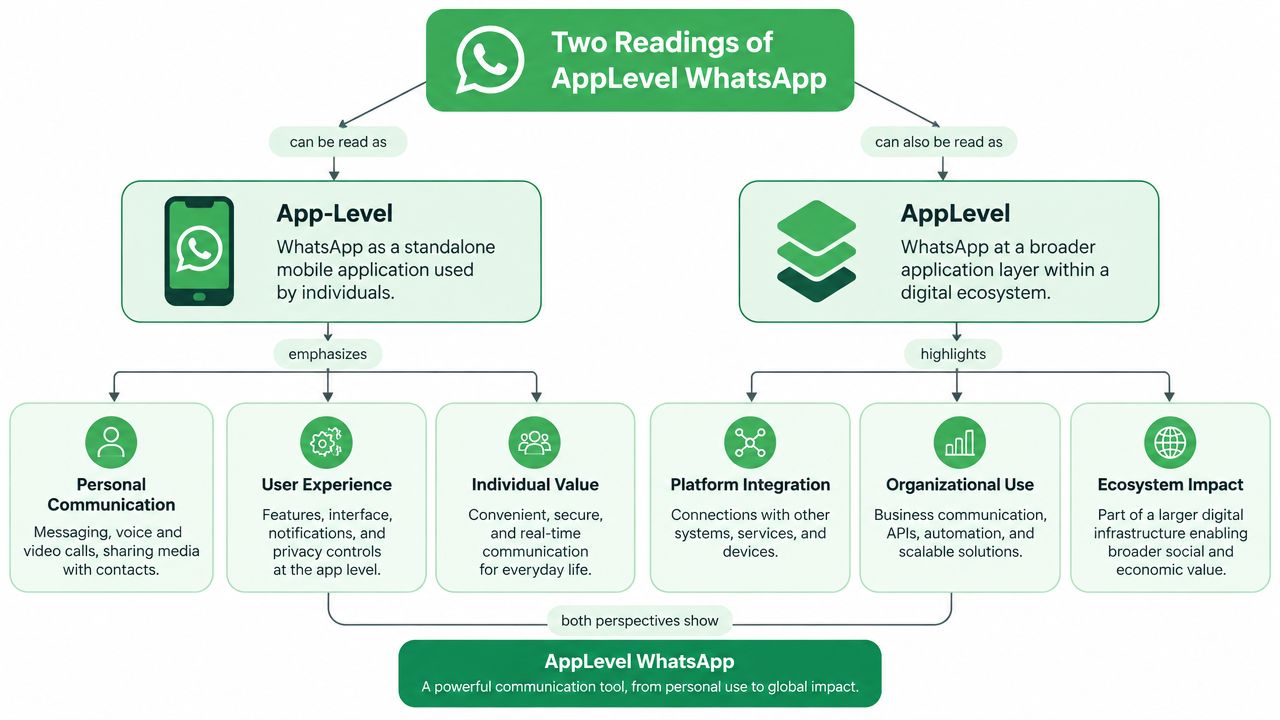
Use “AppLevel WhatsApp” as the product label when discussing the AppLevel brand. Use “app-level integration” when discussing the architecture. That vocabulary prevents a common sales mistake, where a vendor promises API-like behavior while the underlying connection still depends on a paired device.
AppLevel WhatsApp vs Cloud API vs QR Integrations
These are category choices, not three versions of the same product. AppLevel-style tools favor quick deployment and multi-number operations. Cloud API favors official infrastructure, policy alignment, approved templates, and defined platform rules. QR or device integrations connect an existing WhatsApp account with minimal setup. The QR-versus-API boundary matters more than the dashboard design.
| Dimension | AppLevel WhatsApp | WhatsApp Cloud API | QR / Device Integration |
|---|---|---|---|
| Setup speed | Fast onboarding through an application dashboard | Slower, with Meta setup and approval steps | Fast if the phone and account are ready |
| Cost model | Depends on the platform and its commercial terms | Conversation-based pricing and Meta limits | Often looks inexpensive upfront, but operational support still costs money |
| Compliance posture | Depends on the connection method and vendor controls | Official WhatsApp Business Platform route | Inherits device and account risks |
| Scalability | Better than a single unmanaged phone, but bounded by the underlying method | Strongest option for structured, approved high-volume messaging | Weakest choice for sustained campaign volume |
| Multi-number control | A core reason agencies consider it | Possible through structured business assets and integrations | Awkward when several phones or teams are involved |
| Reseller fit | Strong for fast onboarding and branded operations | Strong for clients needing formal infrastructure | Suitable for limited support or simple owner-operated workflows |
Cloud API has a specific operating advantage. Its limits apply to unique customers a business-initiated conversation can reach in a rolling 24-hour window, rather than every message sent inside an open thread. Follow-up messages in that conversation do not use the same unique-customer quota, as explained in this overview of WhatsApp API rate limits. Design campaigns around first-response automation and active-session reuse.
Recipient tiers and transport throughput are separate constraints. Businesses may face limits around 250, 1,000, 10,000, 100,000, or unlimited unique recipients per 24 hours. Cloud API throughput is commonly described as about 80 messages per second per phone number by default, with higher capacity available for larger deployments. An approved campaign can still stall when the account tier or request capacity is not ready, as detailed in this explanation of WhatsApp sending limits.
QR integrations sit on the other side of that boundary. They can be practical for support handled from a connected phone, but the workflow remains dependent on the device, account session, and vendor's connection controls. AppLevel tools occupy the middle: they add routing, inbox management, and multi-number coordination without turning a QR connection into official API infrastructure.
Appointment-led businesses should test the booking handoff before choosing a model. A guide to WhatsApp compatible appointment scheduling can help assess whether customers can book without agents copying conversations between tools.
Watch the video below for a visual introduction to the differences between these integration paths.
My rule is direct. Use Cloud API for paid messaging at meaningful volume. Use QR setups for low-volume support where a connected phone is acceptable. Choose AppLevel-style tooling when an agency needs speed, a better operating surface, and multi-number coordination before committing to a full API-led product.
Pros and Cons for Agencies and SaaS Resellers
AppLevel WhatsApp is attractive because it solves the part clients see first. You can provide a branded onboarding path, present a cleaner sender experience, and control more of the customer touchpoints without waiting for every Meta Business verification step to finish. For a boutique agency, that speed can matter more than architectural purity.
The drawback appears in the margin model. Cloud API messaging uses recipient tiers and conversation-based economics, while app-level systems shift more responsibility toward the connected account and the platform operating it. Neither model makes poor audience targeting profitable. A polished dashboard can improve execution, but it can't remove account limits, sender reputation issues, rejected templates, or support work.
Where agencies gain
An agency usually benefits when the sale is consultative and the client wants WhatsApp working quickly. App-level tools can give the agency a controlled workspace for:
- Branded onboarding: The client interacts with your process rather than a collection of Meta setup screens.
- Multi-number operations: Teams can organize several connected accounts in one working environment.
- Faster experimentation: You can test routing, quick replies, scheduling, and campaign flows before investing in a deeper API build.
- Service packaging: WhatsApp becomes part of a lead-generation offer instead of a standalone technical project.
That last point is important for agencies. Clients don't buy message transport. They buy follow-up, lead capture, appointment handling, and campaign execution.
Where resellers absorb risk
A reseller has a harder problem than a single client. Client A's account status doesn't automatically improve Client B's throughput. If you sell a white-label promise, you may end up absorbing the consequences of tier changes, send-rate restrictions, template rejection, disconnected devices, and support tickets.
The official limit structure makes planning especially important. A business can be restricted to recipient tiers such as 250, 1,000, 10,000, 100,000, or unlimited unique customers in 24 hours, and Cloud API transport is commonly described at about 80 messages per second per phone number by default. Those figures come from the platform-specific limit explanations cited above, and they describe separate constraints, not one universal capacity figure.
Margin warning: If your client pays a fixed monthly amount while your delivery cost changes with campaign behavior, you're not selling software. You're underwriting usage.
App-level WhatsApp wins on launch speed and brand polish. It loses when you need perfectly predictable unit economics, centralized template governance, or a support model that can handle many independent client accounts without manual intervention. The right fit depends less on the inbox features than on who carries the operational downside.
Implementation and Migration Considerations
Implementation should begin with the phone number, not the sales demo. Ask where the number lives today and what must survive the move.
Audit the number before connecting anything
A number may already belong to a personal WhatsApp account, the WhatsApp Business app, or a Business Platform provider. Those states aren't interchangeable. Double-registration is a common migration blocker because the next system can't claim a number that remains active in the previous environment.
Run this check first:
- Identify the current registration. Record whether the number is personal, app-based, or connected through a provider.
- Confirm ownership. The client should control the phone number, Meta Business assets, and verification access.
- Decide whether history matters. App chat history and API conversations don't automatically transfer in the same way. Preserve anything the client needs before disconnecting the existing setup.
- Choose the destination model. Don't connect a number to an app-level platform while another provider still expects to manage the same session.
Verify the operating prerequisites
For Cloud API work, confirm that the client owns the relevant Meta Business Manager assets, that the displayed business identity can be supported by the business's online presence, that the payment method is ready for automated review, and that the webhook endpoint supports TLS 1.2. These checks aren't glamorous, but they prevent a technically correct integration from failing during approval or event delivery.
For app-level onboarding, verify the QR connection process, phone availability, session recovery, team permissions, and what happens when the paired device loses connectivity. A fast QR scan isn't a complete migration plan.
The WhatsApp upgrade path is useful when an agency needs to decide whether to stay with an app-level workflow or move toward Cloud API infrastructure.
Before paying for a plan, keep this pre-flight list:
- Number status: Document the current account and provider.
- Ownership: Confirm the client controls the number and business assets.
- History: Decide what must be exported or retained.
- Access: Assign people responsible for QR scans, verification, and recovery.
- Capacity: Compare expected campaign behavior with recipient and send-rate limits.
- Exit plan: Ask how to disconnect, migrate, and recover the account if the platform no longer fits.
When a White-Label Platform Becomes the Better Fit
A white-label platform becomes the better fit when WhatsApp is no longer a service you deliver manually. It should be part of the product you sell.
The trigger is clear if you're building WhatsApp into a SaaS offer, managing ten or more sub-accounts, or hearing clients ask for your logo and domain inside the inbox. It's also clear when one client's marketing activity makes conversation-based billing difficult to forecast. At that point, every extra account creates another usage profile, another support path, and another margin variable.
The economics are operational, not theoretical
A flat-fee reseller seat lets you price WhatsApp delivery into your own monthly recurring revenue. Your customer receives a predictable bill, while you avoid re-invoicing every usage event or explaining why a campaign changed the month's cost. That doesn't make usage irrelevant, but it moves the commercial conversation from volatile message accounting to packaged service value.
This is the same logic agencies use when assessing the benefits of white label SEO. The provider handles infrastructure while the agency owns the client relationship, presentation, and recurring offer. The model works only when the agency has enough repeatable demand to justify packaging the service.
Double My Leads is one option in this category. It offers branded workspaces, QR-based number connection, a shared inbox, campaign and automation tools, CRM synchronization, smart links, and a WhatsApp Cloud API integration. Its flat monthly model is designed for agencies that want to resell workspaces under their own branding rather than pass through every Meta usage charge.
Where AppLevel still wins
AppLevel WhatsApp remains sensible for a boutique agency with one or two flagship clients. You may want a branded front door, rapid onboarding, and direct control over how each client handles Meta conversation pricing. If those clients have modest operational complexity, a larger white-label system can add overhead without improving the offer.
My threshold is practical. Under five clients and with tight margins, AppLevel-style control is fine. Above that, white-label economics usually make more sense, especially when your agency sells WhatsApp as a recurring feature rather than a one-off campaign.
Your Next Steps and Decision Checklist
Use this checklist before you choose a platform:
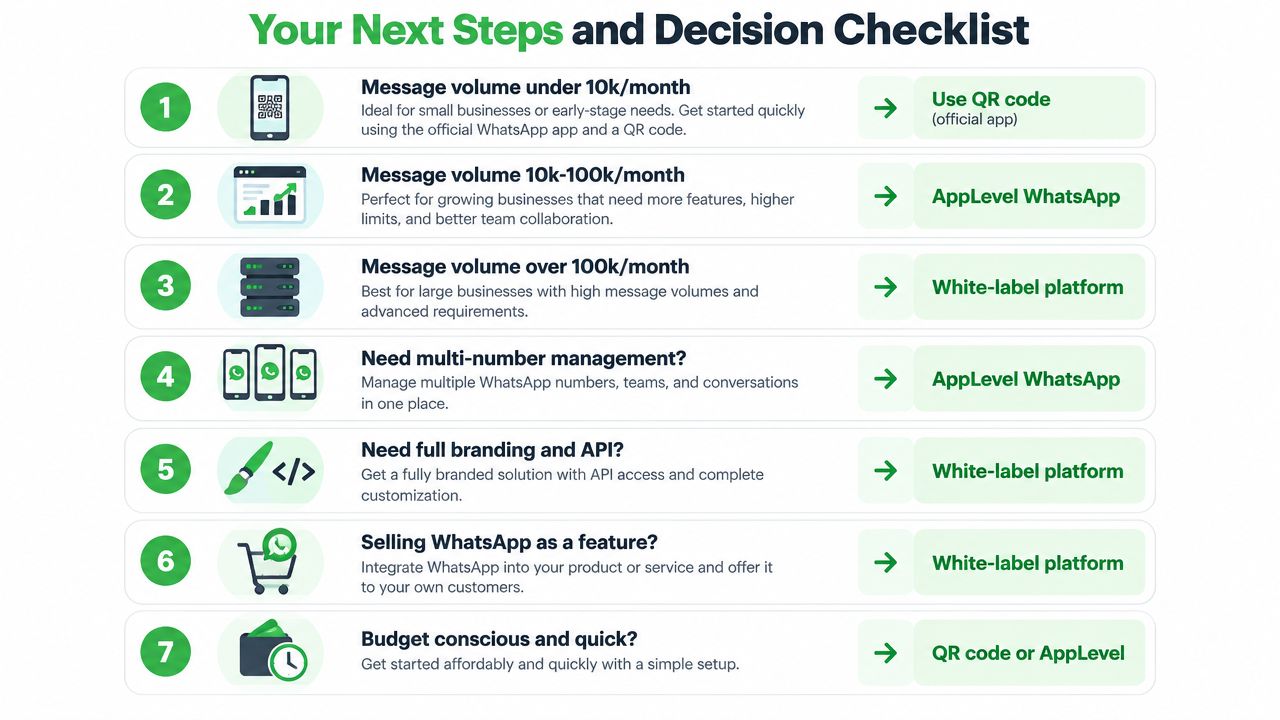
- Low-volume support: If activity stays under 10,000 messages per month, a QR-connected official app may be adequate for a small team. Treat that as an operating guideline, not a promise of capacity.
- Structured API messaging: If activity sits between 10,000 and 100,000 messages per month, evaluate Cloud API first, then confirm recipient tiers, templates, and throughput with the provider.
- Large or branded multi-tenant operations: If you exceed 100,000 messages per month, or sell WhatsApp as a branded feature across client accounts, assess a white-label platform and its migration controls.
- Several numbers: Choose AppLevel-style management when multi-number coordination is the immediate problem and the device-based trade-off is acceptable.
- Formal infrastructure: Choose Cloud API when compliance, approved templates, integrations, and predictable official controls matter more than onboarding speed.
- Commercial packaging: Choose white-label when you need to set your own MRR, branding, permissions, and client billing.
The volume guidance above is a decision framework, not a verified platform limit. Actual capacity depends on the chosen connection method, account status, recipient tiers, send-rate capacity, and message quality.
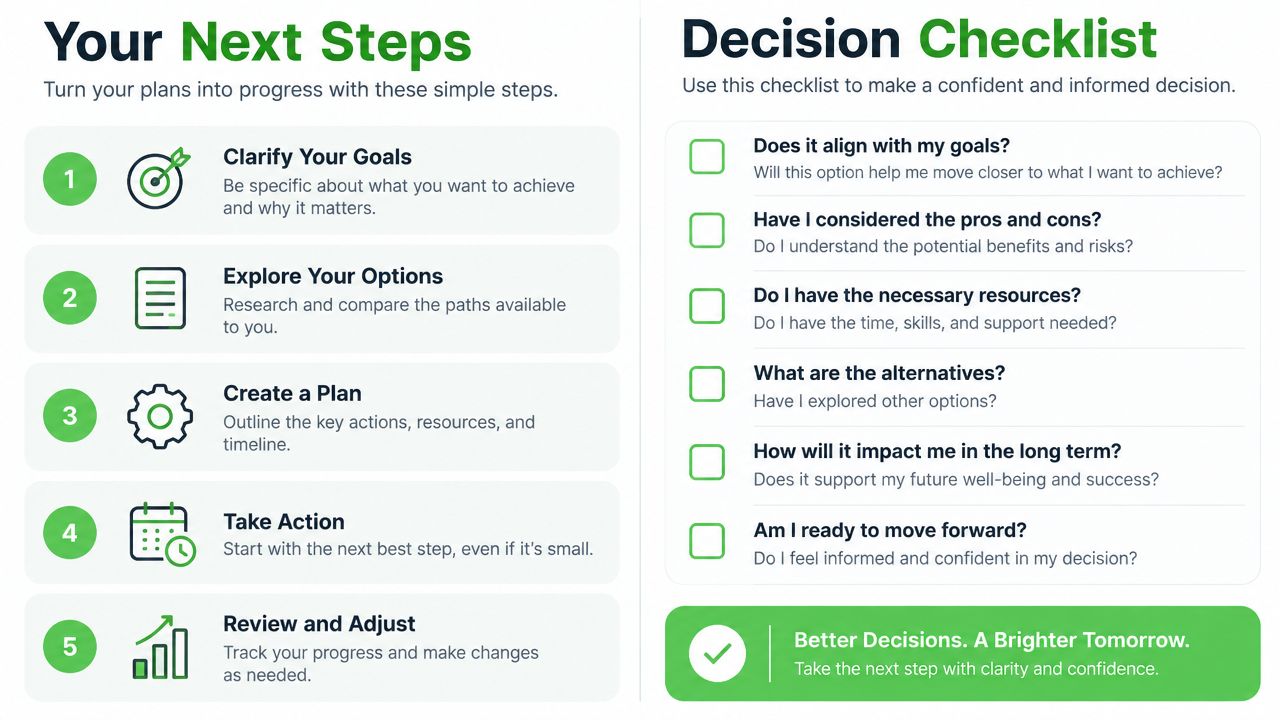
Take four actions today:
- Audit the current number. Identify whether it's personal, app-based, or connected through a provider.
- Confirm business ownership. Check Meta Business Manager access, phone ownership, and approval responsibility.
- Set a cost ceiling. Write down the maximum delivery cost your client contract can absorb.
- Pilot one client. Test onboarding, message routing, recovery, and reporting before rolling the model across your portfolio.
If reseller economics, branding, or volume already make flat-fee delivery the obvious choice, book a Double My Leads demo and ask specifically about migration from your current AppLevel or QR setup.
Double My Leads gives agencies and SaaS resellers branded WhatsApp workspaces, QR-based onboarding, shared inboxes, automation, CRM tools, and Cloud API support in one operating layer. Visit Double My Leads to review the migration options and test whether its flat-fee reseller model fits your client portfolio.